
.webp)
Editor's Picks
| # | Name | Best For | Price | Rating | Image | |
|---|---|---|---|---|---|---|
| 1 | Cafés, food bloggers, bakeries, and recipe-focused food brands | Free | 4.7/5 |

|
More Info | |
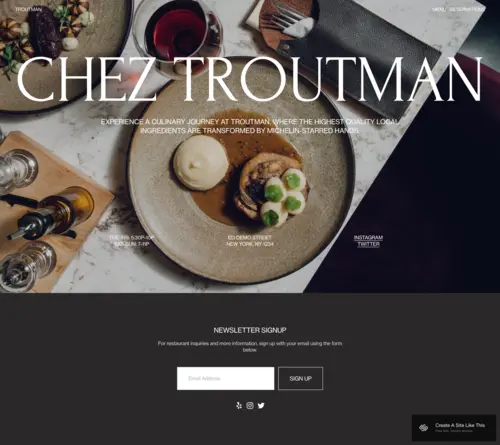
| 2 | Fine dining restaurants, tasting menu venues, chef's table experiences, and upscale eateries | Free | 4.9/5 |
|
More Info | |
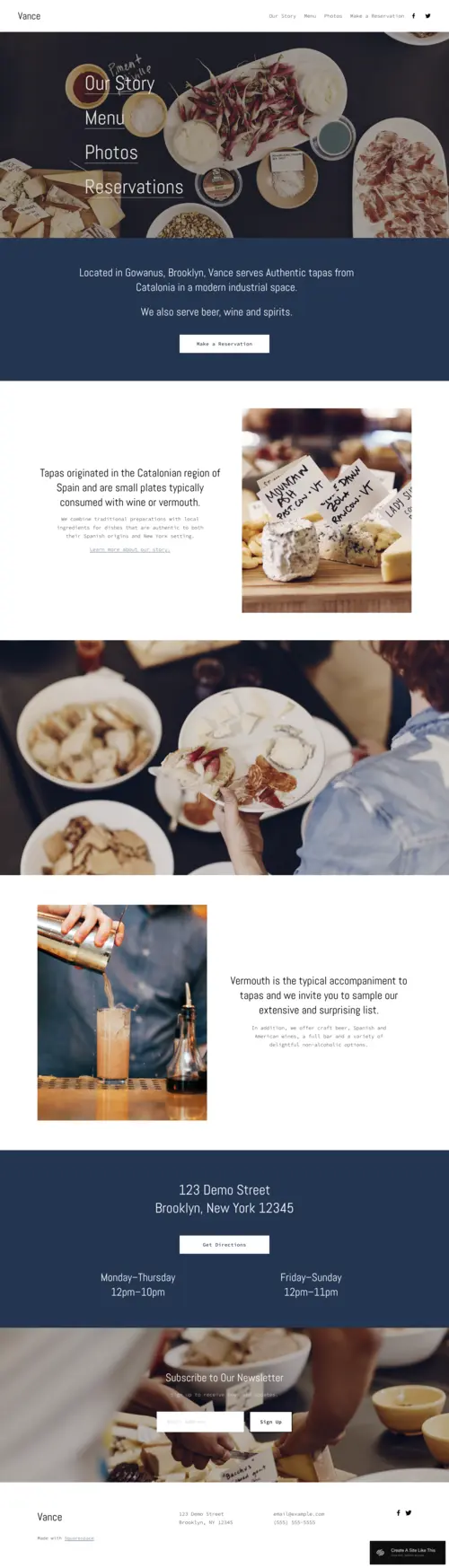
| 3 | Wine bars, tapas restaurants, cocktail lounges, and intimate dining venues with a strong atmosphere | Free | 4.7/5 |
|
More Info | |
| 4 | Casual dining restaurants, neighbourhood eateries, and food businesses that prioritise menu clarity and mobile bookings | Free | 4.6/5 |
.webp)
|
More Info | |
| 5 | Visual-forward restaurants, fast-casual concepts, specialty food businesses, and operators with strong food photography | Free | 4.8/5 |

|
More Info |
Our Picks: The Best Squarespace Food Website Templates
Stanton
Best for Café Blogs, Recipe Sites & Food Storytellers ✓ Pros
- Post grid layout keeps content-rich food businesses fresh with every new recipe or seasonal menu post.
- Author avatar and byline design humanises the brand - a big win for small cafés where the person is as much a draw as the food.
- Email sign-up integration sits naturally within the layout, making it easy to build a loyal subscriber list.
- Clean, readable typography keeps blog-style content pleasant to scroll on any device.
- Neutral colour palette adapts to any café aesthetic without needing a designer.
✗ Cons
- Blog-forward layout puts content discovery ahead of reservation CTAs - not ideal for booking-first venues.
- Casual editorial aesthetic won't communicate fine-dining exclusivity or premium positioning.
- Post-heavy homepage needs consistent publishing - an outdated blog signals neglect and kills trust.
Stanton is the squarespace food website template that talks like your favourite barista - warm, inviting, and always with something interesting to say. Every element is calibrated for food businesses that understand their audience wants a relationship, not just a reservation. For cafés, food bloggers, and bakeries where storytelling is as much of the product as the food itself, Stanton keeps people coming back.
Troutman
Best for Fine Dining Restaurants & Premium Food Experiences ✓ Pros
- Cinematic hero slideshow communicates culinary ambition instantly - exactly what a considered fine-dining booking decision requires.
- Dish description overlays let chefs position food as an experience, not a commodity.
- Native reservation integration keeps the entire booking journey on your domain, lifting conversion rates.
- Newsletter and waitlist forms build advance booking momentum - essential for tasting menu operations.
- Typography and spacing communicate refinement without intimidating guests who are treating themselves.
✗ Cons
- High-production photography is non-negotiable - amateur images actively damage the premium positioning Troutman is built for.
- Fine-dining aesthetic is a poor fit for casual, fast-casual, or high-volume squarespace restaurant websites.
- Feature-rich layout has higher setup complexity and requires ongoing curation to stay sharp.
Troutman is the white tablecloth of squarespace food website templates - earning that positioning through every design decision. The cinematic slideshow, the flavour-forward dish descriptions, the seamless reservation path - each element is calibrated for restaurants where the guest experience begins the moment the website loads. For fine dining operators, Troutman delivers the standard your food demands.
Vance
Best for Wine Bars, Tapas Lounges & Vibe-Driven Dining Venues ✓ Pros
- Unhurried layout mirrors the slow, social pace of tapas and wine bar culture - priming visitors emotionally before they book.
- Shared-plate photography placement sells the communal night out, not just the food.
- Sticky navigation with wine list linking keeps your highest-margin product front and centre throughout browsing.
- Community storytelling sections give independent venues a platform to out-authentic chain competitors.
- Versatile aesthetic scales from intimate cocktail bars to larger tapas venues without major restyling.
✗ Cons
- Atmospheric, slow-browse layout frustrates mobile guests who need quick answers about hours or availability.
- Vibe-first design requires genuine atmosphere photography - flat product shots undermine the entire template.
- Limited e-commerce architecture makes it less suitable for venues selling wine retail or gift vouchers at scale.
Vance feels like an evening out - even before you've made a reservation. The unhurried layout, the shared-plate photography, the community storytelling - every design choice creates the feeling of settling into a favourite bar with good company. For wine bars, tapas lounges, and intimate dining venues where atmosphere is the core product, Vance converts that experience into bookings.
Basil
Best for Menu-Focused Restaurants & Mobile-First Dining Venues ✓ Pros
- Clean menu layout updates fast when dishes change - no web support needed between kitchen and website.
- Inline booking integration keeps reservations embedded in the browsing flow, cutting off-site drop-off.
- Mobile-first design ensures the "restaurants open near me" searcher can find, check, and book within seconds.
- High-resolution food photography sections flatter any cuisine type - from pizza to contemporary casual.
- Clear navigation and prominent booking CTA make Basil one of the most broadly applicable squarespace restaurant website templates.
✗ Cons
- Clean, functional aesthetic won't carry a strong brand identity or concept-driven dining personality.
- Limited long-form content sections leave bloggers and chef-profile-focused operators underserved.
- Menu-forward practicality can read as generic in competitive urban markets where visual distinctiveness counts.
Basil brings your menu to life exactly when it needs to - on a mobile screen, on a Friday evening, when someone is choosing between five nearby restaurants. The flexible menu layout, inline booking, and mobile-responsive performance all prioritise the moment of decision that matters most. For restaurants whose primary job is converting hungry visitors into confirmed reservations, Basil delivers reliably.
Tantillo
Best for Bold Food Photography & Visual-First Restaurant Concepts ✓ Pros
- Full-bleed photography triggers appetite in the first fraction of a second - before any conscious evaluation begins.
- Direct navigation takes visitors to the menu or booking page without intermediate steps.
- On-page booking integration keeps attention and intent intact from decision to confirmation.
- Responsive mobile reservation design captures same-day, spontaneous bookings at peak intent.
- Bold visual architecture adapts to any cuisine type that photographs beautifully.
✗ Cons
- Photography quality is everything - mediocre images in a full-bleed format do more damage than a simpler template would.
- Minimal copy space makes it hard for story-driven food businesses to communicate depth or founding narrative.
- High-impact visual style is too intense for casual, family-friendly, or neighbourhood comfort food venues.
Tantillo hits hard because that's exactly what it's designed to do. The full-width photography, direct navigation, and frictionless booking all serve one moment: when a hungry visitor sees your food and makes the instant decision to come in. For squarespace restaurant websites where photography carries the entire first impression, Tantillo converts that appetite into a booking before the moment passes.
How to Choose the Right Squarespace Food Website Template
Match Your Template's Personality to Your Food Concept
The most common mistake food businesses make when choosing a squarespace restaurant website template is picking the most impressive demo rather than the best fit for their concept. Stanton's editorial warmth belongs to cafés and food bloggers where story drives loyalty. Troutman's cinematic authority is for restaurants that command a premium and need to signal it before a fork is lifted. Vance's relaxed communal atmosphere serves wine bars and tapas venues where the social experience is the product. Basil's clean practicality suits neighbourhood restaurants where speed and clarity drive bookings. Tantillo's bold visual drama works where photography is strong enough to carry the entire first impression.
Prioritise Mobile Performance for Restaurant Discovery
The majority of restaurant searches happen on mobile - often in the moment, on the street, while deciding between nearby options. A squarespace food website that looks great on desktop but buries the menu and booking options on a smartphone loses its most valuable, highest-intent visitors. Basil and Tantillo are both built with mobile-first booking journeys at their core. For any template, test the mobile experience before launch: can a first-time visitor find your menu, check your hours, and book a table within 30 seconds? That's the minimum standard for squarespace restaurant websites in a mobile-first discovery environment.
Think About the Role of Photography in Your Template Choice
Every squarespace food website template reviewed here requires photography - but not at the same level. Stanton works well with a mix of professional and authentic editorial imagery. Troutman requires high-production photography that matches its premium positioning. Vance rewards atmospheric, lifestyle shots that capture venue feel over individual dish detail. Basil performs well with clear, well-lit food images. Tantillo is the most demanding - it needs hero-scale photography that fills a full browser width without losing quality. Honestly assess your current photography assets before choosing, and factor a photography investment into your plan if needed.
Consider Online Booking Integration From the Start
Online booking is no longer optional for most food businesses - it's what separates a website from a digital brochure. All five squarespace food website templates support reservation and booking integration, but the architecture differs. Troutman positions the reservation path as part of a considered, unhurried journey. Basil and Tantillo build the booking CTA into the most prominent layout positions. Stanton and Vance suit venues that rely on walk-ins, with bookings as a secondary function. For restaurants where reservations drive revenue, connect a live scheduling tool (Squarespace Scheduling, OpenTable, or Resy) from day one and treat every unnecessary step between "I want to book" and "confirmed" as a conversion problem to solve.
Frequently Asked Questions
What is the best Squarespace template for a restaurant website?
Can I add online reservations to a Squarespace food website template?
How do I add a menu to a Squarespace restaurant website?
What Squarespace plan do I need for a restaurant website?
Can I use a Squarespace food template for a food delivery or ordering website?
How important is food photography for a Squarespace restaurant website?
Can I switch Squarespace food templates after my site is built?
What pages should a restaurant website include?
How We Evaluate Templates
Conclusion: Squarespace Food Website Templates That Earn the Booking
The right squarespace food website template doesn't just represent your restaurant online - it makes people hungry before they've read a word, builds the case for your food before they've seen the menu, and earns the reservation before they've considered the alternatives. Stanton tells the story of your food with warmth and editorial depth. Troutman stages a cinematic first act worthy of your finest dishes. Vance invites visitors into the unhurried pleasure of a great evening out. Basil puts your menu and your booking path front and centre where hungry, mobile visitors need them. Tantillo lets exceptional food photography do everything that words cannot.
Every visitor who lands on your squarespace food website is deciding whether your restaurant is worth the trip. The template you choose is your first answer to that question - make sure it's saying exactly what your food deserves.
Looking for more Squarespace templates for your business? If you run a food-adjacent service, you might also want to explore our picks for the best scheduling website templates for booking-focused businesses, or browse our full selection of Squarespace business templates for more inspiration. For food bloggers specifically focused on recipe content, our guide to the best Squarespace recipe templates covers designs built for ingredient lists, cooking instructions, and food photography. Nutritionists and dietitians will find wellness-focused options in our guide to the best Squarespace nutritionist website templates.
* Read the rest of the post and open up an offer