

Editor's Picks
| # | Name | Best For | Price | Rating | Image | |
|---|---|---|---|---|---|---|
| 1 | Service businesses | Free | 4.7/5 |
|
More Info | |
| 2 | Restaurants and food businesses | Free | 4.6/5 |
.webp)
|
More Info | |
| 3 | Online stores and eCommerce | Free | 4.7/5 |
.webp)
|
More Info | |
| 4 | Service providers and consultants | Free | 4.5/5 |

|
More Info | |
| 5 | Visual portfolios and creatives | Free | 4.6/5 |

|
More Info | |
| 6 | Professional and corporate businesses | Free | 4.5/5 |
|
More Info | |
| 7 | Visual bloggers and content creators | Free | 4.4/5 |
|
More Info | |
| 8 | Service-based businesses and wellness brands | Free | 4.4/5 |
|
More Info | |
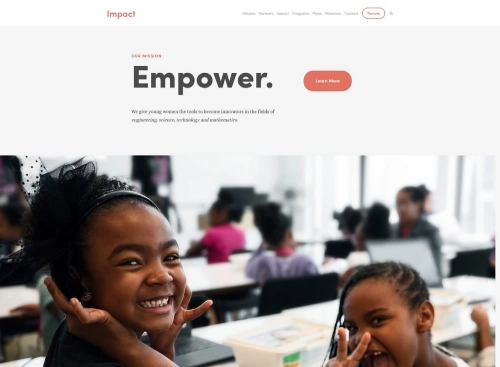
| 9 | Nonprofits and social impact organizations | Free | 4.3/5 |
|
More Info | |
| 10 | eCommerce and portfolio hybrids | Free | 4.5/5 |
.webp)
|
More Info |
Our Picks: 10 Best Free Squarespace Templates 2026
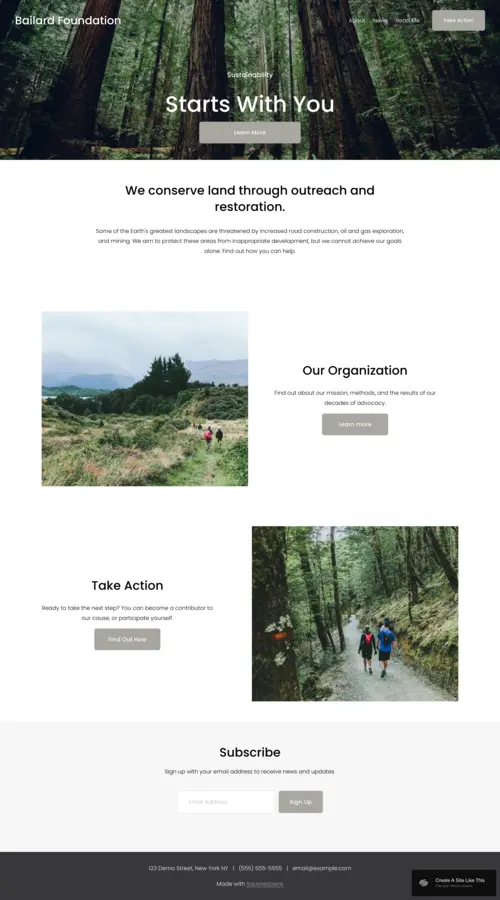
Bailard
Best for Service Businesses ✓ Pros
- Dual CTA placement on the homepage maximizes conversion opportunities
- Fast load speed with lazy loading for below-fold images
- Bold hero section grabs attention without overwhelming visitors
- Clean, minimal code structure supports strong SEO performance
✗ Cons
- Minimalist layout may feel sparse for content-heavy businesses
- Hero image must be high-resolution to avoid pixelation
- Limited built-in layout variation compared to more flexible templates
- Requires careful font pairing to match your brand tone
Bailard is one of the strongest free Squarespace templates for service businesses. Its homepage features two CTA buttons -- one centered on the hero image and another near the navigation menu -- giving visitors two clear paths to take action before they scroll. The fast-loading design and clean structure make it a reliable choice for businesses that depend on organic search traffic.
Tremont
Best for Restaurants ✓ Pros
- Built-in menu display sections designed specifically for food businesses
- Full-width imagery showcases dishes and dining atmosphere effectively
- Reservation and contact sections are easy to set up
- Mobile-friendly layout works well for on-the-go diners
✗ Cons
- Heavily food-oriented design limits use outside the restaurant niche
- Requires high-quality food photography to look professional
- Menu sections need manual updates when items change
- Limited blog functionality compared to content-focused templates
Tremont was built with restaurants and food businesses in mind. It includes dedicated sections for menus, reservations, and location details -- the three things most restaurant visitors are looking for. The full-width image areas let you show off your food and space without competing with cluttered sidebars or excessive text.
Alameda
Best for eCommerce ✓ Pros
- Product grid layout displays inventory in a clean, browsable format
- Built-in product quick view reduces clicks to purchase
- Supports product categories, filters, and variant display
- Checkout flow is streamlined and mobile-optimized
✗ Cons
- Large catalogs can make the homepage feel crowded without curation
- Product images need consistent sizing for a polished grid appearance
- Limited customization for the cart and checkout pages
- Not ideal for service-only businesses with no physical products
Alameda is the go-to free Squarespace template for anyone launching an online store. Its product grid layout makes browsing feel intuitive, and the built-in quick view feature lets shoppers check product details without leaving the page. If you're selling physical goods, digital downloads, or subscriptions, Alameda gives you a professional storefront right out of the box.
Suffolk
Best for Service Providers ✓ Pros
- Service-focused layout with dedicated sections for offerings and pricing
- Built-in scheduling integration for appointment-based businesses
- Testimonial sections help build trust with prospective clients
- Clean typography makes service descriptions easy to read
✗ Cons
- Layout feels generic without strong brand photography
- Limited portfolio functionality for showcasing past work
- Requires content planning to fill all homepage sections effectively
- Not well-suited for image-heavy or visual-first businesses
Suffolk is a practical choice for consultants, coaches, and freelancers who need a website that clearly communicates what they offer. The layout is organized around service descriptions, client testimonials, and a contact section -- the three elements that matter most for converting visitors into clients. It integrates well with Squarespace Scheduling, making it easy to accept bookings directly from your site.
Elliott
Best for Visual Portfolios ✓ Pros
- Full-bleed image display puts your work front and center
- Gallery layouts support grid, slideshow, and masonry formats
- Minimal navigation keeps the focus entirely on visual content
- Responsive image scaling looks sharp on all screen sizes
✗ Cons
- Text-heavy content doesn't display well in this layout
- Requires a strong, curated body of visual work to be effective
- Limited eCommerce functionality compared to store-focused templates
- Navigation can feel too minimal for sites with many pages
Elliott is one of the best free Squarespace themes for photographers, designers, and artists who want their work to speak for itself. The full-bleed image display eliminates visual distractions, and the flexible gallery layouts let you present projects in grid, slideshow, or masonry formats. If your business depends on visual first impressions, Elliott delivers.
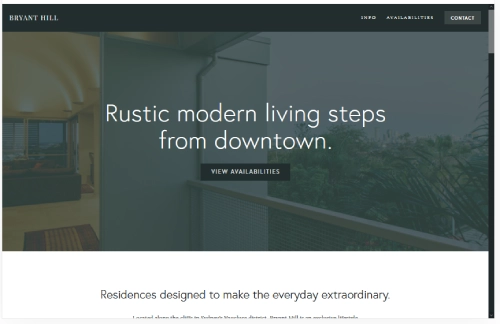
Bryant Hill
Best for Professional Businesses ✓ Pros
- Polished, corporate-friendly design builds immediate credibility
- Structured content sections for team bios, services, and case studies
- Strong typographic hierarchy makes dense content scannable
- Works well for law firms, agencies, and B2B companies
✗ Cons
- Formal design may feel stiff for creative or casual brands
- Requires substantial written content to fill all sections
- Image placement is more rigid than in freeform templates
- Less visual impact on first load compared to hero-image templates
Bryant Hill is built for businesses that need to look established and trustworthy from the first click. The structured layout includes dedicated sections for team members, services, and case studies -- everything a professional firm needs to communicate competence. It's a strong fit for law firms, accounting practices, agencies, and B2B companies where credibility matters more than visual flair.
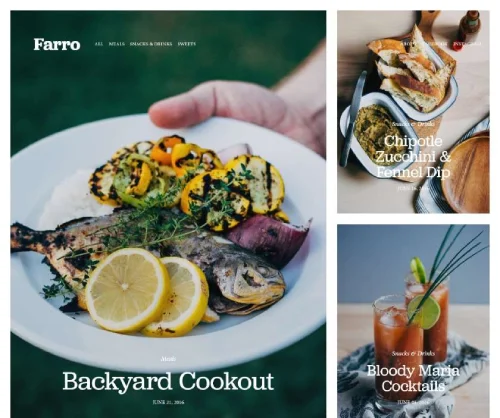
Farro
Best for Visual Bloggers ✓ Pros
- Blog-first layout with large featured images and clean typography
- Category filtering helps readers find content by topic
- Social sharing buttons are built into post layouts
- Sidebar support for email signups, about widgets, and popular posts
✗ Cons
- Blog-centric design isn't ideal for eCommerce or service pages
- Featured images need consistent aspect ratios to maintain grid alignment
- Sidebar can look empty without enough supporting content
- Post-heavy sites may load slowly without image optimization
Farro is the best free Squarespace template for bloggers who rely on strong visuals to draw readers in. The blog layout features large cover images, clean post typography, and built-in category filtering that helps visitors navigate your content library. If you're a food blogger, travel writer, or lifestyle creator, Farro gives your content the visual space it deserves.
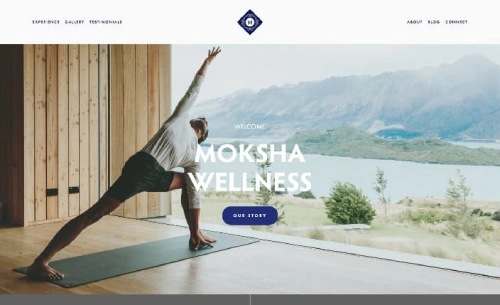
Moksha
Best for Service-Based Businesses ✓ Pros
- Calm, spacious layout works well for wellness and coaching brands
- Built-in sections for services, testimonials, and booking
- Balanced white space makes content feel approachable, not overwhelming
- Integrates smoothly with Squarespace Scheduling for appointments
✗ Cons
- Relaxed aesthetic may not suit high-energy or bold brands
- Requires warm, on-brand photography to match the template's tone
- Limited product display options for eCommerce use
- Color palette changes can clash with the template's default spacing
Moksha is a thoughtfully designed Squarespace template that works especially well for yoga studios, therapists, coaches, and wellness practitioners. The generous white space and calm layout create a sense of trust and approachability that aligns with service-based brands. Built-in sections for services, testimonials, and booking make it easy to set up a complete site without starting from a blank template.
Impact
Best for Social Impact Organizations ✓ Pros
- Mission-focused layout highlights your cause and call to action
- Donation and fundraising sections are easy to integrate
- Story-driven design supports long-form content and impact reports
- Bold typography draws attention to key messages and statistics
✗ Cons
- Niche design isn't well-suited for commercial businesses
- Requires compelling written content to fill story-driven sections
- Image-heavy sections need professional photography to feel authentic
- Limited eCommerce features beyond basic donation handling
Impact lives up to its name. This Squarespace template is purpose-built for nonprofits, charities, and social enterprises that need to communicate a mission clearly and drive action. The layout prioritizes storytelling with large text blocks, bold statistics, and prominent CTA buttons for donations or volunteer signups. If your organization depends on public support, Impact makes it easy to build that case.
Hester
Best for eCommerce & Portfolios ✓ Pros
- Flexible layout handles both product listings and portfolio galleries
- Grid-based design adapts well to different content types
- Clean product pages with space for descriptions and multiple images
- Works for artists, makers, and creators who sell their work
✗ Cons
- Dual-purpose design may require extra customization to feel cohesive
- Product and portfolio sections share similar layouts, which can blur the distinction
- Not as feature-rich as dedicated eCommerce templates for large catalogs
- Requires careful content organization to avoid a cluttered homepage
Hester bridges the gap between portfolio and online store, making it ideal for artists, illustrators, and makers who both showcase and sell their work. The grid-based layout handles product listings and project galleries equally well, so you don't need to choose between the two. If you're a creator who needs a free Squarespace website that doubles as a shop, Hester is a strong contender.
How to Choose the Right Free Squarespace Template
Match the Template to Your Content Type
The single biggest factor in choosing the right Squarespace template is matching it to the type of content you'll publish most. If your site is image-heavy, pick a template with full-bleed galleries like Elliott or Farro. If you're selling products, start with Alameda or Hester. If you're a service provider who needs booking functionality, Bailard or Suffolk will save you time. Starting with the wrong template means fighting the layout instead of working with it.
Prioritize Mobile Responsiveness
More than half of web traffic comes from mobile devices, so your template needs to look and function well on smaller screens. All Squarespace themes are responsive by default, but some handle the transition better than others. Templates with simpler navigation and fewer multi-column sections (like Bailard and Moksha) tend to perform best on mobile. Preview your template on a phone before committing to it.
Consider Your Content Volume
Minimalist templates like Elliott look incredible with a curated selection of projects, but they can feel empty if you don't have enough content to fill them. On the other hand, templates with multiple homepage sections (like Bryant Hill or Suffolk) need substantial written content to avoid placeholder-looking gaps. Be honest about how much content you have ready and choose a template that matches. For more on how Squarespace templates differ in design and layout structure, check out our detailed comparison.
Think About Future Growth
Your website will evolve, so choose a template that can grow with you. If you plan to add a blog later, make sure the template supports blog layouts well. If eCommerce is on your roadmap, start with a template like Alameda that already has product display built in. Squarespace does let you change your template later, but switching templates mid-project means re-customizing your entire site -- so it's worth getting it right the first time. For a full breakdown of the template library, see our guide to how many templates Squarespace has.
Frequently Asked Questions
Are all Squarespace templates free?
What is the difference between free and premium Squarespace templates?
Can I change my Squarespace template later?
Is Squarespace free to use?
How do I tell what Squarespace template a site is using?
Does Squarespace have a blank template I can start from scratch?
How We Evaluate Templates
Conclusion
Every Squarespace template is free with your plan, so the real question isn't about cost -- it's about fit. The best free Squarespace templates in 2026 are the ones that match your content type, support your goals, and minimize the customization you need to do. Bailard and Suffolk work well for service businesses, Alameda and Hester cover eCommerce, Elliott and Farro shine for visual content, and Impact serves organizations with a mission. Start with the template that's closest to what you need, and build from there. For a full breakdown of the template library, see our guide to how many templates Squarespace has.
* Read the rest of the post and open up an offer