

Your website's design and layout shape how visitors perceive your brand within seconds of landing on the page. The right Squarespace template does more than look attractive - it organizes your content, guides visitors toward action, and builds trust before a single word is read. Whether you are launching a portfolio, an online store, or a service-based business, the squarespace templates design and layout you choose will define your entire digital presence.
Squarespace offers a wide selection of templates built around different design philosophies, from bold and interactive to clean and minimal. Each one handles typography, spacing, imagery, and navigation differently, which means picking the right template is about matching your brand's personality to a layout that supports your goals.
We reviewed dozens of squarespace layout templates and selected six that stand out for their design quality, flexibility, and real-world usability. Are you curious about how many themes Squarespace has? There is a wide variety to choose from, including free Squarespace templates, premium Squarespace templates, and modern designs that suit nearly every niche.
Editor's Picks
| # | Name | Best For | Price | Rating | Image | |
|---|---|---|---|---|---|---|
| 1 | Email marketing, interactive campaigns, and engagement-driven sites | Free | 4.2/5 |
|
More Info | |
| 2 | Newsletters, content-focused sites, and information-driven brands | Free | 4.3/5 |
|
More Info | |
| 3 | One-page websites, quick launches, and streamlined online presence | Free | 4.2/5 |

|
More Info | |
| 4 | SEO-focused sites, grid-based portfolios, and fast-loading pages | Free | 4.3/5 |
|
More Info | |
| 5 | Mobile-optimized sites, eCommerce stores, and minimalist brands | Free | 4.4/5 |
|
More Info | |
| 6 | Versatile sites, portfolios, eCommerce, and multi-purpose brands | Free | 4.4/5 |
|
More Info |
Best Squarespace Templates for Design and Layout
Impact
Best for Email Marketing and Interactive Campaigns ✓ Pros
- Interactive layout elements keep visitors engaged longer on every page.
- Strong visual hierarchy guides attention to calls-to-action naturally.
- Pairs seamlessly with Squarespace's built-in email campaign tools.
- Works well for both promotional landing pages and full websites.
- Bold design stands out from generic corporate templates immediately.
✗ Cons
- Interactive elements may feel heavy for simple informational sites.
- Requires quality imagery to match the template's bold visual energy.
- Less suited for text-heavy blogs or documentation-style pages.
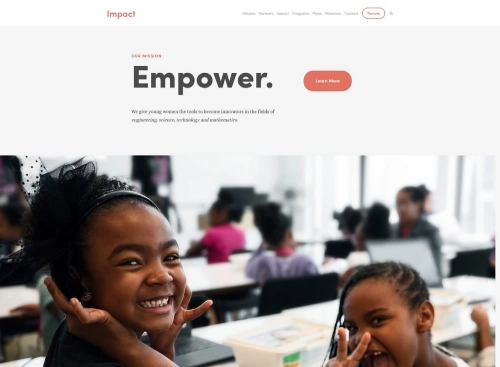
Impact earns its name by putting interactivity at the center of its squarespace template design. The layout is built around engagement - every section encourages visitors to click, scroll, and explore rather than passively read. This makes it an excellent fit for email marketing campaigns and brands that rely on visual storytelling to convert visitors. If you are building a site for a recipe blog or a wedding planning business, Impact gives you the tools to create an experience that feels dynamic and memorable.
Mojave
Best for Newsletters and Content Clarity ✓ Pros
- Clean, organized layout prioritizes readability above everything else.
- Balanced structure works for both long-form content and quick updates.
- Intuitive navigation keeps readers focused without unnecessary distractions.
- Adapts well to different content formats including text, images, and video.
- Professional design communicates credibility for business communications.
✗ Cons
- Minimal design may feel understated for brands wanting bold visuals.
- Limited built-in animation or interactive features compared to flashier templates.
- Content-heavy sites need strong writing to compensate for the simple layout.
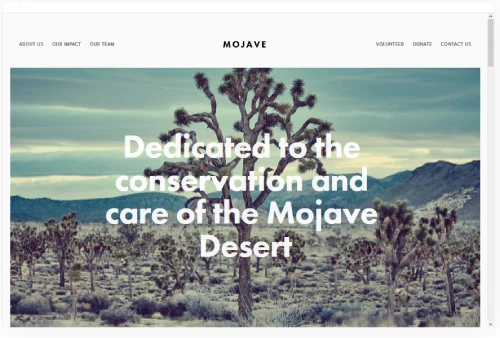
Mojave is one of the strongest squarespace layout templates for anyone who needs content clarity as a priority. Its design strips away unnecessary decoration and lets your words and images carry the weight. This makes it a natural choice for newsletters and content-driven brands that want their audience to read, not just glance. The balanced structure ensures that whether you are sharing weekly updates or in-depth articles, every piece of content feels intentional and easy to follow.
Wycoff
Best for Streamlined One-Page Sites ✓ Pros
- One-page structure keeps visitors focused on a single, clear narrative.
- Extremely fast setup lets you launch a professional site within hours.
- Compact layout is ideal for freelancers, events, or product launches.
- Smooth scrolling navigation creates a seamless browsing experience.
- Lightweight design ensures quick loading times across all devices.
✗ Cons
- Single-page format limits scalability for growing businesses with complex needs.
- Not ideal for sites that require multiple distinct content sections or blogs.
- Limited depth may not satisfy visitors looking for detailed information.
When it comes to choosing the best website template for Squarespace, Wycoff stands out for anyone who values simplicity and speed. This template is purpose-built for a one-page website approach, making it an excellent choice for freelancers, event pages, or businesses that want a compact yet polished online presence. The streamlined layout eliminates decision fatigue for visitors and drives them straight toward your call-to-action.
Jasper
Best for SEO-Optimized Grid Layouts ✓ Pros
- Grid-based layout organizes content cleanly for both visitors and search engines.
- Fast loading times contribute directly to stronger SEO performance.
- Visual hierarchy naturally draws attention to featured content first.
- Works equally well for portfolios, blogs, and business landing pages.
- Clean code structure helps search crawlers index your pages efficiently.
✗ Cons
- Grid layout may feel rigid for brands wanting a more organic, flowing design.
- Requires thoughtful content planning to keep the grid looking balanced.
- Less suitable for single-product or minimalist single-page sites.
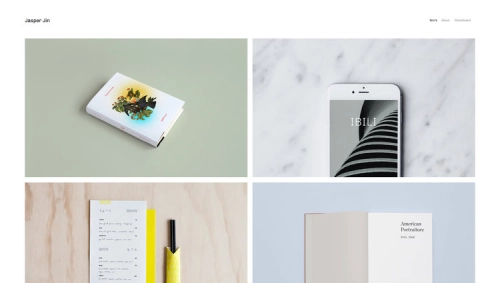
Jasper is one of the best squarespace templates design and layout options for anyone who takes SEO seriously. Its grid-based design creates a structured content hierarchy that search engines can parse easily, while fast loading times give you an edge in rankings. The template balances visual appeal with technical performance, making it a strong choice for businesses that need their website to attract organic traffic consistently. Among the fastest Squarespace templates, Jasper holds its own without sacrificing design quality.
Galapagos
Best for Mobile-Friendly eCommerce ✓ Pros
- Outstanding mobile responsiveness ensures a flawless experience on any device.
- Minimalist design keeps loading times fast even with product-heavy pages.
- Integrated Squarespace Commerce features make selling straightforward.
- Clean whitespace gives products and images room to breathe visually.
- Touch-friendly navigation works intuitively on smartphones and tablets.
✗ Cons
- Minimalist approach may feel too sparse for brands that want a rich, layered look.
- Limited decorative elements require strong product photography to compensate.
- Less effective for content-heavy sites that rely on long-form text.
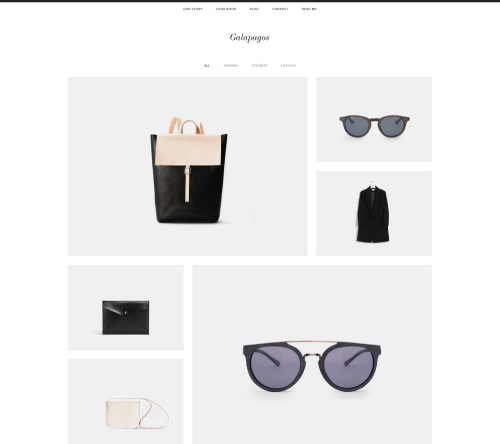
Galapagos is the top choice among squarespace layout templates built for mobile-first design. With more than half of all web traffic coming from phones, having a template that performs flawlessly on small screens is not optional - it is essential. Galapagos delivers a clean, uncluttered experience that loads quickly and looks sharp on every device. Its integration with Squarespace's secure payment system makes it a natural fit for eCommerce brands that want a polished storefront without the complexity.
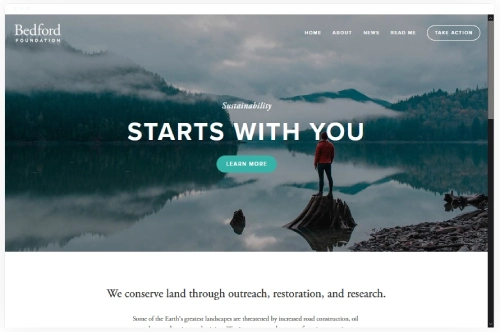
Bedford
Best Versatile Template for All Niches ✓ Pros
- Versatile layout adapts to portfolios, blogs, stores, and service pages equally.
- Banner integration makes website promotion and announcements effortless.
- Strong portfolio features showcase images and videos on every page.
- Works well across niches from nonprofits to podcasters to eCommerce brands.
- Robust page structure supports complex multi-page site architectures.
✗ Cons
- Versatility means the default design can feel generic without heavy customization.
- Banner-heavy layout may overwhelm visitors if not curated carefully.
- Older template family may lack some newer Squarespace 7.1 refinements.
Bedford remains one of the most dependable squarespace templates design and layout options for users who need a single template to handle multiple roles. Whether you are building a portfolio, running an online store, or managing a nonprofit's web presence, Bedford flexes to fit. Its banner integration and robust page structure make it easy to promote events, highlight featured content, and guide visitors through complex site architectures. For a deeper look at versatile options, explore our list of the best Squarespace templates for sale.
How to Choose the Right Squarespace Template Design and Layout
Selecting the right squarespace template design goes beyond picking something that looks good in a demo. The best template for your project depends on how well its structure matches your content, your audience's expectations, and your long-term growth plans. Here is what to evaluate before committing to a design.
Customization and Flexibility
Every Squarespace template comes with a baseline set of design features, but the real question is how far you can push it. The best squarespace layout templates let you rearrange sections, swap color palettes, and adjust spacing without ever touching code. This flexibility matters because your site will evolve - new services, updated branding, seasonal promotions - and your template needs to accommodate those changes without a full redesign. When you do need to switch, our guide to how to change your Squarespace template covers the full process for both 7.0 and 7.1 sites.
Look for templates that offer modular section blocks you can reorder freely. Templates with rigid layouts may look polished in the demo but become frustrating when you try to adapt them to your actual content. The strongest picks on this list - like Bedford and Wycoff - give you room to restructure pages as your needs shift. If you want to understand the full scope of design options, our guide on how to design Squarespace templates walks through the customization process in detail.

Aesthetic Appeal and User Experience
The visual appeal of your website directly shapes how long visitors stay and whether they take action. Squarespace designs are built with this balance in mind - every template prioritizes both aesthetics and usability. A beautiful layout that confuses visitors is worse than a plain one that guides them clearly.
Pay attention to how a template handles navigation, whitespace, and content hierarchy. Templates like Galapagos and Mojave excel because they use clean spacing and intuitive flow to make browsing feel effortless. The best interactive Squarespace templates go further by adding engagement elements that keep visitors exploring without overwhelming the page. The goal is a design that feels natural rather than forced.
Typography and Its Impact on Layout
Font selection plays a larger role in your site's layout than most people realize. The right typeface improves readability, reinforces your brand identity, and creates visual rhythm across your pages. The wrong one can make professional content look amateur or cause visitors to bounce before they finish reading.
Squarespace gives you access to hundreds of fonts, but the best Squarespace fonts are those that complement your template's structure without competing for attention. Pair a clean sans-serif heading with a readable body font and keep sizing consistent across all pages. The best Squarespace templates of all time often feature typography that feels invisible - it supports the content without drawing attention to itself.
Keeping Up With Design Trends
Web design standards shift regularly, and a template that looked current two years ago may feel dated now. The good news is that Squarespace makes it straightforward to refresh your design without starting over. Understanding how to change template on Squarespace means you can adapt to new trends - whether that is dark mode aesthetics, asymmetric layouts, or motion design - without losing your existing content.
Staying current does not mean chasing every trend. Focus on design principles that have staying power: strong typography, generous whitespace, fast loading times, and clear visual hierarchy. Templates like Jasper and Impact incorporate these fundamentals while still feeling fresh and contemporary. The best squarespace template design choices are the ones that will still look professional a year from now.
Frequently Asked Questions
What makes a good squarespace template design and layout?
A strong squarespace template design balances visual appeal with functional structure. Look for clean navigation, logical content hierarchy, mobile responsiveness, and enough customization flexibility to match your brand. The best layouts guide visitors naturally from the first section to your call-to-action without requiring them to hunt for information.
Can I change the layout of a Squarespace template after I start building?
Yes. Squarespace's Fluid Engine editor allows you to rearrange sections, add or remove content blocks, and restructure pages without being locked into the original template layout. You can also switch templates entirely and keep your content. This flexibility is one of the platform's strongest advantages for users who want control over their squarespace template design.
Which Squarespace template has the best layout for SEO?
Templates with clean code structure, fast loading times, and logical heading hierarchies tend to perform best for SEO. Jasper is a strong choice because its grid-based layout encourages structured content organization that search engines can parse easily. That said, any Squarespace template can rank well if you focus on quality content, proper meta tags, and internal linking.
Are squarespace layout templates mobile-friendly by default?
Every Squarespace template is responsive, meaning it automatically adjusts its layout for phones, tablets, and desktops. However, some templates handle the transition better than others. Galapagos, for example, is specifically designed with mobile-first principles that ensure touch-friendly navigation and fast load times on smaller screens.
How do I pick between a minimalist and a feature-rich squarespace template design?
Start with your content volume and goals. If your site relies on a few strong images and a clear call-to-action, a minimalist template like Wycoff or Galapagos keeps the focus tight. If you need multiple page types, banners, portfolios, and blog sections, a feature-rich option like Bedford handles that complexity without feeling cluttered.
What role does typography play in squarespace templates design and layout?
Typography affects readability, brand perception, and overall visual rhythm. The right font pairing makes your content feel professional and easy to scan. Squarespace offers hundreds of font options, and the strongest template designs use consistent heading and body fonts throughout the site. Poor typography choices can undermine even the most polished layout.
Can I use a free Squarespace template for a professional business site?
Absolutely. Every template on this list is included free with any Squarespace plan, and each one is capable of powering a professional business site. The difference between a free template and a premium one is not quality - it is the amount of customization you are willing to do yourself. With the right content and branding, any free squarespace template design can look high-end.
Conclusion: Squarespace Templates Design and Layout
The six templates on this list represent some of the strongest squarespace templates design and layout options available right now. From Impact's interactive energy to Bedford's all-purpose versatility, each template solves a different design challenge while maintaining the polish and functionality Squarespace is known for. The right choice depends on your specific needs - whether that is mobile-first eCommerce, SEO-optimized content, or a streamlined one-page presence.
Whether you are searching for the best templates for Squarespace or exploring top website templates, the key is matching your content and goals to a layout that supports them. Every template on this list is free with any Squarespace plan, fully customizable, and built to perform on all devices.
Your website's design is not just a visual choice - it is a strategic one. Take the time to preview each template, test it with your real content, and choose the layout that makes your brand look and function at its best.
* Read the rest of the post and open up an offer