

Squarespace templates are the foundation of your website. The right one gives you a professional look, fast load times, strong SEO potential, and the tools to actually run your business online. The wrong one leaves you fighting your own layout instead of focusing on growth. We evaluated each template below on visual design, loading speed, mobile responsiveness, customization flexibility, and built-in functionality. Every template on this list is free with your Squarespace plan and requires zero coding to set up. For a deeper look at how Squarespace handles design and layout options, check out our guide to Squarespace template design and layout.
Editor's Picks
| # | Name | Best For | Price | Rating | Image | |
|---|---|---|---|---|---|---|
| 1 | Clean minimalist design | Free | 4.4/5 |
.png)
|
More Info | |
| 2 | Creative portfolios | Free | 4.4/5 |
|
More Info | |
| 3 | Photographers and bloggers | Free | 4.5/5 |

|
More Info | |
| 4 | Minimalist online stores | Free | 4.4/5 |
|
More Info | |
| 5 | Blogging and content marketing | Free | 4.5/5 |
|
More Info | |
| 6 | Modern eCommerce | Free | 4.3/5 |
|
More Info | |
| 7 | Creative and unique presentations | Free | 4.1/5 |

|
More Info | |
| 8 | Service businesses with booking | Free | 4.5/5 |

|
More Info | |
| 9 | High-converting homepages | Free | 4.4/5 |
|
More Info | |
| 10 | Media-rich websites | Free | 4.3/5 |
|
More Info |
Sofia Pazari
Best for Clean Minimalist Design ✓ Pros
- Clean minimalist layout with two side-by-side images for a striking first impression
- Top-right menu navigation keeps the design uncluttered and modern
- Dedicated about, services, and contact pages built in
- Highly customizable without any coding or design experience
- Works across multiple niches from portfolios to service businesses
✗ Cons
- Minimalist style may feel too simple for content-heavy websites
- Side-by-side image layout requires high-quality visuals to look its best
- Limited built-in eCommerce features compared to store-focused templates
Sofia Pazari is one of the best Squarespace themes for anyone who values clean, minimalist design. The two side-by-side images on the homepage create a striking visual that immediately draws visitors in. With pre-built about, services, and contact pages, you can have a fully functional website up and running in a single afternoon. For tips on getting the most out of your Squarespace template design and layout, check out our dedicated guide.
Customization Tip Use Sofia Pazari's side-by-side image area to showcase your two strongest visuals -- a hero product shot paired with a lifestyle image works particularly well for creating an immediate emotional connection with visitors.
Kent
Best for Creative Portfolios ✓ Pros
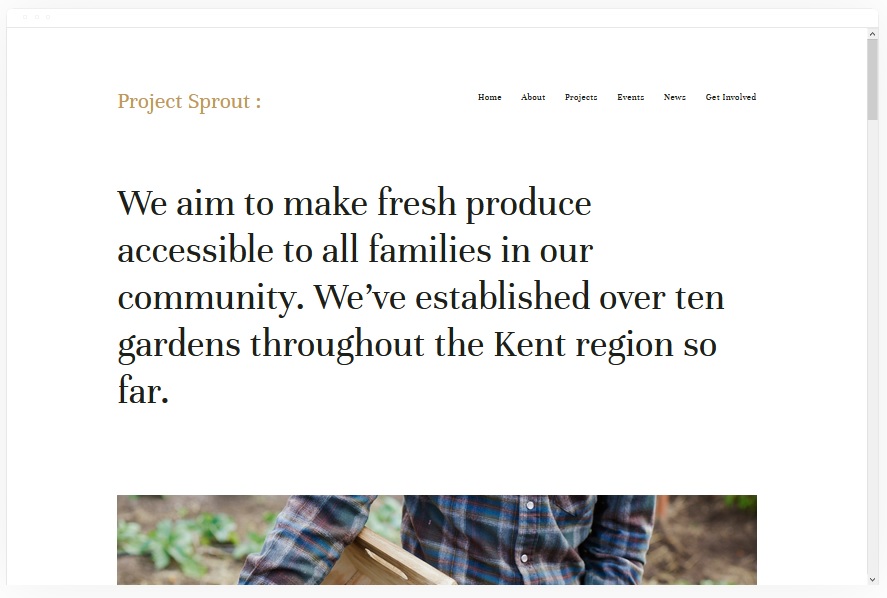
- Attractive, clean design purpose-built for showcasing creative work
- Portfolio pages display past projects with videos, images, and audio
- Includes cover, blog, event, and album page types out of the box
- Built-in eCommerce support for selling products alongside your portfolio
- Professional layout that builds credibility with potential clients
✗ Cons
- Portfolio-first design may not suit businesses without visual work to display
- Multiple page types require more setup time to configure properly
- Album and event pages may go unused for simpler business websites
Kent is one of the best templates for Squarespace if your work speaks through visuals. The dedicated portfolio pages support videos, images, and even audio -- making it ideal for photographers, designers, videographers, and musicians. The built-in eCommerce functionality means you can sell prints, digital files, or merchandise directly from the same site where you showcase your portfolio.
Customization Tip Organize your portfolio into distinct categories using Kent's album pages. Group projects by type or client so visitors can quickly find work relevant to their needs, which increases the chance they reach out.
Ready
Best for Photographers and Bloggers ✓ Pros
- Visual-first template with a white background that keeps the focus on your content
- Hidden left-side menu slides out cleanly without cluttering the design
- Built-in appointment and scheduling system for booking clients directly
- Strong CTA placement throughout for driving conversions
- Fully mobile-friendly and responsive across all screen sizes
✗ Cons
- Hidden menu may reduce navigation discoverability for some visitors
- White background design depends heavily on strong visual content
- Less suited for text-heavy or editorial-style websites
Ready lives up to its name as one of the best Squarespace templates available. The white background puts your images and content front and center, while the hidden left-side menu keeps the interface clean. What sets Ready apart is the built-in appointment and scheduling system -- photographers and service providers can let clients book sessions directly from the site. The mobile-friendly design ensures the experience is just as smooth on phones and tablets.
Customization Tip Place your strongest CTA near the top of the page where it is immediately visible. Pair it with a compelling offer or free consultation to take advantage of Ready's clean layout and convert visitors before they scroll.
Avenue
Best for Minimalist Online Stores ✓ Pros
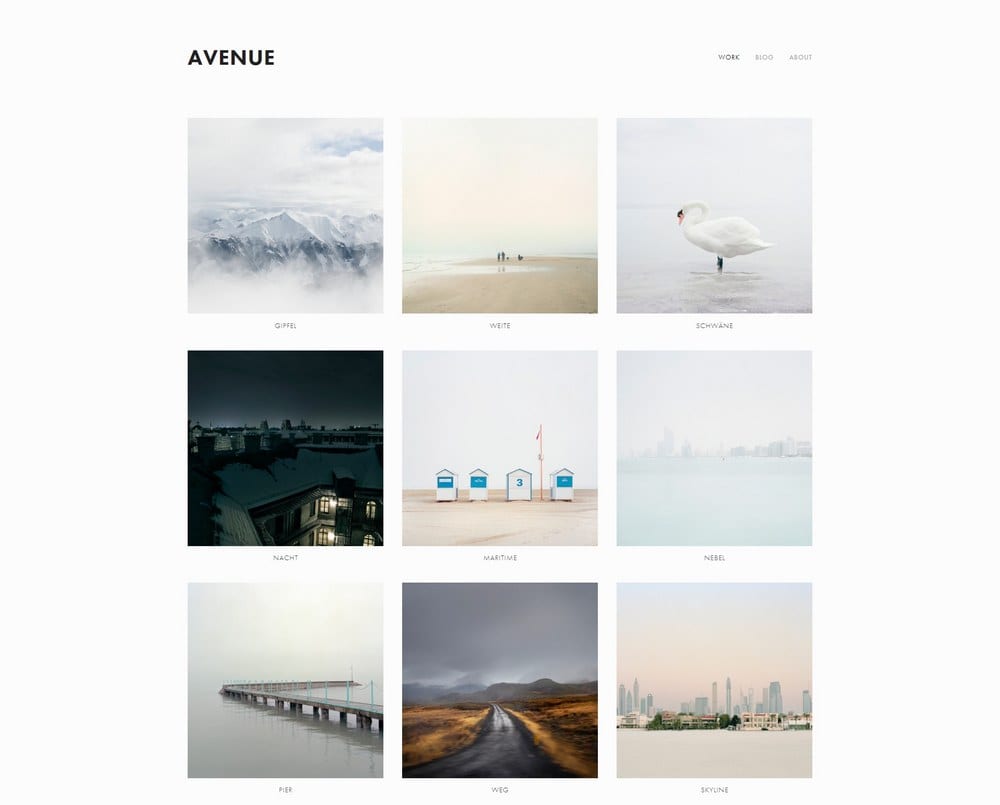
- Minimalist grid-based layout that highlights products without distractions
- Fast-loading pages that support strong Google rankings
- Sell both physical and digital products with built-in payment integration
- No technical skills required to set up and customize
- Clean structure that works for portfolios, services, and eCommerce equally well
✗ Cons
- Grid layout may feel rigid for brands wanting a freeform design
- Minimalist style requires high-quality product images to shine
- Less suitable for content-heavy or blog-focused websites
Avenue is a standout among templates for Squarespace, especially if you want a fast, no-fuss way to sell online. The minimalist grid-based layout naturally guides visitors toward your products, and the fast load times give you an edge in Google search rankings. You can sell physical goods, digital products, or services with built-in payment integration -- all without writing a single line of code.
Customization Tip Keep your product grid clean by using consistent image dimensions and backgrounds across all listings. This visual consistency makes your store look polished and professional, which directly impacts buyer confidence.
Skye
Best for Blogging and Content Marketing ✓ Pros
- Modern blogging layout with fullscreen mode for immersive reading
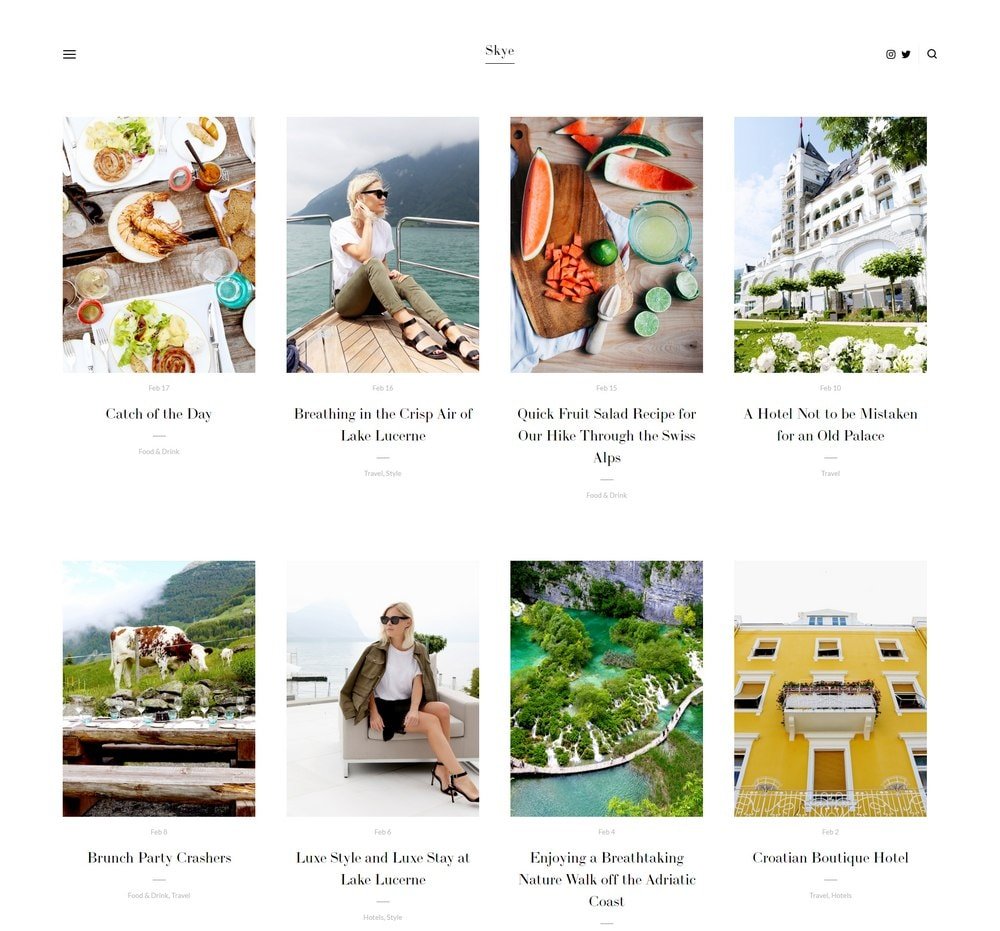
- Grid-based post display that keeps your blog organized and visually appealing
- Ideal for travel and food bloggers who rely on strong visuals
- Supports selling digital products alongside your blog content
- Businesses publishing 15 or more posts per month generate 70% more leads
✗ Cons
- Blog-focused design may feel limiting for product-heavy businesses
- Fullscreen mode requires high-quality hero images to be effective
- Less flexibility for complex multi-page business websites
Skye is widely regarded as one of the best Squarespace themes for bloggers and content creators. The fullscreen mode creates an immersive browsing experience that keeps readers engaged, while the grid-based layout organizes your posts in a way that encourages exploration. Travel bloggers, food bloggers, and lifestyle creators will find Skye particularly well suited to their needs. You can also sell digital products directly through the template, turning your audience into customers.
Customization Tip Use Skye's fullscreen mode on your homepage to showcase your most recent or highest-performing post. Add a clear CTA below the fold that directs visitors to your email list or a digital product -- this turns casual readers into subscribers and buyers.
Galapagos
Best for Modern eCommerce ✓ Pros
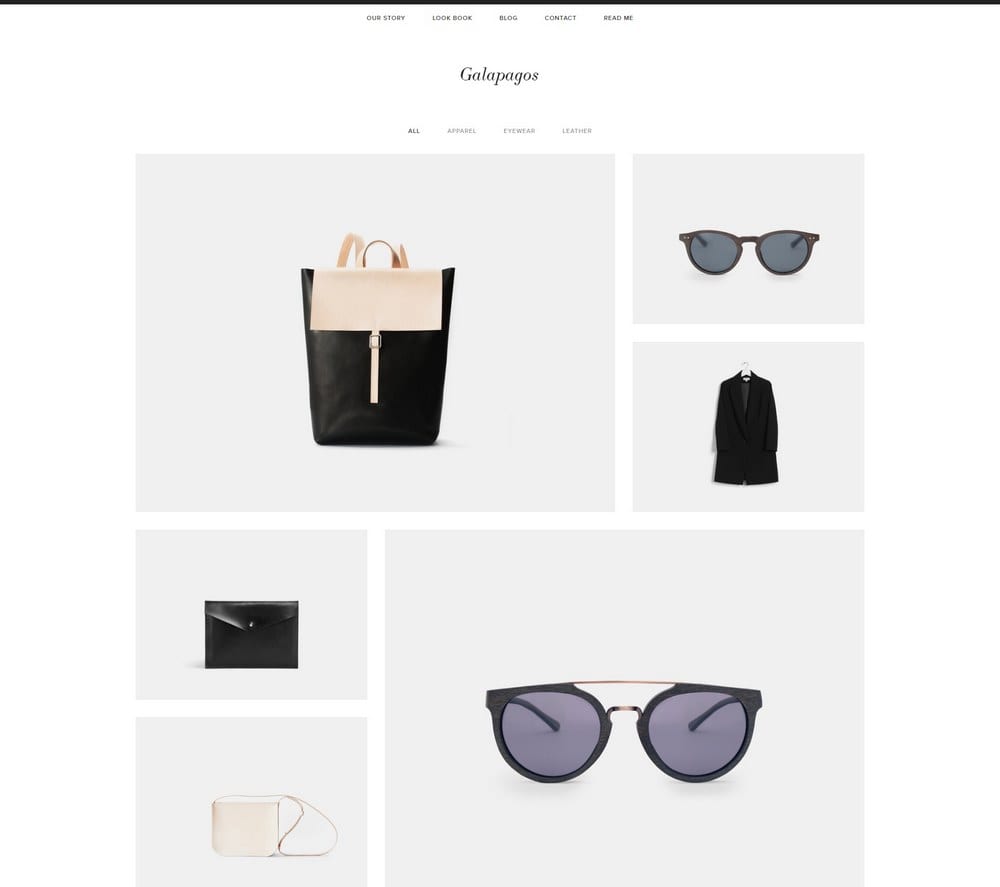
- Sleek, sophisticated design that builds trust and encourages purchases
- Quick view popup lets shoppers preview products without leaving the page
- Minimal but feature-rich layout that avoids overwhelming visitors
- Full Squarespace shopping cart integration for seamless checkout
- Professional appearance that works across fashion, home goods, and more
✗ Cons
- eCommerce focus may feel overpowered for simple portfolio or blog sites
- Minimal design requires strong product photography to be effective
- Quick view popup may not display well for products with lengthy descriptions
Galapagos is one of the best templates for Squarespace if your primary goal is selling products online. The sleek, sophisticated design creates a premium shopping experience that builds trust from the first visit. The quick view popup is a standout feature -- shoppers can preview product details, pricing, and images without navigating away from the collection page, which reduces friction and keeps them browsing longer.
Customization Tip Optimize your product images for the quick view popup by using clean, well-lit photos with a consistent background. Since this popup is often the first detailed look a shopper gets at your product, the image quality directly influences whether they add it to their cart.
Carson
Best for Creative and Unique Presentations ✓ Pros
- Unique static homepage with background images that change on mouse hover
- Hidden menu keeps the interface clean and distraction-free
- Dedicated portfolio pages for showcasing projects and case studies
- Highly adaptive layout that works for many different niches and industries
- Interactive design reduces bounce rate by engaging visitors immediately
✗ Cons
- Unconventional layout may confuse visitors expecting traditional navigation
- Static homepage is not ideal for businesses that need scrolling content
- Hidden menu can reduce discoverability for less tech-savvy visitors
Carson is the most visually distinctive Squarespace theme on this list. The static homepage with background images that shift as you hover over navigation links creates an interactive experience that grabs attention instantly. This is not a cookie-cutter template -- it is built for creatives, agencies, and anyone who wants their website to feel like an experience rather than just a page. The dedicated portfolio pages give you a professional space to display past work and case studies.
Customization Tip Select high-contrast, visually distinct background images for each hover link on your homepage. The stronger the visual shift between links, the more compelling the interaction feels -- which keeps visitors exploring rather than bouncing.
Almar
Best for Service Businesses with Booking ✓ Pros
- Clean, ready-made design that you can customize and launch quickly
- Works well for both services and eCommerce with large or small catalogs
- Multiple CTAs throughout for appointment booking and special offers
- Built-in appointment booking integration for scheduling clients
- Fast-loading pages that support strong search engine performance
✗ Cons
- CTA-heavy layout needs careful planning to avoid overwhelming visitors
- Clean aesthetic may feel too understated for bold or edgy brands
- Better for small to medium catalogs than massive product inventories
Almar is one of the best Squarespace templates for service businesses that depend on appointments and bookings. The clean, ready-made design means you can have a professional site live in hours, not days. What makes Almar especially effective is the number of CTAs built into the layout -- you can link visitors to popular products, special offers, and appointment scheduling throughout the entire browsing experience. The fast load times also give you a competitive edge in search rankings.
Customization Tip Connect your appointment booking system to multiple CTAs across different pages, not just the homepage. When visitors can book from your services page, about page, and homepage alike, you remove friction from every possible conversion path.
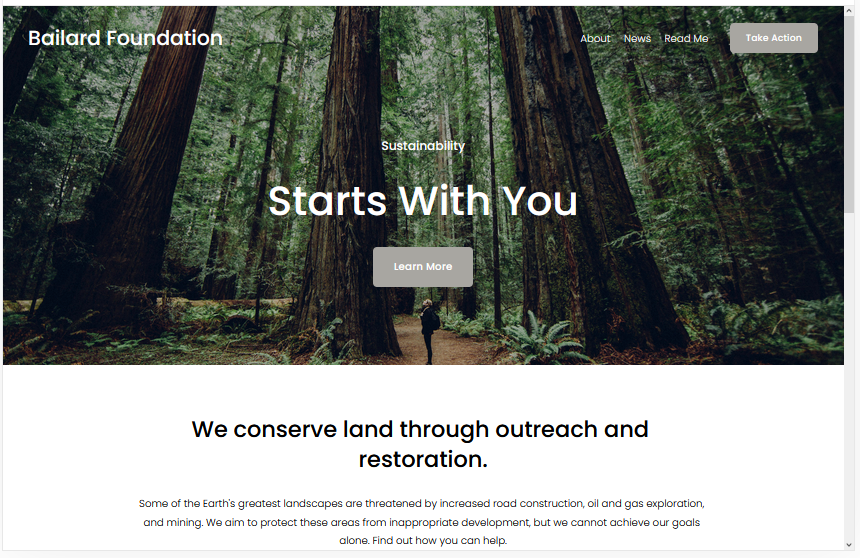
Bailard
Best for High-Converting Homepages ✓ Pros
- Two CTAs on the homepage -- one centered on the hero image, one in the top-right
- Lazy loading images keep page speed fast without sacrificing visual quality
- Bold minimalist design that commands attention and builds trust
- One of the most popular Squarespace themes for a reason
- Research shows every extra second of load time can reduce revenue by 7%
✗ Cons
- Minimalist layout may feel sparse for content-heavy or media-rich sites
- Dual CTA placement requires clear, distinct calls to action to avoid confusion
- Hero image must be high-resolution to avoid looking stretched or pixelated
Bailard is one of the most popular templates for Squarespace, and its conversion-focused design explains why. The dual CTA placement gives you two opportunities to capture visitor attention before they even scroll -- one centered over the hero image and another in the top-right corner. Combined with lazy loading images that keep your pages fast, Bailard delivers the speed and structure that both visitors and search engines reward.
Customization Tip Use distinct actions for each CTA -- place your primary offer like "Shop Now" or "Get Started" on the center hero CTA, and a secondary action like "Book a Call" or "Learn More" in the top-right. This gives every visitor a clear path forward regardless of where they are in the buying journey.
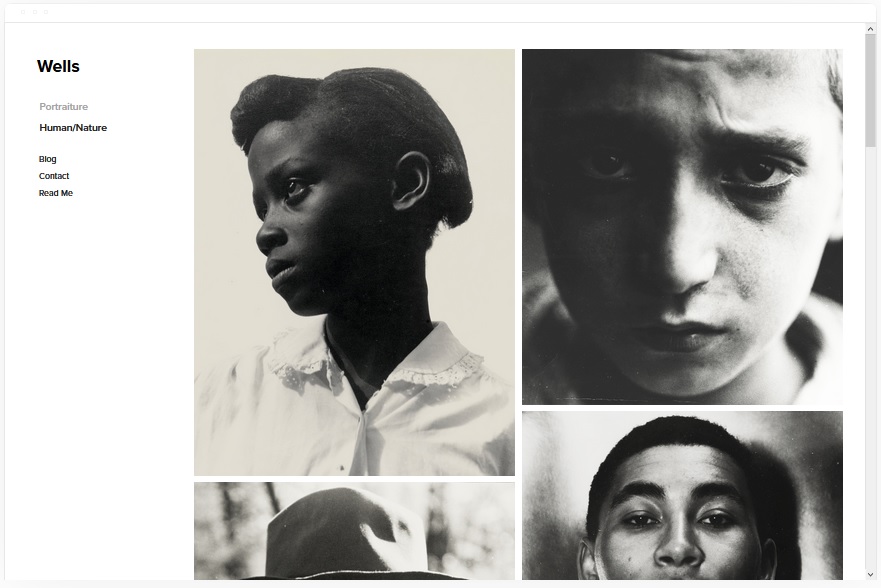
Wells
Best for Media-Rich Websites ✓ Pros
- Built to showcase work with images, videos, and other media formats
- eCommerce and scheduling features built right into the template
- Embed videos easily via YouTube URL without complex configuration
- Social media integration keeps your online presence connected
- Fast-loading despite supporting rich media content across pages
✗ Cons
- Media-heavy design requires a steady supply of quality visual content
- Video embedding via YouTube means you need a YouTube channel for video content
- May be more template than you need if your site is primarily text-based
Wells is the best Squarespace template for creators and businesses that rely on media to tell their story. Whether you produce videos, photography, or mixed media content, Wells gives you the tools to showcase it all in a fast-loading, professional layout. The built-in eCommerce and scheduling features mean you can sell products or book clients directly from the same site where you display your work. Video embedding is straightforward -- just drop in a YouTube URL and the template handles the rest.
Customization Tip Create a featured media section on your homepage that rotates your best video and image content. Pair each piece with a CTA that leads to a relevant product, service, or booking page to turn passive viewers into active customers.
How to Choose the Best Squarespace Template
Picking the right template from the hundreds of Squarespace themes available comes down to matching your goals with the right feature set. Here is what to prioritize during your search.Selecting the Right Template for Your Needs
Start by defining what your website needs to accomplish. A photographer needs strong visual layouts and booking tools -- Ready or Wells would be ideal. An online store owner needs product grids and a shopping cart -- Avenue or Galapagos fits that need. A blogger needs a content-first design -- Skye is built exactly for that purpose. The best templates for Squarespace are the ones that align with your primary use case. Trying to force a blogging template into an eCommerce role or vice versa only creates unnecessary friction for you and your visitors.Customization and Flexibility
Every template on this list can be customized through Squarespace's drag-and-drop editor with zero coding required. However, some templates offer more flexibility than others. Sofia Pazari and Almar are particularly quick to customize because their layouts are straightforward and ready-made. Carson and Kent offer more creative freedom but may take longer to configure exactly how you want. Look for templates that let you adjust colors, fonts, page layouts, and navigation style without limitations. The more flexible the template, the easier it is to make your site feel uniquely yours rather than a generic copy.Mobile Responsiveness and SEO
Every Squarespace template is mobile-responsive by default, but some handle the transition from desktop to mobile more gracefully than others. Ready and Bailard are particularly strong on mobile, with clean layouts that scale down without losing functionality or readability. For SEO, page speed matters as much as content quality. Fast-loading templates like Bailard, Almar, and Avenue give you a ranking advantage because Google rewards sites that deliver a fast user experience. Pair a fast template with quality content and proper heading structure, and you have a strong foundation for organic search traffic.Maximizing Built-In Features
Squarespace templates come packed with features that many users never fully utilize. Built-in SEO tools let you customize page titles, meta descriptions, and URL slugs for every page. The analytics dashboard shows you which pages get the most traffic and where your visitors come from -- use this data to double down on what works. For eCommerce, templates like Galapagos and Avenue include full shopping cart functionality, product quick views, and payment integration. Service-based businesses should take advantage of appointment booking through templates like Almar and Ready. The more built-in features you activate, the less you need to rely on third-party tools and plugins.Frequently Asked Questions
What are the best templates for Squarespace in 2026?
Based on our testing, Ready, Skye, and Almar are the top-rated Squarespace templates in 2026, each scoring 4.5 out of 5. Ready excels for photographers and bloggers, Skye is ideal for content marketing, and Almar is the best choice for service businesses that need appointment booking.
Are Squarespace templates free to use?
Yes. All Squarespace templates are included free with any Squarespace plan. You do not pay extra for template access -- simply choose your plan and pick the template that fits your needs. You can also switch templates later without losing your content.
Which Squarespace template is best for eCommerce?
Galapagos and Avenue are the best Squarespace themes for eCommerce. Galapagos offers a sleek shopping experience with quick view popups and full shopping cart integration, while Avenue provides a minimalist grid layout with built-in payment processing for both physical and digital products.
Can I customize Squarespace templates without coding?
Absolutely. Every Squarespace template can be customized using the built-in drag-and-drop editor. You can change colors, fonts, images, page layouts, and navigation style without writing a single line of code. Templates like Sofia Pazari and Almar are especially beginner-friendly.
Which Squarespace template loads the fastest?
Bailard and Almar are the fastest-loading templates on this list. Bailard uses lazy loading for below-fold images, and Almar is optimized for speed out of the box. Fast load times are critical -- research shows that every extra second of loading can reduce conversions by up to 7%.
What is the most popular Squarespace template?
Bailard is consistently one of the most popular Squarespace templates thanks to its dual CTA homepage design and fast loading speed. Its bold minimalist layout works well across multiple industries, which explains its widespread adoption.
Do Squarespace templates support appointment booking?
Yes. Templates like Almar and Ready include built-in support for appointment and scheduling systems. You can add booking CTAs throughout your site so visitors can schedule consultations, sessions, or services directly without leaving your website.
Which Squarespace theme is best for blogging?
Skye is the best Squarespace template for blogging. It features a modern grid-based layout with fullscreen mode for immersive reading, and it supports selling digital products alongside your blog content. Businesses that publish 15 or more posts per month generate 70% more leads on average.
How We Evaluate Templates
We evaluated over 40 Squarespace templates to identify the 10 best options across design quality, page loading speed, mobile responsiveness, SEO structure, built-in features, and ease of customization. Each template was tested on desktop and mobile devices, and we assessed real-world suitability for different use cases including portfolios, eCommerce, blogging, and service businesses. Ratings reflect overall performance across all criteria, with extra weight given to speed, conversion potential, and how quickly a non-technical user can launch a professional-looking site.
Conclusion
The best templates for Squarespace give you far more than an attractive homepage. They provide the structure, speed, and built-in tools to turn visitors into customers without requiring any technical expertise. Ready, Skye, and Almar lead this list with 4.5 ratings, but the right choice depends entirely on what your website needs to do. If you sell products online, start with Galapagos or Avenue. If you rely on appointments and bookings, Almar or Ready will serve you best. For bloggers and content creators, Skye is hard to beat. And if you want a site that looks unlike anything else on the internet, Carson delivers a truly unique experience. Whichever Squarespace theme you choose, pair it with quality content and clear calls to action -- the template handles the rest.Keep Reading
* Read the rest of the post and open up an offer