

If you've been searching for Squarespace website templates for sale, you've probably noticed that third-party Squarespace templates do exist on external marketplaces. However, the built-in templates that come free with your Squarespace plan are professionally designed, regularly updated, and fully supported - which is more than most paid third-party themes can promise. The templates below were selected because they offer the kind of polish, flexibility, and conversion-ready layouts that rival anything you'd buy from a premium theme shop. Whether you need eCommerce features, portfolio displays, or clean service pages, these are the best Squarespace themes you can get - and you don't need to buy Squarespace templates separately to access them.
Editor's Picks
| # | Name | Best For | Price | Rating | Image | |
|---|---|---|---|---|---|---|
| 1 | Podcasters, YouTubers, professional services, nonprofits, and eCommerce | Free | 4.5/5 |
|
More Info | |
| 2 | Product sellers, service providers, and anyone selling ideas or expertise | Free | 4.4/5 |
|
More Info | |
| 3 | Content creators, eCommerce sellers, and multi-channel businesses | Free | 4.4/5 |
|
More Info | |
| 4 | Artists, photographers, podcasters, YouTubers, and visual content creators | Free | 4.3/5 |
|
More Info | |
| 5 | Beginners, freelancers, nonprofits, and first-time website builders | Free | 4.3/5 |
.png)
|
More Info | |
| 6 | Nonprofits, real estate, construction, and businesses needing a simple single-page site | Free | 4.2/5 |

|
More Info | |
| 7 | eCommerce, construction, professional services, and hospitality businesses | Free | 4.2/5 |
|
More Info | |
| 8 | First-time website owners, side projects, and businesses needing a simple online presence | Free | 4.1/5 |
|
More Info | |
| 9 | Professional services, catering, event planning, and client-based businesses | Free | 4.3/5 |
|
More Info | |
| 10 | Businesses focused on SEO, content marketing, and organic search traffic | Free | 4.2/5 |
.png)
|
More Info |
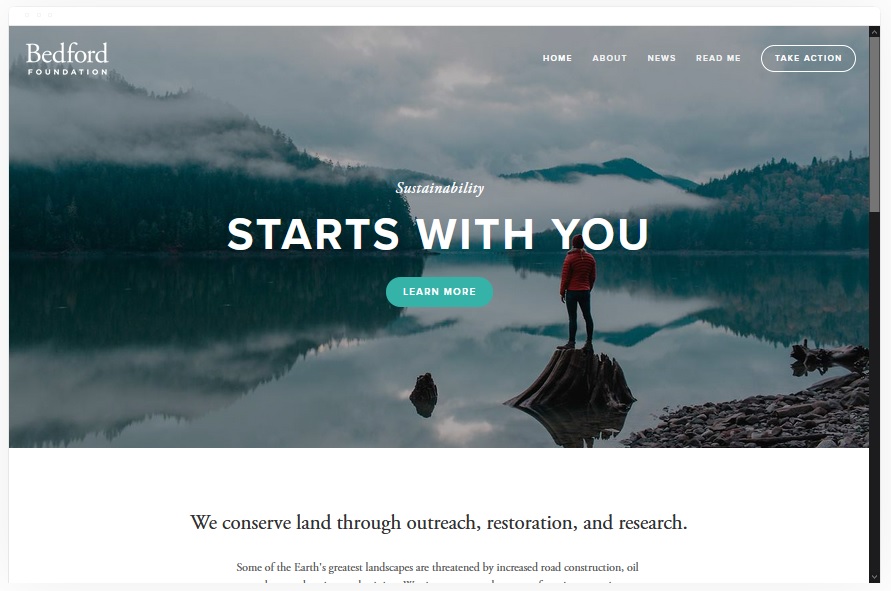
Bedford
Best Overall Template ✓ Pros
- Extremely versatile layout that works across dozens of niches - from professional services to eCommerce to content creators.
- Built-in portfolio section lets you showcase past work with images and videos, building trust before a visitor ever contacts you.
- Strong CTA button placement throughout the template guides visitors toward purchasing, booking, or subscribing.
- Banner sections support embedded videos and images, giving you multiple ways to capture attention above the fold.
- Video integration is seamless - just paste a YouTube URL and the template handles the rest.
✗ Cons
- The wide versatility means you'll spend more time customizing it to fit your specific niche compared to a purpose-built template.
- Banner-heavy layout requires quality visual assets to look professional - thin content sections feel empty.
- Not the most minimal option if you prefer a stripped-back, single-focus design.
Bedford is the template that makes people wonder why they'd ever buy Squarespace templates from third parties. It handles podcasting sites, YouTube channels, service businesses, nonprofits, and online stores with equal competence. The portfolio section alone justifies choosing it - it gives potential clients a visual walkthrough of your past work before they scroll to your CTA. If you only look at one template on this list, make it Bedford.
Customization Tip Use Bedford's banner section to embed a short introduction video at the top of your homepage. Below it, add a three-column portfolio grid showing your best work, and place a "Get Started" CTA button immediately after. This layout mimics the structure of premium templates you'd find for sale elsewhere, but it's already included free with your plan.
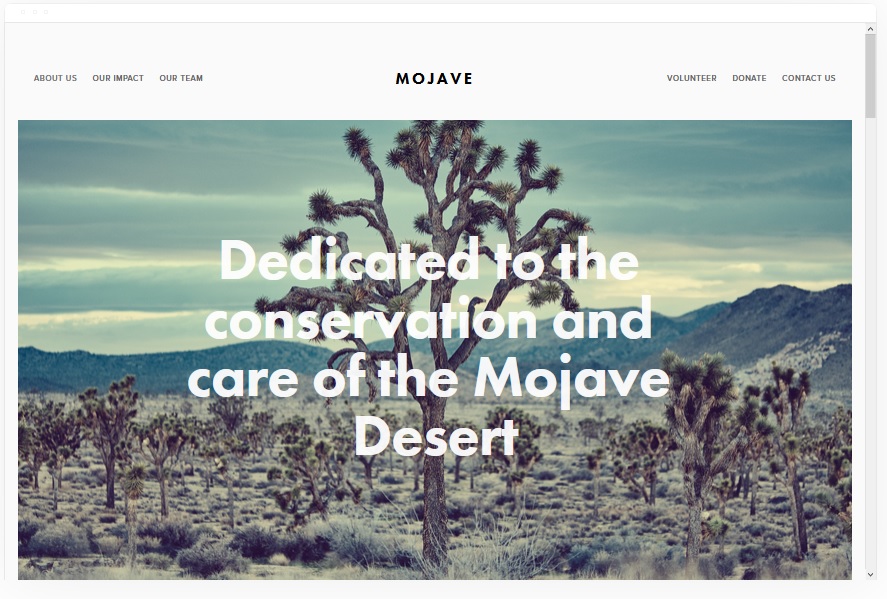
Mojave
Best for Visual Impact ✓ Pros
- Strikingly beautiful design with smooth scrolling effects that create a premium, high-end browsing experience.
- Clean white background default puts all the focus on your products, services, or content.
- CTA buttons are strategically placed throughout the template to guide visitors through the purchasing journey.
- Built-in social media share buttons can be customized and added to any page or post for maximum reach.
- Works equally well for selling physical products, digital services, or thought leadership content.
✗ Cons
- The smooth scrolling effect, while attractive, can feel slow for visitors who want to scan content quickly.
- White-background design demands high-quality imagery - low-resolution photos stand out immediately.
- May require more customization if you want a darker or bolder brand aesthetic.
Mojave is the kind of template that makes visitors assume you paid a designer. The scrolling effects are smooth without being distracting, the CTA placement naturally moves people toward a purchase decision, and the social sharing options help your content spread beyond your site. If you're searching for Squarespace themes for sale because you want something that looks expensive, Mojave delivers that feel for free.
Customization Tip Leverage Mojave's smooth scrolling by creating distinct visual sections for each key message - hero image, value proposition, product showcase, testimonials, and final CTA. Keep each section to one screen height so the scrolling effect creates a natural "slide deck" experience that walks visitors toward conversion.
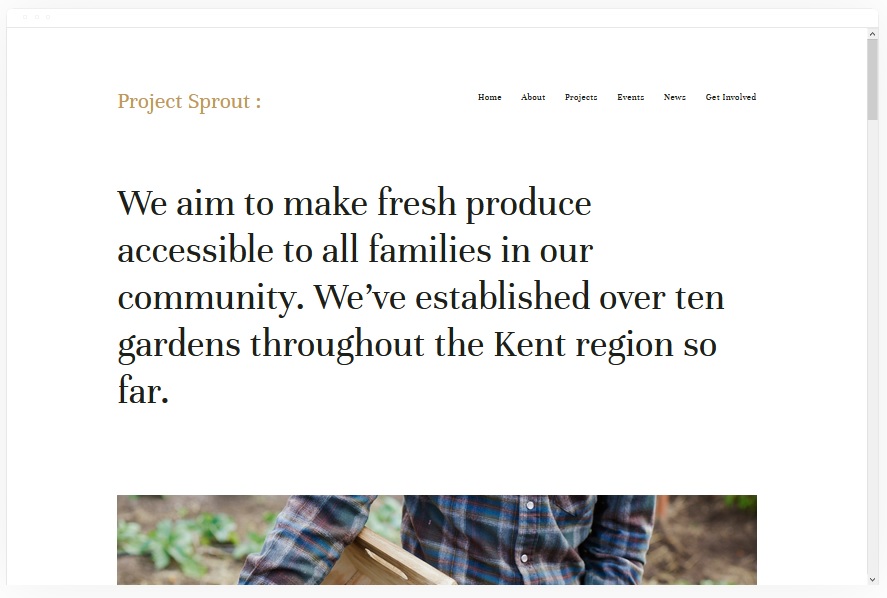
Kent
Best Underrated All-Rounder ✓ Pros
- Clean, attractive design with fast loading speeds - a combination that many paid templates struggle to achieve.
- Portfolio pages support images, videos, audio, and text, giving you flexibility no matter what type of work you showcase.
- Multiple inner page types including cover pages, blog, event, and album layouts for diverse content needs.
- Full eCommerce support covers everything from traditional product sales to merch, dropshipping, and affiliate marketing.
- Often overlooked by users, meaning your site won't look like every other Squarespace website out there.
✗ Cons
- Lower brand recognition means fewer tutorials and third-party guides compared to more popular templates.
- The understated design may not wow visitors who expect bold, attention-grabbing layouts.
- Requires intentional content to fill the multiple inner page types - empty pages hurt your credibility.
Kent is the template that people overlook when browsing for Squarespace templates for sale - and that's exactly why it's worth your attention. While everyone gravitates toward the same popular options, Kent quietly delivers fast load times, a clean design, and support for every content format you'd need. It handles eCommerce, portfolios, blogs, and events without breaking a sweat. If you want a site that stands apart from the crowd, Kent is the sleeper pick.
Customization Tip Take advantage of Kent's multiple inner page types by creating a cover page as your landing page, a portfolio for your work samples, a blog for content marketing, and an event page if you run webinars or workshops. This multi-page setup gives you the functionality of an expensive custom site using a single free template.
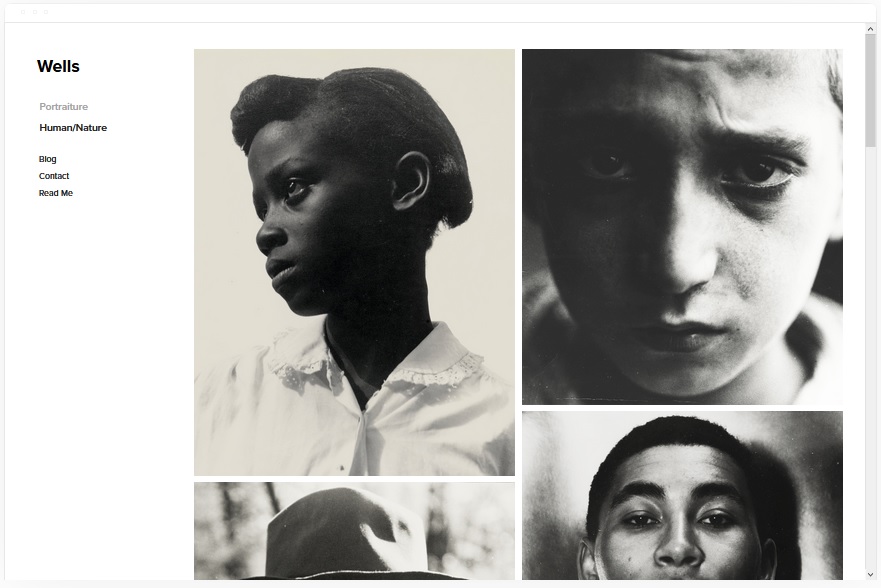
Wells
Best for Creatives and Visual Brands ✓ Pros
- Top-tier design for image and video-focused brands - your visual content takes center stage from the first scroll.
- Portfolio section is purpose-built for creatives who need to display work samples that win clients.
- Full eCommerce support for physical products, digital downloads, merch, affiliate marketing, and dropshipping.
- Video embedding is effortless - just paste a URL and Wells handles the formatting and responsiveness.
- Social media connection features help drive traffic between your website and your creative channels.
✗ Cons
- The visual-first approach means text-heavy sites look out of place - you need strong imagery to match the template.
- Not ideal for businesses that lead with written content, pricing tables, or detailed service descriptions.
- Multiple revenue channel options can be overwhelming if you're just starting out with a simple portfolio.
Wells is built for the creator who wants their website to feel like a gallery, not a brochure. Photographers, artists, podcasters, and YouTubers will find a template that puts their work front and center while still offering serious eCommerce features behind the scenes. The portfolio section alone rivals what you'd get from paid Squarespace themes for sale on third-party marketplaces - except Wells is included free with your plan.
Customization Tip Set up Wells' portfolio as a curated gallery of your five best projects, each with a dedicated page containing a project description, images or embedded video, and a CTA to hire you or buy a related product. Connect your social media accounts so new portfolio posts automatically feed to your creative channels.
Sofia Pazari
Best for Beginners ✓ Pros
- Specifically designed for people new to website building - the simple layout is easy to customize without any technical skills.
- Strong SEO fundamentals and fast page speeds built into the design, so you rank well from day one.
- Clean white design with two large side-by-side images at the top creates an immediate visual anchor with clickable links.
- Simple top-right menu keeps navigation intuitive for both you and your visitors.
- Works beautifully for service providers, freelancers, and nonprofits who need a professional online presence fast.
✗ Cons
- The simplicity that makes it beginner-friendly also means fewer advanced layout options for experienced designers.
- Side-by-side image layout at the top requires two strong hero images - one weak photo throws off the whole balance.
- May feel too basic if your business outgrows its simple structure and needs more complex page layouts.
Sofia Pazari is the answer for anyone who has been searching to buy Squarespace templates because they assumed the free options wouldn't be good enough for a beginner. This template proves otherwise. The design is clean, the customization is straightforward, and the SEO and speed performance are solid out of the box. If you're a freelancer or nonprofit getting your first website online, Sofia Pazari removes every excuse to delay launching.
Customization Tip Replace the two default hero images with photos that represent your two core services or offerings, and make each one clickable to the relevant service page. Keep the menu to four items or fewer - Home, About, Services, Contact - so first-time visitors never feel lost. This minimalist setup loads fast and converts well on mobile.
Wycoff
Best One-Page Template ✓ Pros
- One-page design is extremely easy to set up and maintain - no juggling multiple pages or complex navigation.
- CTA buttons appear in numerous locations throughout the page, giving visitors multiple chances to take action.
- Fully responsive design looks great on both mobile and desktop without any extra configuration.
- Minimal layout with image sections for showcasing projects, properties, or completed work.
- Perfect for businesses that need a professional web presence without the overhead of a multi-page site.
✗ Cons
- The one-page structure limits how much content you can display without the page becoming overly long.
- Not suitable for businesses that need separate sections for blogs, portfolios, and eCommerce.
- SEO is harder with a single page since you can only target a limited number of keywords effectively.
Wycoff proves that you don't need to hunt for third-party Squarespace templates to find a clean one-page design. The layout is focused and intentional - every section exists to move visitors toward a single goal, whether that's booking a consultation, requesting a quote, or donating to your cause. For real estate agents, contractors, and nonprofits who want a site that's live in an afternoon and requires minimal upkeep, Wycoff delivers.
Customization Tip Structure Wycoff's single page in this order: hero image with your main headline, a brief "About" section, an image gallery of your work or properties, a testimonials block, and a final CTA section with contact form. Place CTA buttons after every second section so visitors never have to scroll back up to take action.
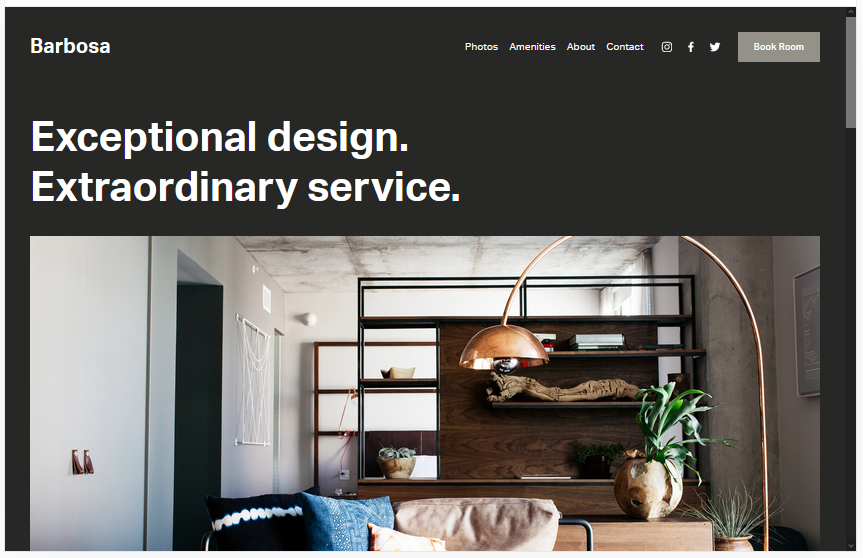
Barbosa
Best for Multi-Niche Businesses ✓ Pros
- Adapts to a wide range of niches including eCommerce, construction, professional services, and hospitality.
- Multiple inner page types - contact, booking, about, and amenities - cover most business needs out of the box.
- Flexible image spaces in both large and small formats let you build a portfolio without a dedicated portfolio template.
- Contact information can be embedded directly within portfolio and project pages for immediate lead capture.
- Gray default background creates a professional, understated look that's fully customizable to match any brand.
✗ Cons
- The gray default background may feel muted - you'll likely want to customize colors to energize the design.
- With so many inner page types available, it takes longer to populate the full site with content.
- The jack-of-all-trades approach means no single feature is as refined as purpose-built templates.
Barbosa is the template for business owners who need their site to handle multiple jobs. You get booking pages for scheduling, contact forms for inquiries, portfolio layouts for showcasing projects, and eCommerce features for selling - all in one template. If you've been looking at Squarespace website templates for sale because you thought you'd need a premium theme to get this kind of flexibility, Barbosa will change your mind.
Customization Tip Swap Barbosa's default gray background for a white or brand-colored palette to immediately make the design feel custom. Set up the booking page for sales calls or consultations, add your best project photos to the large image spaces, and embed your phone number and email directly on portfolio pages so prospects can contact you without navigating away.
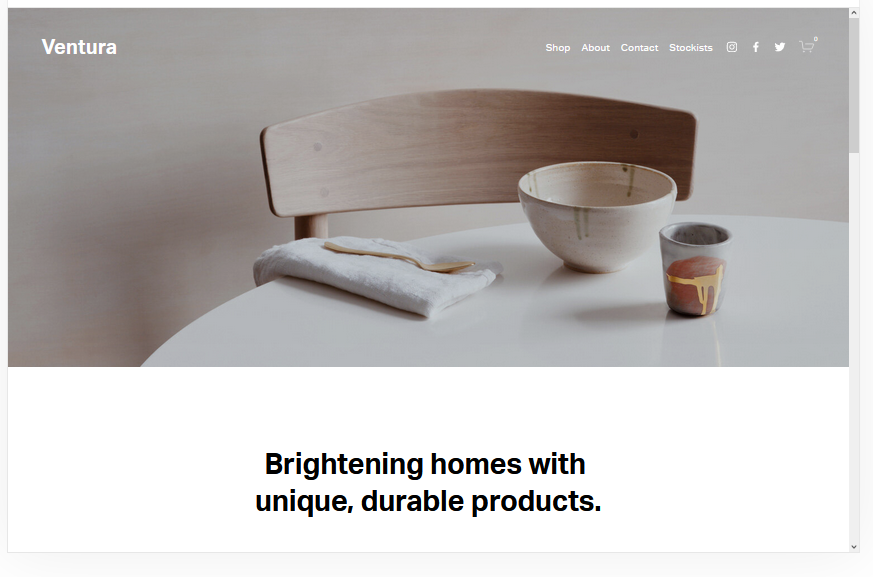
Ventura
Best for Low-Maintenance Sites ✓ Pros
- Quick to customize - you can have a professional-looking site live in under an hour with minimal effort.
- Minimalist design loads fast and ranks well, giving you an SEO advantage without any optimization work.
- Built-in pages for contact, about, and shop cover the essentials for most small businesses.
- Mailing list integration lets you start building an email list from day one.
- Full eCommerce features are available when you're ready to sell, without needing to switch templates.
✗ Cons
- The stripped-back design can feel too simple for businesses that want to project scale or sophistication.
- Limited visual impact compared to templates like Mojave or Wells - not a showstopper at first glance.
- Fewer layout options if you decide to expand your site significantly down the road.
Ventura is for the business owner who values their time over flashy design. Setup is fast, maintenance is minimal, and the template does its job - present your business, collect emails, and sell products - without demanding constant attention. If you've been putting off building a website because it seemed like too much work, Ventura removes that barrier. You don't need to buy Squarespace templates or hire a designer. Just pick Ventura and launch.
Customization Tip Enable the mailing list signup form on your homepage from the start - even before you have a product to sell. Use Ventura's shop page as a "coming soon" section with email capture so you're building an audience while you prepare your inventory. The minimal design means every element you add gets noticed.
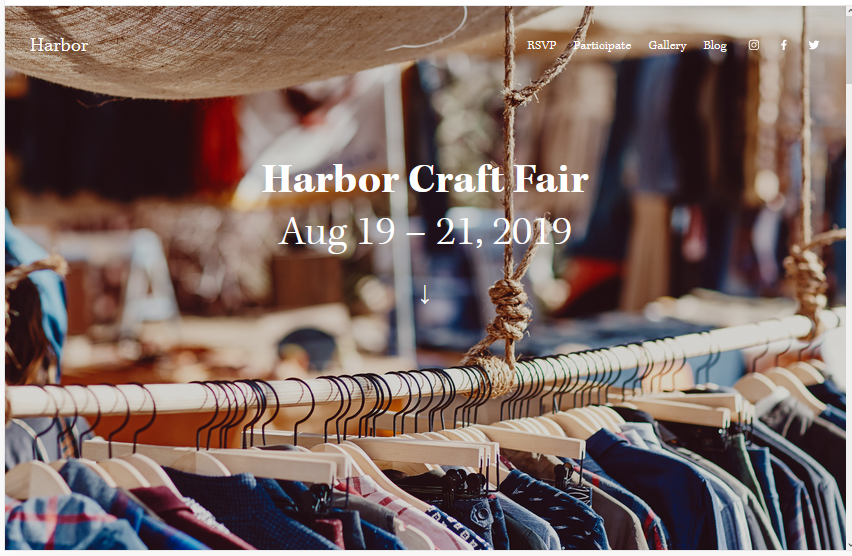
Harbor
Best for Professional Services ✓ Pros
- Background image with simple top-right menu creates an immediate professional impression that builds trust.
- Portfolio page for showcasing past projects helps service businesses prove their expertise visually.
- CTA placement is optimized for booking sales calls and consultations - the primary goal for most service providers.
- Fast-loading design ensures visitors don't bounce before they see what you offer.
- Fully responsive across all devices including mobile, where most local service searches happen.
✗ Cons
- The background-image-forward design requires a strong hero photo - a weak image undermines the entire first impression.
- Simple menu structure limits navigation options for sites with many pages or categories.
- Less suited for content-heavy businesses like blogs or media sites that need complex navigation.
Harbor is the Squarespace template that service professionals should try first. The design puts a bold background image front and center, pairs it with a clean menu, and then funnels visitors into a portfolio and booking flow. Caterers, consultants, event planners, and professional service providers all benefit from a layout that says "we do great work - here's the proof - now let's talk." Harbor delivers that sequence perfectly.
Customization Tip Choose a high-quality background image that shows your team at work or a completed project - not a generic stock photo. Set up the portfolio page with three to five of your best projects, each including a brief description and client outcome. Place a "Book a Call" CTA button directly below your portfolio section so the transition from "impressed" to "interested" is seamless.
Native
Best for SEO and Organic Growth ✓ Pros
- Built with SEO as a priority - clean code, fast loading, and structured layouts that search engines reward.
- Blog feature is front and center, making it the strongest content marketing template on this list.
- Social media integration drives traffic between your website and your social channels organically.
- Mobile-ready design ensures you capture traffic from Google's mobile-first index without extra work.
- Portfolio and eCommerce features are available alongside the blog, so you can monetize organic traffic directly.
✗ Cons
- The SEO-focused design prioritizes function over flash - it won't wow visitors with visual effects or animations.
- Blog-forward layout may feel off-brand for businesses that don't plan to publish content regularly.
- Portfolio section is secondary to the blog, so creative professionals may prefer Wells or Kent instead.
Native is the template for anyone who wants their Squarespace site to rank on Google. While other templates focus on visual impact, Native is engineered for search performance - fast load times, clean structure, and a blog feature that makes content marketing straightforward. If your growth strategy depends on organic traffic rather than paid ads, Native gives you the foundation to build on. No need to search for third-party Squarespace templates with better SEO - this one handles it natively.
Customization Tip Launch with five cornerstone blog posts targeting your main keywords, and publish at least two new posts per month. Use Native's social media integration to auto-share every new post to your channels. Add your portfolio as a secondary page and include an eCommerce section so visitors who find you through search can hire you or buy from you immediately.
How to Choose the Right Squarespace Template
Choosing the Right Template for Your Niche
The best Squarespace template for your site depends entirely on what your business does and how you want visitors to interact with your content. Service providers should prioritize templates with strong CTA placement and portfolio sections - Bedford, Harbor, and Barbosa excel here. Creatives and visual brands should look at Wells and Mojave, where imagery takes center stage. And if organic traffic is your growth engine, Native gives you the SEO foundation to build on. Don't get distracted by how a template looks in its demo. Focus on the structure: does it support the page types you need? Does it put your most important content where visitors will actually see it? Does it make the action you want visitors to take - buying, booking, subscribing - easy and obvious?Maximizing Your Template's Potential
Every Squarespace template is a starting point, not a finished product. The templates that look most impressive are the ones where the owner invested time in customization - strong images, clear copy, and intentional page structure. Swap demo content for your real photos, rewrite placeholder text to speak directly to your audience, and remove any sections that don't serve a clear purpose. Test your site on mobile before you publish. Over half of web traffic comes from phones, and a template that looks great on desktop but breaks on mobile will cost you visitors and sales. All 10 templates on this list are responsive, but your custom content needs to work at every screen size too.SEO Optimization and Search Performance
All Squarespace templates come with solid SEO fundamentals - clean code, fast hosting, and mobile responsiveness. But the template you choose does affect how easy it is to optimize further. Templates with built-in blog features like Native and Kent give you a natural place to publish keyword-targeted content. Templates with fast load times and minimal design elements - like Ventura and Sofia Pazari - tend to score higher on Core Web Vitals. Fill in every meta title, meta description, and image alt tag. Use your page structure to create a clear hierarchy that search engines can follow. And remember that the best SEO template in the world won't rank if the content on it isn't worth reading. For more on getting the visual and structural elements right, check our guide on Squarespace templates design and layout.eCommerce Integration and Selling Online
If you plan to sell products or services through your site, make sure your template handles eCommerce gracefully. Bedford, Kent, Barbosa, and Ventura all include strong eCommerce features - product pages, shopping carts, and checkout flows. Wells adds support for digital products, merch, and even dropshipping or affiliate marketing. The key is matching your selling style to your template's strengths. If you sell a few high-value services, you need booking and inquiry features more than a full shop. If you sell dozens of products, you need grid layouts, filters, and a smooth checkout experience. Choose the template that makes your specific sales process feel natural to visitors.Frequently Asked Questions
Are Squarespace templates for sale?
Not from Squarespace directly. Every template in the Squarespace library is included free with your hosting plan - there are no premium tiers or paid upgrades for built-in designs. You get access to the full collection the moment you subscribe. Third-party Squarespace templates do exist on external marketplaces, but the built-in options are professionally designed and regularly updated.
Can you buy Squarespace templates from third parties?
Yes, some independent designers sell Squarespace templates and custom designs on marketplaces outside of Squarespace. However, these third-party Squarespace templates may not receive the same updates and support as the official built-in templates. For most users, the free templates included with your plan offer more than enough quality and flexibility.
Are all Squarespace templates free?
Yes. Every template in the official Squarespace template library is included at no extra cost with any Squarespace plan. There is no separate template store or premium template pricing. Your subscription covers hosting, the template, and all design tools.
What is the difference between Squarespace templates and themes?
Squarespace uses the term "templates" rather than "themes," but they refer to the same thing - pre-designed website layouts you customize with your own content. If you've been searching for Squarespace themes for sale, you're looking for templates, and they're all free with your plan.
How many templates does Squarespace offer?
Squarespace offers over 100 professionally designed templates across categories like business, portfolio, online store, blog, and more. The full library is available to every subscriber, and new templates are added regularly.
Can I switch my Squarespace template after building my site?
Yes. Squarespace allows you to preview and switch templates without losing your content. Your pages, blog posts, and products carry over to the new design. However, some layout-specific customizations may need adjusting after a switch, so it's worth previewing thoroughly before committing.
Do I need to pay extra for eCommerce features in Squarespace templates?
The templates themselves are free, but eCommerce functionality depends on your Squarespace plan. The Business plan includes basic eCommerce, while the Commerce Basic and Commerce Advanced plans unlock features like abandoned cart recovery, subscriptions, and advanced shipping options. The template you choose doesn't affect pricing - only your plan does.
Are third-party Squarespace templates better than the built-in ones?
Not necessarily. Third-party Squarespace templates may offer unique designs or niche-specific layouts, but Squarespace's built-in templates are optimized for performance, mobile responsiveness, and platform compatibility. Built-in templates also receive automatic updates when Squarespace rolls out new features, which third-party templates may not.
How We Evaluate Templates
We evaluated every current Squarespace template specifically for users searching for Squarespace templates for sale - people looking for premium-quality designs to build their websites on. Each template was assessed on design quality, loading speed, mobile responsiveness, eCommerce capabilities, portfolio features, CTA placement, and customization flexibility. We tested every template across multiple niches to determine which ones deliver the kind of polish and functionality that rivals paid themes on other platforms. Ratings reflect each template's overall value for the broadest range of users, with higher scores going to templates that combine versatility, performance, and professional design out of the box.
Conclusion
The best Squarespace templates for sale searches lead to one clear answer: you don't need to buy them. Every template on this list is included free with your Squarespace plan, and they deliver the kind of design quality and functionality that premium theme shops charge hundreds of dollars for. Bedford stands out as the most versatile overall pick, Mojave wins on visual impact, and Native is the go-to for anyone focused on SEO and organic growth. Pick the template that matches your business needs, invest your time in customization rather than your money in third-party themes, and get your site live.Keep Reading
* Read the rest of the post and open up an offer