

10 Best Squarespace Templates for Creative Agencies
A great Squarespace creative agency template needs to do three things well: display your portfolio in a way that impresses prospective clients, load fast enough to keep impatient visitors from bouncing, and make it easy for leads to book a call or request a proposal. Eye-catching visuals and a sleek portfolio showcase are non-negotiable for any agency site. The templates below were selected because they handle all of this straight out of the box. Whether your agency focuses on brand identity, digital marketing, advertising campaigns, or full-service design, there is a layout here that fits your work and your workflow.
Editor's Picks
| # | Name | Best For | Price | Rating | Image | |
|---|---|---|---|---|---|---|
| 1 | Agencies that want a bold, unconventional first impression | Free | 4.3/5 |
|
More Info | |
| 2 | Agencies that sell services online and need strong conversion features | Free | 4.4/5 |
|
More Info | |
| 3 | Agencies that blog regularly and want smooth, scroll-friendly layouts | Free | 4.2/5 |
|
More Info | |
| 4 | Agencies that want fast load times and strong lead generation features | Free | 4.5/5 |
.webp)
|
More Info | |
| 5 | Design agencies and studios that combine portfolio work with regular blogging | Free | 4.3/5 |
|
More Info | |
| 6 | B2B agencies focused on professional presentation and lead generation | Free | 4.4/5 |
|
More Info | |
| 7 | Agencies that showcase work through video content and high-resolution imagery | Free | 4.2/5 |
|
More Info | |
| 8 | Agencies that prefer a clean, grid-based design with fast performance | Free | 4.3/5 |
.webp)
|
More Info | |
| 9 | Agencies with strong social media presence that want blog-style portfolio display | Free | 4.1/5 |
|
More Info | |
| 10 | Agencies that want a professional site up and running fast with minimal setup | Free | 4.1/5 |
.webp)
|
More Info |
Carson
Best for Interactive Portfolio Showcases
✓ Pros
- Interactive homepage where background images change as visitors hover over links creates an instant attention-grabber for agency portfolios.
- Static homepage layout reduces bounce rate by encouraging visitors to explore rather than scroll past.
- Hidden navigation menu keeps the design clean while still linking to services, portfolio, and contact pages.
- Highly adaptable to different creative niches including branding, marketing, and advertising agencies.
- Unique design sets your creative agency apart from competitors using standard grid-based templates.
✗ Cons
- The unconventional layout is polarizing; some visitors may find the hover navigation unintuitive on first visit.
- Not ideal for agencies that need to display large amounts of text content or detailed service descriptions.
- The interactive homepage relies on strong imagery, so weaker visuals will hurt the overall impact.
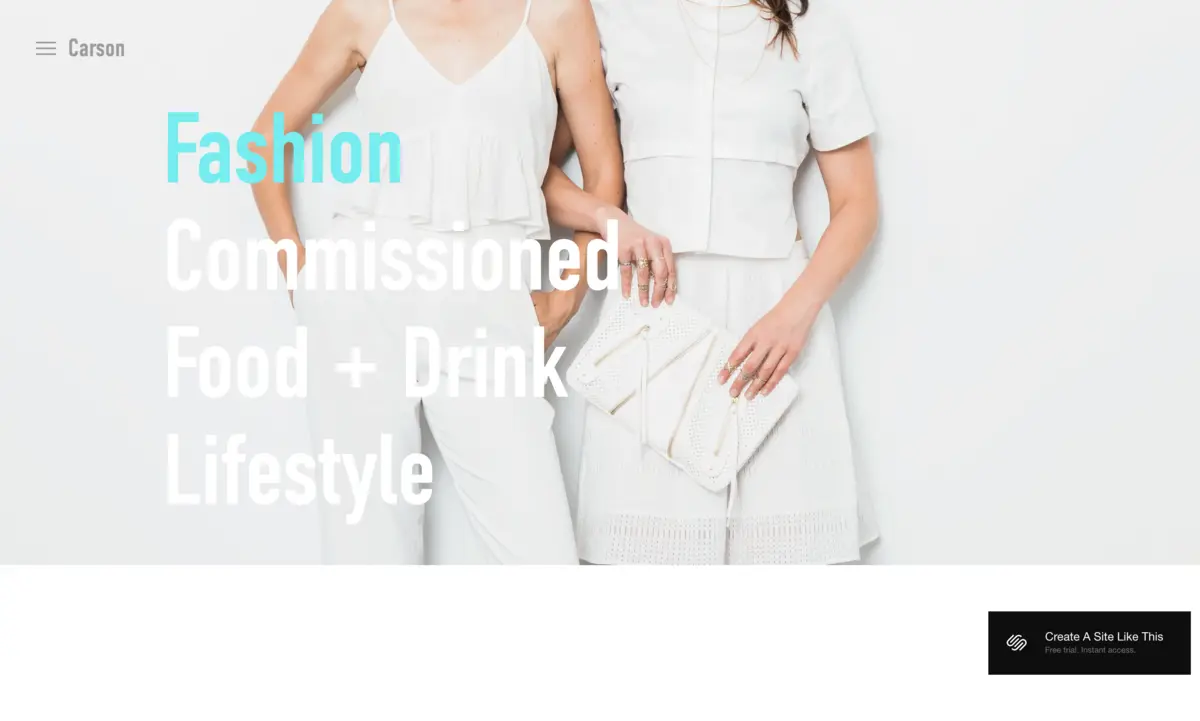
Carson is one of the more unusual Squarespace templates available, and that is exactly why it works for creative agencies. The homepage skips the traditional scrolling layout entirely. Instead, when a user hovers over a navigation link, the background image changes to match, giving you a dynamic way to preview your agency's past projects before visitors even click through. This interactive approach keeps people engaged and can meaningfully reduce your bounce rate.
The hidden menu links to pages across your site including services, contact, and portfolio sections. For a branding or marketing agency that wants to make a memorable first impression, Carson delivers something most Squarespace agency templates cannot: genuine surprise.
Assign your strongest project images as the hover backgrounds for each navigation link. Use high-contrast typography for the menu items so they remain readable against changing backgrounds. Keep your navigation labels short and direct (Work, Services, Contact) to match the template's minimalist design philosophy.
Bedford
Best for Service-Based Creative Agencies
✓ Pros
- Built-in payment processing lets your creative agency sell services, consultations, and packages directly from the site.
- Sidebar navigation system keeps your agency's service pages, portfolio, and contact info accessible at all times.
- Banner sections with call-to-action buttons help drive leads toward booking calls or requesting proposals.
- Supports both images and embedded videos on every page, ideal for showcasing campaign reels and project walkthroughs.
- Scrolling homepage layout lets you tell your agency's story in a structured, top-to-bottom flow.
✗ Cons
- The sidebar navigation takes up screen real estate that some agencies might prefer to use for imagery.
- The template's layout is content-heavy, which requires strong copywriting to avoid looking cluttered.
- Less visually dramatic than templates like Carson or Wells for agencies that lead with bold creative work.
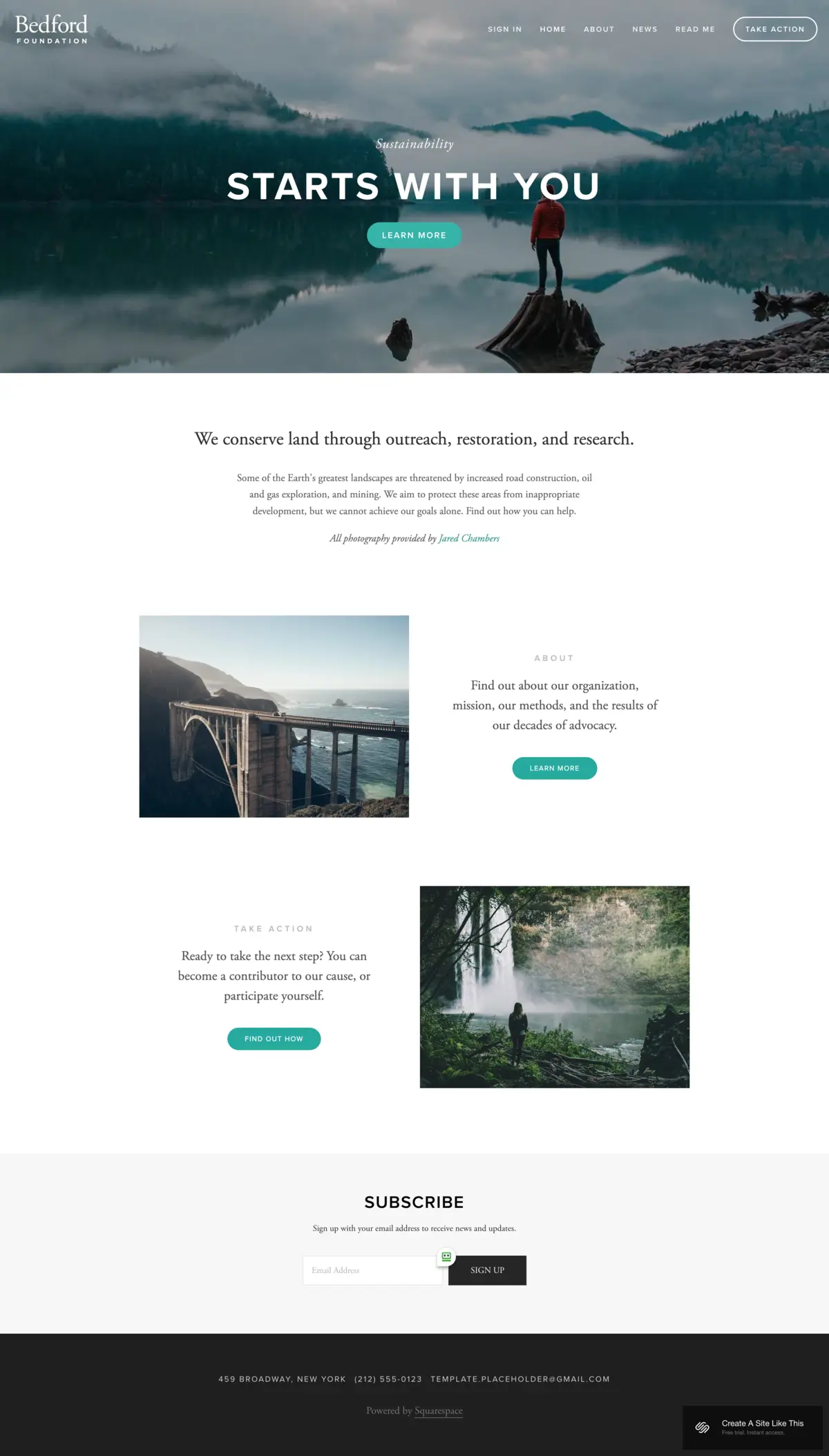
Bedford is a top option when you want to promote your creative agency on Squarespace. You can add detailed information about your agency's services, team, and process with this template, and the sidebar navigation keeps everything easy to find. The scrolling homepage lets you structure your pitch from value proposition down to client testimonials and a final call to action.
Where Bedford really stands out is service selling. You can accept payments directly through the site, which means clients can purchase retainer packages or one-off projects without you sending a single invoice. Every page supports images and video, so you can embed campaign highlight reels alongside written case studies. The banner sections with built-in CTAs make it straightforward to funnel visitors toward your contact page or booking system.
Use Bedford's sidebar to create a persistent navigation structure that mirrors your agency's service categories. Set up banner sections on the homepage with a strong headline, a supporting image from your best project, and a clear CTA like "See Our Work" or "Book a Strategy Call." Add video walkthroughs of past campaigns to your portfolio pages to boost engagement and time on site.
Rally
Best for Content-Driven Creative Agencies
✓ Pros
- Smooth scrolling animation creates a polished browsing experience that reflects well on your agency's attention to detail.
- Streamlined layout with a clean top-right menu keeps navigation simple and professional.
- Built-in social media link buttons let you connect your agency's website audience to LinkedIn, Instagram, and other platforms.
- Strong blog section perfect for publishing case studies, industry insights, and thought leadership content.
- Fast load times improve both search engine rankings and visitor experience on mobile devices.
✗ Cons
- The streamlined design offers fewer visual customization options compared to more dramatic portfolio templates.
- Not as image-forward as templates like Carson or Wells for agencies that rely on large visual displays.
- The scroll-heavy layout may not suit agencies that prefer visitors to click through distinct pages.
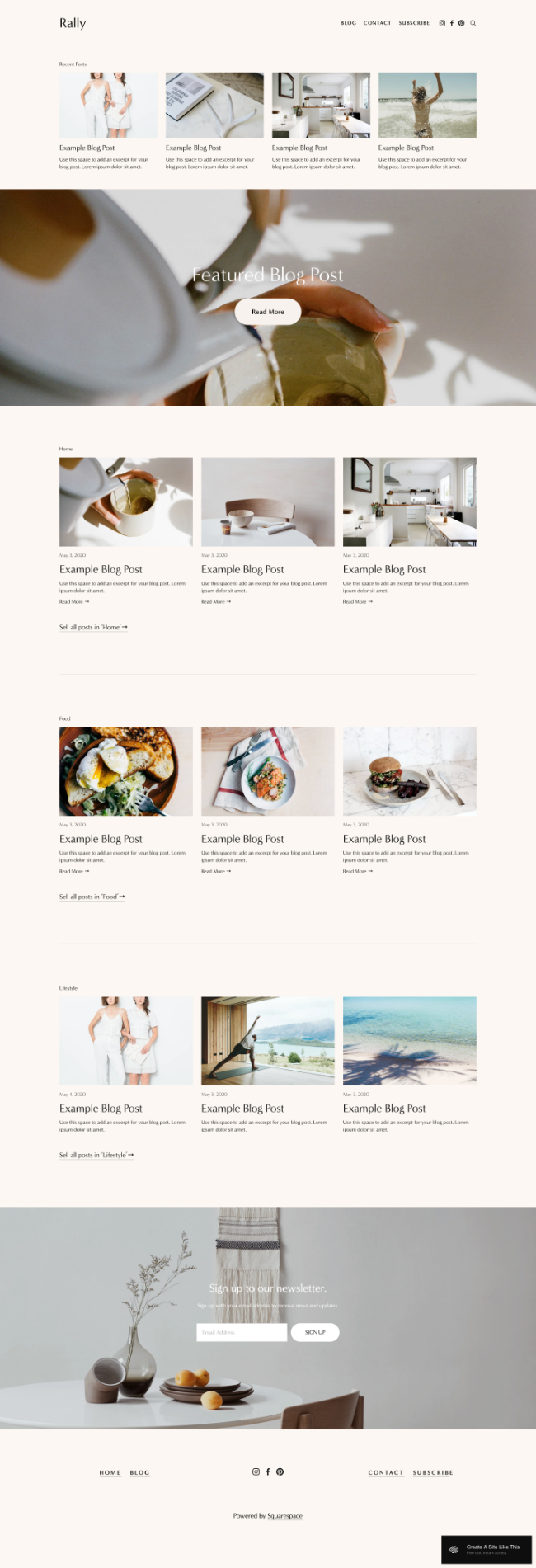
Rally is one of the top streamlined Squarespace templates for creative agencies that invest in content marketing. The design pairs text and images together in an aesthetically pleasing way, with a simplified menu in the top-right corner and social media links right beside it. For agencies that publish regular blog content (case studies, industry commentary, behind-the-scenes project breakdowns), Rally makes that content look sharp and easy to browse.
The smooth scrolling is a standout feature. It gives your agency site a polished, app-like feel that keeps visitors moving through your content. Rally is also fully optimized for mobile devices, which matters when prospective clients are researching agencies on their phones between meetings.
Use Rally's blog section as a case study hub for your creative agency. Publish a post for each major project with before-and-after visuals, the brief, and the results. Link your social media profiles using the built-in buttons so visitors can see your agency's day-to-day work on Instagram and LinkedIn alongside the polished portfolio pieces.
Almar
Best for Clean, Conversion-Focused Agency Sites
✓ Pros
- Clean, professional design builds immediate trust with prospective creative agency clients.
- Call-to-action buttons throughout the template make it easy to drive visitors toward consultations and proposals.
- Fast-loading pages improve SEO rankings and reduce bounce rates for your agency site.
- Built-in appointment booking lets prospective clients schedule consultations directly from your website.
- eCommerce-ready within minutes if your agency sells digital products, templates, or packaged services.
✗ Cons
- The minimalist design may feel too understated for agencies that want a visually bold first impression.
- Fewer built-in animation or interactive features compared to templates like Carson.
- Requires strong portfolio imagery to avoid looking generic with such a clean layout.
Almar is one of the cleanest Squarespace templates you will find, and it is a strong match for creative agencies that prioritize conversions over visual flash. The ready-made design lets you build a professional agency site quickly without any trouble. Whether you sell branding packages, marketing retainers, or one-off design projects, this template can be set up to accept payments within minutes.
The call-to-action placement throughout the template is what sets Almar apart. You can link to service pages, portfolio sections, and consultation booking from multiple touchpoints across your site. The appointment booking feature is especially valuable for agencies: prospective clients can commit to a discovery call or strategy session without any back-and-forth emails. Almar also loads fast, which helps your agency rank higher on Google and keeps visitors engaged.
Place your strongest client testimonial above the fold alongside a CTA that links to your booking page. Use Almar's clean sections to create a services breakdown with one block per service offering, a short description, and a "Learn More" button. Keep the color palette tight to match your agency's brand guidelines and let your portfolio images provide the visual punch.
Skye
Best for Visual Portfolio and Blogging
✓ Pros
- Grid-based layout is purpose-built for showcasing creative agency portfolios with multiple project categories.
- Fullscreen image display gives every project the visual weight it deserves and creates a magazine-quality feel.
- Strong blog section lets your agency publish case studies, process posts, and industry insights alongside portfolio work.
- Highly mobile responsive; your creative agency site looks sharp on phones and tablets where many clients browse.
- Scheduling integration lets prospects book consultations directly, cutting down on email back-and-forth.
✗ Cons
- The grid layout depends on consistently strong photography; weaker project images will stand out.
- The slide-out menu may feel hidden to visitors expecting traditional top-bar navigation.
- Image-heavy pages can slow load times if images are not properly compressed before uploading.
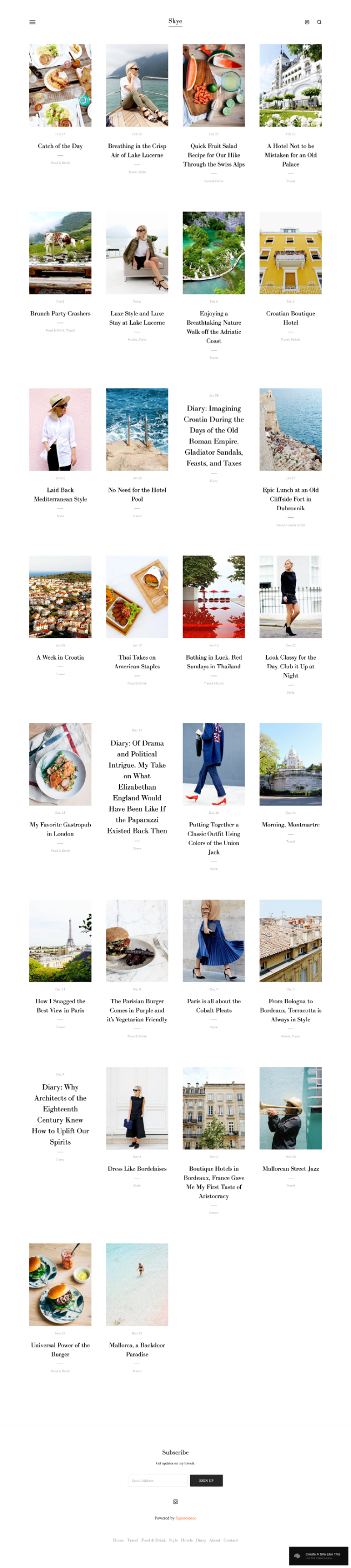
Skye is often cited as one of the top Squarespace templates across many niches, and there is a good reason it appears on this list. The block-based layout makes it easy to customize, so your creative agency can spend more time servicing clients than managing its website. The grid design is ideal for agencies that want to display work across multiple categories: branding projects in one section, marketing campaigns in another.
Blogging is another area where Skye delivers. Publishing regular content helps a creative agency build authority and generate leads. Research shows that brands publishing more than 15 blog posts per month can generate significantly more leads. Skye also includes one of Squarespace's best scheduling features, letting prospective clients book consultations, discovery calls, or project kickoff meetings right from your site. The template is fast and mobile-friendly, which helps with Google rankings.
Organize your Skye grid into portfolio categories that match your agency's service lines: one section for brand identity projects, one for digital campaigns, one for print work. Use the blog section to publish monthly case studies with results data. Enable the scheduling feature and link it from your homepage CTA so prospects can book a call without leaving your site.
Hayden
Best for B2B Creative Agencies
✓ Pros
- Professional design built specifically for B2B environments, ideal for agencies that work with corporate clients.
- Sticky navigation menu follows visitors as they scroll, keeping your services and contact page one click away.
- Dedicated portfolio section for showcasing past work, case studies, and client results.
- Built-in scheduling system lets prospects book sales calls and strategy sessions directly from the site.
- Blog section helps your agency build search engine authority and generate inbound leads over time.
✗ Cons
- The professional aesthetic may feel too corporate for agencies targeting indie brands or startups.
- Requires quality case study content to make the portfolio section feel substantial rather than sparse.
- The sticky menu takes up vertical space that some agencies might prefer for larger hero images.
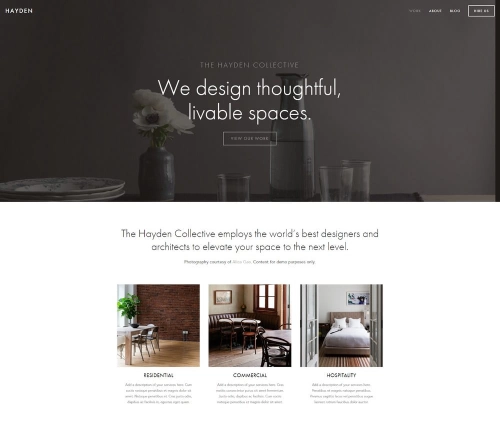
Hayden was specifically designed for brands that want a professional presence in B2B environments, which makes it a natural fit for creative agencies. The template comes with features that help you market your services, showcase past projects, and convert visitors into leads. There is a dedicated area for displaying completed work: case studies, campaign results, before-and-after visuals, and client testimonials, all designed to convince prospects you can deliver on your promises.
The sticky navigation menu is a standout feature. Located in the top-right corner, it follows visitors as they scroll down the page, keeping your services and contact page always accessible. This improves the user experience and means a prospect who is ready to reach out never has to scroll back up. Hayden also includes scheduling integration, so potential clients can book demonstrations or sales calls directly through your site. Social media integration options help grow your agency's following alongside your website traffic.
Set up Hayden's portfolio section with your three to five strongest case studies, each with clear before-and-after results. Use the sticky menu to include a prominent "Book a Call" link that goes directly to your scheduling page. Add social proof (client logos, testimonial quotes, or results metrics) in a banner section above the fold to build immediate credibility with B2B visitors.
Wells
Best for Video-First Creative Agencies
✓ Pros
- Video-first design lets you embed campaign reels, client testimonials, and project walkthroughs directly on your homepage.
- High-resolution image support turns your portfolio into a visual showcase that impresses prospective clients.
- Built-in eCommerce features allow your agency to sell digital products, templates, or packaged services.
- Clean layout keeps the focus on your creative work rather than competing design elements.
- Strong conversion potential with well-placed sections for client logos, testimonials, and service breakdowns.
✗ Cons
- Video-heavy pages can slow load times if not optimized, which may hurt mobile performance.
- Less suited to agencies that rely primarily on written case studies rather than visual content.
- The eCommerce features may add complexity for agencies that only sell services through proposals.
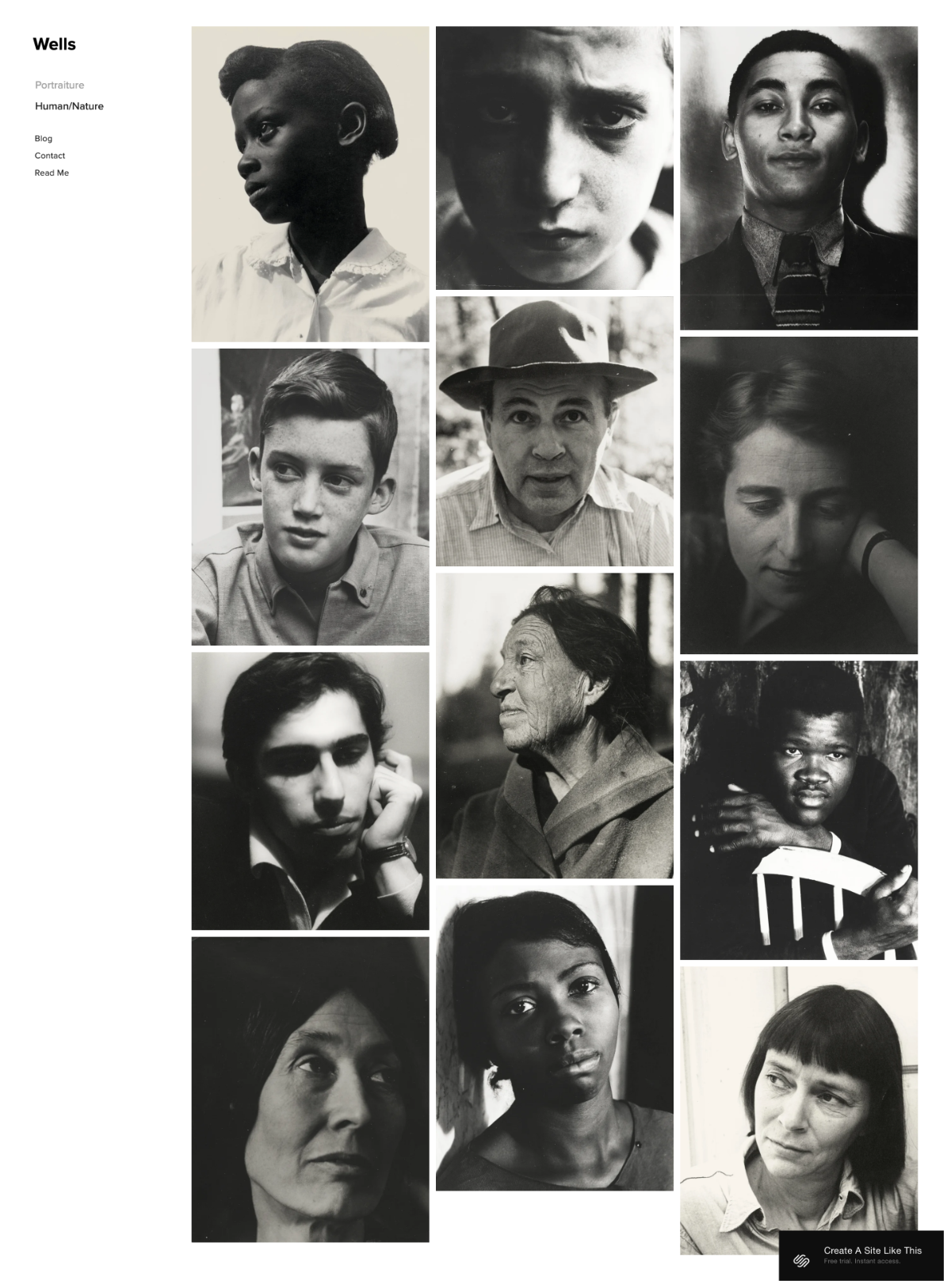
Wells is one of the best Squarespace templates for creative agencies that lead with video content. You can add high-resolution images that showcase your past projects and link them to detailed case study pages. The template also supports eCommerce, so your agency can sell digital products like brand guideline templates, social media kits, or design resources alongside your core services.
Where Wells really shines is video integration. You can embed a video using just a YouTube or Vimeo URL, and the template handles the rest. For agencies that produce campaign videos, brand films, or client testimonials, this makes your homepage a living showreel. The visual-first layout ensures your best work is front and center, which is exactly what prospective clients want to see when evaluating a creative agency.
Lead your Wells homepage with a 60-second agency showreel that highlights your best three to five projects. Below the video, add a grid of project thumbnails that link to individual case study pages. Use the eCommerce section to offer downloadable brand audit templates or social media toolkits as lead magnets that capture email addresses while generating passive revenue.
Avenue
Best Minimalist Agency Template
✓ Pros
- Minimalist grid layout lets your creative work speak for itself without distracting design elements.
- Fast-loading pages improve Google rankings and keep impatient visitors from bouncing.
- Easy to customize colors and fonts to match your agency's brand guidelines precisely.
- Portfolio pages with individual project sections make it simple to showcase work across multiple categories.
- Low maintenance design means your agency spends less time managing the website and more time on client work.
✗ Cons
- The minimalist approach may feel too plain for agencies that want a bold, attention-grabbing design.
- Limited built-in features for appointment booking or eCommerce compared to templates like Almar or Bedford.
- The grid layout needs consistently strong portfolio images to avoid looking sparse.
Avenue is one of the top minimalist Squarespace templates for creative agencies that want their work to do the talking. The clean grid layout puts your portfolio front and center without visual noise competing for attention. You can showcase past projects on dedicated pages and within a portfolio section, and customize the color scheme to match your agency's branding.
The real advantage of Avenue is performance. The minimalist design means fast load times, which translates to better rankings on Google and a smoother experience for visitors. For a creative agency that values clean aesthetics and does not want to spend hours tweaking a complex website, Avenue delivers a professional result with minimal upkeep. You can expect more organic traffic over time, which brings in more leads without increasing your ad spend.
Use Avenue's grid to create a homepage portfolio that shows one project per block with a strong hero image and a two-line description. Match the template's color palette to your agency's brand colors for a cohesive feel. Add a simple contact form at the bottom of the homepage with a direct headline like "Start a Project" to capture leads without adding visual clutter.
Native
Best for Social-First Creative Agencies
✓ Pros
- Blog-style homepage layout is ideal for agencies that publish frequent updates, project reveals, and industry content.
- Rounded circular thumbnail images on blog posts create a distinctive, modern visual style.
- Strong social media integration helps funnel website visitors to your agency's Instagram, LinkedIn, and other profiles.
- Location tagging on blog entries is useful for agencies that work on-site with clients across different cities.
- Clean, modern homepage design that adapts well to any creative niche from branding to advertising.
✗ Cons
- The blog-style layout may not suit agencies that want a traditional portfolio grid as their homepage.
- Rounded thumbnails work best with certain image compositions; not all project screenshots crop well into circles.
- Less conversion-focused than templates like Almar or Hayden that emphasize CTAs and booking features.
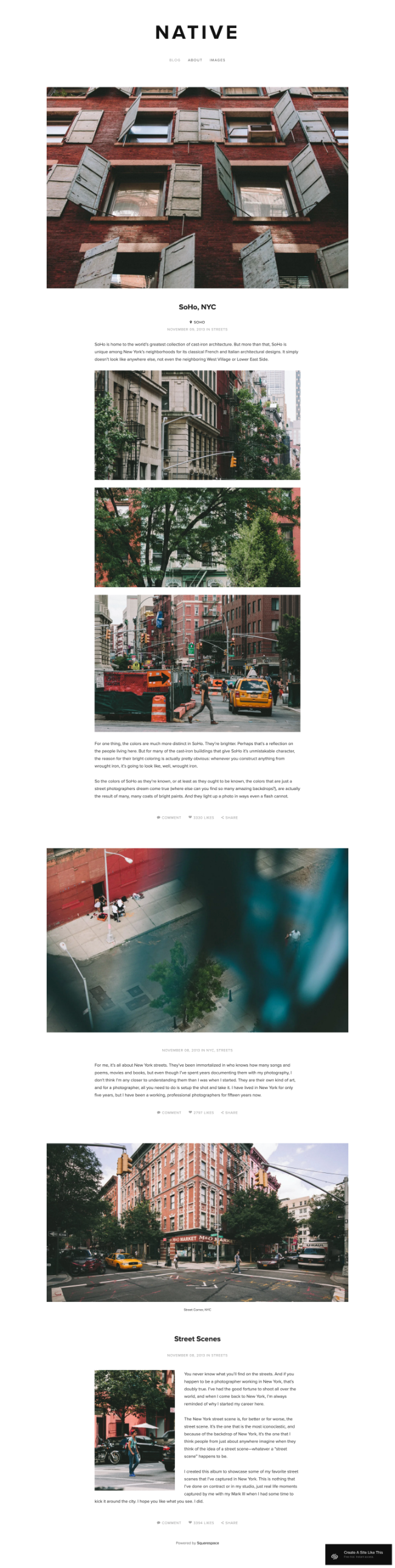
Native is one of the most versatile Squarespace templates, built to share your ideas, past projects, and services with a wide audience. There are features that make this a strong choice for creative agencies, including customizable headers, circular thumbnail images on blog posts, and a clean modern design that works across niches.
The template is particularly good for agencies that maintain an active online presence. The homepage displays your content in a blog-style feed, which is effective for agencies that publish frequently: project reveals, behind-the-scenes looks, client spotlights. Native also includes location tagging for blog entries, which is a useful feature for creative professionals who work with clients across multiple cities and want to signal their geographic reach.
Use Native's blog-style homepage as a project feed: publish a post for each completed project with a strong feature image, a brief client description, and results. Enable location tagging to show the geographic range of your agency's client base. Link your agency's Instagram and LinkedIn prominently using the built-in social integration so visitors can follow your day-to-day creative work.
Harbor
Best for Simple, Quick-Launch Agency Sites
✓ Pros
- Background image homepage creates an immediate visual statement that sets the tone for your agency's brand.
- Simple top-right menu keeps navigation intuitive and uncluttered for a polished professional look.
- Fast-loading design helps your creative agency rank well on Google and other search engines.
- Can be built and launched within minutes, which is ideal for agencies that need a web presence quickly.
- Works smoothly across desktop, tablet, and mobile devices without any additional configuration.
✗ Cons
- The simplicity means fewer built-in features; no appointment booking or eCommerce without additional setup.
- Limited layout options for agencies that want complex multi-section homepages.
- The background image homepage needs a single strong image to work well; a weak photo will undermine the design.
Harbor is a template that works across niches, which makes it a solid option for creative agencies that want to get online quickly. With a bold background image and a simple top-right menu bar, this template can be built and ready to launch within minutes. The simplicity is the selling point: no complicated layout decisions, no endless customization rabbit holes.
The template lets you showcase your past projects and connect with prospective clients easily. Use the front page as a visual statement about why people should work with your agency, then link to a portfolio page and a contact section with a clear call to action. Harbor loads fast and ranks well on Google, and its responsive design means your agency site looks professional on every device.
Choose your single strongest portfolio image as the Harbor background, ideally something that captures your agency's creative style in one frame. Keep the menu limited to four or five items: Work, Services, About, Contact. Add a large CTA button over the background image that says "See Our Work" or "Get in Touch" to give visitors an immediate action to take.
How to Choose the Right Squarespace Template for Your Creative Agency
Match the Template to Your Agency's Primary Content Type
Different creative agencies lead with different content. If your agency produces video campaigns, Wells gives you the strongest video integration. If you publish regular case studies and blog posts, Rally and Skye have the best blogging features. If your work is primarily visual (brand identities, packaging, print campaigns), Carson and Avenue put imagery front and center. Start by identifying what type of content makes up most of your portfolio, then pick the template that handles that content best. A creative agency is a service business at its core, so it is also worth comparing the best Squarespace templates for service businesses.
Prioritize Lead Generation Features
A creative agency website that looks great but does not convert visitors into leads is a missed opportunity. Templates like Almar and Hayden include appointment booking and strong CTA placement out of the box. Bedford lets you accept payments directly. If your agency relies on inbound leads from the website, choose a template with built-in conversion features rather than adding them later with workarounds.
Consider Your Agency's Growth Plans
A new agency with five portfolio pieces has different needs than an established firm with fifty. Templates like Skye and Bedford scale well because their grid and sidebar layouts handle growing content libraries without looking cluttered. Harbor and Avenue are better for smaller portfolios where simplicity is an advantage. Choose a template that fits where your agency is heading, not just where it is now.
Test on Mobile Before Committing
Many prospective clients will first encounter your creative agency site on their phone during a commute, between meetings, or while comparing agencies. Every template on this list is mobile responsive, but some handle small screens better than others. Rally and Skye are particularly strong on mobile with their scrolling and grid designs. Preview your top template choices on a phone screen to make sure the portfolio images, navigation, and CTAs all work smoothly at that size.
Keep Navigation Simple and Direct
Creative agencies often offer multiple services across branding, marketing, advertising, and design. That does not mean your navigation needs a dropdown for every category. The best agency sites keep their menu to five items or fewer. Bedford's sidebar and Hayden's sticky menu handle multi-page navigation well. Carson's hidden menu works if you have a smaller site. Pick a template whose navigation style matches the amount of content your agency needs to organize.
Frequently Asked Questions
What is the best Squarespace template for a creative agency?
Almar is the strongest overall choice for a creative agency on Squarespace. Its clean design, fast load times, built-in appointment booking, and CTA-focused layout give your agency a professional site that converts visitors into leads. For agencies that prioritize visual portfolio display over conversion features, Carson offers a more dramatic and interactive approach.
Which Squarespace agency template is best for showcasing a portfolio?
Carson and Skye are the two best options for portfolio-focused creative agencies. Carson uses interactive hover effects to preview project images from the homepage, which creates a memorable first impression. Skye uses a grid-based layout that organizes projects into browsable categories, making it ideal for agencies with large portfolios spanning multiple service lines.
Can I sell services directly through a Squarespace creative agency website?
Yes. Bedford and Almar both support direct payment processing, so your creative agency can sell retainer packages, consultation sessions, or one-off design projects without sending separate invoices. Wells also includes eCommerce features for selling digital products like brand templates or social media toolkits alongside your core agency services.
Which Squarespace template is best for a marketing agency?
Bedford is the strongest option for a marketing agency on Squarespace. Its sidebar navigation, banner CTAs, video embedding, and payment processing features are built for agencies that need to explain complex service offerings and convert visitors into clients. Hayden is a strong alternative for marketing agencies that focus on B2B clients and want a more corporate-facing design.
Do I need a developer to build a creative agency website on Squarespace?
No. Every template on this list works with Squarespace's drag-and-drop editor, so you can build your creative agency site without writing any code. You can customize fonts, colors, layouts, and page structures using visual tools. The only time you might need a developer is for advanced custom features beyond what Squarespace offers natively, but most agencies will never hit that limit.
Is Squarespace good for SEO for creative agency websites?
Yes. Squarespace includes built-in SEO tools including customizable page titles, meta descriptions, clean URL structures, automatic sitemaps, and SSL certificates. For a creative agency, you will want to optimize each portfolio page and blog post with relevant keywords, use proper heading structure, and add descriptive alt text to all project images. Templates like Rally and Almar are particularly fast-loading, which is a ranking factor that helps your agency appear higher in search results.
How We Evaluate Templates
These 10 Squarespace templates were evaluated specifically for creative agencies based on portfolio presentation quality, lead generation features, mobile responsiveness, page load speed, and built-in tools for client acquisition including appointment booking, payment processing, and CTA placement. Each template was tested for how well it handles visual portfolio content, supports service-based business workflows, and provides a professional browsing experience for prospective clients on both desktop and mobile devices. Ratings reflect overall suitability for creative agency use cases including branding firms, marketing agencies, advertising agencies, and design studios.
Conclusion: Build Your Creative Agency's Online Presence
Your creative agency's website is more than an online presence; it is your most visible portfolio piece and your hardest-working sales tool. Almar leads the pack for agencies that prioritize conversions, Carson delivers the most memorable first impression, and Bedford is the strongest option for service-based agencies that need to sell and book directly through their site.
Pick the Squarespace agency template that matches how your agency works and how your clients find you. Drop in your best projects, set up a clear path to your contact page, and let your creative work do the convincing. The right template turns your website from a digital brochure into a lead-generating machine that works around the clock.
* Read the rest of the post and open up an offer