

For creative professionals, your website is the project that every future client sees first. A strong Squarespace creative template skips the generic and goes straight to what matters: bold visuals, clean navigation, and a layout that lets your work speak louder than any headline. These seven squarespace templates for creative professionals were selected because they handle portfolios, case studies, and client-facing pages with the kind of polish that turns a casual visitor into a paying client. If you are an actor building a showreel site or an architect showcasing completed projects, the right template makes the difference between a bounce and a booking.
\n\nEditor's Picks
| # | Name | Best For | Price | Rating | Image | |
|---|---|---|---|---|---|---|
| 1 | Freelancers, personal brands, and solo creatives | Free | 4.4/5 |
|
More Info | |
| 2 | Graphic designers, motion creatives, and visual artists | Free | 4.3/5 |
|
More Info | |
| 3 | Creative freelancers, consultants, and editorial professionals | Free | 4.4/5 |
.webp)
|
More Info | |
| 4 | Interactive designers, UX creatives, and multi-project portfolios | Free | 4.2/5 |

|
More Info | |
| 5 | Video creators, multimedia artists, and content producers | Free | 4.3/5 |
|
More Info | |
| 6 | Photographers, visual artists, and creative storytellers | Free | 4.2/5 |
|
More Info | |
| 7 | Fine artists, illustrators, and minimalist creatives | Free | 4.3/5 |
.webp)
|
More Info |
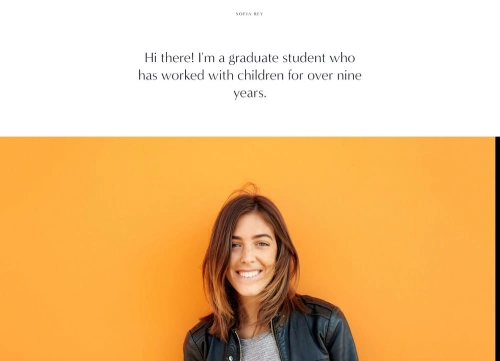
Sofia Rey
Best for Freelancers and Personal Brands
✓ Pros
\n- \n
- Vibrant, personality-forward layout that immediately communicates creative confidence - ideal for freelancers who want their brand to feel memorable and distinct. \n
- Intuitive drag-and-drop customization requires zero developer knowledge, so you can launch and iterate fast without waiting on anyone else. \n
- Dedicated sections for contact forms, client reviews, and a resume area give freelancers everything needed to convert portfolio browsers into paying clients. \n
- Social media integration keeps your audience connected across platforms, turning your website into a central hub rather than an isolated portfolio. \n
- Works equally well for actors, illustrators, writers, and multi-disciplinary creatives who need one site to represent varied work. \n
✗ Cons
\n- \n
- The bold, colorful aesthetic may feel too energetic for creatives targeting corporate or conservative clients who expect understated professionalism. \n
- Limited gallery customization out of the box - photographers or designers with large collections may need to restructure sections to avoid visual clutter. \n
- Requires strong personal branding to shine; generic stock imagery or vague copy will clash with the template's confident personality. \n
\n\nSofia Rey is the squarespace creative template that treats your personal brand like a headline. It does not hide behind minimalism - it puts your personality, your work, and your story right at the front. For freelancers and solo creatives who want visitors to feel their energy before reading a single service description, this template delivers that first impression with confidence.
\n\n
Use Sofia Rey's hero section to lead with a single bold statement about who you help and what you create. Place your three strongest portfolio pieces directly below the fold, then follow with a testimonial block. The layout rewards confidence - skip the long bio and let your work and client results do the talking.
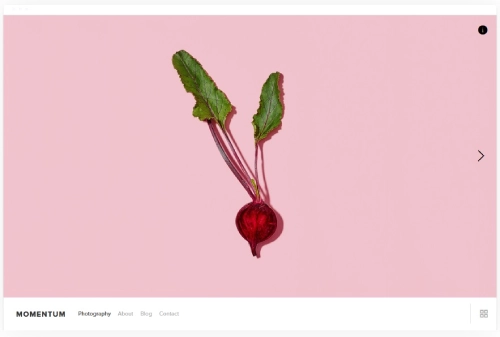
\nMomentum
Best for Designers and Motion Creatives
✓ Pros
\n- \n
- Full-screen slideshow feature creates an immersive viewing experience that captures attention instantly - perfect for designers and motion creatives with strong visual assets. \n
- High-resolution image support ensures architectural renders, design mockups, and creative photography display at their sharpest without compression artifacts. \n
- Clean, minimalist navigation keeps the focus entirely on your creative work rather than competing interface elements. \n
- Responsive design adapts beautifully across devices, so your portfolio looks intentional whether clients view it on a desktop monitor or a phone screen. \n
- Flexible page structure supports project case studies, process breakdowns, and client galleries without forcing you into a rigid layout. \n
✗ Cons
\n- \n
- The slideshow-heavy layout depends on strong photography - weak or inconsistent images will undermine the entire design rather than being hidden by it. \n
- Text-heavy content like long case study descriptions can feel cramped within the visual-first layout unless carefully formatted. \n
- Not the strongest choice for creatives who primarily showcase written work, code projects, or other non-visual deliverables. \n
\n\nMomentum is the squarespace portfolio template that treats every project like a full-screen experience. It does not ask visitors to click through thumbnails - it puts your best work at maximum scale from the first second. For designers and motion creatives whose portfolios live and die on visual impact, this template removes every barrier between your work and the person evaluating it.
\n\n
Curate your slideshow to five or six of your absolute strongest pieces rather than showing everything. Each slide should feel like a standalone portfolio piece. Add a subtle text overlay with the project name and client, then link each slide to a dedicated case study page for visitors who want the full story.
\nReady
Best for Creative Freelancers and Consultants
✓ Pros
\n- \n
- Fast loading times keep visitors engaged - critical for journalists, writers, and editorial creatives whose audiences expect snappy performance. \n
- Content-first aesthetic focuses attention on storytelling and written work, making it a strong creative portfolio website template for copywriters, editors, and content strategists. \n
- Responsive design ensures articles, case studies, and long-form content read cleanly on mobile - where most editorial audiences consume content. \n
- Interactive menu structure improves navigation across multi-page sites, helping visitors find specific projects or service pages without friction. \n
- SEO-friendly layout with proper heading hierarchy helps creative professionals rank for niche search terms and attract organic client inquiries. \n
✗ Cons
\n- \n
- Less visual punch than image-heavy templates - photographers and visual artists may find the layout undersells their work compared to gallery-focused alternatives. \n
- The editorial feel can read more "blog" than "portfolio" if you do not carefully structure your project pages with strong visuals alongside text. \n
- Limited built-in animation or interactive elements for creatives who want their site to feel dynamic and experiential. \n
\n\nReady is the template for creatives whose work is built on words, ideas, and strategy as much as visuals. It loads fast, reads clean, and puts your content at the center of the experience. For freelance consultants, editorial professionals, and content-focused creatives, this squarespace creative template proves that strong work does not need flashy packaging to convert.
\n\n
Structure your homepage as a curated feed of your three to four strongest case studies, each with a headline, one featured image, and a two-sentence summary that links to the full project page. Use Ready's clean typography to let your writing quality speak for itself - this template rewards sharp copy over visual complexity.
\nCarson
Best for Interactive Portfolio Showcases
✓ Pros
\n- \n
- Dynamic background effects create a visually interactive browsing experience that keeps visitors engaged longer and reduces bounce rates on your portfolio site. \n
- Hidden navigation menu maximizes screen real estate for your work, letting projects dominate the viewport without competing interface elements. \n
- Adaptable layout works across diverse creative niches - from UX design case studies to fine art galleries to architectural project showcases. \n
- Built-in page types for contact, about, and services make it easy to build a complete professional presence beyond just a portfolio grid. \n
- Strong first-impression impact helps creatives stand out in competitive fields where clients evaluate dozens of portfolios before reaching out. \n
✗ Cons
\n- \n
- The interactive background effect can feel gimmicky if overused - it works best as a subtle accent rather than the defining feature of your site. \n
- Hidden navigation may confuse visitors unfamiliar with the pattern, potentially increasing friction for clients who want to quickly find your contact page. \n
- Not ideal for content-heavy sites - the visual-first approach prioritizes impact over information density. \n
\n\nCarson turns your portfolio into something visitors remember. The interactive elements create a browsing experience that feels intentional and curated rather than static. If you want your squarespace portfolio template to demonstrate not just what you create but how you think about user experience, Carson makes that statement without saying a word. For a full walkthrough on structuring your work, check out our guide on how to create a portfolio page on Squarespace.
\n\n
Use Carson's dynamic background as a subtle accent on your homepage hero section, then transition to a clean grid layout for your project pages. Keep the hidden menu simple - four to five pages maximum - and make your contact page accessible from every project page via an inline CTA button.
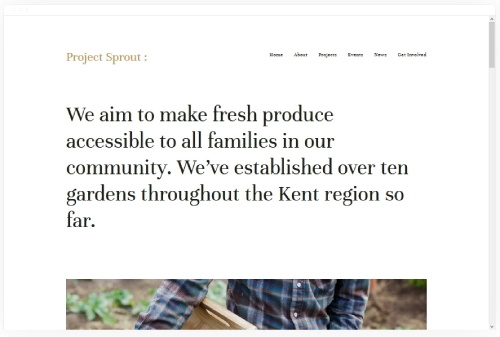
\nKent
Best for Media-Rich Creative Portfolios
✓ Pros
\n- \n
- Purpose-built for video and multimedia content, making it the strongest squarespace template for video portfolios among creative-focused options. \n
- Supports multiple page types including blogs, albums, and product pages - ideal for creatives who monetize their work through prints, courses, or digital downloads. \n
- Easy customization and low maintenance overhead let you spend more time creating and less time managing your website. \n
- Clean visual hierarchy guides visitors through your media content in a logical sequence rather than dumping everything into a single grid. \n
- Scales well as your body of work grows, accommodating new project categories without requiring structural redesigns. \n
✗ Cons
\n- \n
- Video-heavy pages can slow loading times if you embed too many players without lazy loading - requires careful curation of above-the-fold content. \n
- The multimedia focus may feel overpowered for creatives with primarily static portfolios like illustration or print design. \n
- Album and blog features need intentional organization to avoid a cluttered, unfocused site structure. \n
\n\nKent is the creative portfolio website template built for creatives who work in motion, sound, and multimedia. It does not just display video - it makes video the centerpiece of your professional identity. For filmmakers, animators, and content producers who need their site to handle diverse media types without compromising on presentation quality, Kent delivers. For deeper guidance on selecting the right layout, see our breakdown of which Squarespace template is best for video.
\n\n
Lead your homepage with a single autoplay showreel or hero video rather than a static image. Place your three strongest project thumbnails directly below as clickable cards linking to full case study pages. Use Kent's album feature to organize work by category - commercial, personal, experimental - so visitors can self-select into the work most relevant to them.
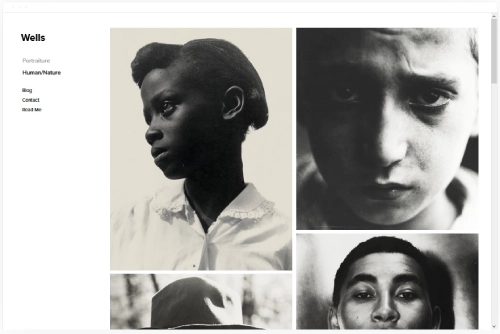
\nWells
Best for Visual Storytellers and Creatives
✓ Pros
\n- \n
- Clean, minimalist design ensures your visual work takes center stage - no competing layout elements, just your images presented at their best. \n
- Strong eCommerce capabilities let photographers sell prints, licensing, and digital downloads directly from their portfolio without third-party tools. \n
- Large image sections display work at scale, making it one of the top squarespace templates for creative professionals who rely on visual impact. \n
- Versatile media support handles photography, video, and mixed-media portfolios without forcing you into a single content type. \n
- Lightweight, uncluttered aesthetic works for both fine art and commercial portfolios, adapting to your brand tone through typography and color choices alone. \n
✗ Cons
\n- \n
- The minimal approach can feel sparse if you do not have enough high-quality work to fill the layout - the template exposes thin portfolios rather than hiding them. \n
- Limited built-in text formatting options may frustrate creatives who want to pair extensive written narratives with their visual work. \n
- The quiet aesthetic may not generate enough energy for creatives in bold, high-impact fields like fashion or event design. \n
\n\nWells is the squarespace portfolio template that gets out of the way. It does not compete with your images - it frames them. For photographers, visual artists, and creative storytellers who want their portfolio to feel like a gallery rather than a website, Wells creates that quiet, focused experience. If you are ready to set up your photography site, our guides on how to build a photography website on Squarespace and creating a photography website on Squarespace walk you through the full process.
\n\n
Use Wells's large image blocks to create a curated homepage gallery of eight to ten signature images - your absolute best work, not everything you have ever shot. Add a simple "View Full Portfolio" link below that leads to categorized gallery pages. Keep your color palette neutral so nothing competes with the images themselves.
\nAvenue
Best for Minimalist Creative Portfolios
✓ Pros
\n- \n
- Grid-based layout organizes creative work into a visually clean, gallery-style presentation - one of the strongest art portfolio templates available on Squarespace. \n
- Fast loading times contribute positively to SEO rankings, helping creative professionals get discovered through organic search rather than relying solely on social media traffic. \n
- Built-in eCommerce features enable artists to sell original work, prints, and merchandise directly through their portfolio without a separate storefront. \n
- Minimalist aesthetic adapts to virtually any creative discipline through simple color and typography adjustments, making it a versatile squarespace creative template. \n
- Structured grid keeps large portfolios organized and scannable rather than overwhelming visitors with an endless scroll of unstructured work. \n
✗ Cons
\n- \n
- The grid format can feel rigid for creatives who want more editorial or freeform portfolio presentations with varied image sizes and asymmetric layouts. \n
- Minimalism requires discipline - an inconsistent portfolio or mixed-quality work becomes more obvious in a clean grid than in a busier, more forgiving layout. \n
- Less personality out of the box than bolder templates - creatives with strong brand identities will need to customize heavily to make Avenue feel distinctly theirs. \n
\n\nAvenue is the creative portfolio website template for creatives who believe less is more. Its grid layout treats every piece of work like it belongs in a gallery - organized, intentional, and presented without distraction. For artists, illustrators, and minimalist creatives who want their portfolio to feel curated rather than cluttered, Avenue provides the structure to make that happen.
\n\n
Set your grid to display work in a consistent aspect ratio - square or 4:3 - so the gallery feels cohesive even when showcasing diverse projects. Use Avenue's eCommerce integration to add a subtle "Available for Purchase" badge on sellable pieces, turning your portfolio into a passive revenue channel without disrupting the gallery experience.
\nHow to Choose the Right Squarespace Template for Creative Professionals
\n\nMatch the Template to Your Primary Medium
\n\nThe single biggest factor in choosing a squarespace creative template is what you actually create. Photographers and visual artists need templates like Wells and Avenue that prioritize large-scale image display. Video creators and motion designers should lean toward Kent or Momentum, where multimedia content is a first-class feature rather than an afterthought. Writers, consultants, and editorial creatives benefit most from Ready's content-first approach. Trying to force a text-heavy portfolio into a visual-first template - or vice versa - creates friction that costs you clients. Wondering whether web designers actually use Squarespace? Many do, precisely because the template selection covers this range of creative needs. For photographers building their first Squarespace site, our photography website setup guide covers every step from plan selection to launch.
\n\nConsider Who Hires You
\n\nYour template choice should reflect the expectations of the people paying you. Corporate clients evaluating a creative agency want polished professionalism and structured project presentations - Carson and Avenue deliver that. Independent artists selling directly to collectors or fans need gallery-style layouts with eCommerce - Wells and Avenue handle both. Freelancers pitching to startups and small businesses benefit from Sofia Rey's personality-forward energy. The question is not which template looks best to you - it is which one your ideal client will trust on sight.
\n\nThink About Portfolio Size and Growth
\n\nA creative professional with ten signature projects needs a different layout than one with a hundred. Smaller, curated portfolios shine in templates like Wells and Momentum, where each piece gets maximum visual real estate. Larger, multi-category portfolios need the organizational structure of Avenue's grid or Kent's album system. Plan for where your portfolio will be in a year, not just where it is today. Choosing a squarespace portfolio template that scales with your output prevents a painful redesign down the road.
\n\nFactor in Revenue Channels Beyond Client Work
\n\nMany creative professionals earn from more than just client projects. If you sell prints, digital downloads, courses, or merchandise, templates with built-in eCommerce like Wells, Avenue, and Kent give you that capability without bolting on external tools. If your primary income is client bookings, prioritize templates with strong CTA placement and contact form integration like Sofia Rey and Ready. The right creative portfolio website template supports your full business model, not just your portfolio display. Creatives who also produce audio content might consider how their site handles media - our roundup of podcast templates covers that angle in detail.
\n\nFrequently Asked Questions
What is the best Squarespace template for creative professionals?
\nThe best squarespace template for creative professionals depends on your medium. Sofia Rey is the strongest pick for freelancers and personal brands. Momentum and Kent excel for visual and video-focused creatives. Wells and Avenue are top choices for photographers and fine artists. Ready suits editorial and content-focused professionals. Carson stands out for interactive, experience-driven portfolios. All seven are free with any Squarespace plan.\n
Can I use Squarespace to build a creative portfolio website?
\nYes. Squarespace is one of the most popular platforms for creative portfolio websites because it offers professional-grade templates, built-in gallery and video support, and drag-and-drop customization that requires no coding. All seven templates reviewed here are native Squarespace options designed to showcase creative work effectively across devices.\n
Are Squarespace creative templates free?
\nYes - all Squarespace templates, including Sofia Rey, Momentum, Ready, Carson, Kent, Wells, and Avenue, are included free with every Squarespace subscription. Plans start at $16 per month billed annually. You pay for the platform, not individual templates.\n
How do I choose between a minimalist and a bold Squarespace template for my portfolio?
\nChoose based on your work and your audience. Minimalist templates like Wells and Avenue let strong visual work speak for itself and suit photographers, fine artists, and illustrators. Bolder templates like Sofia Rey and Carson suit creatives whose personal brand is part of the sell - freelancers, UX designers, and multi-disciplinary professionals who want their site to feel as dynamic as their work.\n
Can I sell artwork or prints through a Squarespace creative portfolio?
\nYes. Squarespace includes built-in eCommerce tools that let you sell physical products, digital downloads, and services directly from your site. Templates like Wells and Avenue integrate eCommerce sections seamlessly into a portfolio layout, so you can display your work and sell it from the same page without redirecting visitors to a separate store.\n
Do Squarespace templates work well on mobile for creative portfolios?
\nAll seven templates - Sofia Rey, Momentum, Ready, Carson, Kent, Wells, and Avenue - are fully responsive and mobile-optimized. Images scale properly, navigation adapts to touch interactions, and video content plays natively on mobile devices. Given that a significant portion of portfolio traffic comes from mobile, this responsiveness is essential for creative professionals.\n
Can I switch Squarespace templates after building my creative portfolio?
\nYes. Squarespace allows you to switch templates at any time without losing your content. Pages, text, and images carry over, though you may need to adjust spacing, gallery layouts, and section ordering to match the new template's structure. Preview any new template before committing to ensure your portfolio displays correctly.\n
Conclusion: Build a Creative Portfolio That Works as Hard as You Do
\n\nThe right squarespace template for creative professionals is not the one that looks the most impressive in a demo - it is the one that makes your specific work look its best and gets the right clients to reach out. Sofia Rey brings personal brand energy. Momentum and Kent handle visual and video content at scale. Ready serves editorial and consulting creatives. Carson creates memorable interactive experiences. Wells and Avenue deliver quiet, gallery-quality presentation for photographers and fine artists.
\n\nPick the template that matches your medium, your audience, and your business model. Drop in your strongest work, write a headline that names who you help, and let your portfolio start working while you focus on creating.
\n\n\n"* Read the rest of the post and open up an offer