

Editor's Picks
| # | Name | Best For | Price | Rating | Image | |
|---|---|---|---|---|---|---|
| 1 | Interactive portfolio experiences | Free | 4.3/5 |

|
More Info | |
| 2 | Freelancer portfolios | Free | 4.4/5 |
|
More Info | |
| 3 | Minimalist portfolio design | Free | 4.2/5 |
.png)
|
More Info | |
| 4 | Visual-heavy portfolios | Free | 4.3/5 |
|
More Info | |
| 5 | Versatile portfolio layouts | Free | 4.3/5 |
|
More Info | |
| 6 | Blog-integrated portfolios | Free | 4.2/5 |
|
More Info | |
| 7 | Grid-based portfolio display | Free | 4.3/5 |
|
More Info | |
| 8 | Selling creative work | Free | 4.2/5 |
|
More Info | |
| 9 | Social media-driven portfolios | Free | 4.1/5 |
.png)
|
More Info | |
| 10 | Media-rich creative portfolios | Free | 4.4/5 |
|
More Info |
Carson
Best for Interactive Portfolio Experiences ✓ Pros
- Unique hover-triggered background images create an engaging, interactive experience that keeps visitors exploring your work longer.
- Hidden menu navigation keeps the design distraction-free while still providing full access to all your pages.
- Dedicated portfolio sections for showcasing both current and past projects in a clean, organized layout.
- Highly adaptive design works across many creative niches -- from photography and illustration to web design and architecture.
- Static page layout lets each project breathe, giving your work the full visual attention it deserves.
✗ Cons
- The hover-based interaction relies on mouse input, so the effect is less impactful on mobile and tablet devices.
- Hidden menu may confuse visitors who expect traditional top navigation on a portfolio site.
- The unconventional layout requires more deliberate content planning to guide visitors through your work effectively.
Carson is unlike anything else in the Squarespace portfolio template library. The background image changes based on where the visitor's cursor hovers, turning passive browsing into an interactive experience. That kind of engagement matters when you are competing for attention in crowded creative fields. The hidden menu keeps the focus entirely on your visuals, and the layout adapts well whether you are a photographer showing a dozen projects or a developer showcasing four flagship builds.
Sofia Rey
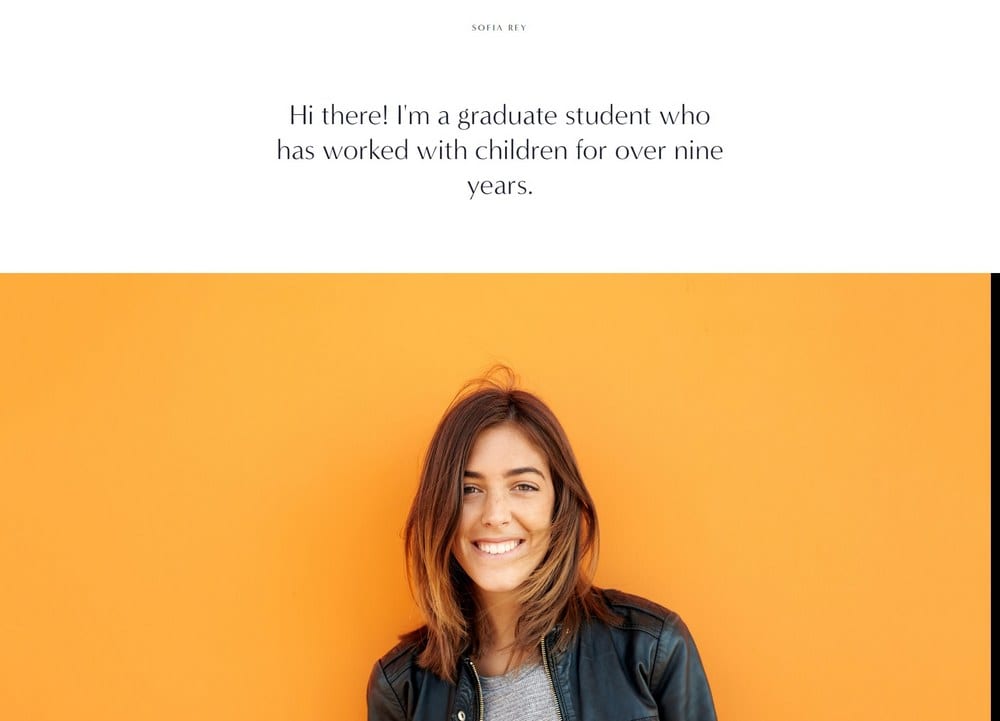
Best for Freelancer Portfolios ✓ Pros
- Built specifically for freelancers with dedicated sections for skills, services, reviews, and contact information all on one site.
- Resume section lets you display experience and training credentials -- a feature most Squarespace portfolio templates lack.
- Vibrant, sleek design with a professional aesthetic that works for both creative and technical freelancers.
- Top-left menu and top-right social media integration keep navigation intuitive without cluttering your portfolio pages.
- Contact forms and review sections are built into the template structure, reducing setup time for new freelancers.
✗ Cons
- The freelancer-specific layout may feel restrictive if you are building a portfolio for a multi-person studio or agency.
- The vibrant design style may not suit freelancers who prefer a more understated, minimalist brand presence.
- The resume section requires careful content editing to avoid looking cluttered with too many credentials listed.
Sofia Rey is purpose-built for the independent creative who needs a portfolio that also functions as a business card, resume, and client magnet. The template covers every touchpoint a potential client looks for: what you do, what you have done, what others say about you, and how to get in touch. The resume section is a standout feature for freelancers who want to highlight formal training or years of experience alongside their project gallery.
Sofia Pazari
Best for Minimalist Portfolio Design ✓ Pros
- Clean, minimalist layout with two side-by-side images on the homepage that create an immediate visual impact.
- Top-right menu navigation keeps the design uncluttered so your portfolio work remains the focal point.
- Pre-built about, services, and contact pages get your portfolio site functional in under an hour.
- Fast loading times help your site rank higher on Google -- critical for creatives competing for search visibility.
- Highly customizable text and images make it easy for beginners to personalize without technical skills.
✗ Cons
- The minimalist approach may feel too sparse for creatives who need to display large volumes of work.
- Side-by-side image layout demands high-quality visuals -- weak photos will be especially noticeable.
- Limited built-in features compared to more robust Squarespace portfolio templates on this list.
Sofia Pazari is the portfolio template for creatives who believe less is more. The two side-by-side homepage images immediately set a visual tone, and the clean layout lets each piece of work breathe without competing for attention. The built-in about, services, and contact pages mean you are not building from scratch -- just replacing placeholder content with your own. For designers, illustrators, and artists whose work is strongest when presented without distraction, this is a strong Squarespace portfolio template choice.
Mojave
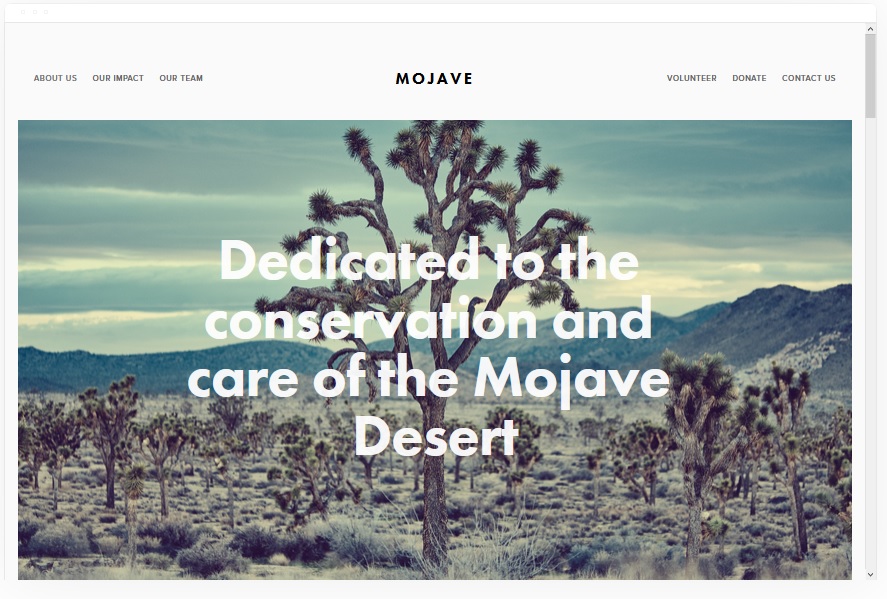
Best for Visual-Heavy Portfolios ✓ Pros
- Striking white background design lets images and videos pop without visual competition from the layout itself.
- Smooth scrolling effect creates a gallery-like browsing experience that suits image-heavy creative portfolios.
- Built-in social share buttons help your portfolio pieces reach a wider audience through word-of-mouth sharing.
- eCommerce functionality lets you sell prints, digital assets, or creative services directly from your portfolio.
- Strong call-to-action button placement guides visitors from browsing your work to hiring you or making a purchase.
✗ Cons
- The image-first design means text-heavy content like case studies or long project descriptions can feel out of place.
- The white background aesthetic limits the mood you can create -- darker, moodier portfolios may need more customization.
- Share buttons can distract from the portfolio itself if not positioned carefully within the layout.
Mojave treats your portfolio like an exhibition. The clean white background and scrolling effect make every image feel intentional and curated, which is exactly what photographers, graphic designers, and visual artists need. The built-in eCommerce tools are a bonus for creatives who want to sell directly from their portfolio site rather than directing buyers to a separate store. Social share buttons baked into the design mean your best work can spread organically.
Bedford
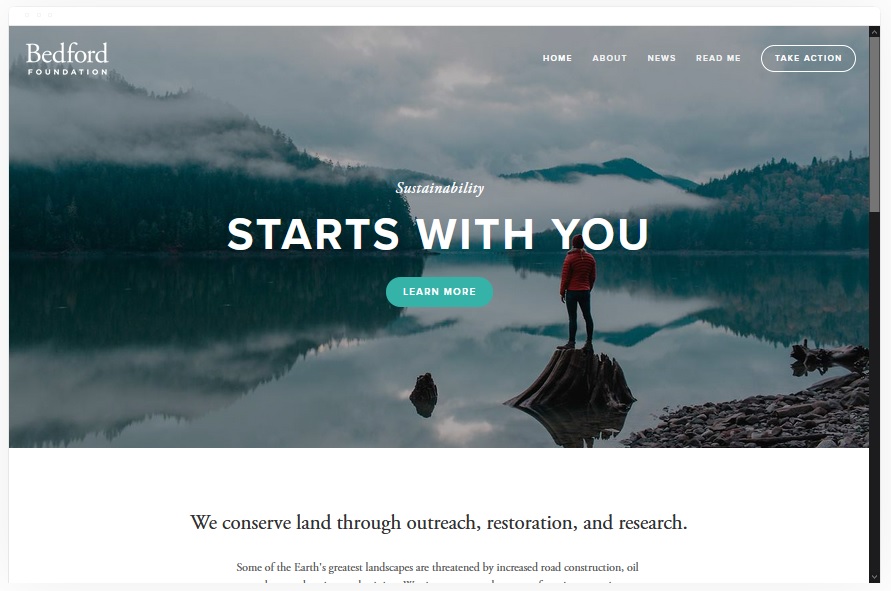
Best for Versatile Portfolio Layouts ✓ Pros
- Sidebar navigation and scrolling index page let visitors browse your portfolio categories without leaving the main view.
- Banner sections with embedded images, videos, and call-to-action buttons create a polished, professional portfolio entrance.
- Built-in eCommerce allows you to sell artwork, prints, or services alongside your portfolio display.
- Versatile layout adapts to many creative fields from architecture and interior design to photography and branding.
- Strong media support across all pages -- add high-quality images and videos to every section of your site.
✗ Cons
- Sidebar navigation feels unconventional and may take visitors a moment to orient themselves compared to top menus.
- The scrolling index page can feel long for portfolios with many project categories.
- Banner customization requires thoughtful image selection to avoid a cluttered or unfocused first impression.
Bedford is the Swiss army knife of Squarespace portfolio templates. The sidebar navigation paired with a scrolling index page gives visitors a clear path through your work, while banner sections with embedded CTAs push them toward hiring you or buying your work. This template handles diverse content well, so if your portfolio spans multiple disciplines or project types, Bedford keeps everything organized without feeling rigid.
Rally
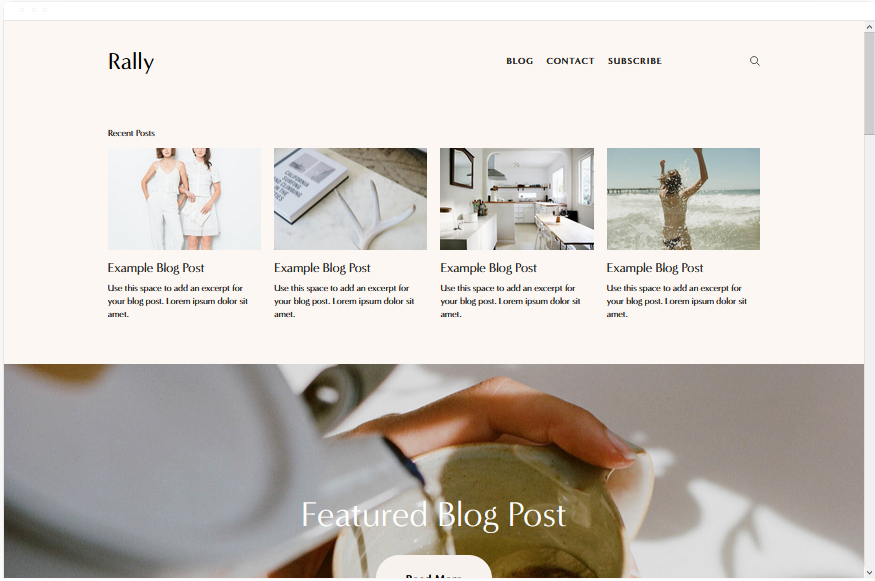
Best for Blog-Integrated Portfolios ✓ Pros
- Streamlined design pairs portfolio pages with built-in blogging -- ideal for creatives who write about their process.
- Smooth scrolling animation creates a polished user experience that encourages visitors to browse longer.
- Social media link placement in the top navigation makes it easy for visitors to follow you on other platforms.
- Fully optimized for mobile devices so your portfolio looks sharp on phones and tablets.
- Simple enough for beginners to set up, yet flexible enough for experienced designers to customize deeply.
✗ Cons
- The streamlined layout may feel limiting for portfolios that need complex project categorization.
- Blog and portfolio sections share visual weight, which may dilute impact if you want the portfolio front and center.
- Social media link placement in the header can feel crowded on smaller screen sizes.
Rally is built for creatives who understand that a blog is a portfolio amplifier. Sharing your process, case studies, or behind-the-scenes work alongside your finished pieces adds depth that a gallery alone cannot. The template's smooth scrolling and mobile optimization mean your content reads well everywhere, and the social media integration helps you funnel platform followers to your full portfolio. If content marketing is part of your creative business strategy, Rally gives you the tools without the bloat.
Skye
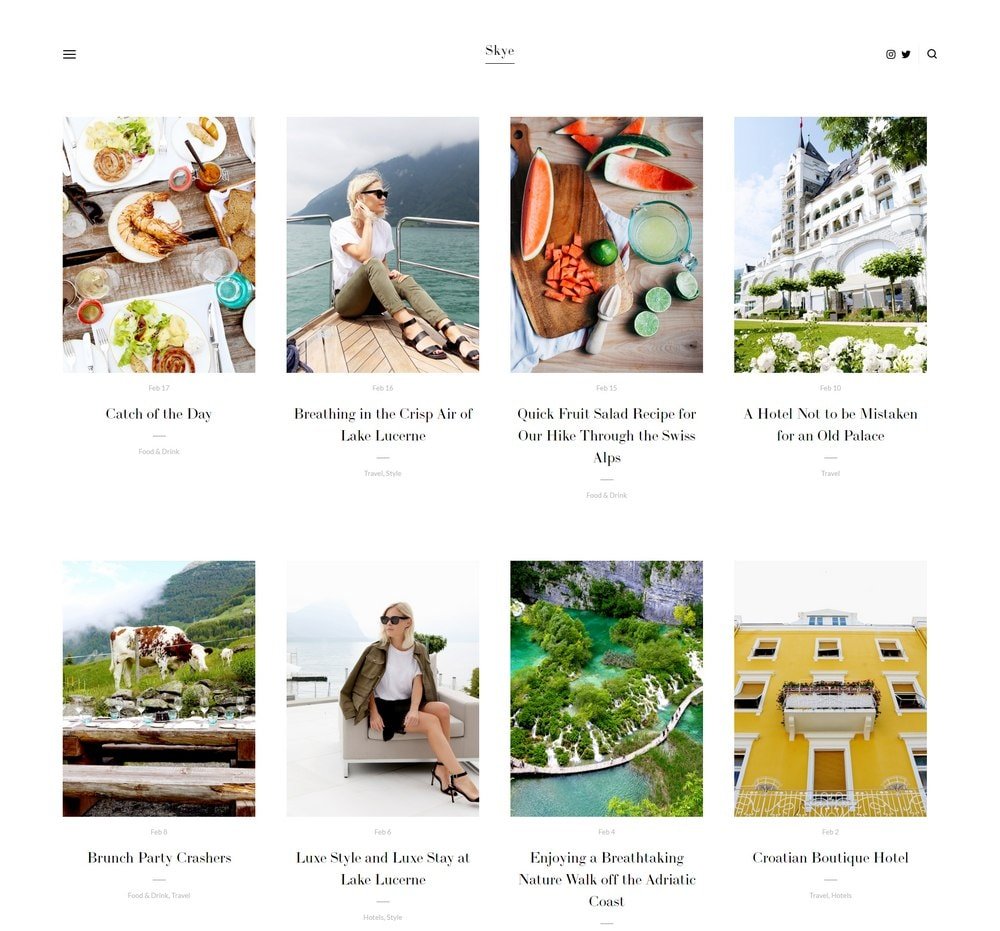
Best for Grid-Based Portfolio Display ✓ Pros
- Grid-based layout organizes images and videos into a clean, scannable portfolio that works across all creative fields.
- Fullscreen display option lets you showcase hero pieces at maximum visual impact.
- Strong blogging tools built into the template for content marketing alongside your portfolio.
- One of the most popular Squarespace templates with proven performance across many niches and use cases.
- Excellent mobile optimization ensures your grid portfolio translates perfectly to phone and tablet screens.
✗ Cons
- Grid layouts can feel repetitive if all your portfolio pieces share a similar visual style or color palette.
- The template's popularity means your site may look similar to other creatives unless you invest in customization.
- Fullscreen images require large, high-resolution files that may need compression to maintain fast load times.
Skye is one of the most trusted Squarespace portfolio templates for a reason. The grid-based layout is inherently flexible -- it works for photographers displaying dozens of shoots, designers showcasing brand projects, or artists presenting a catalog of paintings. The fullscreen option gives your strongest pieces the spotlight, while the blogging tools help you build organic search traffic that feeds your portfolio. Skye is a clean, modern, and accessible foundation that makes your work the star on Squarespace.
Wells
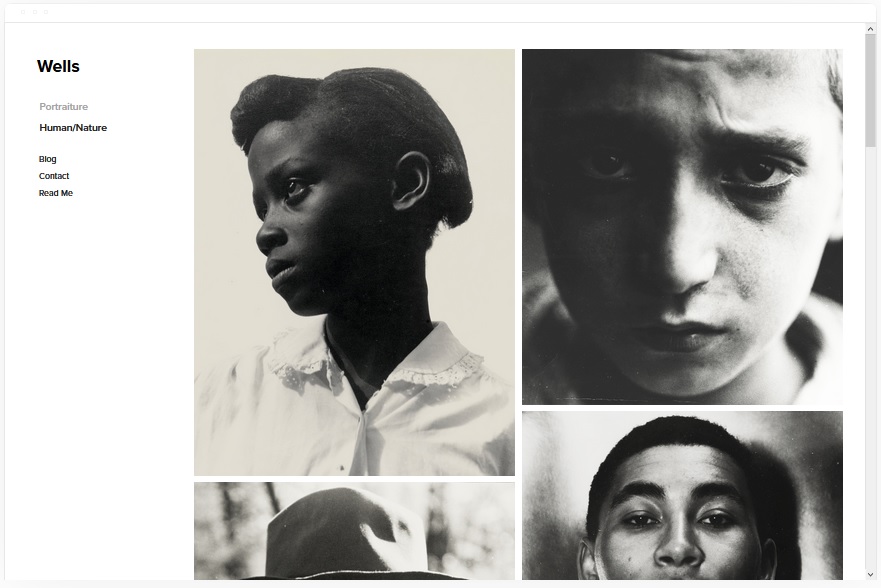
Best for Selling Creative Work ✓ Pros
- Built-in eCommerce features make it easy to sell prints, digital downloads, or creative services directly from your portfolio.
- Large image display areas showcase visual work at high resolution, which is essential for selling art and photography.
- Video integration via YouTube URL lets you embed project walkthroughs, showreels, or behind-the-scenes content.
- Social media integration helps drive traffic from your platforms to your portfolio shop.
- Clean layout balances portfolio display with product listings so visitors can browse and buy in one place.
✗ Cons
- The eCommerce focus may feel heavy for creatives who only want to display work without selling anything.
- Video relies on YouTube hosting, so you need an active YouTube channel to take full advantage of the feature.
- Product listing pages require setup time for pricing, descriptions, and shipping details alongside your portfolio.
Wells is the right Squarespace portfolio template if your creative work is also your product line. Photographers selling prints, designers offering digital assets, and artists listing originals all benefit from a template that treats the portfolio and the store as one seamless experience. The video integration via YouTube is a smart addition for creatives who produce process videos or showreels that help justify higher price points.
Native
Best for Social Media-Driven Portfolios ✓ Pros
- Strong social media integration connects your portfolio to all your platforms, creating a unified online presence.
- Rounded thumbnail galleries give your portfolio a distinctive, modern look that stands out from standard grid layouts.
- Blog location tagging is ideal for travel photographers, location-based artists, and creatives who work on-site.
- Clean scrolling homepage presents your work in a curated feed that feels natural to social media-savvy visitors.
- Fast load times and responsive design ensure your portfolio performs well on every device.
✗ Cons
- Rounded thumbnails may not suit all visual styles -- sharp architectural or product photography can feel softened.
- The social media-forward design may date quickly as platform aesthetics evolve.
- Location blog tagging is a niche feature that adds little value for studio-based or non-travel creatives.
Native is the Squarespace portfolio template for creatives whose audience lives on social media. The deep platform integration means your website and your social profiles feel like parts of the same brand rather than separate destinations. The rounded thumbnail galleries add a distinctive visual touch that makes your portfolio memorable, and the blog location tagging is a standout feature for travel photographers and on-location creatives who want to showcase where their work takes them.
Kent
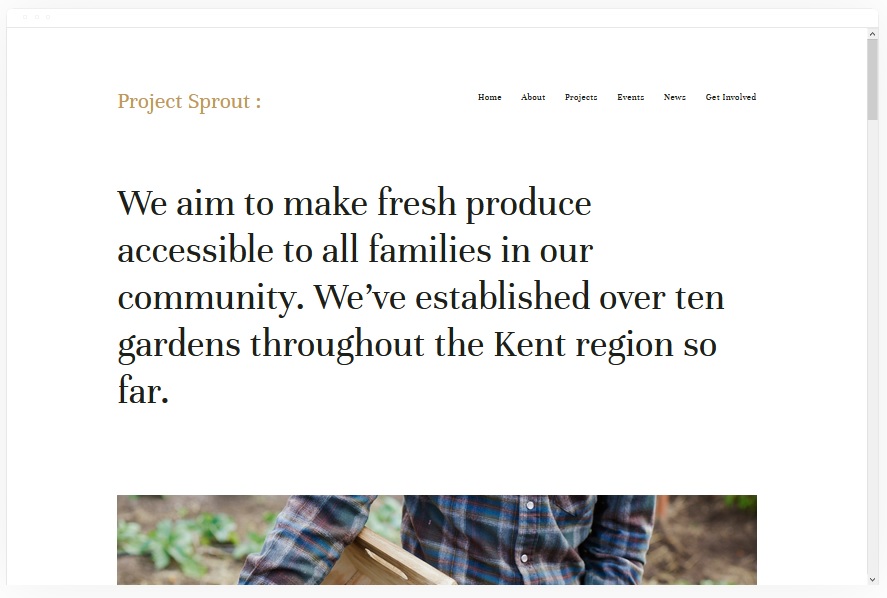
Best for Media-Rich Creative Portfolios ✓ Pros
- Supports multiple media types including images, videos, and audio -- ideal for multidisciplinary creatives.
- Built-in page types for covers, blogs, events, albums, and portfolios give you maximum content flexibility.
- eCommerce support lets you sell artwork, photography prints, music, or merchandise alongside your portfolio.
- Attractive, clean design that highlights your creative skills and builds professional credibility.
- Strong SEO foundation helps your portfolio rank on Google for competitive creative industry keywords.
✗ Cons
- The wide range of page types requires more setup time and content planning than simpler templates.
- Event and album pages may go unused if your creative practice does not involve performances or collections.
- Media-rich pages with multiple videos and high-resolution images need careful optimization to maintain fast load speeds.
Kent is the most feature-rich Squarespace portfolio template on this list. If your creative work spans multiple formats -- photography, video, music, writing -- Kent gives you dedicated page types for each without forcing everything into a generic gallery. The eCommerce integration means you can monetize your portfolio directly, whether that is selling prints, booking event appearances, or offering digital downloads. For creatives who need a single site to do everything, Kent delivers.
How to Choose the Right Squarespace Portfolio Template
Match the Template to Your Creative Discipline
The best Squarespace template for a portfolio depends on what kind of work you are showing. Photographers and visual artists benefit from image-forward templates like Mojave and Skye that let visuals dominate. Freelancers who need to display credentials alongside their work should look at Sofia Rey's resume-integrated layout. Multidisciplinary creatives working across video, audio, and imagery will get the most flexibility from Kent.
Consider How Visitors Will Browse Your Work
Think about the path you want visitors to take through your portfolio. Grid layouts like Skye let people scan quickly and click into what interests them. Scrolling designs like Mojave and Bedford guide visitors through a curated sequence. Interactive approaches like Carson turn browsing into an experience. Choose the navigation style that matches how your target audience -- whether art directors, potential clients, or gallery owners -- prefers to evaluate creative work.
Think About What Happens After They See Your Work
A portfolio that impresses but does not convert is a missed opportunity. If you want visitors to hire you, templates with strong contact integration like Sofia Rey and Sofia Pazari shorten the path. If you want them to buy, Wells and Kent have built-in eCommerce. If you want them to follow your journey, Rally and Native connect your portfolio to your blog and social channels. Pick the template whose built-in features match your actual business goal.
Plan for Growth and Content Volume
Your portfolio will grow. A template that works for 10 projects needs to still work at 50. Grid-based templates like Skye scale well because adding items extends the grid naturally. Sidebar navigation in Bedford handles expanding categories cleanly. Simpler templates like Sofia Pazari are beautiful but may feel strained as your body of work grows. Choose based on where your portfolio will be in two years, not just where it is today.
Prioritize Mobile Performance
More than half of web traffic comes from mobile devices. Every template on this list is responsive, but some translate better to small screens than others. Rally and Skye are specifically optimized for mobile browsing. Interactive features like Carson's hover effect lose impact on touchscreens. If analytics show your audience is primarily mobile, prioritize templates where the mobile experience is just as strong as desktop.
Explore E-commerce and Scheduling Capabilities
For creative professionals who want to monetize their portfolio or book clients directly, Squarespace offers built-in eCommerce and scheduling tools. Templates like Wells, Bedford, and Kent support online stores natively, while any template can integrate Squarespace Scheduling for appointment booking. Consider whether selling work or booking sessions is part of your portfolio strategy and choose a template that supports that workflow from the start.
Frequently Asked Questions
What is the best Squarespace template for a portfolio website?
Are Squarespace portfolio templates free to use?
Can I sell my work directly from a Squarespace portfolio website?
Which Squarespace portfolio template is best for photographers?
Can I switch Squarespace portfolio templates after building my site?
Do Squarespace portfolio templates work well on mobile phones?
How do I add a blog to my Squarespace portfolio website?
Is Squarespace good for SEO for portfolio websites?
How We Evaluate Templates
Conclusion: Build a Portfolio That Works as Hard as You Do
Your portfolio deserves a Squarespace template that makes your work look its best and makes it easy for the right people to find you, hire you, or buy from you. Carson delivers interactive engagement, Sofia Rey covers every freelancer need, and Kent handles the full range of media formats for multidisciplinary creatives.
Pick the Squarespace portfolio template that matches your creative discipline and business goals, add your best work, and let your site start opening doors while you focus on the next project.
* Read the rest of the post and open up an offer