

Whether you shoot documentaries, music videos, short films, commercials, or wedding cinematography, the right Squarespace filmmaker template needs to do three things: showcase your reel or portfolio in a way that immediately communicates your skill level, make it easy for potential clients or collaborators to contact you, and load fast enough that nobody clicks away before your work appears. The templates below were selected specifically for filmmakers, videographers, directors, and cinematographers who need a portfolio-first website that looks as polished as the work it displays. If you are looking for broader options beyond filmmaking, check out our guide to Squarespace templates for creative professionals.
Editor's Picks
| # | Name | Best For | Price | Rating | Image | |
|---|---|---|---|---|---|---|
| 1 | Documentary filmmakers, horror directors, genre filmmakers, and visual storytellers who want a grid-based portfolio | Free | 4.5/5 |
|
More Info | |
| 2 | Directors promoting a single film, cinematographers with a flagship reel, and filmmakers launching a new project | Free | 4.4/5 |

|
More Info | |
| 3 | Production companies, multi-genre filmmakers, commercial videographers, and directors who need organized project categories | Free | 4.2/5 |
|
More Info | |
| 4 | Independent filmmakers, film school graduates, emerging directors, and cinematographers building a professional portfolio | Free | 4.4/5 |

|
More Info | |
| 5 | Social media filmmakers, content creators, travel videographers, and directors who build audience across multiple platforms | Free | 4.1/5 |
|
More Info | |
| 6 | Filmmaker-bloggers, cinematographers sharing technique, directors building a personal brand through written and video content | Free | 4.2/5 |
|
More Info | |
| 7 | Minimalist filmmakers, art-house directors, cinematographers who want a clean and fast portfolio site | Free | 4.2/5 |
.webp)
|
More Info | |
| 8 | Freelance videographers, emerging filmmakers, directors who want a simple one-page portfolio with clear CTAs | Free | 4.0/5 |

|
More Info | |
| 9 | Cinematographers, event filmmakers, wedding videographers, and directors who need portfolio, blog, events, and eCommerce in one site | Free | 4.3/5 |
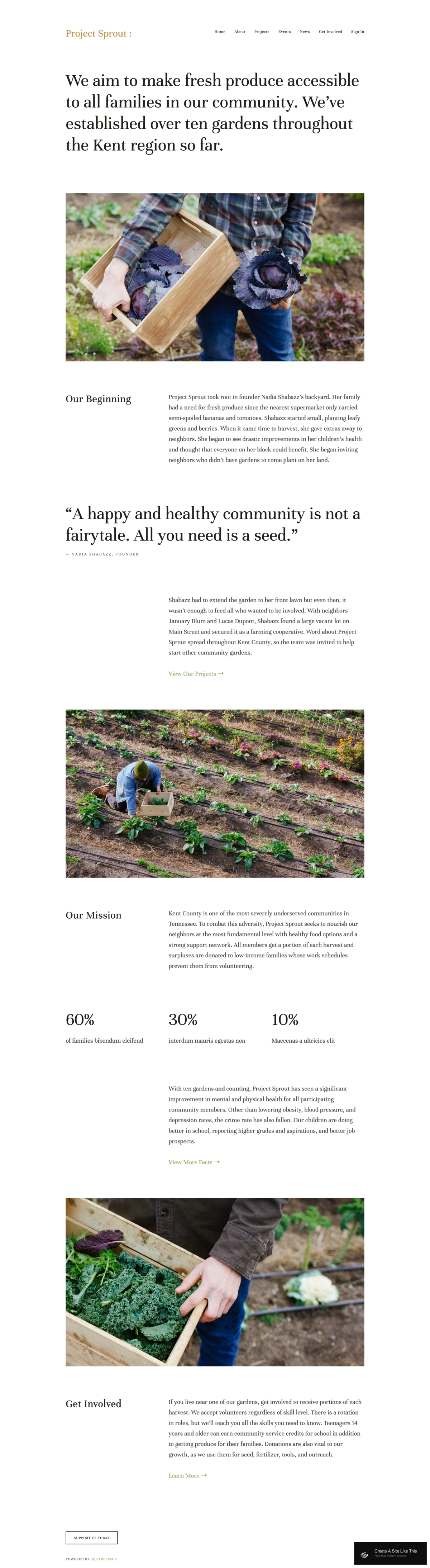
|
More Info | |
| 10 | Art-house filmmakers, fashion videographers, wedding cinematographers, and directors who want a refined visual presentation | Free | 4.0/5 |
.webp)
|
More Info |
Wells
Best for Visual Storytellers and Genre Filmmakers
✓ Pros
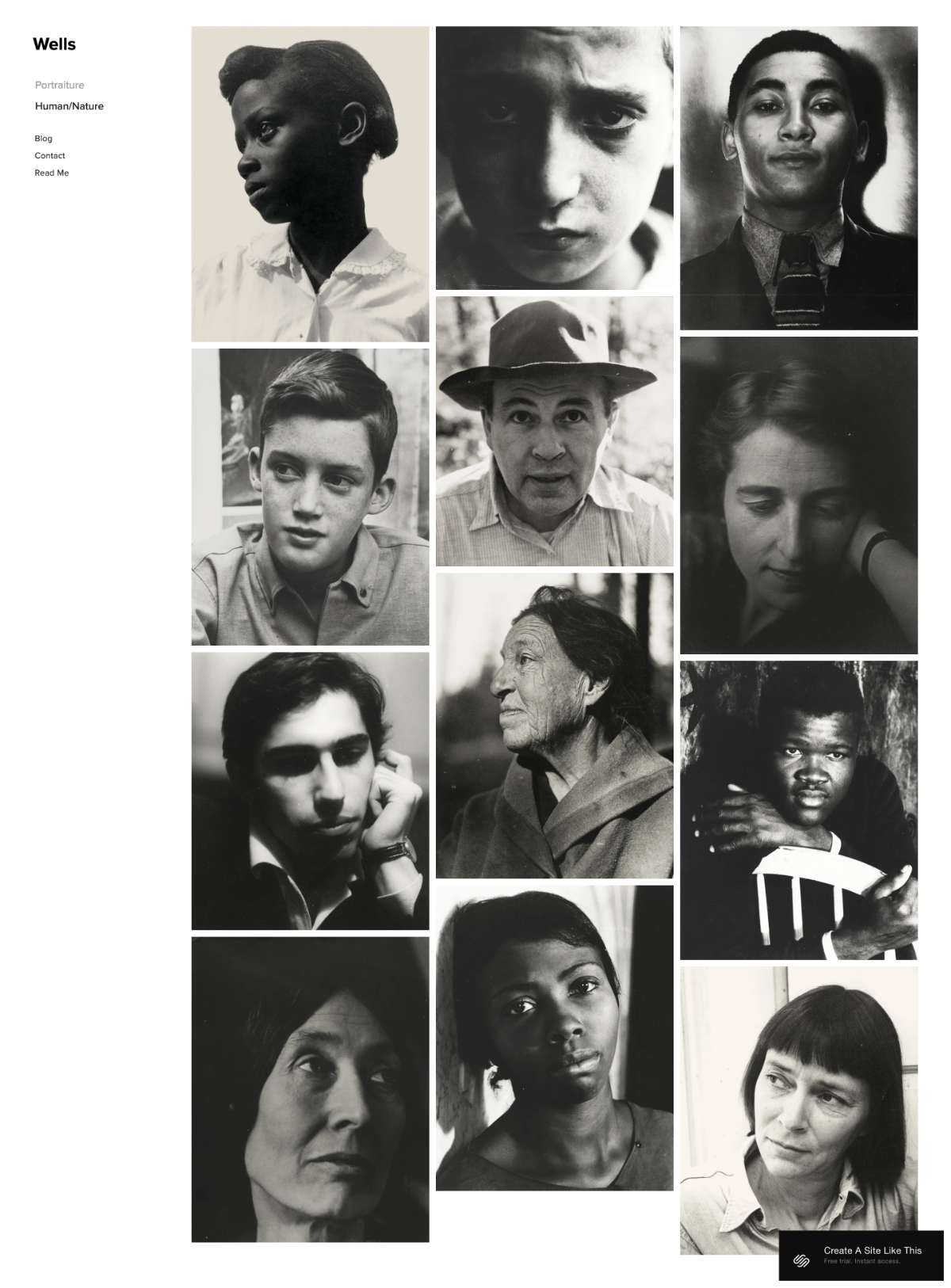
- Slick tiled grid layout puts your entire body of work on display at once; visitors can scan your filmography in seconds and click into any project that catches their eye.
- Visuals-focused design keeps text secondary, which is exactly what filmmakers need when the work itself is the strongest selling point.
- Flexible enough to handle wildly different genres side by side; a documentary portfolio and a horror reel can coexist on the same grid without visual clash.
- Built-in eCommerce functionality lets you sell screenings, digital downloads, or merchandise without needing a separate platform or plugin.
- Clean, modern aesthetic that looks professional across devices without requiring any design experience to set up or maintain.
✗ Cons
- The grid-heavy layout can feel overwhelming if you only have a small number of projects; it works best when you have enough work to fill the tiles meaningfully.
- Text content takes a backseat to visuals, which may undersell filmmakers who rely on detailed project descriptions or behind-the-scenes narratives to attract clients.
- Customizing the tile sizes and spacing requires some experimentation to get the visual balance right for your specific portfolio mix.
Wells is the Squarespace filmmaker template for directors and cinematographers who want their portfolio to hit like a mood board. The tiled grid gives every project equal visual weight, so whether you are showcasing a short horror film, a documentary feature, or a commercial reel, each piece gets its moment. The design stays out of your way and lets the imagery carry the entire experience. If your work speaks for itself, Wells gives it the stage.
Use Wells' grid tiles strategically: place your strongest, most visually striking project in the largest tile position to anchor the page. Keep thumbnails consistent in color grading or tone so the grid reads as a cohesive filmography rather than a random collection. Add a brief filmmaker bio section below the grid with a clear "Hire Me" or "Contact for Bookings" button to convert portfolio browsers into actual inquiries.
Mojave
Best for Single-Project Showcases and Film Premieres
✓ Pros
- Huge hero section creates a bold, cinematic opening that immediately sets the tone, perfect for filmmakers who want their site to feel like a film poster or trailer landing page.
- Ideal for promoting a single work or flagship project, giving it the undivided attention and visual real estate it deserves.
- Built-in blog section works well for behind-the-camera content, production diaries, and director's notes that deepen audience engagement.
- Fast loading speeds keep visitors on the page even when the hero image or embedded video is high resolution.
- Straightforward layout structure makes it easy for filmmakers to update the site between projects without rebuilding the entire page.
✗ Cons
- The single-focus hero design is less effective for filmmakers with large portfolios who need to display many projects at once.
- The dramatic opening can feel top-heavy if the content below the hero section is thin or underdeveloped.
- Filmmakers working across multiple genres may find the template's visual emphasis on one project limits how they present range and versatility.
Mojave is the Squarespace filmmaker template that turns your website into a premiere. The oversized hero section hits like a movie poster: one powerful image or embedded trailer fills the screen and tells your visitor exactly what kind of filmmaker they are dealing with. This is not a template for showing everything you have ever made. It is a template for showing the one thing you most want people to see right now. For directors launching a new film, cinematographers building buzz around a flagship reel, or videographers promoting a signature project, Mojave creates the kind of focused first impression that sticks.
Make Mojave's hero section earn its real estate by using a still frame from your strongest project or embedding a trailer that auto-plays on mute. Below the hero, add a "Now Streaming" or "Official Selection" badge section if your film has festival laurels or distribution credits. Use the blog for production updates and behind-the-scenes stories, as this content drives organic search traffic from people looking for filmmaker insights and keeps your site fresh between major releases.
Bedford
Best for Versatile Filmmakers and Production Companies
✓ Pros
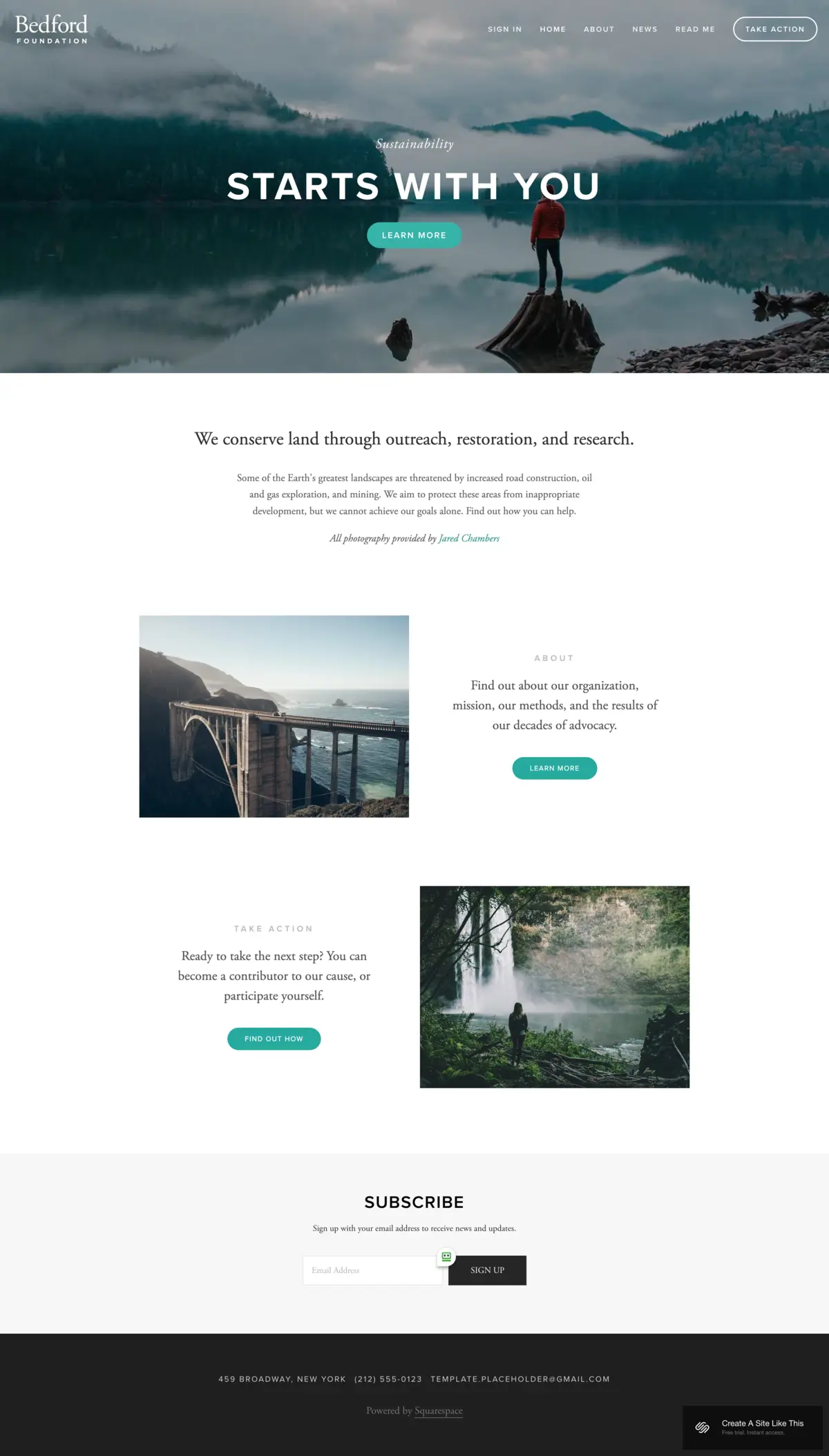
- Versatile sidebar navigation keeps your entire site structure visible, making it easy for visitors to jump between reels, project categories, and contact pages without getting lost.
- Scrolling index page works beautifully for filmmakers who want to present projects chronologically or by category with a continuous visual flow.
- Banner sections with built-in CTAs let you highlight featured projects, upcoming releases, or booking availability right at the top of any page.
- Handles complex site structures well; ideal for production companies with separate pages for narrative, commercial, documentary, and music video work.
- Clean typography and layout balance keep the design professional without competing with your visual content.
✗ Cons
- The sidebar navigation style may feel less modern than full-screen, immersive layouts that some filmmakers prefer for portfolio presentation.
- Requires more upfront content organization; filmmakers who want a simple one-page site will find Bedford's multi-section structure unnecessarily complex.
- The versatility that makes Bedford strong for production companies can make it feel generic if not carefully customized with strong visual content.
Bedford is the Squarespace filmmaker template built for the director or production company that does more than one thing. If you shoot commercials on Monday, a documentary on Wednesday, and a music video on Friday, you need a site that organizes all of that without looking cluttered. Bedford's sidebar navigation and scrolling index pages give every category of work its own space while keeping the whole site navigable. It is the template that grows with your career instead of boxing you into a single-project spotlight.
Organize Bedford's sidebar into clear project categories: Narrative, Commercial, Documentary, Music Videos, so visitors can self-select based on what they are hiring you for. Use the banner CTA on your homepage to promote whatever is most timely: a new release, festival screenings, or open booking dates. Keep each project page consistent in structure (hero still, embedded video, brief description, credits) so the site reads as a professional filmography rather than a collection of disconnected pages.
Lange
Best for Dedicated Filmmaker Portfolios
✓ Pros
- Designed specifically with filmmakers in mind: the layout, pacing, and visual hierarchy all reflect how film professionals actually present their work.
- Portfolio-first structure ensures your reel or project gallery is the centerpiece of every visit, not buried below an about section or blog.
- Clean, industry-appropriate aesthetic that looks credible whether you are an emerging director or an established cinematographer.
- Supports video embeds prominently, making it easy to feature trailers, reels, and full project previews directly on the page.
- Scales well from a simple three-project portfolio to a comprehensive filmography with dozens of entries.
✗ Cons
- The filmmaker-specific design may feel limiting for videographers who also offer non-film services like corporate video production or event coverage.
- Less visual personality than more stylized templates; the clean, professional look prioritizes credibility over creative flair.
- Filmmakers who want extensive written content alongside their portfolio may find the template favors visuals over text.
Lange is the Squarespace filmmaker template that was built for exactly this job. While other templates can be adapted for filmmakers, Lange was designed with film portfolios as the primary use case. The layout feels like walking into a screening room: your work is front and center, the interface is invisible, and the visitor's attention goes exactly where it should, on your films. For directors and cinematographers who want a no-nonsense portfolio site that looks like it belongs in the film industry, Lange delivers without any design gymnastics.
Lead with your reel or strongest project embedded directly in Lange's hero section; do not make visitors click through to find your best work. Arrange your filmography in reverse chronological order so your most recent and presumably strongest work appears first. Add festival laurels, awards, or notable collaborator names near the top of the page as instant credibility markers. Keep the color palette dark and neutral to let your footage be the only source of visual energy on the page.
Native
Best for Social-First Filmmakers and Content Creators
✓ Pros
- Strong social media integration makes it easy to connect your website to Instagram, YouTube, Vimeo, and other platforms where your film work lives.
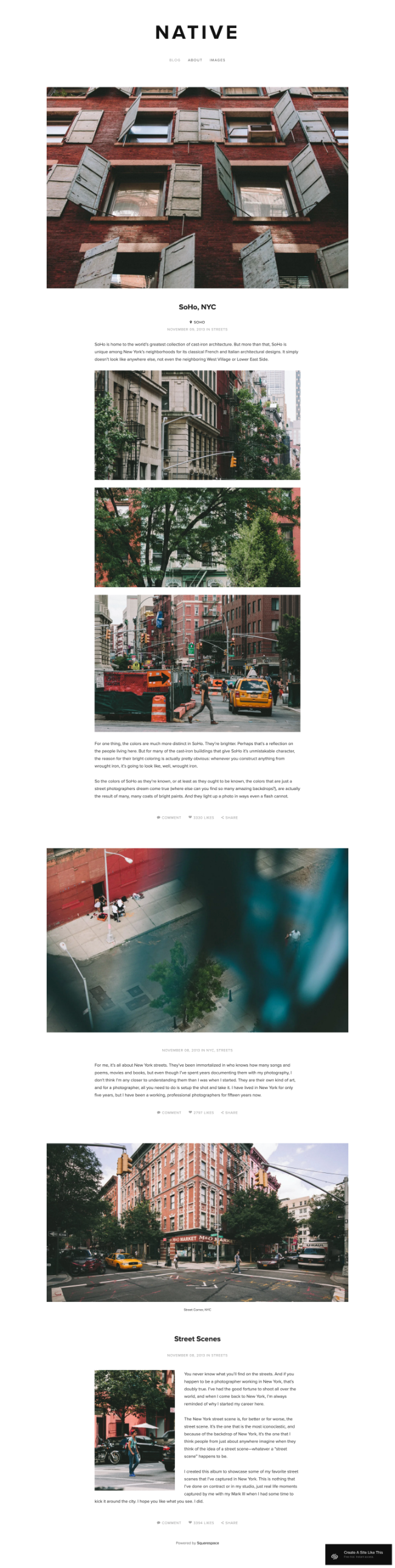
- Rounded thumbnail style gives the portfolio a distinctive, modern look that stands out from the standard grid layouts most filmmaker sites use.
- Built-in blog with location-based content support works well for travel videographers and documentary filmmakers who want to share stories from the field.
- Scrolling layout creates a natural, story-driven browsing experience that mirrors how audiences consume content on social platforms.
- Easy to update frequently, which matters for filmmakers who produce content regularly and need a site that stays current without major redesigns.
✗ Cons
- The social-first design may feel too casual for filmmakers seeking high-end commercial or corporate clients who expect a more formal portfolio presentation.
- Rounded thumbnails are a distinctive style choice that may not suit every filmmaker's visual brand or the tone of their work.
- Less effective for filmmakers with a small body of work; the scrolling, content-rich layout needs regular updates to avoid looking sparse.
Native is the Squarespace filmmaker template for creators who live across platforms. If your audience follows you on YouTube, catches behind-the-scenes clips on Instagram, and watches your reels on Vimeo, Native ties all of that together into a single home base. The social integration is seamless, the blog gives you space for longer-form storytelling, and the scrolling layout feels familiar to audiences who discover filmmakers through social feeds first. It is the template that bridges the gap between your social presence and a professional filmmaker website.
Connect all your active social channels and embed your latest YouTube or Vimeo uploads directly on the homepage so visitors see your freshest work immediately. Use the blog for location-tagged production stories (Shooting in Joshua Tree, Behind the Scenes at SXSW) which drive organic search traffic from filmmakers and fans searching for those locations and events. Keep the rounded thumbnails consistent in aspect ratio and color tone so your portfolio grid looks curated rather than random.
Jasper
Best for Filmmakers Who Blog and Share Process
✓ Pros
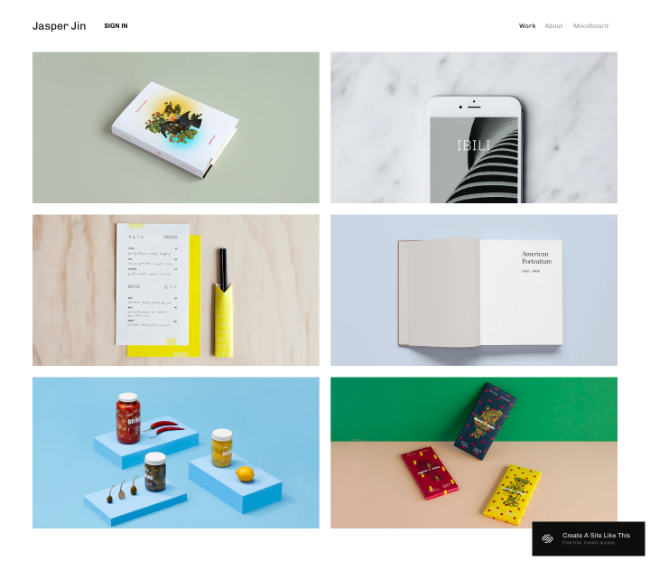
- Grid-block layout with animations creates visual interest and keeps visitors engaged as they scroll through your portfolio and blog content.
- Scaling fonts and dynamic typography give the site a cinematic energy that matches the creative work it is designed to showcase.
- Strong blogging architecture makes Jasper ideal for filmmakers who share production breakdowns, gear reviews, or technique tutorials alongside their portfolio.
- Portfolio pages integrate naturally with blog content, so a visitor can move from watching your reel to reading about how you shot it without any friction.
- Animations and visual transitions add polish without slowing down page loads or distracting from the actual film work on display.
✗ Cons
- The animations and dynamic elements may feel distracting to visitors who just want to quickly scan a filmography and find contact information.
- Requires commitment to regular blog content; the template's blogging architecture looks incomplete if the blog section is empty or rarely updated.
- The creative typography and grid layout demand high-quality images and thumbnails to look polished; weak visuals are more noticeable in a dynamic design.
Jasper is the Squarespace filmmaker template for directors and cinematographers who have as much to say about their process as they have to show in their portfolio. The grid layout, the animations, the scaling fonts: everything about Jasper communicates creative energy and forward motion. But what makes it genuinely useful for filmmakers is how well the blog integrates with the portfolio. You can post a project, then publish a production diary about making it, and visitors can move between the two seamlessly. For filmmakers building a personal brand around both their work and their voice, Jasper gives both equal weight.
Pair every portfolio entry with a companion blog post: a production breakdown, a gear list, or a lesson learned on set. This doubles your site's content, drives organic search traffic from aspiring filmmakers searching for technique advice, and positions you as both a skilled filmmaker and a knowledgeable professional. Keep Jasper's animations subtle by using the default settings rather than maxing out every transition; the movement should guide attention, not compete with your film stills and video embeds.
Avenue
Best for Minimalist Filmmaker Portfolios
✓ Pros
- Minimalist grid layout strips away everything unnecessary, letting your film stills and thumbnails command full attention on every page.
- Fast loading speeds across all devices; visitors reach your portfolio in seconds, which matters when potential clients are reviewing multiple filmmaker sites.
- Dedicated portfolio pages give each project its own clean, distraction-free presentation space with room for video embeds and project descriptions.
- The understated design ages well and never looks dated, which means less time redesigning and more time filmmaking.
- Works equally well for a five-project portfolio and a fifty-project filmography; the grid scales without losing its clean visual rhythm.
✗ Cons
- The minimalist approach may feel too sparse for filmmakers who want their site to convey energy, personality, or a strong visual brand beyond the work itself.
- Limited built-in design flourishes mean that filmmakers who want animations, dynamic typography, or visual transitions will need to look elsewhere.
- The grid-first layout does not prioritize a single hero project, which may not suit filmmakers who want to lead with one standout reel or film.
Avenue is the Squarespace filmmaker template for directors and cinematographers who believe the work should be the only thing a visitor notices. There are no animations, no dramatic typography, no visual tricks: just a clean grid of your projects against a quiet background. This kind of restraint takes confidence, but for filmmakers whose footage is strong enough to carry the entire experience, Avenue is the template that gets out of the way completely. It loads fast, looks sharp on every screen, and never competes with the films it is built to showcase.
Curate Avenue's grid ruthlessly: show only your strongest work and remove anything that dilutes the overall quality of the portfolio. Use consistent thumbnail aspect ratios and similar color grading across all project thumbnails so the grid reads as a unified filmography. Keep the site navigation to three or four pages maximum (Portfolio, About, Contact, and optionally a Blog or Press page) to maintain the minimalist discipline that makes Avenue effective.
Wycoff
Best for One-Page Filmmaker Sites
✓ Pros
- Minimal one-page layout gets everything (reel, bio, and contact) onto a single scrollable page, which is the fastest path from visitor to inquiry.
- Prominent CTA buttons throughout the page make it impossible for visitors to miss how to hire you or request a quote.
- Quick to set up and launch; filmmakers who need a professional site fast can have Wycoff live in an afternoon with Squarespace.
- The streamlined design works well as a digital business card or link-in-bio destination for filmmakers who drive traffic from social media.
- Low maintenance: a one-page site means fewer pages to update, fewer images to swap, and less time spent on website management overall.
✗ Cons
- The one-page format limits how much work you can display; filmmakers with extensive portfolios will feel constrained by the single-scroll structure.
- Less room for detailed project descriptions, production credits, or blog content that helps with search engine visibility.
- The minimal design may not convey enough depth for filmmakers pitching to agencies, studios, or large corporate clients who expect a full-featured website.
Wycoff is the Squarespace filmmaker template for when you need a professional online presence and you need it now. No multi-page navigation, no complex portfolio architecture: just your reel, your story, your contact info, and a clear call-to-action button that says "let's work together." For freelance videographers, film school graduates entering the market, or any filmmaker who wants a polished digital business card without the overhead of managing a full website, Wycoff delivers exactly what is needed and nothing that is not.
Place your best reel or showreel embed at the very top of Wycoff's single page; it is the first and possibly only thing a visitor will watch. Follow it immediately with a two-sentence bio that states who you are and what you shoot. Place CTA buttons after every major section (reel, about, testimonials) so a visitor can take action no matter where they stop scrolling.
Kent
Best for Media-Rich Filmmaker and Cinematographer Sites
✓ Pros
- Media-rich layout supports cover pages, blog posts, event listings, and album galleries; everything a working filmmaker needs in a single template.
- Portfolio section handles video and photo content equally well, which is essential for cinematographers who shoot both motion and stills.
- Blog and event page support makes Kent a strong choice for filmmakers who attend festivals, host screenings, or teach workshops.
- Built-in eCommerce lets you sell digital downloads, prints, tickets, or merchandise alongside your portfolio.
- The multi-feature architecture never feels cluttered; Kent organizes a lot of content types cleanly without overwhelming the visitor.
✗ Cons
- The feature-rich layout requires more content to fill properly; a Kent site with empty blog, events, and shop sections looks unfinished.
- Filmmakers who only need a simple portfolio and contact page may find Kent's multi-section structure more complex than necessary.
- Managing multiple content types (portfolio, blog, events, shop) demands ongoing time investment that some filmmakers may not have.
Kent is the Squarespace filmmaker template for the working professional who does more than just make films. If your career includes screenings, workshops, festival appearances, merchandise, and a blog alongside your portfolio, Kent is the template that handles all of it without requiring a different tool for each job. The media-rich layout was built for exactly this kind of creative multi-tasking: it keeps everything organized, accessible, and visually consistent. For cinematographers and directors whose website needs to be as versatile as their career, Kent is the all-in-one solution.
Only activate Kent's extra sections (blog, events, shop) when you have real content ready for each one. A half-empty events calendar or a shop with two items hurts credibility more than not having those sections at all. Start with portfolio and contact, then add blog posts when you have three or more ready to publish simultaneously. Use cover pages for individual film projects; they create immersive, full-screen introductions that give each film the dramatic presentation it deserves.
Sofia Pazari
Best for Clean and Elegant Filmmaker Portfolios
✓ Pros
- Clean, minimalist design with a refined aesthetic that communicates professionalism and taste; ideal for filmmakers working in fashion, weddings, or art-house genres.
- Two side-by-side image layout creates a distinctive portfolio presentation that lets visitors compare stills or view complementary shots from the same project.
- Easy to customize without design skills; the template's structure is intuitive enough that filmmakers can swap content and adjust layouts quickly.
- The elegant typography and whitespace create breathing room around your visual content, making each project feel more intentional and curated.
- Works well for filmmakers who want to present a smaller, carefully selected body of work rather than an exhaustive filmography.
✗ Cons
- The restrained, elegant aesthetic may feel too quiet for filmmakers working in high-energy genres like action, horror, or extreme sports.
- The side-by-side image layout assumes strong horizontal imagery; filmmakers whose best stills are vertical or square may need to adjust their presentation approach.
- Less built-in functionality for blogs, events, or eCommerce compared to more feature-rich templates like Kent or Bedford.
Sofia Pazari is the Squarespace filmmaker template for directors and cinematographers who want their website to feel like a gallery opening rather than a showroom. The paired-image layout, the generous whitespace, the understated typography: everything about this template says "I am selective about my work and intentional about how I present it." For filmmakers in fashion, weddings, or art-house cinema, that restraint is a powerful brand signal. Sofia Pazari does not try to show everything; it makes what it does show feel unmissable.
Curate your side-by-side image pairs carefully: choose complementary stills from the same project or thematically linked images from different films that create a visual dialogue. Keep the color palette minimal (black, white, and one accent color) to maintain the gallery-like feel. Add a short director's statement on the About page rather than a lengthy bio; Sofia Pazari's design rewards brevity and lets a few well-chosen words carry the same weight as paragraphs elsewhere.
How to Choose the Right Squarespace Filmmaker Website Template
Match the Template to Your Type of Film Work
The most important factor in choosing a Squarespace filmmaker template is what kind of work you do and who you need to impress. Narrative feature directors who want to promote a single project should lean toward Mojave's hero-driven layout. Commercial videographers juggling dozens of projects across categories need Bedford's sidebar organization. Cinematographers who let their footage speak for itself will find Avenue or Wells give the portfolio maximum visual weight. Identify your primary use case first, then choose the template that serves it best.
Consider Your Portfolio Size and Content Volume
A filmmaker with three strong projects needs a very different template than one with thirty. Wycoff and Sofia Pazari shine with small, curated portfolios where every piece is hand-selected. Wells, Bedford, and Kent handle large filmographies without becoming cluttered. If you are early in your career with a growing body of work, choose a template like Lange or Jasper that scales from a few projects to many without requiring a redesign.
Decide How Much Your Site Needs to Do Beyond Portfolio
Some filmmakers only need a reel and a contact form. Others need a blog, event listings, social integration, and eCommerce. Wycoff and Avenue are ideal for portfolio-only sites that load fast and stay simple. Kent and Bedford are built for filmmakers whose websites need to handle multiple functions. Jasper bridges the gap if you want a portfolio plus a blog. Be honest about what you will actually maintain; a half-empty feature-rich site looks worse than a simple, polished portfolio.
Think About Your Audience and How They Find You
If potential clients Google "filmmaker website template" or "squarespace videographer template" to find a director for hire, your site needs strong portfolio presentation and clear contact paths; Wells, Lange, and Avenue excel here. If your audience comes from social media, Native's platform integration and Wycoff's link-in-bio simplicity make the transition seamless. If festival programmers or industry professionals visit your site, Mojave's cinematic hero section and Kent's media-rich layout create the professional depth they expect.
Frequently Asked Questions
What is the best Squarespace filmmaker website template?
Wells is the strongest all-around Squarespace filmmaker template. Its tiled grid layout gives every project in your filmography equal visual weight, it loads fast, and it works for every genre from documentary to horror. For filmmakers who want to promote a single project, Mojave is the better choice. For directors who need a full-featured site with blog, events, and eCommerce, Kent covers the most ground.
Is Squarespace good for filmmaker portfolio websites?
Yes. Squarespace is one of the best platforms for filmmaker portfolios because every template is mobile-responsive, supports video embeds natively, and includes built-in SEO tools. Filmmakers can create a professional portfolio site without coding, and templates like Wells, Lange, and Avenue are designed specifically for visual-heavy portfolios where footage and stills need to be the focal point.
Can I embed video reels on a Squarespace filmmaker website?
Yes. All Squarespace templates support video embeds from YouTube, Vimeo, and other platforms. You can embed reels, trailers, and full project videos directly on your portfolio pages. Templates like Mojave and Lange are especially well-suited for filmmaker video embeds because their layouts give video content prominent, full-width placement.
How much does a Squarespace filmmaker website cost?
Squarespace plans start at $16/month for a Personal plan, which includes all templates, custom domain support, and SSL security. For filmmakers who want eCommerce features to sell digital downloads or merchandise, the Business plan at $33/month adds those capabilities. All ten filmmaker templates (Wells, Mojave, Bedford, Lange, Native, Jasper, Avenue, Wycoff, Kent, and Sofia Pazari) are free with every plan.
What should a filmmaker website include?
A filmmaker website should include a portfolio or reel section showcasing your best work, an about page with your bio and specialties, a contact page with a booking form or inquiry option, and optionally a blog for production stories or technique breakdowns. Templates like Kent and Jasper support all of these sections natively. At minimum, every filmmaker site needs strong visuals, a clear description of what you shoot, and an easy way for clients to reach you.
Which Squarespace filmmaker template loads the fastest?
Avenue and Mojave are the fastest-loading filmmaker templates on this list. Avenue's minimalist grid layout has fewer visual elements to render, and Mojave's focused hero-section design keeps the initial page load lean. For filmmakers concerned about page speed (which affects both user experience and search rankings), these two templates offer the best performance while still presenting your work professionally.
How We Evaluate Templates
These Squarespace filmmaker website templates were evaluated based on how well they serve filmmakers, videographers, directors, and cinematographers specifically. We assessed each template's portfolio presentation quality, video embed support, page loading speed, mobile responsiveness, customization flexibility, and suitability for different filmmaker niches (narrative, documentary, commercial, wedding, social media). Ratings reflect real-world usability for film professionals who need a portfolio-first website that showcases visual work without requiring design or coding expertise.
Conclusion: Build Your Filmmaker Website and Get Back to Making Films
Your films deserve a website that matches their quality, and none of these ten Squarespace filmmaker templates require you to become a web designer to get there. Wells handles large portfolios with its visual grid. Mojave creates cinematic impact for single-project showcases. Bedford organizes complex filmographies. Lange was built specifically for filmmaker portfolios. Native bridges social platforms. Jasper blends portfolio with blogging. Avenue delivers minimalist speed. Wycoff gets you online in an afternoon. Kent handles everything from portfolio to eCommerce. Sofia Pazari presents your work with gallery-level elegance.
Pick the template that matches how you work and who you want to reach, add your footage and your story, and launch a filmmaker website that lets you spend your time where it matters: behind the camera.
* Read the rest of the post and open up an offer