

Editor's Picks
| # | Name | Best For | Price | Rating | Image | |
|---|---|---|---|---|---|---|
| 1 | Minimalist portfolio and fine art photographers | Free | 4.6/5 |

|
More Info | |
| 2 | Travel, landscape, and architecture photographers | Free | 4.5/5 |

|
More Info | |
| 3 | Landscape and panoramic photographers | Free | 4.3/5 |

|
More Info | |
| 4 | Fashion, editorial, and portrait photographers | Free | 4.4/5 |
|
More Info | |
| 5 | Food, product, and styled photography | Free | 4.4/5 |

|
More Info | |
| 6 | Portrait, editorial, and headshot photographers | Free | 4.3/5 |

|
More Info | |
| 7 | Travel, documentary, and photojournalism photographers | Free | 4.3/5 |

|
More Info | |
| 8 | Fine art, still life, and product photographers | Free | 4.2/5 |

|
More Info | |
| 9 | Landscape and nature photographers | Free | 4.3/5 |

|
More Info | |
| 10 | Architectural and geometric photography | Free | 4.2/5 |

|
More Info | |
| 11 | Street, documentary, and lifestyle photographers | Free | 4.3/5 |

|
More Info | |
| 12 | Portrait and environmental portrait photographers | Free | 4.3/5 |

|
More Info | |
| 13 | Session-based photographers who book clients | Free | 4.1/5 |
.webp)
|
More Info | |
| 14 | Photography bloggers and visual storytellers | Free | 4.2/5 |
|
More Info | |
| 15 | Creative and experimental photographers | Free | 4.0/5 |
|
More Info | |
| 16 | Portfolio photographers and fine art galleries | Free | 4.1/5 |
|
More Info | |
| 17 | Photographers who also produce video content | Free | 4.1/5 |
|
More Info | |
| 18 | Nature, landscape, and event photographers | Free | 4.1/5 |
|
More Info | |
| 19 | Multi-service photography businesses | Free | 4.0/5 |

|
More Info | |
| 20 | Blogging photographers across all niches | Free | 4.0/5 |
|
More Info | |
| 21 | Travel bloggers and social media photographers | Free | 4.0/5 |
|
More Info | |
| 22 | Filmmakers and cinematic photographers | Free | 4.2/5 |
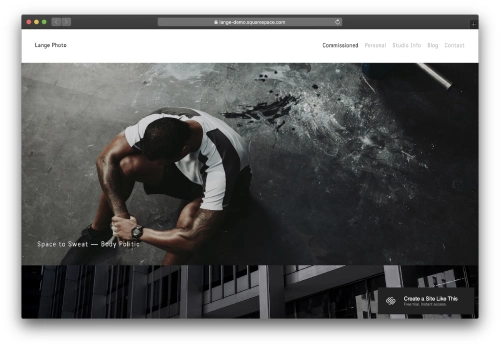
|
More Info |
22 Best Squarespace Photography Website Templates
Arthur
Best for Minimalist Art Photography ✓ Pros
- Clean, gallery-like layout that puts each image center stage with generous white space.
- Asymmetrical design adds visual intrigue without competing with your photos.
- Built-in subscription section keeps followers connected to new work.
- Distraction-free browsing experience that feels like walking through a curated exhibit.
- Works beautifully for abstract, fine art, and conceptual photography portfolios.
✗ Cons
- The minimal layout may feel too sparse for photographers who want to display large volumes of work at once.
- Limited built-in text sections if you need detailed project descriptions alongside images.
- The asymmetric grid requires strong, consistent image quality to look its best.
Arthur is built for photographers whose work speaks for itself. The layout strips away every distraction so visitors slow down, look closer, and engage with each image on its own terms.
Balboa
Best for Travel and Landscape Storytelling ✓ Pros
- Project-based gallery structure that tells the story behind each shoot or location.
- Clean, professional layout with a warm, approachable feel.
- Dedicated bio section that helps clients connect with the photographer, not just the photos.
- Organized navigation that guides visitors through visual journeys without confusion.
- Excellent for presenting series-based work like travel diaries or architectural projects.
✗ Cons
- The storytelling layout is less suited to photographers who want a single-page scrolling portfolio.
- Requires enough written content per project to make the narrative sections feel complete.
- May feel overly structured for candid or spontaneous photography styles.
Balboa turns your portfolio into a collection of visual stories. Each project gets its own dedicated space, making it ideal for photographers who want clients to understand the context behind every shot.
Elliott
Best for Panoramic and Landscape Photos ✓ Pros
- Horizontal slideshow layout that displays wide images exactly as they should be seen.
- Browsing feels like flipping through a high-end photography book.
- Minimal navigation keeps focus entirely on the imagery.
- Strong call-to-action placement for booking or contact without breaking the visual flow.
- Perfect for photographers who work in wide-format or cinematic compositions.
✗ Cons
- The horizontal scroll may feel unfamiliar to visitors used to standard vertical layouts.
- Not ideal for portrait-oriented or square-format photography.
- Limited space for text-heavy content like blog posts or service descriptions.
Elliott is simplicity at its finest. The slideshow-style layout lets each landscape breathe, making visitors linger on every frame instead of scrolling past.
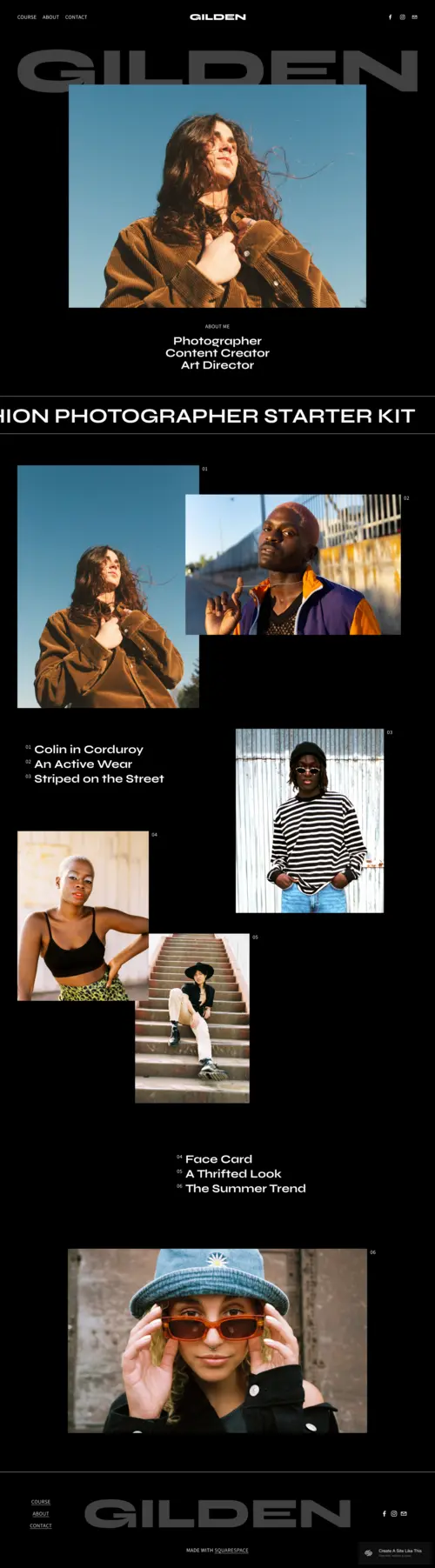
Gilden
Best for Fashion and Editorial Photography ✓ Pros
- Bold black background creates a high-fashion magazine feel instantly.
- Dynamic layout with sections for curated collections and editorial series.
- Full-page image display makes every shot feel like a statement piece.
- Sleek design that attracts fashion brands and editorial clients.
- Strong visual hierarchy guides viewers through your strongest work first.
✗ Cons
- The dark, edgy aesthetic limits versatility if your style is bright or airy.
- Heavy reliance on high-contrast images to match the template's mood.
- May feel too dramatic for family, wedding, or lifestyle photography niches.
Gilden feels like a high-fashion magazine brought to life. If your photography is bold, dramatic, and unapologetically confident, this template matches that energy.
Minetta
Best for Food Photography Portfolios ✓ Pros
- Grid-style layout that creates a cohesive visual feel across different shoots and subjects.
- Modern, clean design that emphasizes color and composition in every thumbnail.
- Excellent for managing multiple project portfolios within a single site.
- Easy navigation lets visitors browse curated collections without overwhelm.
- Dark background option unifies diverse images into a polished presentation.
✗ Cons
- The grid format crops images to uniform sizes, which may cut important details from some shots.
- Less effective for single-image hero presentations or full-bleed showcases.
- Requires a large volume of work to fill the grid without gaps.
Minetta is a visual feast. Its grid layout creates order from variety, making it the go-to template for food photographers and styled shoot specialists. Another excellent grid option is Matsuya.
Ortiz
Best for Portrait and Editorial Photographers ✓ Pros
- Warm, approachable design that balances professionalism with personality.
- Built-in sections for client testimonials and a personal bio that build trust.
- Service offerings and booking integration make client conversion smooth.
- Elegant layout that highlights both your artistry and your personality.
- Ideal for photographers who want clients to feel a personal connection before booking.
✗ Cons
- The personal storytelling focus may feel excessive for photographers who prefer to let work speak alone.
- Softer tones and warm palette may not suit dark or moody photography styles.
- Requires writing compelling bio and service copy to fill the template's text sections.
Ortiz is about connection. Designed for portrait and editorial photographers, it lets you share your story alongside your images so clients see the person behind the camera.
Tepito
Best for Travel and Documentary Photography ✓ Pros
- Journalistic layout that feels like a digital travel journal or photo essay.
- Map integration shows your current location - ideal for photographers on the move.
- Clean, direct design that lets each image carry the narrative weight.
- Newsletter signup keeps followers updated on new projects and destinations.
- Sections for recent work and personal bio add authenticity and context.
✗ Cons
- The journal-style layout works less well for commercial or studio photography.
- Map feature requires regular updating to stay relevant.
- Simpler design may feel limiting for photographers with complex service offerings.
Tepito feels like a travel journal in digital form. Its minimalist, journalistic approach is perfect for documentary photographers who want every image to feel like part of a larger story.
Cimen
Best for Fine Art and Still Life Photography ✓ Pros
- Bold typography paired with soft visuals creates a striking art-gallery feel.
- Generous white space lets each image breathe as a standalone piece.
- Smooth flow between portfolio sections and inquiry forms for easy client conversion.
- Works beautifully for photographers who treat every shot as fine art.
- Services and portfolio integrated smoothly for a professional presentation.
✗ Cons
- The gallery-like presentation requires consistently high image quality to maintain the effect.
- Bold typography may overpower more subtle or muted photography styles.
- Less suited to action-heavy or fast-paced photography genres.
Cimen turns your portfolio into an online gallery. If your strength lies in capturing quiet, composed moments, this template frames each image as the art piece it is.
Falodu
Best for Immersive Landscape Photography ✓ Pros
- Spacious layout gives wide, breathtaking shots the room they need to impress.
- Full-screen visuals transport viewers directly into each landscape scene.
- Minimalist navigation keeps all attention on the photography itself.
- Each image flows naturally into the next for a journey-like browsing experience.
- Clean white background ensures colors render accurately and vividly.
✗ Cons
- The spacious design means fewer images visible per page - not ideal for large catalogs.
- Minimal text sections limit the ability to tell stories behind each landscape.
- Requires genuinely stunning images to fill the large display areas effectively.
Falodu is built for landscape photographers who want their images to feel immersive. The full-screen layout turns your portfolio into a visual journey that pulls viewers into every scene.
Gates
Best for Architectural Photography Portfolios ✓ Pros
- Bold grid design mirrors the clean lines and symmetry of architectural subjects.
- Excellent for organizing large portfolios into navigable collections.
- Each photo stands strong individually while forming a cohesive visual story.
- Modern, professional aesthetic that appeals to commercial and design clients.
- Structured layout handles diverse project types without feeling cluttered.
✗ Cons
- The rigid grid may feel restrictive for organic or free-flowing photography styles.
- Works best with images that share consistent aspect ratios and framing.
- The structured feel may not suit photographers who want a more casual presentation.
Gates is where structure meets creativity. Its bold grid design is a natural match for architectural and geometric photography, giving each image a polished, professional frame.
Matsuya
Best for Eclectic and Street Photography ✓ Pros
- Playful yet structured layout that embraces variety across genres and styles.
- Grid display organizes diverse work without making the site feel cluttered.
- Casual, approachable aesthetic that reflects spontaneous photography styles.
- Strong portfolio organization for photographers who work across multiple genres.
- Clean design keeps things professional while maintaining a laid-back vibe.
✗ Cons
- The casual feel may not project enough authority for high-end commercial clients.
- Grid thumbnails may not do justice to images that need full-screen viewing.
- Requires a varied portfolio to fully take advantage of the eclectic layout.
Matsuya embraces variety. If you shoot street scenes, lifestyle moments, and candid documentary work, this template presents the full range of your eye without losing cohesion. Read our full Matsuya review.
McCurry
Best for Portrait Photography Portfolios ✓ Pros
- Large image display makes emotional connection between subject and viewer the focal point.
- Minimal, elegant design draws all attention to expressions, lighting, and mood.
- Smooth navigation lets clients scroll through portraits without interruption.
- Cohesive layout works for editorial, environmental, and studio portrait work.
- Purposeful image placement gives each portrait space to make an impact.
✗ Cons
- The portrait-focused design is less versatile for mixed-genre portfolios.
- Minimal text areas limit service descriptions and detailed pricing pages.
- Requires consistently strong portraits to fill the large display areas.
McCurry is a powerhouse for portrait photographers. The large-format display and minimal design ensure that every expression, every emotion, every detail in your portraits commands full attention.
Ready
Best for Photographers Who Need Booking ✓ Pros
- Built-in appointment scheduling system for booking photography sessions directly.
- Minimalist design keeps load times fast and helps with search engine rankings.
- White background puts your photography front and center without visual competition.
- Hidden left-side menu keeps navigation clean and unobtrusive.
- Social media integration helps maintain audience connections across platforms.
✗ Cons
- The minimalist approach may feel too simple for photographers wanting a visually rich portfolio experience.
- Hidden menu navigation can confuse first-time visitors who expect visible nav links.
- Limited layout variety compared to more design-forward templates on this list.
Ready is built for photographers who need to convert visitors into booked sessions. The integrated scheduling system and clean CTA placement make it easy for clients to go from browsing to booking.
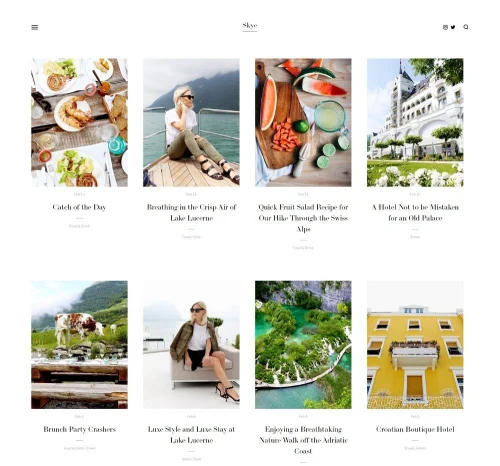
Skye
Best for Photography Bloggers ✓ Pros
- Grid-based content blocks showcase blog posts with strong visual thumbnails.
- Excellent for photographers who combine blogging with portfolio work.
- Fully mobile-responsive with fast loading times across all devices.
- Fullscreen design with easy-to-update content areas for regular posting.
- Hidden slide-out menu keeps the visual experience clean and distraction-free.
✗ Cons
- The blog-forward layout may feel less portfolio-focused for pure gallery presentations.
- Requires regular content updates to keep the grid feeling fresh and active.
- Hidden navigation can reduce discoverability of deeper portfolio pages.
Skye bridges the gap between blog and portfolio. If you publish behind-the-scenes posts, session recaps, or photography tips alongside your gallery work, this template handles both smoothly.
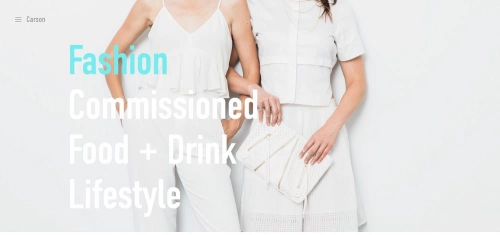
Carson
Best for Interactive Photography Portfolios ✓ Pros
- Unique hover-to-reveal design changes the background image as visitors explore links.
- Interactive browsing experience that reduces bounce rate and increases engagement.
- Hidden menu keeps the interface clean while linking to all portfolio pages.
- No coding or developer skills needed to set up and customize.
- Perfect for showcasing current and past projects in an engaging format.
✗ Cons
- The hover-based interaction does not translate to mobile touchscreens.
- Unconventional layout may confuse visitors expecting a traditional gallery.
- Limited space for detailed service descriptions or pricing information.
Carson turns portfolio browsing into an interactive experience. The hover-to-reveal design keeps visitors engaged and exploring, making every click feel intentional and curated.
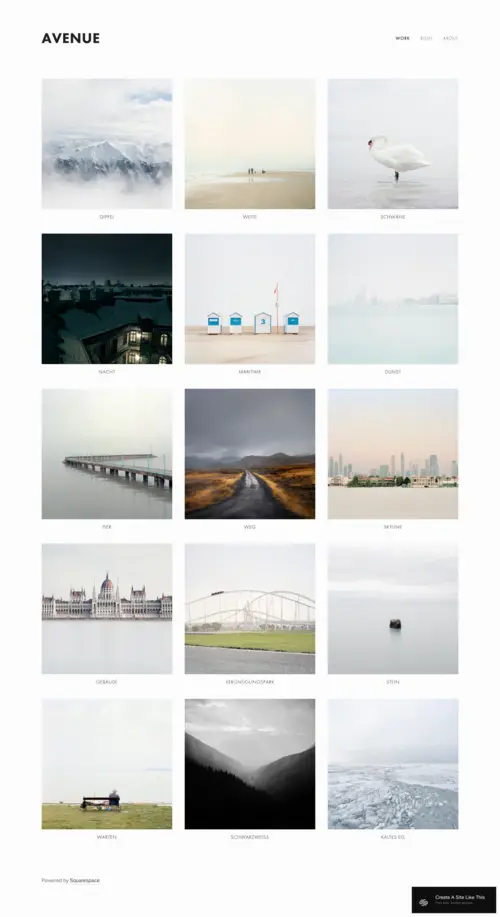
Avenue
Best for Clean Grid Photography Galleries ✓ Pros
- Minimalist grid layout that is easy to design, customize, and maintain long-term.
- Individual project pages let you showcase entire sessions with detailed descriptions.
- Fast loading times from the clean, clean design boost search engine rankings.
- Built-in eCommerce functionality for photographers who sell prints or packages.
- Grid-based layout handles diverse portfolio types from weddings to commercial work.
✗ Cons
- The basic grid design may feel generic without strong customization effort.
- Less visual impact than full-bleed or immersive templates for hero images.
- Project pages require written content to feel complete alongside the images.
Avenue is the reliable workhorse. Its clean grid layout makes portfolio management effortless, and the fast load times mean your images reach visitors without delay.
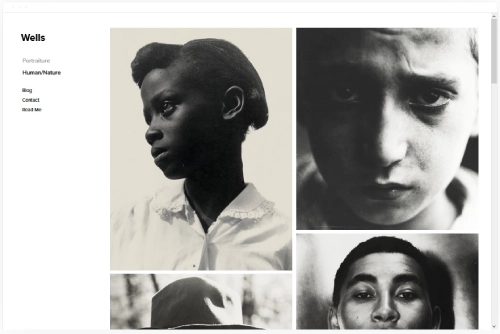
Wells
Best for Video and Photo Hybrid Portfolios ✓ Pros
- Supports both photo galleries and embedded video for hybrid visual portfolios.
- Built-in eCommerce for selling prints, canvases, or digital downloads.
- Easy video embedding by pasting a URL - Squarespace handles the rest.
- Clean design that balances multiple media types without feeling cluttered.
- Social media profile links help direct visitors to your other platforms.
✗ Cons
- The multi-media focus may dilute the impact for photographers who want a pure gallery experience.
- Video-heavy pages can slow load times if not optimized properly.
- Less refined for pure photography portfolios compared to dedicated gallery templates.
Wells is ideal for photographers branching into video. The template handles both media types cleanly, plus offers eCommerce tools for selling your work directly from the site.
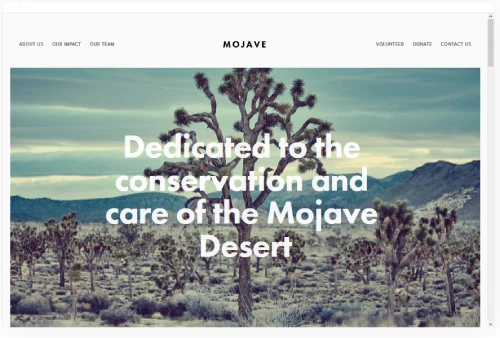
Mojave
Best for Bold, Scrolling Photography Showcases ✓ Pros
- Striking scrolling effect creates an immersive browsing experience.
- Banner area supports both images and video for a dynamic first impression.
- Well-placed call-to-action buttons for converting visitors into leads.
- Share buttons on galleries and blog posts extend your reach through social media.
- Clean white background keeps focus on your visual work throughout the site.
✗ Cons
- The scrolling design can feel slow for visitors who want to browse quickly.
- Banner-heavy layout requires strong hero images to make the right first impression.
- Share button setup requires some technical configuration to implement fully.
Mojave commands attention from the first scroll. The bold banner area and smooth scrolling effect make it ideal for photographers who want their homepage to feel cinematic.
Bedford
Best for Versatile Photography Businesses ✓ Pros
- Versatile sidebar navigation with banner support for a professional business layout.
- Scrolling index page makes showcasing exhibits, services, and portfolio sections easy.
- Built-in eCommerce for selling photos, prints, and booking photography packages.
- Supports images and videos on every page for rich multimedia presentations.
- Banner call-to-action placement on each section drives lead generation effectively.
✗ Cons
- The business-forward layout may feel less artistic than pure gallery templates.
- Sidebar navigation takes up screen space that could be used for images.
- Requires more content and pages to feel complete compared to minimal templates.
Bedford is the Swiss Army knife. If your photography business offers sessions, sells prints, runs exhibits, and publishes blog content, Bedford handles all of it within one cohesive layout.
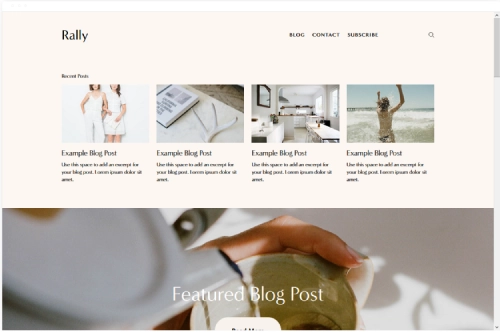
Rally
Best for Photography Blog and Portfolio Combos ✓ Pros
- Smooth scrolling experience that feels polished and professional throughout.
- Strong blog functionality for publishing session recaps and photography tips.
- Social media link placement keeps visitors connected across platforms.
- Streamlined menu design at the top right keeps navigation accessible but clean.
- Optimized for speed and works flawlessly on mobile devices.
✗ Cons
- The blog emphasis may overshadow portfolio presentation for gallery-focused photographers.
- Simpler layout offers fewer visual wow-factor moments compared to immersive templates.
- Requires consistent blog publishing to keep the homepage looking active and current.
Rally is built for photographers who blog. The smooth scrolling, strong post layouts, and fast performance make it easy to publish regularly while keeping your portfolio accessible.
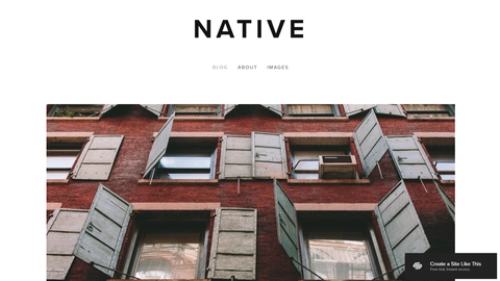
Native
Best for Social Media-Savvy Photographers ✓ Pros
- Strong social media integration for photographers who build their brand across platforms.
- Rounded thumbnail galleries create a distinctive, modern visual style.
- Location tagging on blog entries - great for travel and destination photographers.
- Clean, modern scrolling homepage that showcases your latest work immediately.
- Optimized for speed across all devices to capture mobile-first audiences.
✗ Cons
- Rounded thumbnails may not suit all photography styles, especially formal or corporate work.
- The social-media-forward design may feel too casual for studio or commercial photographers.
- Blog-centric layout requires regular posting to keep the site feeling fresh.
Native is made for photographers who live on social media. The platform integrations and location-tagged blog entries create a smooth bridge between your Instagram feed and your portfolio site.
Lange
Best for Full-Bleed Cinematic Photography ✓ Pros
- Full-bleed hero images showcase your strongest work at maximum visual impact.
- Intuitive navigation helps visitors find galleries and contact info quickly.
- Space for photographer notes and credits alongside each image adds editorial depth.
- Vertical scrolling works naturally on both desktop and mobile devices.
- Clean design that ranks well on search engines due to fast load times.
✗ Cons
- Full-bleed images require very high resolution files to avoid pixelation on large screens.
- The cinematic feel may not suit lighter, airier photography styles.
- Limited layout options for photographers who want complex page structures.
Lange is built for visual impact. The full-bleed hero images and space for photographer notes make it feel like a digital photo essay, ideal for filmmakers and cinematic photographers alike.
How to Choose the Right Squarespace Photography Template
Match the Template to Your Photography Style
The single most important decision is matching the template's design language to your shooting style. Landscape and nature photographers need spacious, full-bleed layouts like Falodu or Elliott. Portrait photographers benefit from large single-image displays like McCurry. Fashion and editorial shooters should lean toward bold, high-contrast templates like Gilden. If you shoot across multiple genres, flexible grid templates like Matsuya or Avenue handle variety without losing cohesion.
Prioritize How Clients Will Find and Book You
Think about your actual client journey. If most clients discover you through Google searches for Squarespace photography templates or portfolio examples, choose a template with fast load times and clean structure that ranks well. If you book sessions directly, Ready's scheduling integration is hard to beat. If clients come through referrals and want to browse your work first, gallery-focused templates like Arthur or Balboa let your images build trust before the inquiry.
Consider Your Content Beyond Photos
Some photographers need just a portfolio. Others run a blog, sell prints, publish behind-the-scenes content, or maintain client galleries. If you blog regularly, Skye and Rally are built for that workflow. If you sell work online, Avenue, Wells, and Bedford include eCommerce functionality. If your portfolio is the entire site, minimalist options like Arthur, Cimen, or Falodu keep things focused.
Plan for Growth and Updates
Pick a template that still works when your portfolio doubles in size. Grid-based templates like Gates, Minetta, and Avenue scale well as you add projects. Story-based templates like Balboa and Tepito require more effort per project but reward depth. Consider how often you will update the site - if infrequently, choose a template that looks complete with fewer images rather than one that needs constant fresh content.
Frequently Asked Questions
What is the best Squarespace photography template for beginners?
Are Squarespace photography templates free to use?
Can I sell prints on a Squarespace photography website?
Which Squarespace photography template loads the fastest?
Can I add a blog to my Squarespace photography website?
How do I choose a Squarespace photography template for my portfolio style?
Can I switch Squarespace photography templates after building my site?
Do Squarespace photography templates work well on mobile devices?
How We Evaluate Templates
Conclusion: Build Your Photography Portfolio on Squarespace
Your photography deserves a website that works as hard as you do behind the camera. Whether you need a minimalist gallery like Arthur, an immersive landscape showcase like Falodu, or a booking-focused business site like Ready, there is a Squarespace photography template built for your workflow.
Pick the template that matches how you shoot, drop in your strongest images, and let your work do the talking. Every template on this list is free with your Squarespace plan, so you can test-drive your top picks before committing. The best photography websites are not the fanciest ones - they are the ones that get built and launched.
* Read the rest of the post and open up an offer