

Choosing the right food photographer website template is about more than aesthetics - it shapes how potential clients perceive your work before they ever reach out. A cluttered layout or generic design undermines the precision and artistry that goes into professional food photography.
The Minetta Squarespace template solves that problem. Its dark palette and full-width image sections create a gallery-like browsing experience that feels intentional and polished. Every element is designed to put your food photography front and center while guiding visitors naturally toward your contact page or booking form. In this Minetta template review, we break down what makes this squarespace food photography template stand out, who it works best for, and how to customize it without losing its edge.
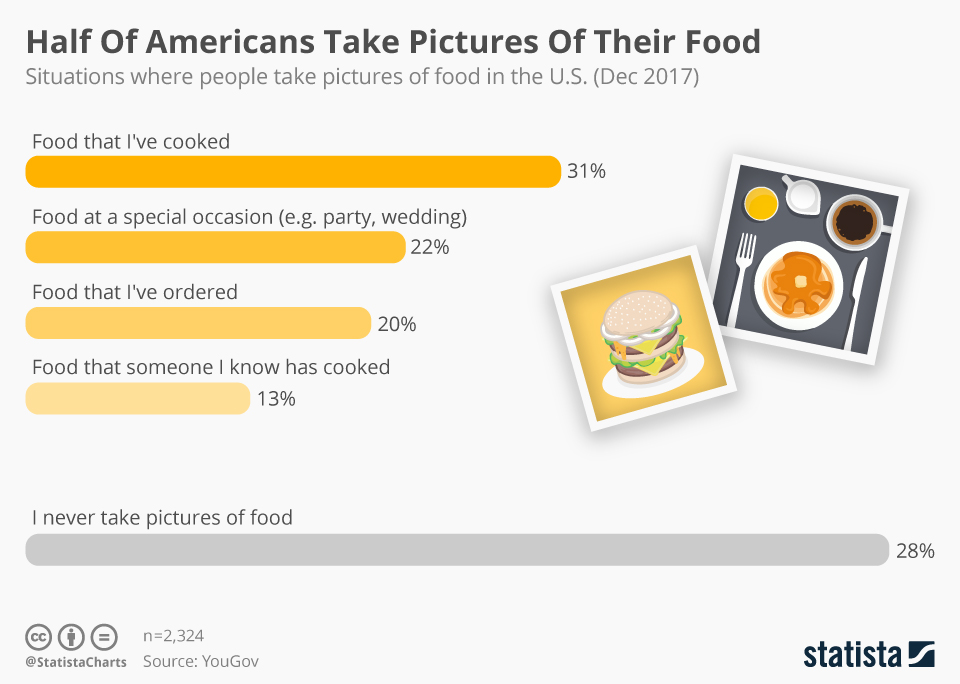
You will find more infographics at Statista
Editor's Picks
| # | Name | Best For | Price | Rating | Image | |
|---|---|---|---|---|---|---|
| 1 | Food photographers, culinary creatives, and restaurant photographers | Free | 4.4/5 |
.webp)
|
More Info |
Minetta
Best for Food Photographers and Culinary Creatives ✓ Pros
- Full-screen image grid immerses visitors in your portfolio from the first scroll
- Dark black background makes food colors, textures, and plating details pop on screen
- Minimalist typography keeps the focus on your photography rather than competing for attention
- Clean portfolio layout organizes projects beautifully without unnecessary clicks or clutter
- Fully responsive design ensures your food photography looks sharp on desktop, tablet, and mobile
✗ Cons
- Dark theme may not suit food bloggers or recipe sites that need a lighter, more approachable feel
- Grid-heavy layout depends on consistently high-quality photography - weaker images will stand out
- Limited built-in text sections make it less ideal for photographers who want to pair long-form stories with their images
The Minetta Squarespace template stands out because it treats your food photography portfolio like a gallery exhibition, not a generic website. Where most portfolio templates try to balance text and images equally, Minetta gives your visuals the full stage - wrapping essential navigation and contact features around an experience that makes clients feel the quality of your work before reading a single word.
How to Choose the Right Squarespace Food Photography Template
Match the Template to Your Photography Style
Not every food photographer website template works for every niche. A dark, grid-focused design like the Minetta Squarespace template is a natural fit for editorial food photographers, commercial shooters, and restaurant photographers who rely on bold, high-contrast imagery. If your style leans toward bright, airy lifestyle food photography, a lighter template may better represent your brand. The goal is choosing a template whose default aesthetic matches the mood your best images create.
Prioritize Portfolio Organization
Potential clients browsing a food photographer's website want to find relevant work fast. The Minetta template's grid layout makes it easy to organize shoots by category - restaurant work, editorial spreads, product shots, and personal projects. Before committing to any squarespace food photography template, think about how your portfolio is structured. A template that lets you create distinct galleries or project pages will serve you better than one that dumps everything into a single feed.
Consider Your Image Quality
Image-forward templates like the Minetta Squarespace template depend entirely on the quality of what you upload. Full-width photo sections and grid layouts amplify great photography, but they also expose weak images. Before launching, audit your portfolio and lead with your strongest work. If some shoots need re-editing or re-shooting, handle that before going live. A polished template paired with polished images is what separates a professional food photographer's website from an amateur one.
Test the Mobile Experience First
Art directors, editors, and restaurant owners often browse photographer portfolios on their phones between meetings. The Minetta template is fully responsive and adapts cleanly to smaller screens, keeping your grid layout intact and navigation simple. When evaluating any food photographer website template, always preview it on mobile first - if images load slowly or navigation feels awkward on a phone, you risk losing potential clients before they see your best work.
Frequently Asked Questions
What is the Minetta Squarespace template best for?
Is the Minetta template free with Squarespace?
Can I use the Minetta template for a food blog?
Does the Minetta template work for other types of photography?
How do I customize the Minetta Squarespace template?
Is the Minetta template mobile-friendly?
What makes Minetta different from other Squarespace photography templates?
Conclusion: Launch Your Food Photography Portfolio With Minetta
The Minetta Squarespace template gives food photographers and culinary creatives a portfolio website that feels as intentional as the images they create. If your work thrives on bold visuals, rich color, and high-contrast presentation, Minetta ensures your online presence matches. For photographers who prefer a lighter grid aesthetic, the Matsuya template offers a comparable layout worth considering.
Already using Minetta for your food photography portfolio? Drop your site link in the comments - we would love to see your work in action.
* Read the rest of the post and open up an offer