

Editor's Picks
| # | Name | Best For | Price | Rating | Image | |
|---|---|---|---|---|---|---|
| 1 | Music festivals, art shows, creative conferences, and design events | Free | 4.6/5 |
|
More Info | |
| 2 | Craft fairs, farmers markets, community festivals, and local workshops | Free | 4.4/5 |
|
More Info | |
| 3 | Garden parties, eco-conscious events, outdoor receptions, and nature retreats | Free | 4.3/5 |
|
More Info | |
| 4 | Music festivals, multi-day events, outdoor concerts, and large public gatherings | Free | 4.3/5 |

|
More Info | |
| 5 | Tech conferences, product launches, startup events, and forward-thinking gatherings | Free | 4.2/5 |
|
More Info | |
| 6 | Graduation parties, family gatherings, milestone celebrations, and private events | Free | 4.1/5 |
|
More Info |
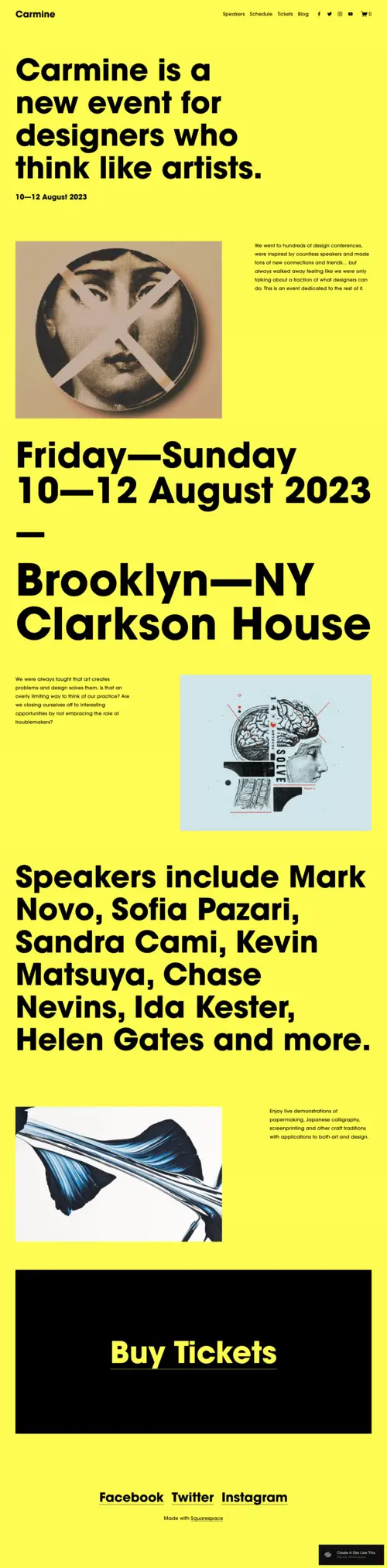
Carmine
Best Overall for Creative Events ✓ Pros
- Bold, modern design with vibrant colors and unique typography that immediately sets an energetic, creative tone for any event.
- Speaker and performer list sections give each person their own visual moment, building anticipation and personal connection before the event.
- Prominent "Buy Tickets" buttons are easy to find on every page, keeping the conversion path short and obvious.
- Event schedule layout presents dates, times, and sessions in a format that's scannable and impossible to miss.
- Full visual impact on both desktop and mobile - the bold design elements translate well to smaller screens without losing energy.
✗ Cons
- The bright, expressive aesthetic may feel too loud for formal corporate conferences or understated private gatherings.
- Requires strong event photography or branded visuals to match the template's high-energy design - generic images weaken the impact.
- Less suited for events that need lengthy text-based agendas or detailed session descriptions in a traditional format.
The Carmine Squarespace event template screams creativity. Right off the bat, the bright colors and unique typography make this template feel exciting and fresh. Every section is designed with the visual thinker in mind - it takes the usual event details like location, dates, and speakers and throws them at you in a way that's hard to ignore. The speakers list especially feels personal, giving each person their own visual moment and setting up a strong connection before you even get to the event. Carmine is also built for action. Buttons like "Buy Tickets" stand out and are easy to find. This is an event website designed to get people excited and moving - no boring scrolls through basic info here.
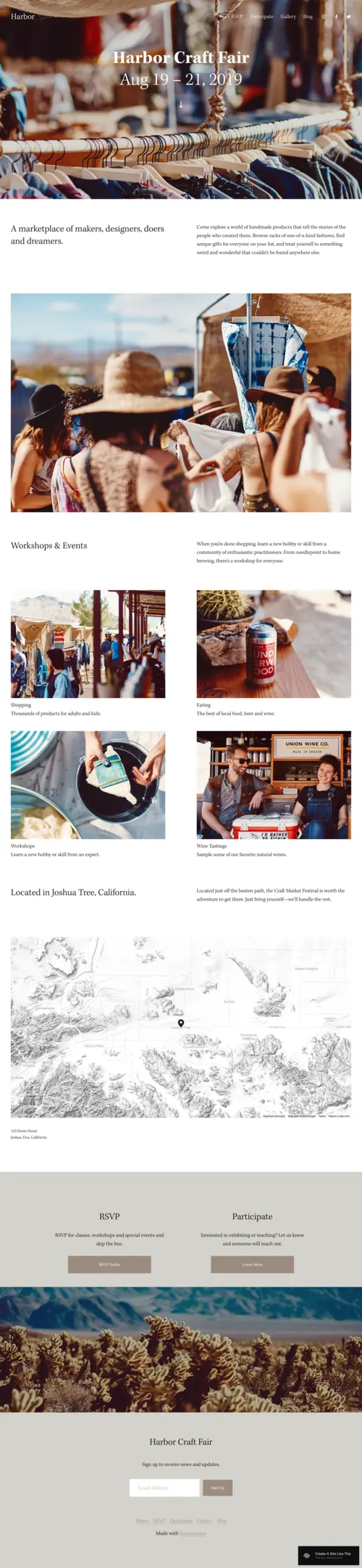
Harbor
Best for Community and Local Events ✓ Pros
- Warm, inviting design with earthy tones that instantly communicates a community-focused, approachable event atmosphere.
- Dedicated sections for showcasing artisan workshops, vendor stories, and marketplace highlights give depth to your event page.
- Smooth RSVP and participation features make it easy for attendees to sign up without friction or confusion.
- Layout naturally guides visitors through what the event offers - from workshops to unique vendor products to schedule details.
- Personal, handcrafted feel throughout the design makes the event feel special and worth attending, not just another weekend outing.
✗ Cons
- The soft, community-focused aesthetic doesn't project the energy needed for high-intensity music festivals or tech conferences.
- Image-heavy vendor sections require photos from multiple participants, which can be hard to collect before the event.
- Less effective for events that need aggressive urgency-driven ticket sales or countdown-style marketing.
The Harbor template feels like a day at an artsy marketplace. It's designed to attract both the makers and the doers, with every section feeling handcrafted. The warm tones of the imagery and easy layout guide visitors naturally through what the event has to offer, from workshops to unique vendor products. This template isn't just about the event - it's about the people. The focus is on community, with space for vendor stories and personal touches that make the event feel special. The RSVP feature is smooth, no hassle, and gets people involved fast. Whether it's a craftsperson teaching their trade or a local food vendor showcasing a signature dish, Harbor brings everyone together in a way that feels easy and natural.
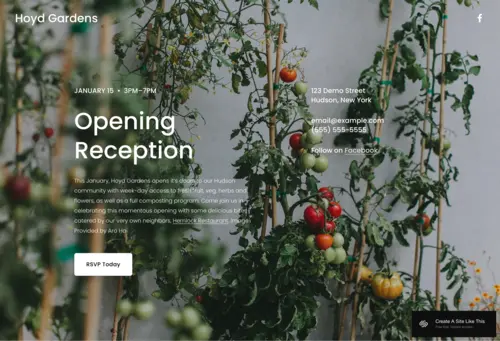
Hoyd
Best for Garden and Nature-Themed Events ✓ Pros
- Lush, plant-filled aesthetic creates an instant sense of calm - perfect for outdoor events, garden tours, and eco-conscious gatherings.
- Clean, minimalist layout lets your event details breathe and stand out without competing with cluttered design elements.
- Strong visual storytelling through full-width nature imagery sets the tone before visitors read a single word.
- Simple but effective RSVP and event detail sections make location, time, and registration easy to find on any device.
- Eco-friendly, organic feel appeals directly to audiences drawn to sustainability, wellness, and nature-based experiences.
✗ Cons
- The serene, nature-driven design won't suit high-energy events like concerts, tech launches, or competitive festivals.
- Minimal layout means less room for complex schedules with multiple tracks, breakout sessions, or detailed speaker bios.
- The green-and-natural palette may clash with event brands that use bold, non-organic color schemes.
The Hoyd template feels like stepping into a peaceful retreat. It's lush, filled with greenery, and makes you feel instantly calm. This is a strong Squarespace event template for events that draw on a natural vibe - whether it's an opening reception, a garden tour, or an eco-conscious gathering. The layout is simple but stunning, allowing the event details to breathe and stand out. What makes Hoyd stand out is how clean it is. It's not over-cluttered with unnecessary info. Instead, it sticks to the essentials while letting the visuals do the talking. The images feel alive and give off a sense of space and openness. The strong yet minimalist design is also great for highlighting key details like location, time, and RSVPs without distractions.
Ocotillo
Best for Music Festivals and Large-Scale Events ✓ Pros
- Bold, electric design with immersive colors and strong typography that matches the excitement of live music and festival culture.
- Prominent lineup sections make it easy to feature artists, performers, and headliners in a format that builds hype instantly.
- Clear, user-friendly ticket-buying process keeps the path from "I'm interested" to "I've got my ticket" short and seamless.
- Larger-than-life visual feel across the entire site - everything from fonts to images communicates that this event is a big deal.
- Multi-section layout handles complex festival information including lineup, schedule, venue map, and FAQ without feeling overwhelming.
✗ Cons
- The festival-scale energy is overkill for intimate workshops, private parties, or small-group professional events.
- Requires a confirmed lineup or performer list to fill the template's prominent showcase sections - placeholder content looks empty.
- The bold, maximalist aesthetic may not align with corporate or formal event brands that prefer restraint.
The Ocotillo template packs a punch. It's for festivals and events that don't want to blend in with the crowd. Bright, bold, and filled with energy, this Squarespace event template is built for music festivals that want to showcase a killer lineup and bring in massive crowds. Everything feels larger-than-life, from the typography to the images. If you want to get people hyped, Ocotillo does the job. The lineup is laid out in a way that's impossible to miss, and you can tell right away what kind of experience you're in for. The ticket section stands out without being obnoxious, and it's easy for anyone to navigate, making sure people click and buy without a second thought.
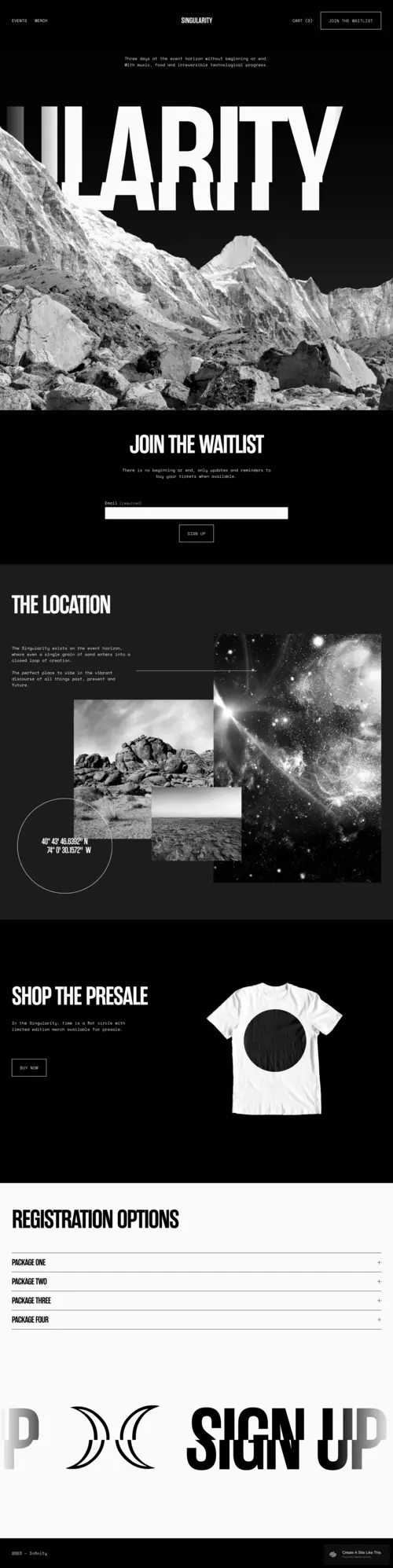
Singularity
Best for Tech Conferences and Product Launches ✓ Pros
- Futuristic, dark-themed design with a sleek minimal aesthetic that feels perfectly at home for technology and innovation events.
- High-impact visuals and striking black-and-white color scheme create a modern, polished edge that signals a premium experience.
- Built for anticipation - presale ticket sections, waitlist signups, and teaser content keep visitors engaged before the full event reveal.
- Clean registration flow with easy sign-up options reduces friction for attendees who want to secure their spot quickly.
- Every section pushes toward action - whether it's signing up for a waitlist, grabbing early-bird tickets, or sharing the event.
✗ Cons
- The dark, moody aesthetic may feel too intense or cold for community events, family celebrations, or wellness gatherings.
- Minimalist design means limited space for detailed multi-track conference agendas or extensive speaker bio pages.
- The tech-forward look narrows its appeal - event types outside tech, music, or design may feel mismatched.
Singularity feels like a step into the future. Dark, moody, and strikingly minimal, this Squarespace conference template is designed for events that focus on technology, innovation, or anything forward-thinking. The black-and-white color scheme gives it a modern, polished edge, while the huge, attention-grabbing visuals make it hard to look away. This template is all about anticipation. Whether it's selling presale tickets or teasing a product launch, it keeps people engaged and wanting more. Every section is built to push you toward action - whether it's signing up for a waitlist or grabbing tickets before they're gone. The sleek, minimalist look works perfectly with the tech aesthetic, offering an easy-to-navigate experience without sacrificing style.
Wycoff
Best for Personal Celebrations and Milestone Events ✓ Pros
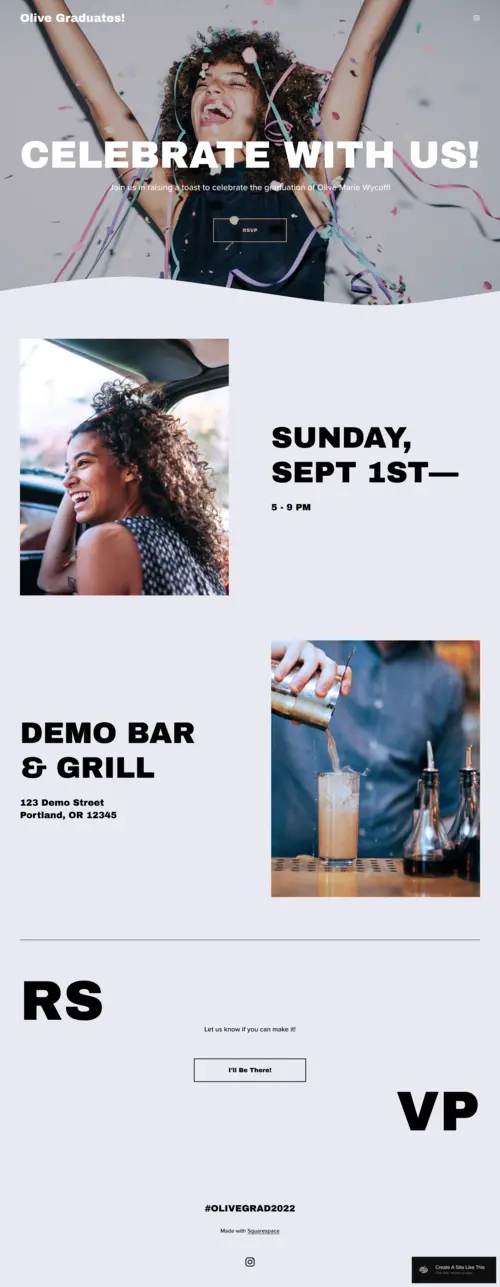
- Fun, celebratory design with bright energetic imagery that sets a positive, welcoming tone for personal milestone events.
- Simple layout with a clear focus on RSVPs and guest interaction - gets attendees confirmed without unnecessary complexity.
- Strong call-to-action buttons make it easy for guests to respond, with an "I'll Be There" feel that matches the celebration vibe.
- Fast-loading, minimal design ensures the site works well even when shared via text or social media on mobile devices.
- Sections flow naturally from event details to RSVP, keeping the energy up and ensuring no one gets lost in the shuffle.
✗ Cons
- The playful, personal tone doesn't translate well to professional conferences, corporate gatherings, or business events.
- Limited options for complex event schedules, multiple sessions, or speaker lineups that larger events require.
- The celebration-focused aesthetic may need significant restyling for events outside the party and milestone category.
The Wycoff template is all about celebration. It's got a bright, cheerful design that's perfect for anything from graduation parties to big family gatherings. With a focus on fun imagery and clear calls to action, this Squarespace events template makes it easy to get guests excited and engaged right away. It's personal, friendly, and welcoming. The layout keeps things simple but effective. The focus is on making sure everyone knows the details and can RSVP without any hassle. Every section flows into the next, keeping the energy up and ensuring no one gets lost. This is a great pick for anyone throwing an event that's all about fun and togetherness - the kind of template that'll have people clicking "I'll Be There!" before they even finish scrolling.
How to Choose the Best Squarespace Event Template
Match the Template to Your Event Type
The most important factor when choosing a Squarespace event template is the kind of event you're organizing. A music festival needs the high-energy visual punch of Ocotillo. A corporate conference needs the sleek professionalism of Singularity. A community craft fair needs the warm, inviting feel of Harbor. Start by identifying your event's personality - loud and exciting, calm and welcoming, or polished and professional - and pick the template that matches it naturally.
Prioritize the Right Conversion Action
Every event website exists to get people to do one thing: register, RSVP, or buy a ticket. The best Squarespace template for events puts that action front and center. If you're selling tickets, Carmine and Ocotillo make the purchase path impossible to miss. If you need RSVPs for a free event, Harbor and Wycoff handle that smoothly. If you're building a waitlist for a conference that hasn't announced details yet, Singularity's anticipation-driven layout works perfectly.
Consider Your Content Readiness
Some event templates need more content than others to look complete. Ocotillo looks best with a confirmed lineup of performers. Carmine shines with strong event photography and speaker headshots. If you're launching your event site before all the details are finalized, Singularity's teaser-friendly design or Wycoff's simple layout lets you go live with minimal content and add more as your event takes shape.
Think About Mobile Experience for Event Attendees
Most people will check your event website on their phone - often while deciding whether to attend, sharing with friends, or looking up details on the day of. Every Squarespace event template on this list is responsive, but simpler layouts like Wycoff and Hoyd perform especially well on mobile because they keep the essential info - date, location, RSVP - visible without excessive scrolling. Test your chosen template on a phone before committing.
Frequently Asked Questions
What is the best Squarespace event template?
Can I sell event tickets on a Squarespace event website?
Is Squarespace good for event websites?
Which Squarespace event template works best for conferences?
How do I add an event schedule to my Squarespace event website?
Can I create an RSVP form on a Squarespace event template?
What should an event website include on Squarespace?
Which Squarespace template is best for a festival event website?
How We Evaluate Templates
Conclusion: Pick the Right Event Template and Start Selling Tickets
The right Squarespace event template can make or break your event's online presence. You're not just picking colors or layouts - you're choosing a visual story that has to resonate with your audience and reflect the experience you're offering. Carmine is the strongest all-rounder for creative events and conferences. Harbor wins for community-driven gatherings. Ocotillo dominates for festivals and large-scale events. Singularity commands attention for tech events and product launches.
Pick the template that matches your event's personality, add your real schedule and lineup details, and let your website start converting visitors into attendees. Every template on this list is free with any Squarespace plan - the only cost is the time it takes to make it yours. Start strong, and give people a reason to show up.
* Read the rest of the post and open up an offer