

Editor's Picks
| # | Name | Best For | Price | Rating | Image | |
|---|---|---|---|---|---|---|
| 1 | Versatile real estate agents, brokerages, and property businesses | Free | 4.4/5 |
|
More Info | |
| 2 | Content-driven realtors, agents building audiences through property blogs | Free | 4.2/5 |
|
More Info | |
| 3 | Agents who need a professional real estate site launched quickly | Free | 4.5/5 |

|
More Info | |
| 4 | Agents with strong property photography who want integrated scheduling | Free | 4.3/5 |
|
More Info | |
| 5 | Established brokerages, real estate teams, and agents with strong brand identity | Free | 4.4/5 |
|
More Info | |
| 6 | Agents focused on high-quality visuals, video tours, and property photography | Free | 4.3/5 |

|
More Info | |
| 7 | Agents focused on search rankings, mobile performance, and clean design | Free | 4.3/5 |
.jpg)
|
More Info | |
| 8 | Social media-focused agents, community-oriented realtors, and location-based marketing | Free | 4.1/5 |
.png)
|
More Info | |
| 9 | Agents who want a bold first impression with simple, professional navigation | Free | 4.2/5 |

|
More Info | |
| 10 | New real estate agents, lead capture-focused sites, and agents building mailing lists | Free | 4.1/5 |
|
More Info |
Our Picks: The 10 Best Squarespace Templates for Real Estate
Bedford
Best Versatile Squarespace Template for Real Estate ✓ Pros
- Sidebar navigation keeps your menu accessible without taking space from property images and listing content.
- Scrolling index page lets you build a smooth property showcase that guides visitors through listings naturally.
- Supports both images and videos, making it easy to feature virtual tours and walkthrough footage alongside photos.
- Banner sections with built-in CTAs drive visitors toward booking a viewing or requesting a consultation on every page.
- Highly customizable layout adapts to solo agents, teams, and full brokerages without requiring code changes.
✗ Cons
- The sidebar menu style may feel unconventional for visitors expecting a traditional top navigation on a real estate site.
- Scrolling index pages can become long and unwieldy if you list a large number of active properties without careful curation.
- Requires strong photography to fill the image-heavy layout, weak listing photos will undermine the professional impression.
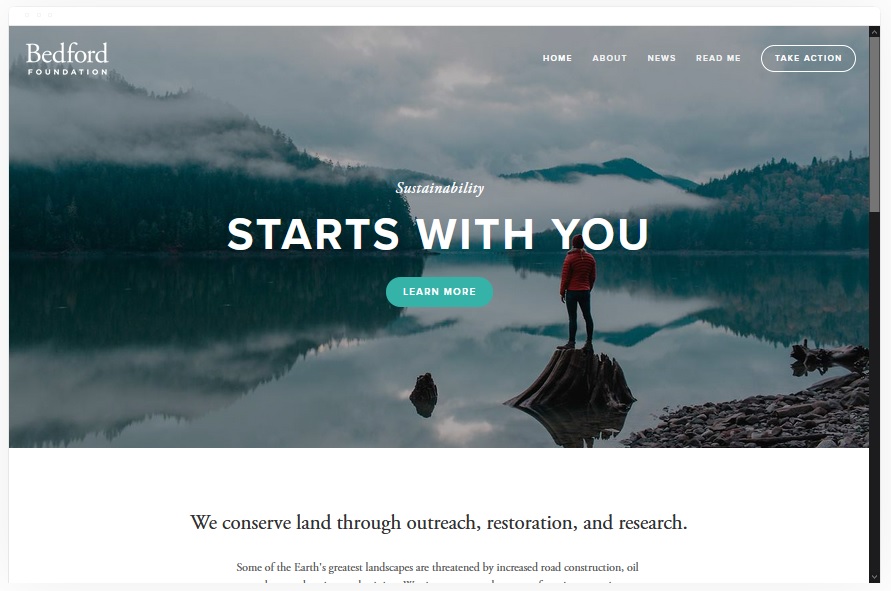
Bedford is the Swiss army knife of Squarespace real estate templates. Its sidebar navigation and scrolling index page create a browsing experience that mirrors how buyers actually shop for homes, scrolling through options, stopping when something catches their eye, and clicking through for details. The layout handles everything from a three-listing boutique agent site to a full brokerage portfolio with equal confidence. For realtors who want one template that flexes across property types and market segments without compromise, Bedford delivers.
Rally
Best for Realtors Who Blog and Build Audiences ✓ Pros
- Streamlined top-right navigation with integrated social media links connects your site to your broader online presence.
- Strong blogging architecture lets you publish market updates, neighbourhood guides, and property content that drives organic traffic.
- Smooth scrolling design creates a polished browsing experience that keeps visitors engaged through multiple sections.
- Mobile-optimized layout ensures property content and listings display perfectly on phones where most buyers search.
- Clean, distraction-free aesthetic puts the focus on your content and listings rather than flashy design elements.
✗ Cons
- The blog-forward layout may feel content-heavy for agents who want a simpler, listing-focused real estate website.
- Social media link placement in the header could distract visitors away from your site before they've explored your listings.
- Less visual impact on the homepage compared to more image-dominant Squarespace real estate templates.
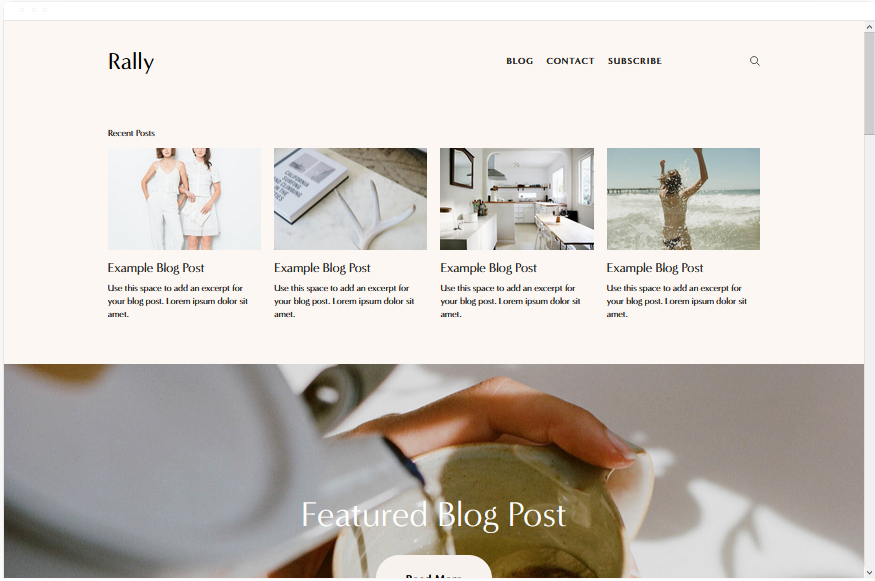
Rally is built for the realtor who understands that real estate marketing is a long game. Publishing neighbourhood guides, market analysis posts, and property spotlights generates compounding search visibility, and Rally's blogging architecture is designed exactly for that strategy. Research shows that businesses publishing 15 or more blog posts per month generate roughly 70% more leads than those that don't. For agents willing to invest in content, Rally turns a Squarespace real estate website into a lead-generation engine that works while you're showing houses.
Almar
Best for Fast-Setup Real Estate Websites ✓ Pros
- Clean, ready-made layout gets a professional real estate website live in hours rather than weeks.
- Property listing sections are built into the structure, so you can add homes without designing pages from scratch.
- Strong CTA placement throughout the template makes it easy to drive visitors toward booking viewings or consultations.
- Fast-loading pages improve both user experience and search engine rankings for competitive real estate keywords.
- Minimal design keeps the focus on properties and agent credentials without visual clutter.
✗ Cons
- The streamlined layout may feel limiting for established agents who want a more feature-rich, custom-designed site.
- Less flexibility for adding complex features like interactive property maps or advanced search filters.
- The minimalist approach requires careful content planning, too few listings or details can make the site feel thin.
Almar is the template for realtors who need to stop deliberating and start generating leads. The clean, ready-made layout means you can have a professional Squarespace real estate website live within a day, complete with property listings, CTAs for booking viewings, and a structure that search engines reward with higher rankings. For new agents entering the market or experienced ones who've been relying on a brokerage page and need their own online presence, Almar removes every excuse for not having a website that works.
Skye
Best for Image-Heavy Property Listings and Scheduling ✓ Pros
- Modern blog-style layout supports large, high-quality images that make property listings visually compelling.
- Built-in scheduling integration lets buyers book viewings directly from your Squarespace real estate website.
- Image-forward design showcases properties the way buyers want to see them, big photos, clean presentation.
- Fast page load speeds ensure your listings display quickly even with multiple high-resolution property images.
- Blog architecture supports both listing posts and market content, combining your portfolio with lead-generating articles.
✗ Cons
- The blog-style format may not suit agents who prefer a traditional property listing grid layout.
- Relies heavily on professional photography, average or phone-quality listing photos will weaken the overall design.
- The content-driven layout requires regular updates to avoid looking stale or inactive to returning visitors.
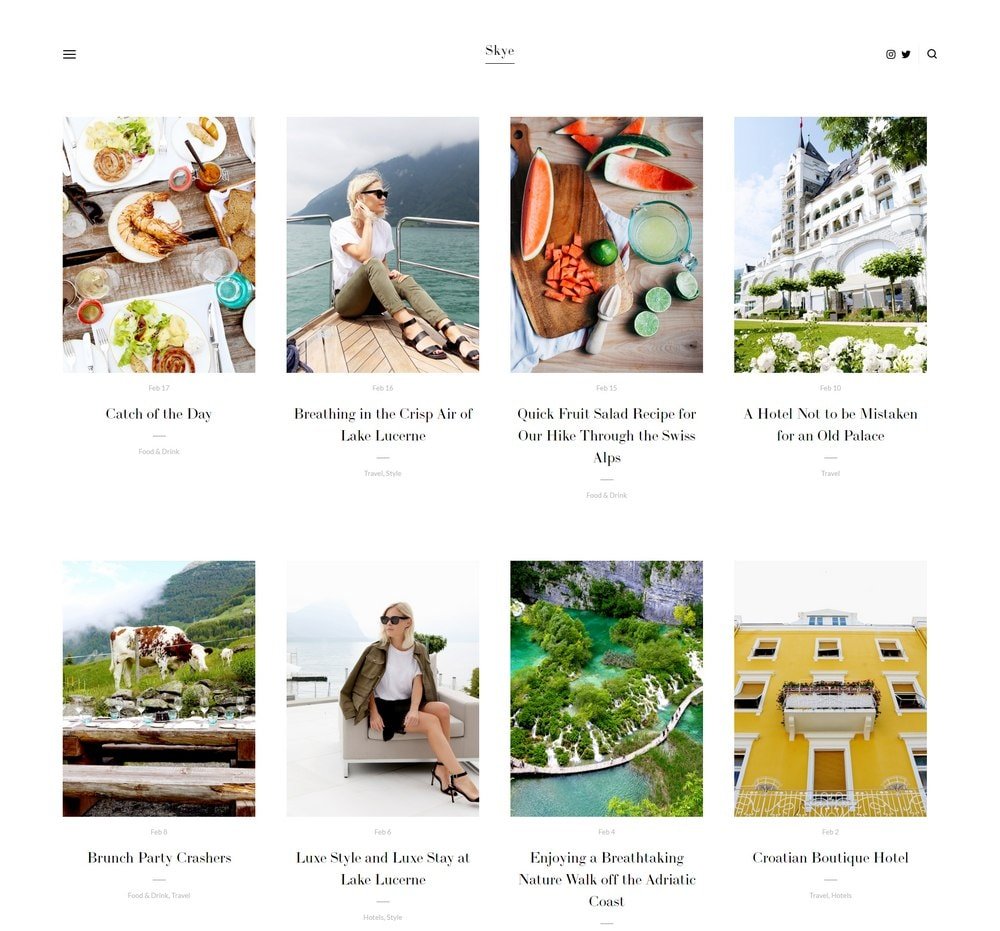
Skye combines two things that matter most in real estate marketing: stunning property visuals and a frictionless path to booking a showing. The modern layout gives every listing the space it deserves, and the built-in scheduling removes the back-and-forth that loses motivated buyers. Agents who publish regular content alongside their listings, neighbourhood spotlights, market updates, new listing announcements, will find that Skye's architecture naturally builds the kind of search visibility that generates leads month after month.
Hayden
Best for Established Real Estate Brands and Teams ✓ Pros
- Professional layout builds immediate brand authority, ideal for established agents and real estate teams.
- Property listing pages with room for detailed descriptions, specs, and case studies showcase your track record.
- Integrated booking system lets prospective buyers and sellers schedule viewings or consultations directly.
- Sticky navigation menu keeps key pages accessible as visitors browse through property content and agent bios.
- Blogging support allows you to publish market insights, sold property case studies, and neighbourhood guides.
✗ Cons
- The polished, corporate aesthetic may feel too formal for independent agents who want a more personal, approachable tone.
- Requires substantial content to fill the layout effectively, thin pages with few listings will look incomplete.
- The multi-section structure is more complex to set up than simpler Squarespace real estate templates.
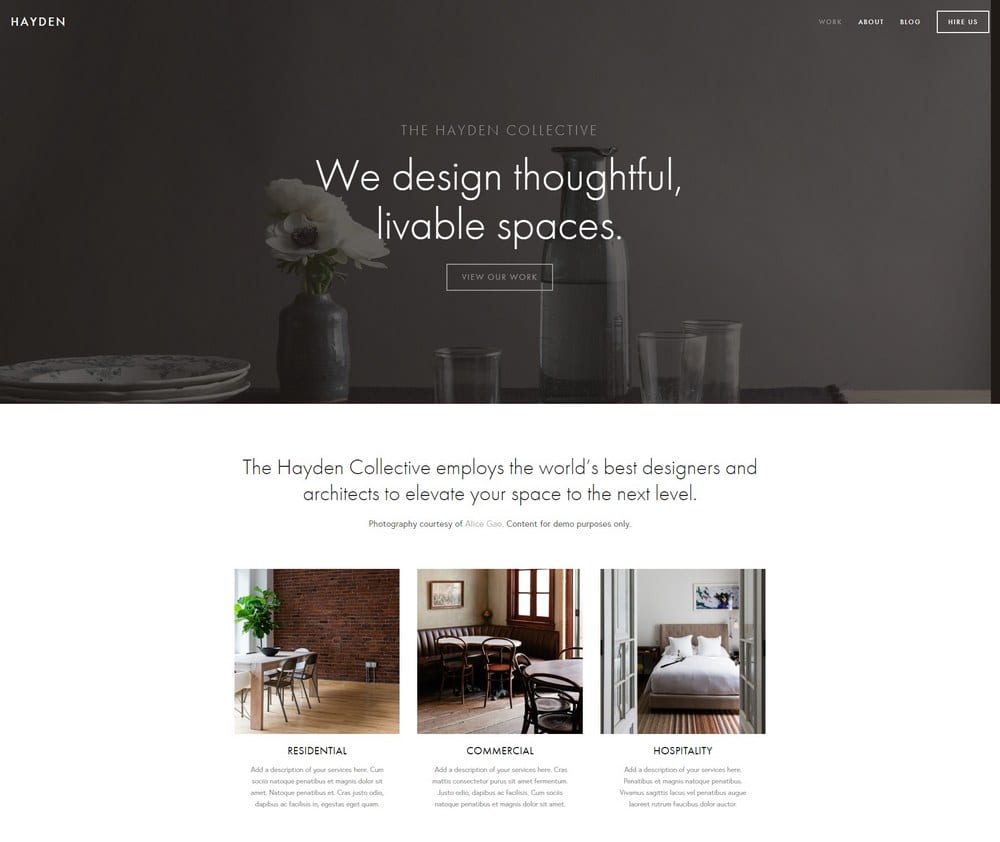
Hayden is the Squarespace real estate template that signals you've been doing this long enough to have a track record worth showcasing. The professional layout supports detailed property listings, sold case studies, and team bios, the kind of depth that established brokerages and top-producing agents need to differentiate from newer competitors. The sticky menu and booking integration mean visitors can explore your full portfolio while always being one click from scheduling a consultation. For real estate businesses that compete on reputation and results, Hayden presents that story with the weight it deserves.
Wells
Best for Visual Property Showcases and Video Tours ✓ Pros
- Image-first design makes property photos the centrepiece, every listing gets the visual attention it deserves.
- Images can be linked directly to booking pages, turning your gallery into a conversion tool for scheduling viewings.
- Video integration via YouTube URLs lets you embed virtual tours and walkthrough footage alongside photo galleries.
- eCommerce functionality supports selling digital products like neighbourhood guides or property investment reports.
- Clean gallery layouts showcase multiple properties in a browsable format that mirrors how buyers search.
✗ Cons
- The heavy reliance on visuals means agents without professional photography will struggle to make the template shine.
- Gallery-focused layouts can feel repetitive if you're listing many similar property types without visual variety.
- Less emphasis on text content may limit your ability to rank for detailed Squarespace real estate search queries.
Wells is the template that understands a truth every experienced agent knows: buyers fall in love with photos before they fall in love with properties. The image-first layout turns your Squarespace real estate website into a visual portfolio where every listing is presented with the impact of a magazine spread. The ability to link images directly to booking pages and embed video tours from YouTube creates a smooth journey from "that kitchen is stunning" to "I need to see this in person." For agents who invest in professional photography and videography, Wells amplifies that investment into leads.
Avenue
Best Minimalist Template for Real Estate SEO ✓ Pros
- Minimalist, fast-loading design ranks well on Google, critical for competitive Squarespace real estate keywords.
- Property listing pages with space for detailed descriptions, specs, and neighbourhood information.
- Clean layout keeps visitors focused on listings and contact actions without distracting design elements.
- Fully mobile-responsive design performs smoothly on phones where most property searches begin.
- Lightweight code structure means faster page speeds, which directly improves search engine visibility.
✗ Cons
- The minimalist aesthetic may feel too plain for luxury real estate agents who need a more premium visual presence.
- Less visual impact than image-heavy templates, the design depends more on content quality than photography drama.
- Limited built-in features for agents who want advanced gallery layouts or interactive property showcases.
Avenue is the Squarespace real estate template built for agents who understand that ranking on the first page of Google generates more leads than any other marketing channel. The minimalist, fast-loading design scores well on Core Web Vitals, the performance metrics Google uses to rank websites. Every unnecessary element has been stripped away, leaving a clean structure that search engines can crawl efficiently and visitors can navigate without friction. For realtors competing in markets where "real estate agent " is a high-value search query, Avenue gives you the technical foundation to win that ranking battle.
Native
Best for Social Media-Savvy Realtors ✓ Pros
- Built-in social media integration connects your website to Instagram, Facebook, and other platforms where you market properties.
- Rounded thumbnail galleries create a distinctive visual style that stands out from typical real estate website layouts.
- Blog sections double as location-based listing pages, create posts for each neighbourhood or area you serve.
- Mobile-optimized layout ensures your content looks sharp on the devices your social media followers use most.
- Clean structure supports local SEO, helping your pages rank for area-specific Squarespace real estate searches.
✗ Cons
- The social-forward design may feel informal for agents targeting luxury or high-end commercial real estate markets.
- Rounded gallery thumbnails are distinctive but may not suit all property photography styles.
- Less emphasis on traditional property listing layouts compared to more structured Squarespace real estate templates.
Native is the Squarespace real estate template for agents whose business runs on social proof and community connection. If your Instagram drives enquiries, your Facebook reviews close deals, and your local reputation is your biggest asset, Native builds a website around that reality. The social media integration isn't an afterthought, it's central to the design. The blog-as-neighbourhood-guide approach lets you create location-specific content that ranks for area searches while giving your audience the local expertise they follow you for. For community-oriented realtors, Native turns your online presence into a cohesive ecosystem rather than a disconnected collection of profiles.
Harbor
Best for Clean, Image-Forward Real Estate Presentations ✓ Pros
- Full-width background image creates a dramatic first impression that immediately communicates property quality.
- Simple top-right navigation keeps the design clean and lets your hero imagery do the selling.
- Property listing sections showcase homes with the visual weight that makes buyers stop scrolling and start clicking.
- Strong CTA placement for booking viewings drives visitors toward action without cluttering the design.
- Fast-loading pages ensure your listings appear quickly and perform well in search engine rankings.
✗ Cons
- The background-image-heavy design depends entirely on having one exceptional hero photo, a weak lead image kills the impact.
- Simple navigation can feel limiting for agents with extensive content, multiple service pages, or team sections.
- Less suited to agents who need complex site structures with many nested pages and submenus.
Harbor understands that in real estate, the first image a buyer sees determines whether they explore further or bounce. The full-width background image hits visitors with immediate visual impact, a stunning kitchen, a waterfront view, a dramatic exterior shot, and the clean navigation stays out of the way while that image does its work. For agents who lead with photography and want their Squarespace real estate website to feel more like a property showcase than a corporate brochure, Harbor delivers that visual-first experience with the simplicity that keeps load times fast and bounce rates low.
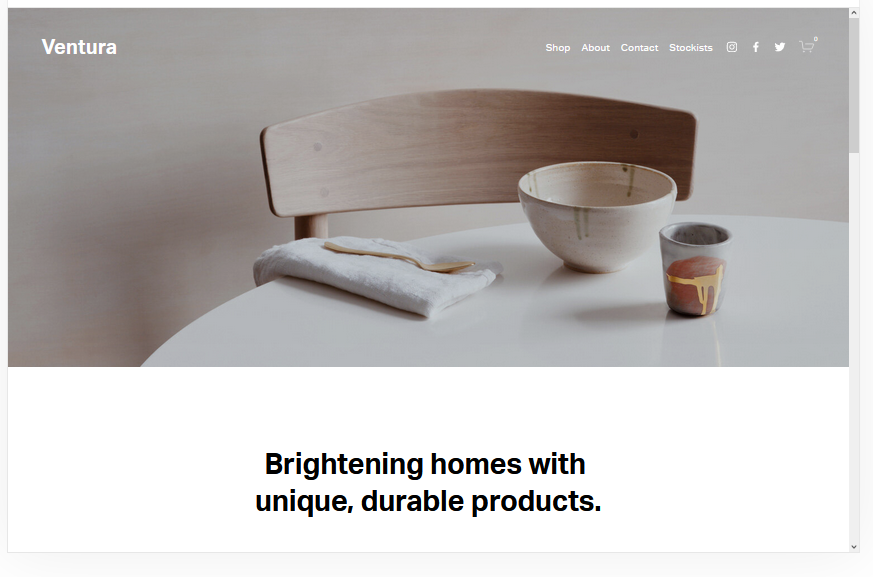
Ventura
Best for New Agents and Lead Capture ✓ Pros
- Easy-to-use layout gets new agents online quickly without requiring design experience or technical skills.
- Minimalist, fast-loading design ensures strong performance on mobile and in search engine rankings.
- Built-in mailing list features help you capture leads and build a database of buyers and sellers over time.
- eCommerce support lets you sell buyer guides, market reports, or other digital products alongside your listings.
- Structured pages for contact, about, and property listings give you a complete real estate website from day one.
✗ Cons
- The straightforward design may feel too basic for experienced agents who want a more polished, premium presence.
- Limited visual drama compared to image-heavy templates, the design prioritises function over aesthetic impact.
- Mailing list features require consistent email marketing follow-through to generate actual ROI from captured leads.
Ventura is the no-excuses Squarespace real estate template for agents who need to get online, start capturing leads, and build their client base from scratch. The minimalist layout loads fast, ranks well, and includes everything a working realtor needs: property listing pages, an about section for credentials, contact forms, and, critically, mailing list integration that turns casual visitors into a database you can market to for years. For new agents who don't yet have a portfolio of sold properties to showcase, Ventura's strength is in what it helps you build rather than what it helps you display.
Adding MLS and IDX Listings to a Squarespace Real Estate Website
This is the one real limit to know before you build. Squarespace has no native MLS or IDX connection, so it cannot pull live listings from your local board on its own. Every template above handles this the same way, so it is not a reason to pick one over another. What matters is the workaround you choose.
You have two practical options. For a small number of listings, build each property as its own page or blog post with photos, a description, price, and a booking or contact button. This is free, works on any Squarespace plan, and is enough for many individual agents. For live, auto-updating MLS search, add a third-party IDX service such as iHomefinder, IDX Broker, or Buying Buddy. These give you an HTML embed code for a search page, featured listings, or a single-property showcase that you drop into a Squarespace code block.
Two things to plan for with IDX. You need a Squarespace Business or Commerce plan to add the code, since the cheapest Personal plan blocks custom code injection. And the IDX service is a separate subscription, usually in the range of $50 to $100 or more per month on top of Squarespace. If live MLS search is essential to your business, budget for both from the start. If it is not, manual listing pages keep your costs to the Squarespace plan alone.
Real Estate Plugins and Integrations Worth Adding
Beyond listings, a few integrations do the heavy lifting on a realtor site. Squarespace Scheduling (formerly Acuity) lets buyers book viewings without the back-and-forth. The built-in forms capture leads straight into your email, and you can connect them to a CRM or an email tool like Mailchimp for follow-up. For social proof, embed a review widget or your latest Instagram posts. None of these need the MLS, and together they turn a good-looking template into a site that books appointments.
How to Choose the Right Squarespace Template for Your Real Estate Website
5 Must-Haves for a Realtor's Website
Before choosing a template, make sure it supports the five features that every effective real estate website needs. First, property listings with search or filter functionality, buyers need to browse your inventory by location, price, or property type without scrolling through irrelevant results. Second, high-quality photos and virtual tours, real estate is a visual business, and templates like Wells, Skye, and Harbor are built to make property photography the centrepiece. Third, agent bios and credentials, buyers and sellers choose agents they trust, and a dedicated page with your experience, certifications, and market specialties builds that trust before the first conversation. Fourth, clear calls to action on every page, whether it's "Schedule a Viewing," "Get a Free Market Report," or "List Your Home," visitors should never have to search for the next step. Fifth, mobile optimization, the majority of property searches now start on a phone, so your Squarespace real estate website must load fast and display perfectly on every screen size.
Why Realtors Need a Dedicated Website
Relying on your brokerage profile page or a Zillow listing is like renting your online presence from someone else, you don't control the branding, the lead capture, or the experience. A dedicated Squarespace real estate website gives you ownership of your professional identity online. You control which listings are featured, how your credentials are presented, and where leads go when they fill out a contact form. It also builds long-term SEO equity: every neighbourhood guide, market update, and listing page you publish on your own domain strengthens your search visibility in ways that third-party profiles never will. Agents who invest in their own website consistently outperform those who rely solely on aggregator platforms for lead generation.
What Types of Realtors Are Launching Websites?
The real estate professionals building Squarespace websites today span every market segment. Luxury real estate agents use visually striking templates like Harbor and Wells to create digital experiences that match the calibre of the properties they represent. First-time buyer specialists lean toward approachable, informative designs like Rally and Ventura that educate and nurture leads through the buying process. Commercial real estate professionals choose authoritative layouts like Hayden that showcase portfolios, case studies, and market data for investor and tenant audiences. Vacation home and rental property specialists use image-heavy templates like Skye and Bedford to display seasonal inventory and drive booking enquiries from out-of-area buyers who can't visit in person. No matter your niche, the right Squarespace real estate template positions you as the go-to agent in your market.
Tips and Tricks for a High-Converting Real Estate Website
Start with search features, even a simple category system that lets visitors filter by neighbourhood, property type, or price range dramatically improves the browsing experience. Invest in professional visuals for every listing; agents who use professional photography sell homes faster and at higher prices than those who don't. Make your site mobile-friendly above all else, most buyers will find your site on their phone, and a template that doesn't perform on mobile loses those leads instantly. Keep the design simple and the navigation obvious; real estate visitors want listings and contact information, not animated transitions and complex menus. Finally, add client testimonials prominently, in a relationship-driven business, social proof from past buyers and sellers is the most persuasive content on your site.
Famous Realtors Who Built Strong Online Presences
The most successful agents in the industry all share one thing: a commanding online presence that drives business independently of referrals and word-of-mouth. Ryan Serhant built a media empire around real estate content, proving that a strong website and consistent digital marketing can elevate an agent from local practitioner to national brand. Barbara Corcoran transformed her real estate expertise into a multi-platform business that starts with a polished, professional web presence. Josh Flagg's digital strategy demonstrates how luxury agents can use their website as the hub of a marketing ecosystem that includes social media, video content, and email campaigns. You don't need their budgets to apply their principles, a well-chosen Squarespace template and consistent content gets you started on the same path.
Frequently Asked Questions
What is the best Squarespace template for a real estate website?
How much does a Squarespace real estate website cost?
Can I add property listings to a Squarespace real estate site?
Can I add virtual tours to my Squarespace real estate website?
How do I make my Squarespace real estate site rank on Google?
Does Squarespace support MLS or IDX listings?
What plugins or integrations do real estate agents need on Squarespace?
How We Evaluate Templates
Conclusion: Pick Your Squarespace Real Estate Template and Start Generating Leads
Your real estate website is the one marketing asset that works for you around the clock, fielding enquiries at midnight, showcasing listings to out-of-state buyers, and building search visibility while you're at showings. Bedford delivers versatility for any market segment. Almar gets you live fast. Wells and Skye make your photography the star. Hayden builds authority for established brands. Rally turns content into leads. Avenue wins the SEO race. Native connects your social presence. Harbor makes a dramatic first impression. And Ventura starts building your database from day one.
Choose the template that matches how your clients find you and what makes them choose you. Then fill it with your listings, your market knowledge, and your credentials, and let it do what a great Squarespace real estate website does best: turn strangers into clients.
Looking for templates across other business categories? Browse our full collection of Squarespace templates for business and services to find the right fit for any industry.
* Read the rest of the post and open up an offer