

How Can You Sell Digital Products on Squarespace?
Squarespace offers two paths for selling digital products:
Path 1: Standard Commerce Plans. The Business, Basic Commerce, and Advanced Commerce plans all support digital product sales. Upload files (PDFs, audio, video, zip archives), set prices, and customers receive download links after purchase. No additional subscription needed.
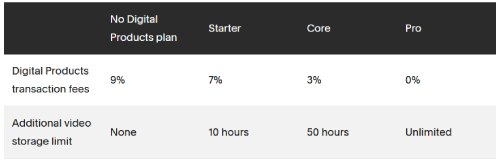
Path 2: Digital Products Add-On. A separate subscription that adds reduced transaction fees, increased video storage, and access to courses and membership content features. This is layered on top of your website plan.
Standard Commerce Pricing for Digital Products
Business Plan - $23/Month (Annual)
Supports digital product sales with a 3% Squarespace transaction fee (plus payment processor fees). This works for creators selling a small number of digital products - the 3% fee is acceptable at low volumes.
Basic Commerce - $28/Month (Annual)
Zero Squarespace transaction fees. Only payment processor fees apply (Stripe ~2.9% + $0.30 per transaction). Customer accounts, e-commerce analytics, and checkout on your domain are included. This is the sweet spot for most digital product sellers.
Advanced Commerce - $52/Month (Annual)
Adds abandoned cart recovery, subscription products, and advanced discounts. Worth it if you sell subscription-based digital content or need automated recovery emails for incomplete purchases.
For the full plan breakdown, see our Squarespace plans and pricing guide.
Digital Products Add-On Pricing
The Digital Products plan is a separate subscription added to any website plan. It provides enhanced features specifically for digital content creators.
What the Add-On Includes
- Reduced transaction fees compared to standard Commerce
- Increased video storage for course content
- Access to Courses features (structured lessons, drip content)
- Commerce features automatically unlocked (customer accounts, checkout on domain)
How to Check Current Pricing
Navigate to the Selling panel on your site. Click Products, then select the Digital Products tab. Click Upgrade to view current pricing tiers. Squarespace adjusts Digital Products plan pricing periodically - checking directly in your dashboard ensures you see the latest rates.
Do You Need the Digital Products Add-On?
You DO Need It If
You sell online courses with structured lessons and video content. You need higher video storage limits than standard plans provide. You want the lowest possible transaction fees on digital sales. Your digital product business is your primary revenue source and volume justifies the extra subscription.
You DO NOT Need It If
You sell simple downloadable files (PDFs, ebooks, templates, audio). Your digital product volume is low to moderate. The Basic Commerce plan's zero transaction fees already cover your needs. You do not need course-specific features like lesson structures or drip content.
What Digital Products Can You Sell on Squarespace?
Downloadable files: Ebooks, PDFs, templates, spreadsheets, design assets, audio files, software, zip archives. Customers receive a download link after purchase.
Online courses: With the Digital Products add-on, create structured courses with chapters, lessons, and video content. Drip content over time or grant instant access.
Memberships: Gate content behind a paywall using Members Area. Charge monthly or annual subscriptions for access to exclusive resources.
Music and audio: Sell individual tracks, albums, or sound effects as downloadable files. Musicians and producers can build a direct-to-fan sales channel.
Photography and art: Sell high-resolution digital downloads of photographs, illustrations, or design work.
How to Set Up Digital Product Sales
Step 1: Choose your Squarespace plan - Business or above for standard digital sales, or add the Digital Products plan for courses.
Step 2: Go to Products > Add Product > Digital. Upload your file (max 300 MB per file on most plans). Set the price, write a description, and add a product image.
Step 3: Configure your payment processor (Stripe or PayPal). Connect through Commerce > Payments.
Step 4: Create a product page or add products to existing pages. Customize the layout to showcase your digital offerings.
Step 5: Test the purchase flow - buy your own product to verify the download link works, the confirmation email sends, and the checkout experience is smooth. For getting started with digital products, Squarespace provides a step-by-step setup guide.

Squarespace vs Other Platforms for Digital Products
vs Gumroad
Gumroad charges no monthly fee but takes 10% of each sale. Squarespace's Basic Commerce ($28/month) has zero transaction fees - if you sell more than $280/month in digital products, Squarespace costs less. Squarespace also gives you a full website, not just a product page.
vs Shopify
Shopify requires a third-party app for digital products (additional cost). Squarespace handles digital downloads natively on Commerce plans. Shopify is better for physical product stores; Squarespace is better for creators selling a mix of content and digital products alongside a portfolio or blog.
vs Wix
Wix supports digital downloads on Business plans and above. Feature sets are comparable. Squarespace's design quality and templates are generally considered superior for creative professionals selling digital products.
Frequently Asked Questions
How much does it cost to sell digital products on Squarespace?
Can I sell digital products on Squarespace's Personal plan?
What is the Squarespace Digital Products add-on?
What file types can I sell as digital products on Squarespace?
Does Squarespace charge transaction fees on digital product sales?
Can I sell online courses on Squarespace?
Is Squarespace good for selling digital products?
Sell Digital Products on Squarespace
Squarespace supports digital product sales on Business plans and above with native download delivery. The Basic Commerce plan ($28/month) eliminates transaction fees and is sufficient for most digital product sellers. Add the Digital Products plan only if you need course features or increased video storage. Start with the simplest setup, test with your first product, and expand from there.
* Read the rest of the post and open up an offer