

The squarespace fluid engine templates in this list were chosen because they give Fluid Engine room to shine. Each one ships with a layout architecture that's flexible enough to be pulled in multiple directions - whether you're running an online store, a creative portfolio, a service business, or a content-heavy blog. With Fluid Engine powering the editor, none of these templates are locked into their defaults; they're starting points you can reshape completely. For a deeper look at what's possible once you're up and running, our guide to advanced customization on Squarespace covers the techniques that experienced builders rely on. Below you'll find reviews of all ten squarespace fluid engine templates, with honest pros and cons, practical customization tips, and a clear picture of which template is the best fit for your specific use case.
Editor's Picks
| # | Name | Best For | Price | Rating | Image | |
|---|---|---|---|---|---|---|
| 1 | Versatile business, portfolio, and multi-purpose sites | Free | 4.8/5 |
|
More Info | |
| 2 | Agencies, consultancies, and bold service-based businesses | Free | 4.6/5 |
|
More Info | |
| 3 | Photographers, videographers, and visual creatives | Free | 4.7/5 |

|
More Info | |
| 4 | Personal brands, lifestyle bloggers, and elegant service businesses | Free | 4.5/5 |
|
More Info | |
| 5 | Bloggers, writers, content creators, and editorial brands | Free | 4.6/5 |
|
More Info | |
| 6 | Ecommerce stores, product brands, and direct-to-consumer businesses | Free | 4.7/5 |
|
More Info | |
| 7 | Fashion brands, beauty businesses, and lifestyle ecommerce stores | Free | 4.8/5 |
.webp)
|
More Info | |
| 8 | Events, nonprofits, community organizations, and social causes | Free | 4.4/5 |
|
More Info | |
| 9 | Musicians, performers, bands, and creative artists | Free | 4.5/5 |
|
More Info | |
| 10 | Bold personal brands, speakers, authors, and thought leaders | Free | 4.3/5 |
|
More Info |
Our Picks: The 10 Best Squarespace Fluid Engine Templates
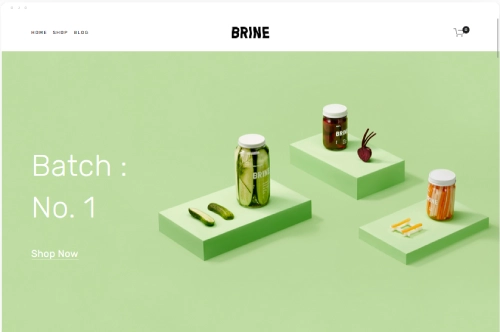
Brine
Best for Versatile Business and Portfolio Sites ✓ Pros
- Highly adaptable layout suits almost any niche - from creative portfolios to small business sites.
- Fluid Engine unlocks true drag-anywhere placement so each section feels genuinely custom.
- Navigation is clean and scalable - handles a large page count without becoming cluttered.
- Strong typographic hierarchy makes copy-heavy pages readable and visually confident.
✗ Cons
- Its versatility means it lacks a strong default personality - you'll need to bring your own brand identity.
- Requires more setup time than niche-specific templates to achieve a distinct, polished look.
Brine has long been one of Squarespace's most trusted starting points, and with Fluid Engine it becomes something more powerful: a genuinely blank canvas that responds to your creative decisions rather than fighting them. It's the template you reach for when the brief is broad or the brand is complex. The drag-anywhere flexibility of Fluid Engine means Brine's default layouts are really just a suggestion - and a good one at that.
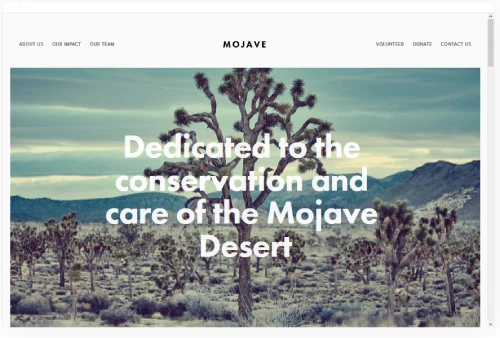
Mojave
Best for Bold Service Businesses and Agencies ✓ Pros
- Strong typographic presence signals authority and professionalism from the first scroll.
- Fluid Engine lets you overlap text and image blocks for editorial layouts that feel premium.
- High-contrast sections draw the eye to CTAs and key service statements naturally.
- Works well for multi-service businesses that need clear visual separation between offerings.
✗ Cons
- Bold defaults can feel heavy for softer brands - requires deliberate toning down if your tone is warm or playful.
- Less suited to image-led businesses like photography or food where visual atmosphere takes priority.
Mojave brings confidence to the page before a visitor reads a word. It's a squarespace fluid engine template built for businesses that want to project expertise - agencies, consultancies, and service brands that lead with authority. Fluid Engine adds genuine flexibility here: you can reposition headline blocks, layer images behind text, and build section layouts that feel editorial rather than standard.
Tremont
Best for Photographers and Visual Creatives ✓ Pros
- Full-bleed image sections let photography speak without competing design elements stealing focus.
- Fluid Engine enables asymmetric gallery layouts that feel curated rather than grid-locked.
- Minimal chrome means the work is always the hero - the template disappears behind your images.
- Smooth scrolling experience creates a portfolio that feels as considered as the work inside it.
✗ Cons
- Minimal design framework offers little visual structure for text-heavy or service-led pages.
- Works best with a strong, cohesive image library - weak or inconsistent photography exposes the layout quickly.
Tremont is a squarespace fluid engine template that gets out of the way and lets your work carry the page. For photographers and visual creatives, that restraint is the entire point. With Fluid Engine, you can push the default grid-based gallery layouts into something far more editorial - overlapping image blocks, variable sizing, and section compositions that feel handcrafted rather than generated.
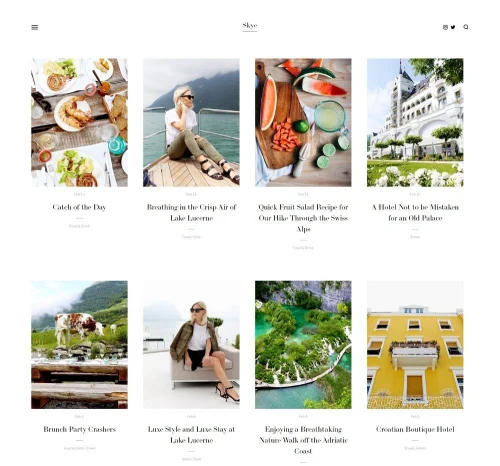
Skye
Best for Elegant Personal Brands and Lifestyle Sites ✓ Pros
- Light, airy default aesthetic creates an immediately calming and premium first impression.
- Fluid Engine lets you build flowing, overlapping layouts that feel organic rather than mechanical.
- Well-suited to personal brands where warmth and accessibility matter as much as polish.
- Typography choices pair beautifully with lifestyle and wellness photography.
✗ Cons
- The soft aesthetic doesn't suit bold, high-contrast brands or businesses that need to project urgency.
- Can look underdeveloped without strong, well-lit photography to fill the spacious layout sections.
Skye is for the brands that win with warmth. It's a squarespace fluid engine template that communicates approachability and taste simultaneously - two things that are harder to achieve together than they sound. Fluid Engine means the default soft layouts can be refined further: text blocks can be nudged closer to images, whitespace can be tightened or expanded deliberately, and the overall composition can feel more intentional than any standard Squarespace template allows.
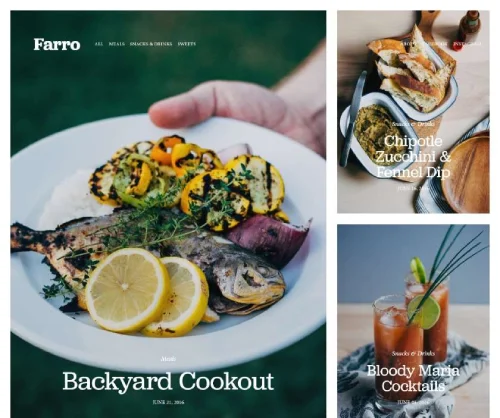
Farro
Best for Bloggers and Content-Led Brands ✓ Pros
- Editorial-first layout puts content front and center - perfect for writers and bloggers who publish regularly.
- The farro squarespace template handles long-form content with excellent readability and visual pacing.
- Fluid Engine allows custom intro sections and featured post layouts that break from the standard blog grid.
- Clean category and tag architecture keeps growing content archives navigable and well-organized.
✗ Cons
- Content-focused layout offers less visual drama for brands that rely on imagery over writing.
- Ecommerce and service sections feel secondary to the editorial flow - requires more deliberate placement.
The farro squarespace template is built around the idea that content is the product - and it shows. Where other templates treat the blog as an afterthought, Farro makes it the centerpiece. With Fluid Engine, you can customize the featured post layout at the top of your blog landing page, using drag-and-drop positioning to give your best content the visual prominence it deserves rather than letting it sit in a standard grid alongside everything else.
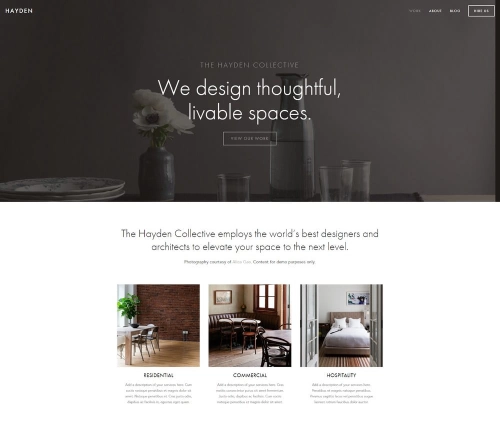
Hayden
Best for Ecommerce and Product-Led Businesses ✓ Pros
- Product display sections are built to convert - prominent imagery, clean pricing, and clear purchase paths.
- Fluid Engine enables custom product feature layouts that go beyond the standard grid presentation.
- Supports collection pages cleanly across multiple product categories without visual clutter.
- Strong homepage structure guides visitors from discovery to purchase without unnecessary detours.
✗ Cons
- Layout is optimized for physical product sales - service businesses and portfolios feel like afterthoughts.
- Heavier default design can slow perceived load time on image-rich product pages.
Hayden is a squarespace fluid engine template that understands commerce. It's structured around the moment a product catches a visitor's eye and the path from that moment to checkout. Fluid Engine adds the finishing touch: you can build custom "hero product" sections that feature a single item at full visual scale, overlapping descriptive text onto the product image itself for a campaign-style layout that standard templates simply can't achieve.
Avenue
Best for Fashion, Beauty, and Lifestyle Ecommerce ✓ Pros
- Chic, contemporary aesthetic instantly positions fashion and beauty brands as premium and credible.
- Fluid Engine lets you build editorial lookbook sections with overlapping images and text that rival magazine layouts.
- Product photography dominates every section - the template is designed to make items look desirable.
- Minimal navigation keeps the focus on products and the shopping experience throughout.
✗ Cons
- Narrow niche fit - the fashion-forward aesthetic looks out of place for professional services or B2B businesses.
- Requires high-quality lifestyle photography to fully realize the template's premium positioning.
Avenue is the squarespace fluid engine template for brands that sell aspiration as much as product. Its visual language is borrowed directly from fashion editorial - clean, confident, and deeply image-led. Fluid Engine takes this further by letting you build section layouts that mirror actual magazine spreads: large hero images with overlapping text, asymmetric product features, and campaign-style compositions that no standard grid editor can produce.
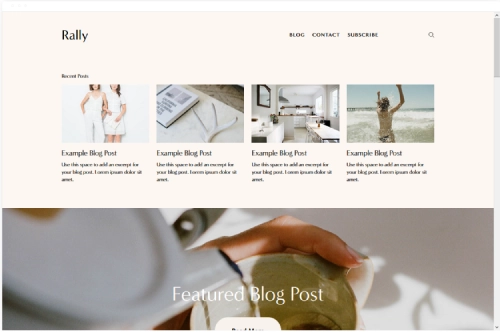
Rally
Best for Events, Community Organizations, and Causes ✓ Pros
- High-energy layout is built to inspire action - ideal for events and causes that need visitors to sign up, donate, or register.
- Fluid Engine enables dynamic countdown and CTA sections that can be repositioned to maximize conversion urgency.
- Bold headline structure communicates mission and urgency before visitors read more than a line.
- Supports multiple event listings and program descriptions cleanly within a consistent layout hierarchy.
✗ Cons
- High-energy defaults don't suit calm, trust-first contexts like healthcare, legal services, or financial consulting.
- Limited visual nuance - the bold framework can feel one-dimensional for brands with complex or layered messaging.
- Heavy reliance on strong headline writing; weak copy is exposed immediately by the prominent typography.
Rally is a squarespace fluid engine template built for momentum. It's the right choice when the goal is to move people - to sign up, to show up, to get involved. With Fluid Engine, you can shift the primary CTA button and supporting text block into the visual center of any section, removing the friction that comes from standard layout constraints and putting the action exactly where attention already sits.
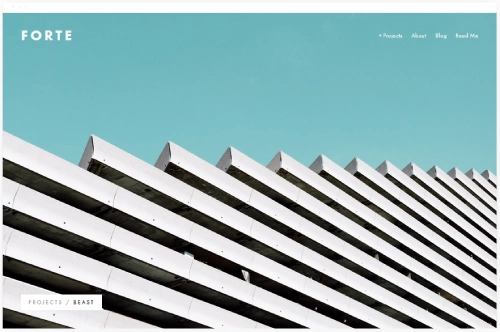
Forte
Best for Musicians, Performers, and Creative Artists ✓ Pros
- Dramatic, atmospheric layout communicates artistic identity before a single word is read.
- Fluid Engine lets you layer tour dates, press quotes, and release artwork into custom section compositions.
- Dark, immersive default aesthetic suits music and performance brands that trade in emotion and intensity.
- Embedded audio and video sections integrate naturally without disrupting the visual flow.
✗ Cons
- Dark, dramatic aesthetic is a difficult fit for upbeat, colorful, or family-friendly creative brands.
- Limited default structure for merch-heavy artists who need a prominent ecommerce presence alongside music content.
Forte is the squarespace fluid engine template for artists who want their website to feel like an extension of their creative world, not just a business card with a streaming link. Its atmospheric layout creates genuine immersion. Fluid Engine makes this even more powerful: you can overlap a press quote directly onto an artist photo, float a "New Release" badge above album artwork, and build tour date sections that feel designed rather than listed.
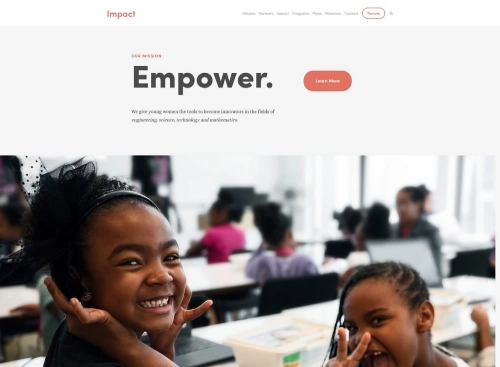
Impact
Best for Bold Personal Brands and Thought Leaders ✓ Pros
- Uncompromisingly bold layout commands attention - perfect for speakers and authors who lead with a big idea.
- Fluid Engine enables custom section compositions that reflect the personality of the individual brand rather than a template default.
- Large typographic sections turn a headline into a design statement - your positioning does visual work before anything else.
- Strong structure for speaking topics, book details, media appearances, and booking CTAs.
✗ Cons
- The aggressive visual style requires a confident, well-defined personal brand to work - an undefined brand will feel lost in this much intensity.
- Not suited to businesses that need to project warmth, accessibility, or collaborative values over authority.
- Heavy customization required to dial down the default intensity for softer brand identities.
Impact lives up to its name. It's a squarespace fluid engine template that assumes you have something important to say and refuses to let the layout get in the way. For speakers, authors, and thought leaders who have a clearly defined point of view, Impact gives that perspective the visual scale it deserves. Fluid Engine lets you position oversized text elements, headshots, and booking buttons with the precision of a professional design tool - turning what would be a serviceable personal brand site into something genuinely memorable.
How to Get the Most from Squarespace Fluid Engine Templates
Plan Your Layout Before You Start
Fluid Engine's drag-anywhere freedom is genuinely exciting, but it's easy to end up with layouts that look inconsistent across sections if you jump in without a plan. Before you move a single block, sketch the basic structure of each key page: where does the headline sit, where does the image go, and where is the primary CTA? Even a rough paper sketch prevents the most common Fluid Engine mistake - sections that each feel independently designed but don't flow together as a coherent page. Consistency across sections is what separates a professional-looking site from a demo that never quite came together.
Use Overlapping Sections Strategically
The ability to overlap elements is one of Fluid Engine's most distinctive features, and the squarespace fluid engine templates in this list are all structured to take advantage of it. But overlapping works best when it serves a purpose: a pull quote layered onto an image creates emphasis, a CTA button positioned over a background photo creates urgency, a small decorative element overlapping two sections creates continuity. Use overlapping deliberately - one or two intentional overlaps per page section - rather than applying it everywhere. When every element overlaps everything else, the visual hierarchy breaks down and the layout starts to feel chaotic rather than creative.
Frequently Asked Questions
What is Squarespace Fluid Engine?
Are all Squarespace templates compatible with Fluid Engine?
Which Squarespace Fluid Engine template is best for beginners?
Can I switch to a different Fluid Engine template after publishing?
Do Squarespace Fluid Engine templates work on mobile?
How We Evaluate Templates
Conclusion
The right squarespace fluid engine template gives you a strong structural foundation and then gets out of your way. Whether you're building a portfolio with Tremont, launching a product store with Hayden or Avenue, creating a content-driven blog with Farro, or establishing a bold personal brand with Impact, every template on this list is built to take advantage of Fluid Engine's drag-anywhere layout control. The key is matching the template's default personality to your brand's tone and then using Fluid Engine to push the layout beyond what any standard grid editor can produce.
Once you've chosen your squarespace fluid engine template and have the basics in place, the real gains come from learning the editor deeply. Our guide to advanced customization on Squarespace walks through the techniques - overlapping elements, mobile layout optimization, custom section structures - that separate a great-looking Squarespace site from an exceptional one. Start with the right template, then use Fluid Engine to make it entirely yours.
* Read the rest of the post and open up an offer