

Your hair salon website is often the first impression a potential client gets - and for a service as personal as hair, that first impression matters. A great squarespace hair salon template needs to do more than look beautiful: it should showcase your portfolio, communicate your services clearly, and make booking an appointment effortless. Squarespace offers a strong range of layouts built to support these goals, from image-forward editorial designs to structured pages that lay out your full service menu at a glance. Whether you run a high-end color studio or a neighborhood barbershop, there is a squarespace salon template that fits your brand.
What separates the best hair salon website Squarespace options from generic layouts comes down to a few key factors: prominent booking integration, gallery-friendly design, clean mobile layouts, and enough structural flexibility to display a multi-category service menu. Squarespace Scheduling allows clients to book directly on your site, and the right template makes that path from browsing to booking as smooth as possible. Visuals matter enormously in this niche - your portfolio is your strongest sales tool, and the template you choose should give those images room to shine.
We evaluated 11 Squarespace templates for hair salons across criteria including booking usability, portfolio display, brand flexibility, and mobile experience to bring you this shortlist. For stylists who want a detailed breakdown of our top editorial pick, our Emmeline template review covers its design, strengths, and who it suits best.
Editor's Picks
| # | Name | Best For | Price | Rating | Image | |
|---|---|---|---|---|---|---|
| 1 | Best for upscale hair salons with editorial flair | Free | 4.8/5 |
|
More Info | |
| 2 | Best for modern barbershops and hair studios | Free | 4.7/5 |
|
More Info | |
| 3 | Best for minimalist hair salons with clean aesthetics | Free | 4.6/5 |
|
More Info | |
| 4 | Best for boutique salons with warm, inviting branding | Free | 4.5/5 |
|
More Info | |
| 5 | Best for full-service salons with detailed service menus | Free | 4.6/5 |
|
More Info | |
| 6 | Best for editorial salons with portfolio-heavy layouts | Free | 4.7/5 |
|
More Info | |
| 7 | Best for natural hair stylists and wellness-focused salons | Free | 4.5/5 |
|
More Info | |
| 8 | Best for bold, statement-making salon brands | Free | 4.4/5 |
|
More Info | |
| 9 | Best for independent stylists and solo hair artists | Free | 4.5/5 |
|
More Info | |
| 10 | Best for luxury hair and beauty lounges | Free | 4.6/5 |
|
More Info | |
| 11 | Best for high-energy salons with bold visual identity | Free | 4.4/5 |
|
More Info |
Our Picks: The 11 Best Squarespace Hair Salon Templates
Emmeline
Best for upscale hair salons with editorial flair ✓ Pros
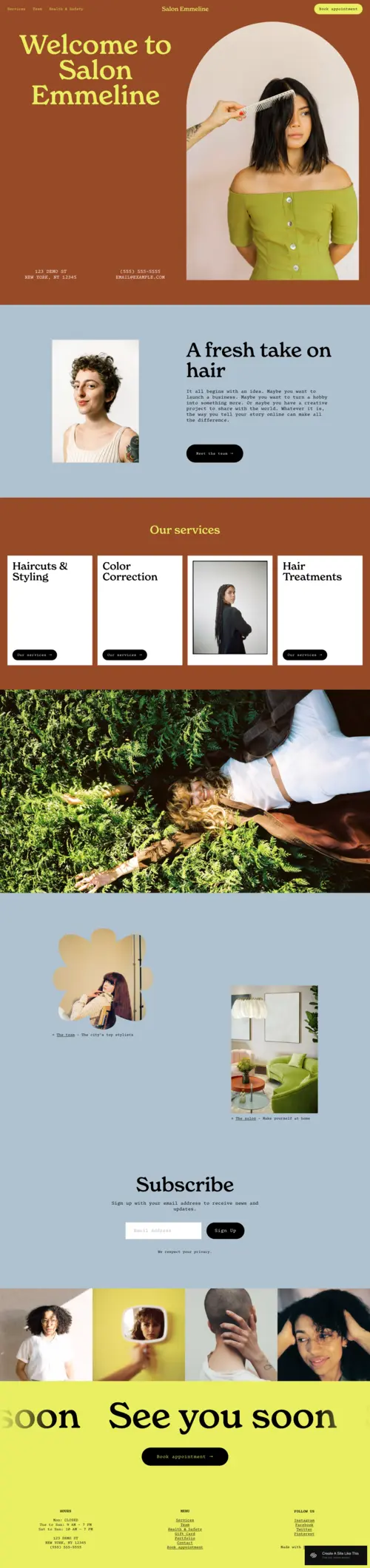
- Striking editorial layout makes portfolio images the undisputed focal point.
- Sophisticated typography suits high-end salon branding effortlessly.
- Excellent support for squarespace booking for hair salon integrations.
- Flexible section blocks display multi-category service menus clearly.
✗ Cons
- Minimalist style may feel too stark for casual or friendly salon brands.
- Requires strong photography to make the layout truly shine.
- Fewer built-in color palette options compared to some alternatives.
Emmeline is our top pick for hair salons that want their website to feel as polished as their work. Its image-forward design lets transformation photos take center stage, while the clean structure makes it easy to present services, pricing, and booking in a logical flow. You can read more about how it performs in our dedicated Emmeline Squarespace template review. For upscale salons aiming to attract a discerning clientele, Emmeline is hard to beat.
Fletcher
Best for modern barbershops and hair studios ✓ Pros
- Bold, structured layout works perfectly for barbershop and studio aesthetics.
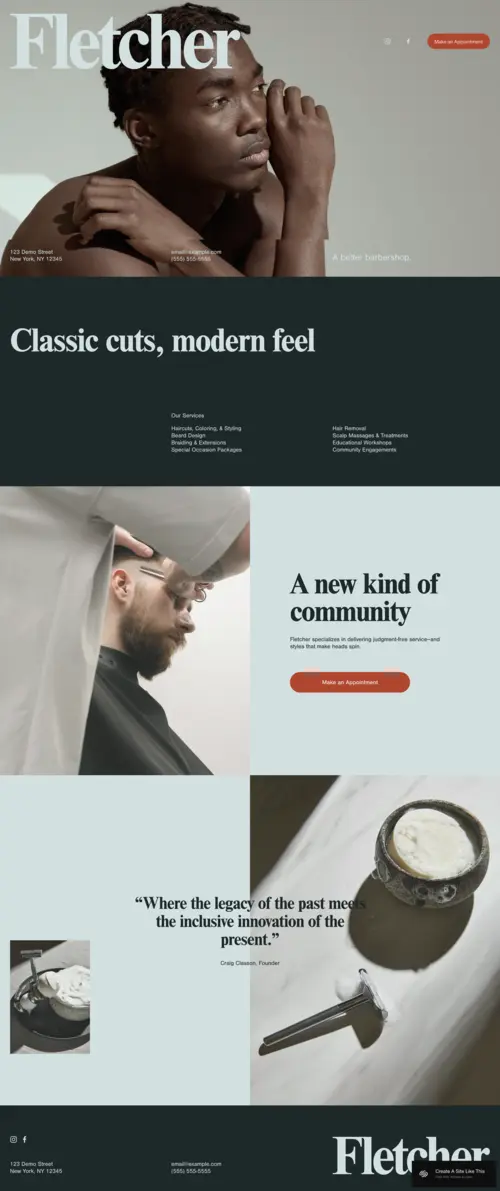
- Strong hero section communicates your brand identity immediately on arrival.
- Clean layout for organizing team bios and individual stylist profiles.
- Clear navigation puts booking and service pages one click away.
✗ Cons
- Heavy visual weight may not suit softer, more feminine salon brands.
- Homepage layout is relatively fixed and harder to restructure significantly.
- Portfolio grid is smaller than more editorial-focused templates.
Fletcher brings a sharp, confident energy that suits modern barbershops and contemporary hair studios extremely well. The strong hero section immediately sets a professional tone, while the structured interior pages give you plenty of room to outline services and introduce your team. It pairs well with dark color schemes and high-contrast photography, making it a smart choice for studios that want to project authority and style in equal measure.
Ready
Best for minimalist hair salons with clean aesthetics ✓ Pros
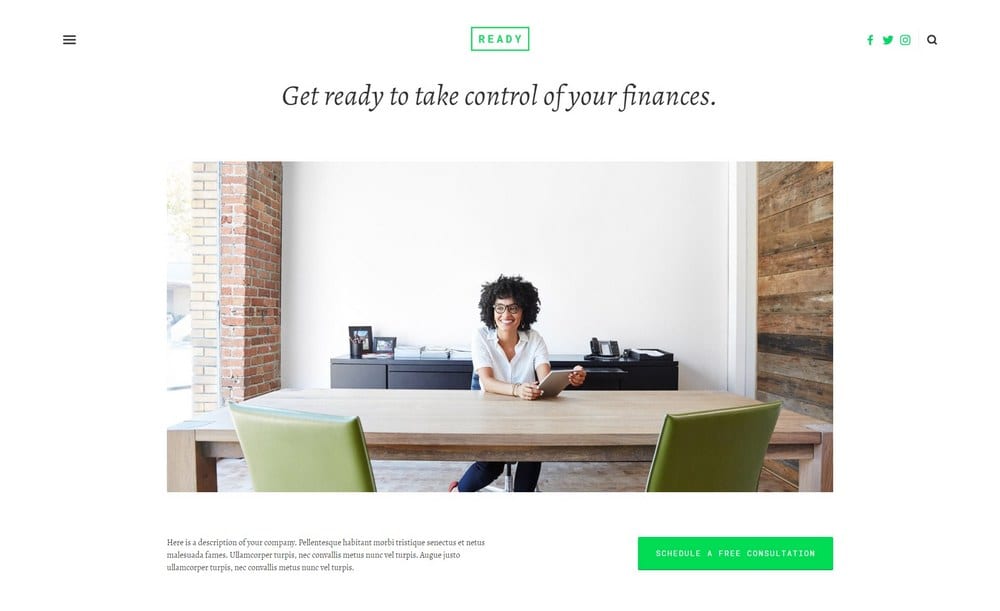
- Uncluttered, minimal design keeps the focus entirely on services and imagery.
- Whitespace-heavy layout feels fresh and modern for clean-brand salons.
- Fast-loading structure delivers a smooth mobile experience for on-the-go clients.
- Straightforward to customize with your own fonts and brand colors.
✗ Cons
- Sparse layout may feel underpowered for salons with content-heavy service menus.
- Limited visual drama makes it less suitable for bold or maximalist brands.
- Fewer styling sections than more feature-rich squarespace salon template options.
Ready is a great fit for hair salons that believe less is more. Its stripped-back aesthetic lets your work speak for itself, with clean lines and generous whitespace giving every image and headline room to breathe. It works particularly well for independent stylists or boutique salons with a refined, understated identity - the kind of hair salon website Squarespace setup where quality does the selling without visual noise.
Almar
Best for boutique salons with warm, inviting branding ✓ Pros
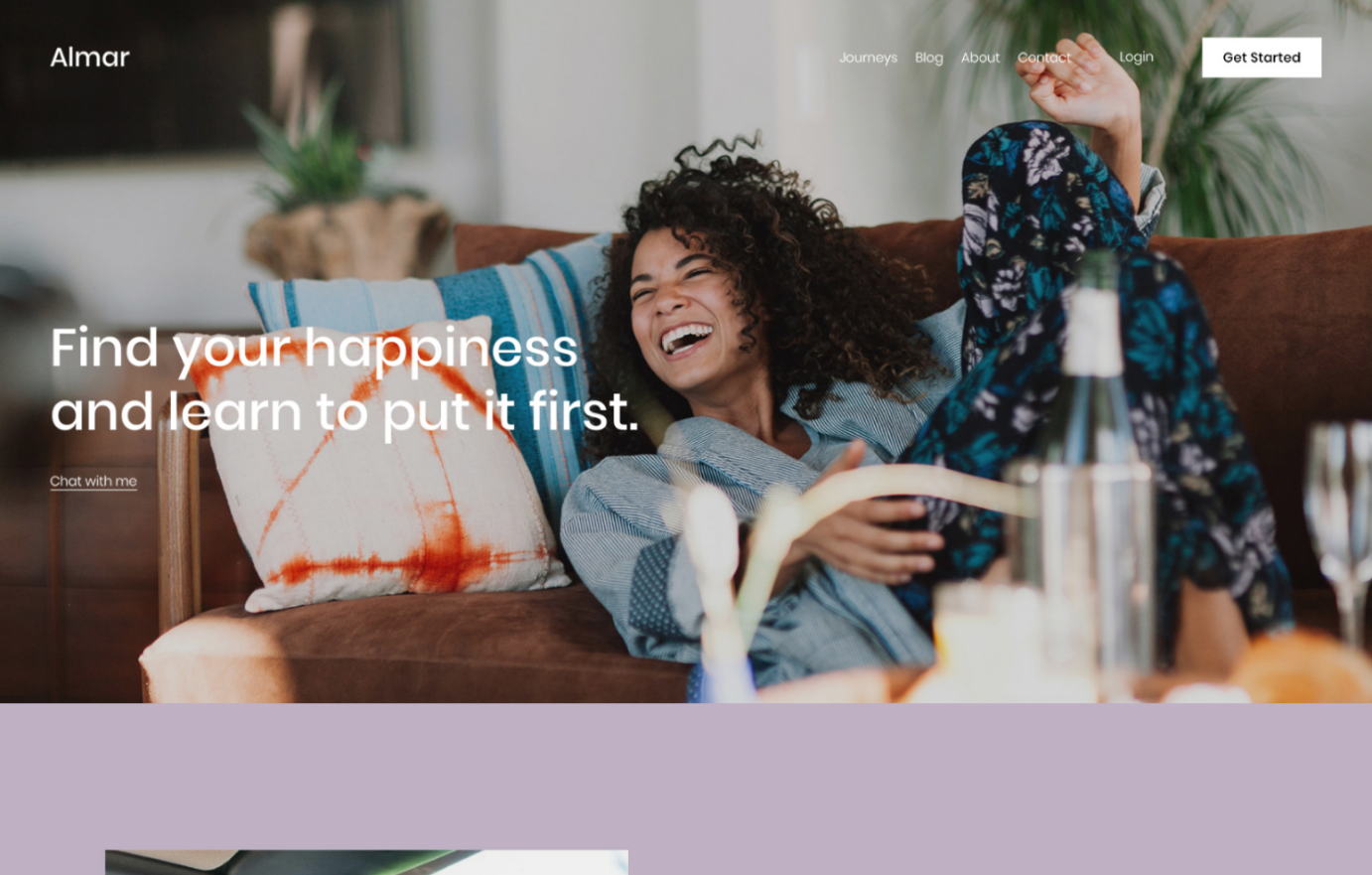
- Warm visual tone suits neighborhood and boutique salon brands naturally.
- Excellent layout for combining service information with a personal brand story.
- Flexible content blocks let you highlight seasonal promotions or limited offers.
- Well-balanced imagery and text without feeling crowded or overwhelming.
✗ Cons
- Softer aesthetic may not translate well for edgy or high-fashion studios.
- Could benefit from more built-in gallery layout variety.
- Navigation menu styling is fairly standard with limited customization depth.
Almar has a warmth and approachability that boutique salon owners will find immediately appealing. It strikes a comfortable balance between professional and personal, making it ideal for salons where the client relationship is front and center. The layout is easy to navigate, with natural spots to tell your brand story, list your services, and embed a squarespace booking for hair salon widget without the page feeling crowded.
Suffolk
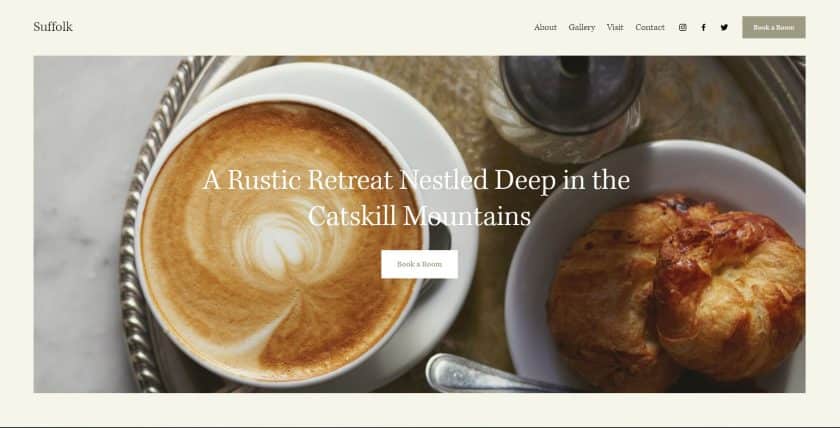
Best for full-service salons with detailed service menus ✓ Pros
- Well-structured layout organizes extensive service menus clearly and logically.
- Clear section hierarchy guides visitors naturally toward booking an appointment.
- Works well for salons with multiple service categories and varied price tiers.
- Professional presentation suits both walk-in and appointment-based businesses.
✗ Cons
- Less visually dramatic than more editorial squarespace hair salon template options.
- Portfolio display is functional but not as image-focused as alternatives.
- May require more content to fill the layout effectively.
Suffolk is a strong choice for full-service salons that need to communicate a wide range of offerings clearly and professionally. Its structured layout is well-suited to separating services by category - cuts, color, treatments, styling - and presenting pricing in a way clients can scan quickly. It is a practical, polished template that prioritizes clarity, which is exactly what a busy salon website needs to convert browsers into booked appointments.
Hayden
Best for editorial salons with portfolio-heavy layouts ✓ Pros
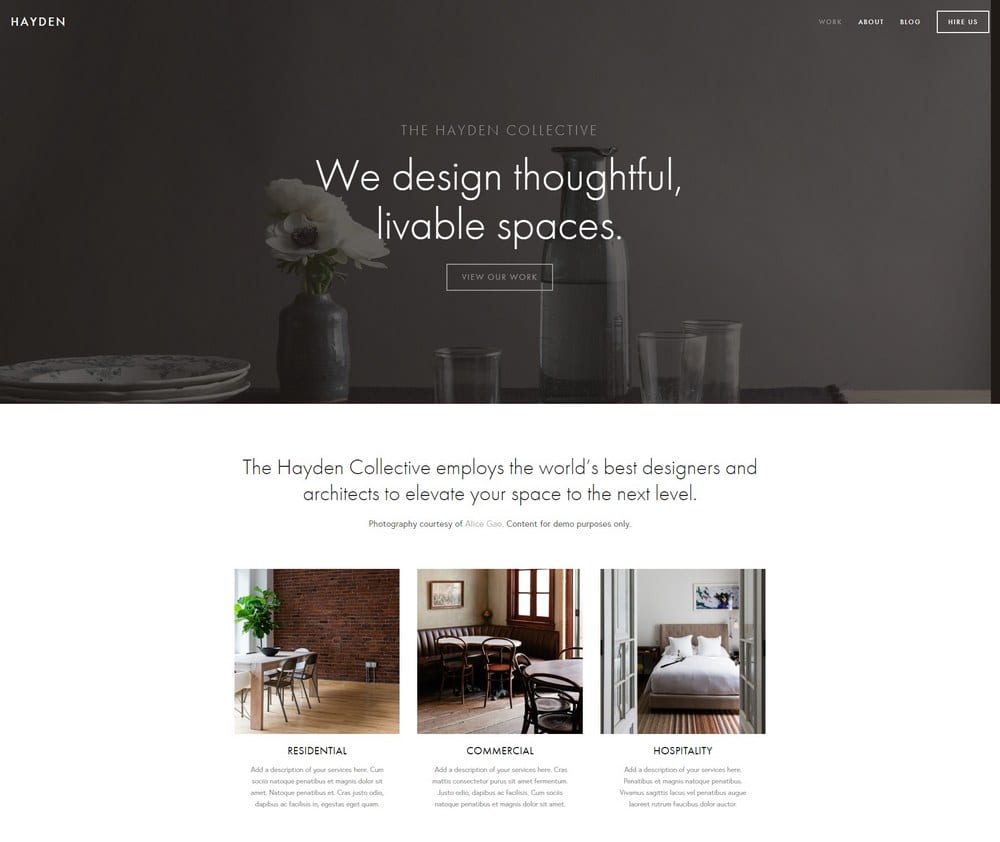
- Portfolio-centric layout puts your best transformation work front and center.
- Multiple gallery display options for showcasing cuts, color, and styling.
- Strong visual impact creates a memorable first impression for new visitors.
- Works beautifully for salons with an active social media content library.
✗ Cons
- Requires a large library of high-quality images to look its best.
- Service and booking information can take a secondary position to visuals.
- Less suited to salons with sparse or inconsistent photography.
Hayden is made for hair salons that treat their craft as an art form. The portfolio-forward layout gives you ample space to display transformations, seasonal color work, and editorial styling in a way that feels curated rather than crowded. It is an especially powerful squarespace hair salon template for salons that actively market on Instagram or TikTok and want their website to match the visual standard of their social channels.
Wells
Best for natural hair stylists and wellness-focused salons ✓ Pros
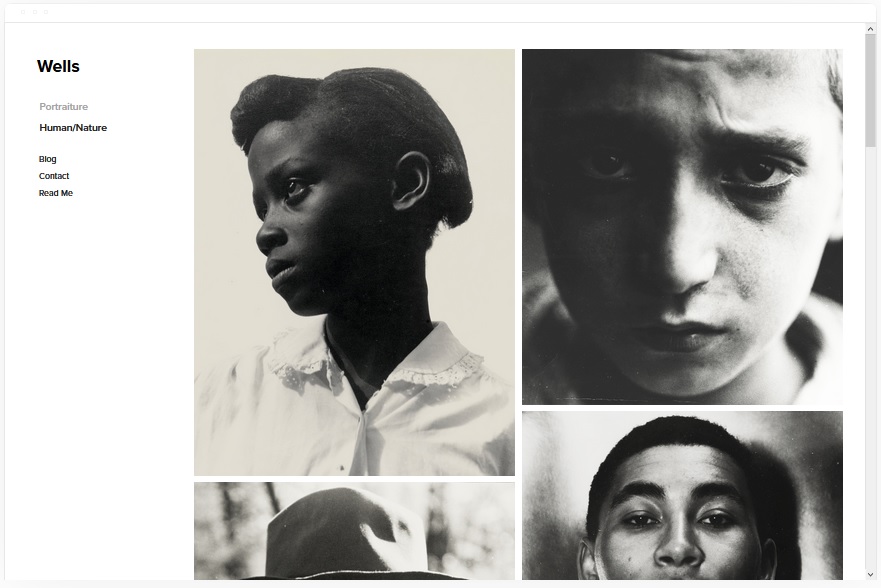
- Organic, relaxed aesthetic suits wellness and natural hair brand identities well.
- Layout accommodates educational content like care tips and product guides.
- Good structure for combining service bookings with a blog or resources section.
- Soft visual palette translates naturally to earth tones and nature-inspired branding.
✗ Cons
- Relaxed tone may not project enough authority for premium urban salon brands.
- Hero section is less impactful than bolder squarespace salon template options.
- Lower visual contrast makes creating a strong hierarchy more challenging.
Wells has a calm, grounded quality that makes it a natural fit for stylists specializing in natural hair care, organic treatments, or holistic beauty services. Its layout gives you room to educate as well as sell, making it ideal for salons that want to build community and trust alongside their booking business. If your brand values align with wellness, sustainability, or slow beauty, Wells communicates those values without you having to say a word.
Elliott
Best for bold, statement-making salon brands ✓ Pros
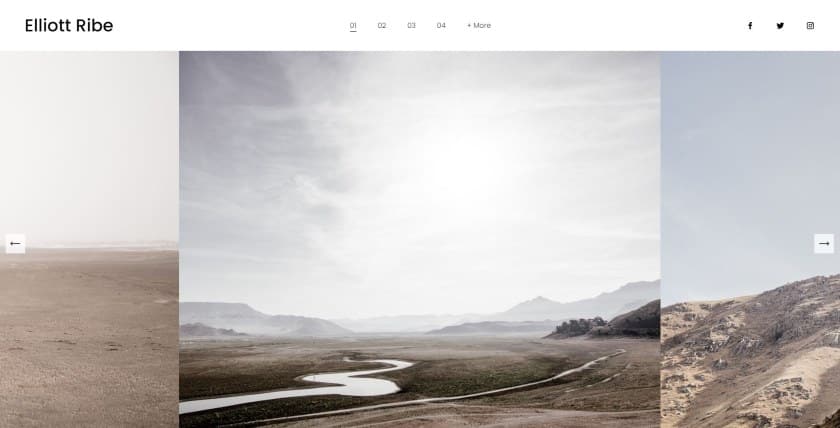
- High-contrast design makes a strong, immediate visual statement on arrival.
- Bold typography lets your salon name and tagline command the page.
- Eye-catching layout is well-suited to salons with a distinct personality.
- Works powerfully with dramatic color palettes and edgy brand identities.
✗ Cons
- Very bold aesthetic limits flexibility for softer or traditional salon brands.
- Heavy visual style requires careful editing to avoid feeling cluttered.
- May need more customization effort to reach a polished final result.
Elliott is for salon owners who want their website to make a statement before a visitor reads a single word. Its bold contrast, strong typography, and dramatic layout signal a brand that is confident and unapologetic - perfect for salons specializing in avant-garde color work, fashion-forward cuts, or editorial styling. It takes more effort to dial in, but the result can be genuinely striking when paired with the right photography and brand identity.
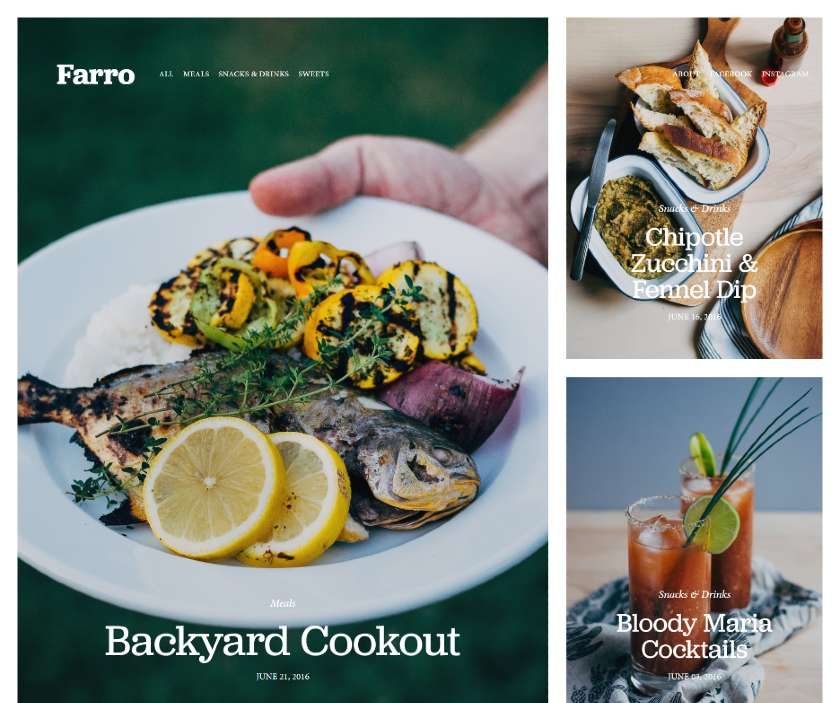
Farro
Best for independent stylists and solo hair artists ✓ Pros
- Compact layout is perfectly scaled for solo stylists and independent operators.
- Easy to highlight a personal brand story and individual stylist personality.
- Straightforward booking integration without complex multi-service menu demands.
- Clean and professional without requiring a large volume of content.
✗ Cons
- May feel too small in scale for multi-stylist salons or large teams.
- Limited section variety compared to more expansive squarespace hair salon template options.
- Portfolio display is modest and may not satisfy image-heavy showcase needs.
Farro is an excellent fit for independent hair stylists who want a website that feels personal and professional without the complexity of a full salon site. The layout is compact and focused, making it easy to introduce yourself, list your services, and get clients to the booking step quickly. For freelance stylists working from a studio suite or mobile setup, Farro delivers exactly what is needed without any unnecessary overhead.
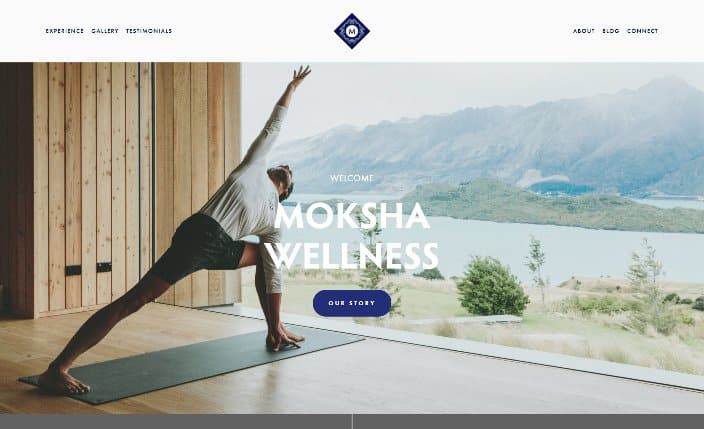
Moksha
Best for luxury hair and beauty lounges ✓ Pros
- Refined, upscale design language suits premium salon and beauty lounge branding.
- Generous whitespace creates a calm, exclusive feel throughout the site.
- Well-suited to multi-service luxury offerings including hair, skin, and wellness.
- Strong layout for presenting premium pricing and package-based services clearly.
✗ Cons
- Understated elegance may not suit high-energy or bold salon personalities.
- Works best with professional, studio-quality photography throughout.
- Limited out-of-the-box color contrast for brands seeking a more dramatic look.
Moksha is one of the most refined options on this list, making it a compelling squarespace salon template for luxury hair salons and beauty lounges that want their website to feel as elevated as the experience they deliver. The layout balances beauty and function with ease - there is plenty of room for atmospheric photography, clear service descriptions, and a seamless path to booking without anything feeling rushed or overly commercial.
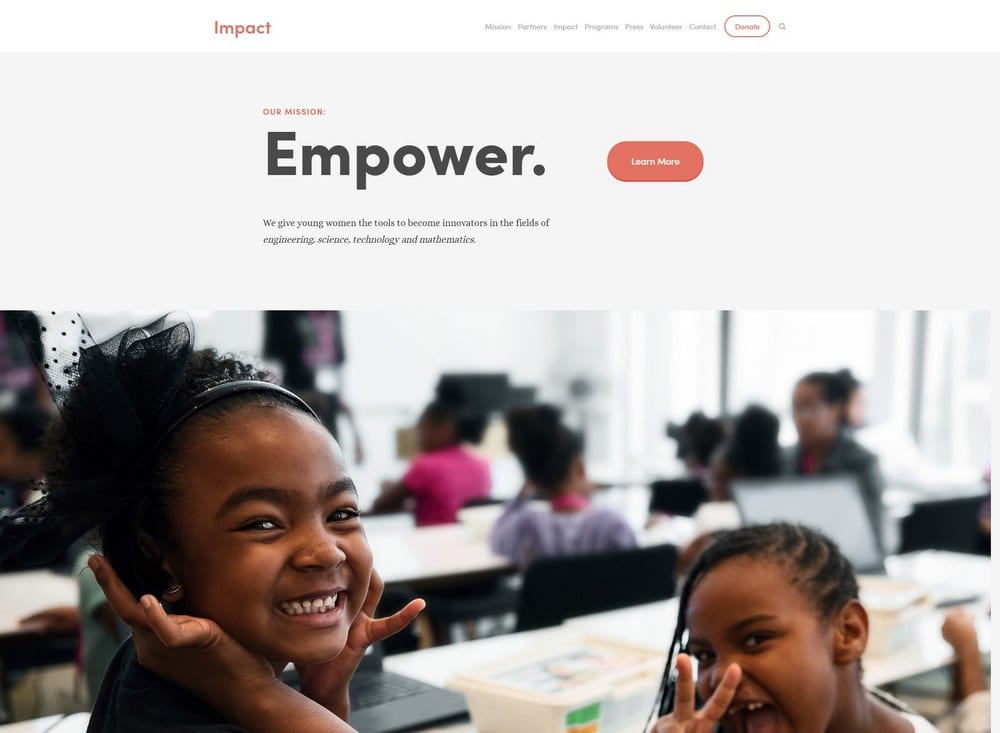
Impact
Best for high-energy salons with bold visual identity ✓ Pros
- Energetic design immediately signals a dynamic, confident salon brand.
- Full-width hero section creates an immersive, cinematic first impression.
- Strong call-to-action placement drives visitors toward booking quickly.
- Works powerfully for salons with video content or animated brand assets.
✗ Cons
- Very bold layout can overpower subtle or quiet salon brand identities.
- Requires strong visual assets to fulfill the template's full potential.
- Large unoptimized images may slow load times on mobile devices.
Impact lives up to its name - this squarespace hair salon template is built for salons that want to make an immediate, unforgettable impression. The full-width hero, bold typography, and energetic layout communicate confidence and excitement from the first scroll. It is best suited to salons with a clear, strong visual identity and a library of high-quality photos or video content to fill the space. For the right brand, Impact can be one of the most powerful options on this list.
How to Choose the Best Squarespace Hair Salon Template
Consider Your Booking Needs First
Every squarespace hair salon template supports Squarespace Scheduling, which lets clients book appointments directly on your site without a third-party tool. If squarespace booking for hair salon is central to how your business runs, prioritize templates with prominent call-to-action placement and a clear, short path from the homepage to the booking page. Look for layouts where the "Book Now" button is visible above the fold without scrolling. For a broader look at templates built around appointment-taking, see our guide to the best scheduling website Squarespace templates.
Match the Template to Your Brand Personality
The visual tone of your template should reflect the experience clients expect when they walk through your door. An upscale color studio will feel most at home with refined, editorial options like Emmeline or Moksha, while a casual neighborhood salon or barbershop might find Fletcher or Almar a better fit. Your squarespace salon template is an extension of your brand identity - choose one that communicates your personality before a visitor reads a single word. If your services extend into wellness or beauty beyond hair, our guides to best Squarespace templates for service businesses and Squarespace templates for health and wellness may also be useful references.
Think About Your Service Menu Complexity
Salons that offer a wide range of services - cuts, color, treatments, styling, and add-ons - benefit most from templates with well-structured layout blocks that can organize information clearly. Suffolk and Emmeline are particularly strong for displaying multi-category service menus in a way that is easy for clients to scan and understand. If pricing transparency is a selling point for your business, make sure the template you choose gives your services page enough visual weight to stand on its own, rather than burying it under portfolio content.
Assess Your Photography Assets
Your portfolio is your most powerful selling tool as a hair salon, and some templates demand more from your image library than others. Editorial layouts like Hayden and Impact need a large collection of high-quality, consistent photography to reach their full potential - they can look sparse or unfinished without it. If your image library is limited, a cleaner, more structured template like Ready or Suffolk will serve you better and still produce a professional hair salon website Squarespace result. Investing in even one professional shoot before launch can dramatically change how any of these templates performs.
Frequently Asked Questions
What is the best Squarespace template for a hair salon?
Can I add online booking to a Squarespace hair salon template?
Are Squarespace hair salon templates mobile-friendly?
Do I need coding skills to customize a Squarespace hair salon template?
How much does a Squarespace hair salon website cost?
Which Squarespace template is best for an independent hair stylist?
Can I display a service menu and pricing on a Squarespace hair salon template?
What makes a good hair salon website on Squarespace?
How We Evaluate Templates
Conclusion: The Best Squarespace Hair Salon Templates
The right squarespace hair salon template comes down to understanding what your brand needs most. For upscale salons focused on editorial impact, Emmeline is the clear front-runner. Fletcher delivers the sharp, modern energy barbershops and contemporary studios thrive on. Almar is the standout choice for boutique salons that lead with warmth and connection, while Suffolk excels for full-service businesses with complex menus. Whatever your niche, Squarespace gives you the tools to integrate booking, showcase your portfolio, and launch a professional hair salon website that works as hard as you do.
For more template guidance across service-based businesses, explore our guides to the best Squarespace templates for service businesses and Squarespace templates for health and wellness.
* Read the rest of the post and open up an offer