

Choosing the right Squarespace news template can make or break a news website. News publishers need a design that handles high-volume content updates, keeps readers engaged, and loads fast enough to stay competitive on Google. A well-chosen squarespace news template gives your publication a professional presence without requiring a developer. Whether you're launching a local news site, a niche editorial, or a full news website on Squarespace, the template you pick sets the foundation for everything.
A great Squarespace news website template combines clean content hierarchy, strong typography, and flexible monetization options. It should support frequent publishing, display featured stories prominently, and perform well on mobile. The best squarespace newspaper template options also allow you to integrate email signups, social media, and membership paywalls without friction.
We evaluated 10 Squarespace news templates for design quality, content organization, loading speed, monetization flexibility, and customization ease - here are our top picks.
Editor's Picks
| # | Name | Best For | Price | Rating | Image | |
|---|---|---|---|---|---|---|
| 1 | News publishers who want bold, image-driven homepage storytelling | Free | 4.3/5 |

|
More Info | |
| 2 | Content-focused news and editorial publishers who prioritize speed and readability | Free | 4.5/5 |
.jpg)
|
More Info | |
| 3 | News publishers who want to sell memberships, courses, or merchandise alongside editorial content | Free | 4.4/5 |

|
More Info | |
| 4 | News publishers covering multiple topics who need a flexible, scalable layout | Free | 4.6/5 |
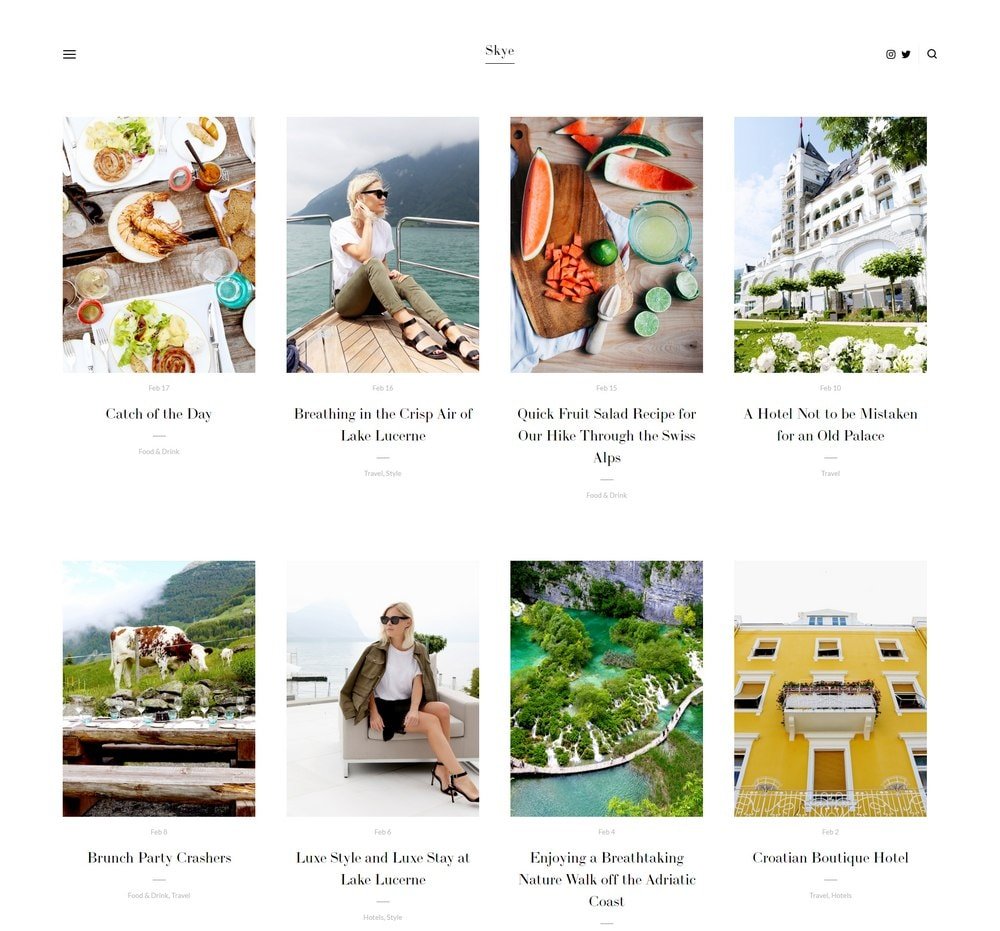
|
More Info | |
| 5 | Digital-native news publishers targeting younger, mobile-first audiences | Free | 4.2/5 |
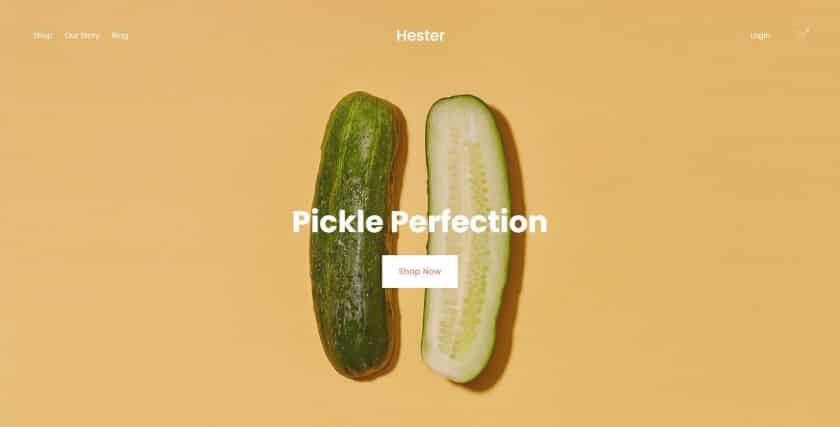
|
More Info | |
| 6 | News publishers who want to drive readers to specific stories or subscription offers on the homepage | Free | 4.3/5 |
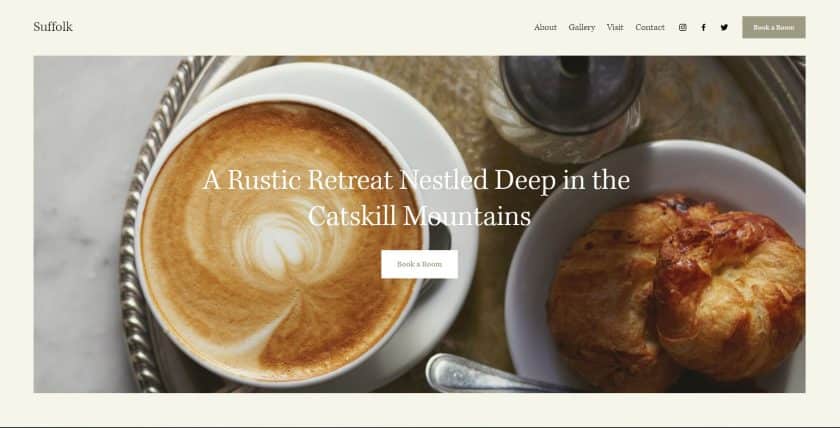
|
More Info | |
| 7 | Freelance journalists, reporters, and small news sites wanting a sleek portfolio-style layout | Free | 4.2/5 |
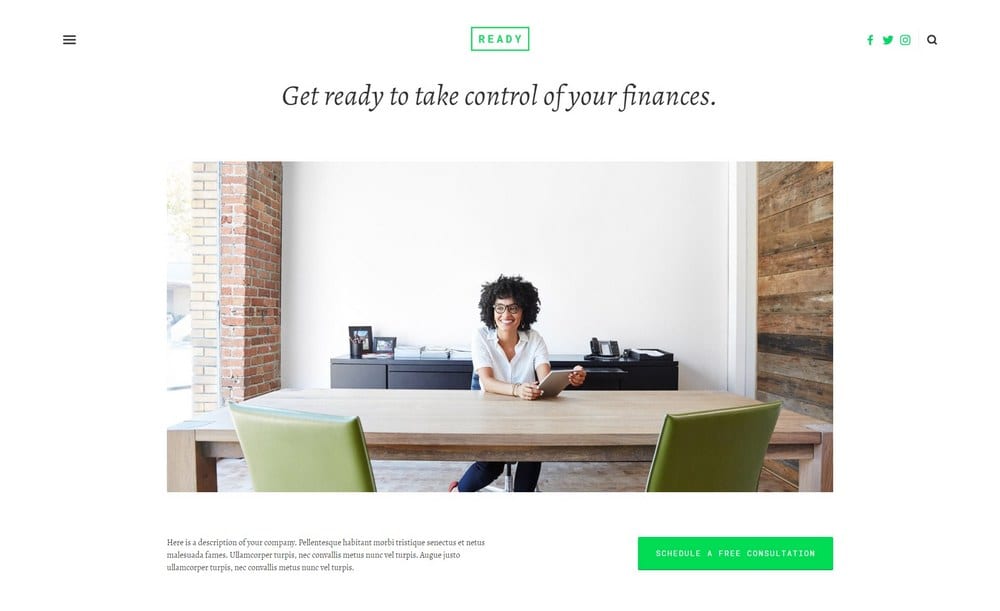
|
More Info | |
| 8 | Niche news publishers who want bold visual presentation with a full-screen slideshow | Free | 4.4/5 |
|
More Info | |
| 9 | News publishers who prioritize page speed and a clean white reading experience | Free | 4.3/5 |
|
More Info | |
| 10 | Independent journalists and niche news publishers who want style alongside editorial credibility | Free | 4.2/5 |
|
More Info |
Our Picks: The 10 Best Squarespace News Templates
Carson
Best for Visual-First News Sites ✓ Pros
- Unique interactive background that changes as visitors hover over stories.
- Hidden navigation menu keeps the focus squarely on your content.
- Fast and simple to customize without any coding knowledge.
- Bold visual presentation grabs reader attention immediately on arrival.
✗ Cons
- Interactive background may feel unconventional for traditional news publishers.
- Limited layout variety compared to multi-column news templates.
- Hidden menu can reduce discoverability for first-time visitors.
Carson is a standout squarespace news template that leads with visuals in a way few other templates attempt. The homepage background dynamically shifts as users hover over different stories, creating an immersive browsing experience. Customization is straightforward, letting you align colors, fonts, and imagery with your publication's brand in minutes. It's especially well-suited for arts, culture, or lifestyle news sites that rely on strong photography.
Avenue
Best for Minimalist Editorial Sites ✓ Pros
- Clean minimalist design keeps all reader attention on your articles.
- Excellent page speed supports stronger Google search rankings.
- Highly converting layout tested across a wide range of audiences.
- Supports embedded videos and images within every blog post.
✗ Cons
- Minimalist style may feel too sparse for feature-heavy news publications.
- Limited built-in homepage layout variety for high-volume publishers.
- Monetization options require additional Squarespace blocks to configure.
Avenue is one of the strongest Squarespace news website template options for publishers who want their writing to do the talking. The white space and clean typography make long-form articles genuinely easy to read, which reduces bounce rates and keeps visitors on site longer. Its fast loading performance gives it an edge in search rankings, which is critical for any news website on Squarespace competing for organic traffic. Customizing Avenue to match a news brand takes very little time, even without design experience.
Myhra
Best for Monetized News and Membership Sites ✓ Pros
- Built-in support for memberships, subscriptions, and digital products.
- Handles courses, events, and news stories within one unified design.
- Blog layout is clean and easy to populate with frequent updates.
- Works equally well for business and services or news publishing niches.
✗ Cons
- Broader feature set can feel like overkill for pure editorial-only publications.
- eCommerce-first design requires extra work to feel like a news site.
- Premium monetization features require a higher-tier Squarespace plan.
Myhra is the best squarespace news template choice for publishers who want to monetize their audience beyond display advertising. It handles memberships, paywalled content, merchandise, and services all within a single cohesive design. The blogging interface is well-organized, making it easy to publish and categorize stories across multiple topics. News sites looking to build a sustainable revenue model will find Myhra covers far more ground than a standard editorial template.
Skye
Best for Multi-Niche News Publishing ✓ Pros
- Trusted by brands worldwide for its versatile and professional design.
- Excellent blog layout built specifically to showcase high-volume news stories.
- Fast loading on all devices keeps bounce rates low across your audience.
- Strong monetization support including memberships and product sales.
✗ Cons
- Wide versatility means it needs deliberate styling to read as a news site.
- Requires careful category structure to avoid a cluttered multi-topic layout.
- Less visually distinctive than purpose-built newspaper-style templates.
Skye is one of the most reliable options on Squarespace for building a scalable news website. Its blog infrastructure is strong enough to handle dozens of daily posts across multiple categories without losing visual coherence. Each story can feature embedded images and video, making it easy to produce rich multimedia content. The template's monetization layer means you can grow a news site into a full publishing business without ever leaving Squarespace.
Hester
Best for Modern and Youth-Oriented News Sites ✓ Pros
- Bold, modern design that immediately appeals to younger readerships.
- Highly customizable colors and typography for strong brand differentiation.
- Built-in mailing list signup form to grow subscribers from day one.
- Flexible page options support both news articles and evergreen content.
✗ Cons
- Playful aesthetic may not suit formal or traditional news publications.
- Requires deliberate setup to handle large volumes of daily content.
- Less white space than minimalist templates, which can feel busy at scale.
Hester is a strong squarespace news template for publishers targeting a younger, digitally native audience that expects bold visuals and fast navigation. The template's color and typography system gives editorial teams real creative control without needing a designer. Consistent publishing of a few articles per day can rapidly build a subscriber base, and the built-in mailing list form captures that audience before they leave. It's one of the more personality-forward templates in this list.
Suffolk
Best for News Sites with a Strong Call to Action ✓ Pros
- Two prominent homepage calls to action drive readers to priority content.
- Clean hero image block showcases your top story with high visual impact.
- Sticky navigation menu keeps site structure accessible on long scroll pages.
- Fast loading speed supports strong performance in news website search rankings.
✗ Cons
- eCommerce-first origins require extra configuration for a news-only site.
- Homepage layout is less flexible than purpose-built news templates.
- Two-CTA layout can feel restrictive for publishers with many story priorities.
Suffolk is a versatile squarespace newspaper template that brings a clean, structured homepage to news publishing. The dual call-to-action buttons above the fold give editors direct control over where reader attention goes - ideal for promoting a subscription offer alongside a breaking story. The sticky menu keeps navigation visible as readers scroll, reducing drop-off on long article pages. Its fast loading characteristics make it a solid performer for a news website on Squarespace competing for search rankings.
Ready
Best for Portfolio-Style News and Journalism Sites ✓ Pros
- Grid-based story layout mimics a classic news front page at a glance.
- Sleek minimalist design keeps all focus directed at the news content.
- Hidden left-side menu keeps navigation clean without crowding the layout.
- Social media and email CTA buttons are easy to configure and display.
✗ Cons
- Portfolio origins limit its scalability for high-volume daily news publishing.
- Hidden menu may reduce navigation visibility for new readers.
- Fewer built-in monetization tools than eCommerce-based news templates.
Ready is a strong choice for freelance journalists or small editorial teams building a news website on Squarespace with a clean, professional look. The homepage grid layout naturally surfaces your latest stories in a format readers recognize from traditional news sites. The left-side hidden menu keeps the interface uncluttered while still providing access to all site sections. Social media integration and a clear email CTA make audience growth straightforward from day one.
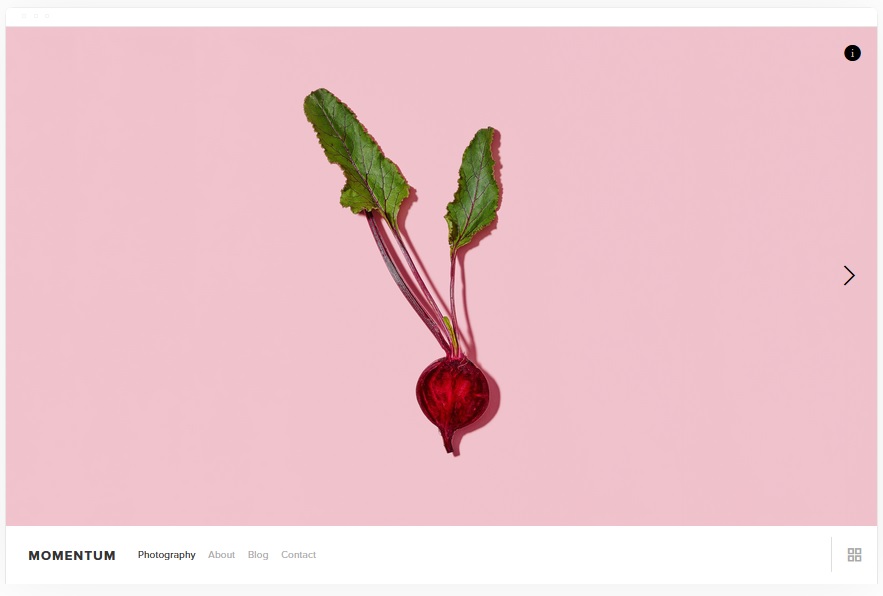
Momentum
Best for Specialist News Sites with Visual Impact ✓ Pros
- Full-screen homepage slideshow puts your biggest stories front and center.
- Dedicated news/blog page keeps content organized and easy to browse.
- Striking image presentation sets it apart from standard editorial templates.
- Built-in monetization allows you to earn revenue alongside your editorial content.
✗ Cons
- Full-screen slideshow can slow initial load times if images aren't optimized.
- eCommerce-first design needs deliberate configuration for pure news use.
- Slideshow format works better for weekly feature stories than daily news updates.
Momentum is one of the most visually arresting squarespace news templates in this list, leading with a full-screen slideshow that commands immediate attention. For specialist news sites - sports, entertainment, technology - that rely on strong photography to tell stories, this template creates a genuine editorial presence. The dedicated news page keeps your archive well-organized, and the monetization layer means you can fund your publication through products or memberships. It's best suited for publishers who update featured stories regularly rather than breaking news operations.
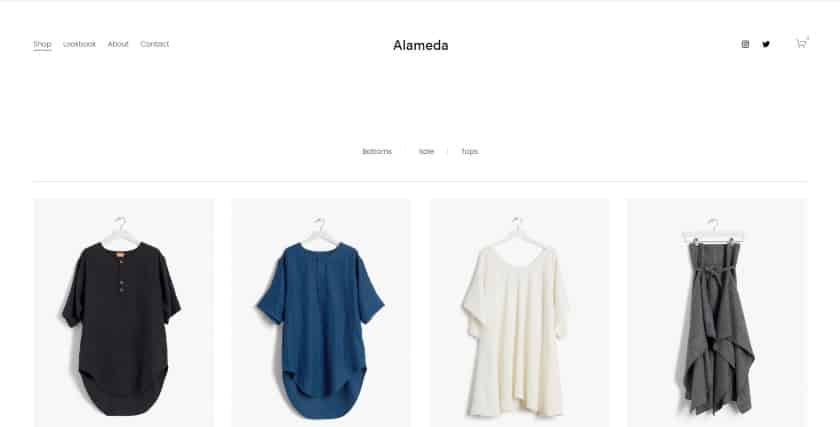
Alameda
Best for Clean, Fast-Loading News Sites ✓ Pros
- Lazy loading technology ensures images only load when readers reach them.
- Clean white background removes all visual noise and highlights your content.
- Fully customizable layout adapts to general or specialist news publishing.
- Quick-view product options support easy monetization alongside editorial content.
✗ Cons
- Clean aesthetic can feel too corporate for opinion or lifestyle news publishers.
- eCommerce features may add visual complexity if not deliberately hidden.
- Requires strong typography choices to give the blank canvas editorial character.
Alameda is a reliable squarespace news website template for publishers who know that speed and readability drive retention. Its lazy loading image system means articles load quickly even when packed with photography, which directly supports better Google rankings. The clean white layout works across virtually any news niche, from general interest to highly specialized verticals. Monetization through products or memberships integrates cleanly without disrupting the editorial reading experience.
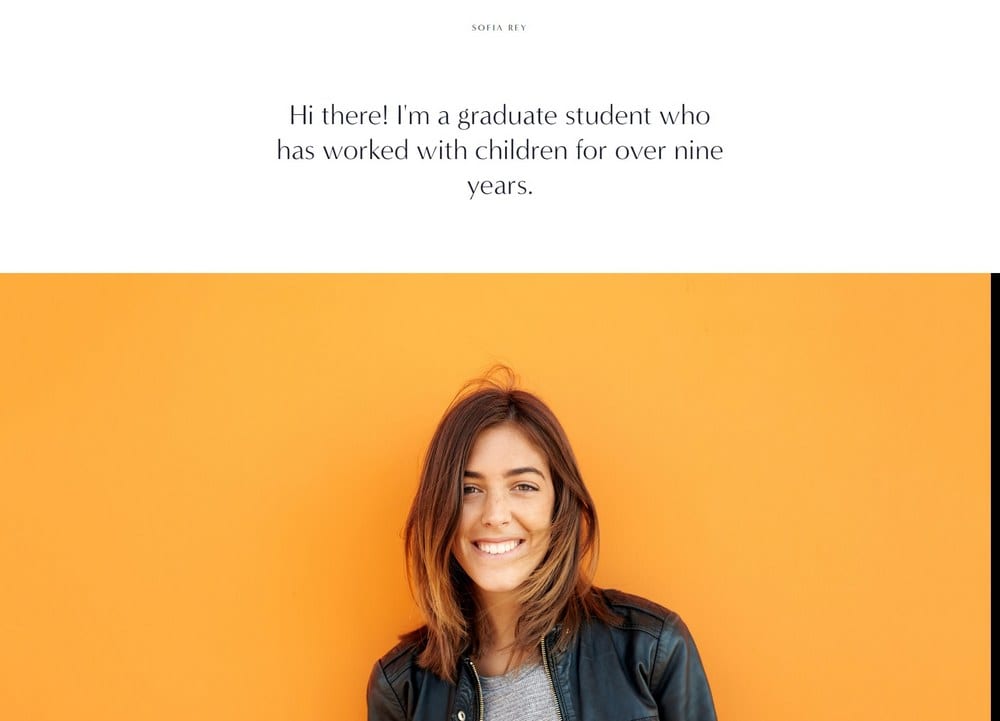
Sofia Rey
Best for Stylish Niche News and Personal Journalism ✓ Pros
- Fully customizable design supports strong visual branding for any news niche.
- Social media buttons integrate cleanly to grow readership across platforms.
- Multiple subscriber and lead capture options built into the template.
- Contact page is clean and easy to edit for press inquiries and pitches.
✗ Cons
- Style-first design requires deliberate effort to feel like a serious news site.
- Less suited to high-frequency breaking news publishing workflows.
- Monetization tools are lighter compared to eCommerce-based alternatives.
Sofia Rey is the right squarespace news template for independent journalists and niche publishers who want their site to feel distinctive and authoritative. The template balances style with substance, making it easy to build trust with a specific audience while monetizing through subscriptions, digital downloads, or services. Social media buttons integrate naturally into the layout, supporting cross-platform audience growth without cluttering the reading experience. Its flexibility makes it equally effective for general news or tightly focused specialist content.
How to Choose the Best Squarespace News Template
Match Your Content Volume to Your Layout
The frequency at which you publish directly affects which squarespace news template will work best for your site. High-volume operations publishing multiple stories daily need grid-based layouts that automatically surface fresh content on the homepage. Lower-frequency publications with a curated editorial focus - weekly deep dives or investigative features - can use slideshow or hero-image templates like Momentum without the homepage feeling stale. Choosing a layout mismatched to your publishing cadence forces constant manual homepage management, which adds unnecessary overhead for editorial teams.
Prioritize Loading Speed for Search Rankings
Page speed is one of the most directly measurable ranking factors for any news website on Squarespace. Google's crawlers prioritize fast-loading pages for indexing, and news content that indexes quickly has a competitive advantage in capturing search traffic. Templates with lazy loading - like Alameda - or minimal asset overhead - like Avenue - give publishers a structural speed advantage before any optimization work begins. Always test your chosen squarespace news website template on mobile as well as desktop, since mobile speed is weighted heavily in Google's current ranking algorithm.
Plan Your Monetization Model Before Choosing a Template
Different squarespace news templates are better suited to different revenue models, and retrofitting the wrong template to your monetization strategy creates friction. Publishers relying on membership paywalls and subscriptions will get the most out of Myhra or Skye, which handle member areas natively. Advertising-supported publications that need clean, fast-reading layouts perform better with minimalist templates like Avenue or Ready. Deciding on your primary revenue approach - subscriptions, ads, merchandise, services - before selecting a template saves significant redesign effort later.
Evaluate Customization Depth for Brand Consistency
A squarespace newspaper template needs to carry your publication's visual identity consistently across dozens or hundreds of article pages. Templates with deep typography, color, and layout customization - like Hester and Sofia Rey - give editorial teams the tools to build a genuinely distinctive brand. Templates with lighter customization work well for publishers who want to launch quickly with a clean default look. Consider how much creative control your team needs day-to-day: if your brand identity is central to audience loyalty, invest time choosing a template with the flexibility to match it precisely.
Frequently Asked Questions
Does Squarespace have a news template?
What is the best Squarespace template for a news website?
Can I build a newspaper website on Squarespace?
Is Squarespace good for SEO on a news site?
Can you add a paywall to a Squarespace news site?
How do I make my Squarespace news site load faster?
Can I use Squarespace for a local news website?
What Squarespace plan do I need for a news website?
How We Evaluate Templates
Conclusion: The Best Squarespace News Templates
The right squarespace news template gives your publication a strong foundation without requiring a developer or designer. Whether you prioritize clean minimalism like Avenue, visual impact like Momentum, or full monetization like Myhra, each template on this list serves a distinct type of news publisher well. Start with your publishing frequency and revenue model, match those to the template strengths above, and you'll have a professional news website on Squarespace up and running quickly.
For journalists specifically - freelancers, investigative reporters, photojournalists, and editorial bloggers - our dedicated guide to the best Squarespace templates for journalists reviews ten templates matched to specific journalism types and publishing goals. If you're also exploring design options beyond editorial, see our guide to Squarespace templates for business and services for related recommendations.
Publishers building broader magazines rather than news-focused sites will find more editorial options in our guide to the best Squarespace magazine templates, covering photography, fashion, travel, and wellness publications.
* Read the rest of the post and open up an offer