

Editor's Picks
| # | Name | Best For | Price | Rating | Image | |
|---|---|---|---|---|---|---|
| 1 | Cafés with food menus and reservation needs | Free | 4.9/5 |
|
More Info | |
| 2 | Coffee cocktails, tastings, and café events | Free | 4.7/5 |

|
More Info | |
| 3 | Coffee blogs, reviews, and editorial content | Free | 4.8/5 |

|
More Info | |
| 4 | Coffee classes, workshops, and community engagement | Free | 4.6/5 |

|
More Info | |
| 5 | Artisan roasters and coffee e-commerce | Free | 4.8/5 |

|
More Info |
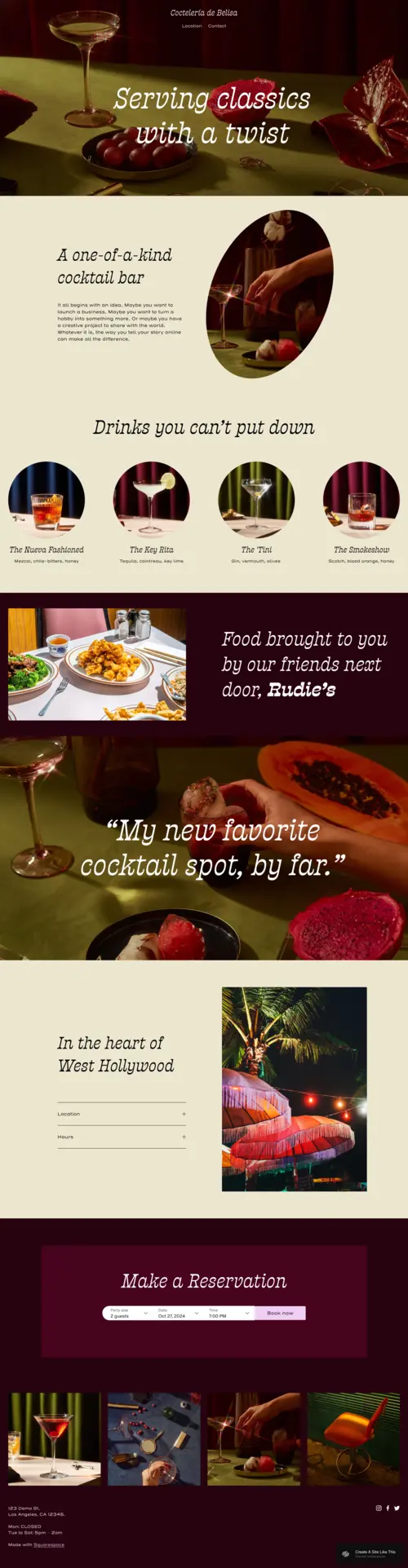
Belisa
Best for Full-Service Cafés & Food Pairings ✓ Pros
• Warm, sophisticated layout that balances coffee imagery with food photography, ideal for cafés offering breakfast or brunch pairings• Built-in reservation system integrates seamlessly with Squarespace scheduling, perfect for coffee shops hosting tastings or private events
• Story-driven sections let you highlight your roasting philosophy, bean sourcing, and barista team without overwhelming visitors
• Bold visual hierarchy draws attention to signature drinks and seasonal specials, encouraging customers to try your featured items
• Mobile-responsive design ensures your menu and hours display perfectly for customers searching on their phones while walking by
✗ Cons
• Image-heavy design requires high-quality photography, grainy smartphone shots will undermine your café's premium positioning• Not ideal for coffee carts or pop-ups that don't need reservation features or extensive menu sections
• May feel too formal for ultra-casual third-wave shops going for a raw, minimalist industrial aesthetic
Belisa feels like walking into a well-designed café, warm lighting, intentional details, and everything in its right place. It's the template for coffee shop owners who want their website to feel as curated as their pour-over menu. The layout gives you room to tell your story without forcing visitors to scroll through paragraphs. You can showcase your espresso bar, highlight your pastry partner, and still keep the booking button front and center. For cafés that take their craft seriously, Belisa matches that energy perfectly.
Fayette
Best for Coffee Bars & Event-Driven Cafés ✓ Pros
• Energetic, vibrant design perfect for coffee bars serving espresso martinis, cold brew cocktails, or themed drink specials• Built-in RSVP and event tools make promoting latte art throwdowns, cupping sessions, or live music nights effortless
• Dynamic layout sections let you rotate seasonal menus and limited-edition roasts without rebuilding your entire page
• Bold color options work beautifully for tropical iced coffee themes or specialty drink promotions
• Gallery-style sections showcase your café's atmosphere and events, building social proof for new customers
✗ Cons
• High-energy aesthetic may feel too loud for traditional, quiet coffee houses focused on calm reading-room vibes• Requires regular content updates to keep event sections fresh, stale "upcoming events" listings look neglected
• Color-forward design needs careful curation or it can overwhelm your coffee photography
Fayette brings the buzz. If your café is as much about the experience as the espresso, think Friday night jazz, weekend pour-over workshops, or rotating guest roasters, this template matches that energy. It's built for coffee shops that want to feel alive online. The event integration is genuinely useful, not just decorative, and the layout keeps things moving without feeling chaotic. Perfect for the café that's always got something brewing.
Rivoli
Best for Coffee Bloggers & Roaster Storytelling ✓ Pros
• Clean, editorial layout puts your writing front and center, ideal for sharing brewing guides, origin stories, or coffee travel journals• Minimalist design lets your coffee photography speak without competing visual elements or distracting sidebars
• Blog-friendly structure supports long-form content about roasting techniques, café reviews, or industry trends
• Versatile enough to incorporate video content, perfect for brewing tutorials or behind-the-scenes roastery footage
• Professional typography creates credibility for coffee educators, consultants, or specialty roasters building thought leadership
✗ Cons
• Not optimized for e-commerce, if selling bags of beans is your priority, you'll need additional customization• Minimal visual impact may underwhelm visitors expecting a more immersive café website experience
• Blog-centric structure requires consistent content creation to avoid looking sparse or abandoned
Rivoli is for the coffee nerds who want to write about it. If you're reviewing single-origins, documenting your roasting experiments, or building a following around your coffee expertise, this template gives your words the space they deserve. It's refined without being stuffy. The focus stays on content, which means your brewing guides, origin deep-dives, and café recommendations actually get read instead of buried under flashy design elements.
Passero
Best for Coffee Educators & Community Cafés ✓ Pros
• Warm, approachable design creates an inviting atmosphere for coffee schools, barista training centers, or community-focused cafés• Dedicated sections for courses and workshops make promoting brewing classes, cupping sessions, or certification programs intuitive
• Recipe and tutorial-friendly layout helps you share pour-over guides, espresso tips, or home brewing advice
• Interactive elements encourage visitor engagement, perfect for building a community around your coffee education content
• Membership-ready structure supports subscription models for exclusive content, monthly bean clubs, or virtual class access
✗ Cons
• Educational focus may feel too instructional for cafés that just want to showcase their menu and location• Requires substantial content investment, empty workshop sections or sparse recipe libraries undermine credibility
• Community-building features only pay off if you're committed to regular engagement and content updates
Passero feels like your favorite neighborhood café, the one where the barista knows your order and actually wants to teach you why their beans taste different. It's built for connection. If you're running brewing workshops, building a coffee education platform, or creating a community around your roastery, Passero gives you the structure to do it well. It's less about looking impressive and more about being genuinely useful to your visitors.
Loam
Best for Specialty Roasters & Bean Sales ✓ Pros
• Artisan aesthetic perfectly matches the specialty coffee market, appealing to customers who care about sourcing and roast profiles• Seamless e-commerce integration makes selling bags of beans, brewing equipment, or subscription boxes straightforward
• Story-driven sections let you highlight farm partnerships, direct trade relationships, and sustainability practices
• Visual focus on ingredients and process builds trust with customers who want transparency about their coffee's journey
• Clean product displays showcase your roasts without clutter, letting tasting notes and origin details shine
✗ Cons
• Artisanal aesthetic may feel too boutique for high-volume cafés focused on quick service rather than craft positioning• E-commerce features require more setup time than simpler templates, not ideal if you're just testing online sales
• Premium look creates high expectations, inconsistent photography or sparse product descriptions will stand out
Loam understands that specialty coffee is about the story behind the cup. It gives you space to explain why your Ethiopian Yirgacheffe tastes like blueberries, why you paid more for direct trade, and why your roasting process matters. For roasters who want to sell beans online without sacrificing the craft narrative, Loam delivers. It's commercial without feeling corporate, and every section reinforces that you care about quality as much as your customers do.
How to Choose the Right Squarespace Template for Your Coffee Shop
Consider Your Primary Revenue Model
If you're a café focused on foot traffic and in-store sales, prioritize templates like Belisa or Fayette that showcase your atmosphere and make finding your hours and location effortless. If online bean sales or subscriptions drive your revenue, Loam's e-commerce integration should be your starting point. Match your template to how you actually make money.
Match the Template to Your Café's Personality
A third-wave specialty roaster and a cozy neighborhood coffee house need different vibes. Loam and Rivoli suit the craft-focused, story-driven approach. Belisa and Fayette work for cafés where the experience and atmosphere are the selling points. Choose the template that feels like your shop before you customize anything.
Plan for Your Content Capabilities
Rivoli and Passero require consistent content creation, blogs, recipes, educational materials. If you're not committed to regular updates, these templates will look neglected within months. For owners who want a "set and forget" website, Belisa or Loam provide impact without demanding constant attention.
Think About Event and Booking Needs
Fayette and Belisa include robust event and reservation features. If you're hosting latte art competitions, cupping sessions, or private events, these tools save time and reduce no-shows. If your café is strictly walk-in, simpler templates won't clutter your site with unused features.
Frequently Asked Questions
What's the best Squarespace template for a new coffee shop website?
Can I sell coffee beans and merchandise through these Squarespace templates?
How much does Squarespace cost for a coffee shop website?
Do these coffee shop templates work well on mobile devices?
Can I integrate online ordering into my Squarespace coffee shop website?
Which template is best for a coffee shop that hosts events and tastings?
How We Evaluate Templates
Start Brewing Your Coffee Shop's Online Presence
The right template transforms your coffee shop website from a digital placeholder into an extension of your café's experience. Whether you choose Belisa's sophisticated warmth, Fayette's event-ready energy, or Loam's artisan storytelling, pick the design that matches your current needs and start building. Your next regular customer might be one search away.
* Read the rest of the post and open up an offer