
Editor's Picks
| # | Name | Best For | Price | Rating | Image | |
|---|---|---|---|---|---|---|
| 1 | Private lessons, studio profiles and philosophy-driven teaching | Free | 4.8/5 |

|
More Info | |
| 2 | Event-driven studios, group classes and performance programs | Free | 4.7/5 |
|
More Info | |
| 3 | Online instruction, hybrid studios and modern teaching methods | Free | 4.6/5 |
|
More Info | |
| 4 | Performer-teachers, composers and creative music educators | Free | 4.5/5 |
|
More Info | |
| 5 | Beginner instruction, children's lessons and patient teaching approaches | Free | 4.6/5 |
|
More Info |
Ortiz
Best for Private Instructors and Studio Owners ✓ Pros
- Story-driven layout puts your teaching philosophy front and centre
- Built-in booking integration removes scheduling back-and-forth
- Image-forward design showcases studio photos and recital moments naturally
- Clean visual hierarchy guides visitors from bio to services to contact
- Dedicated testimonial sections build trust with prospective families
✗ Cons
- Less suited for studios running large-scale group classes or events
- Limited gallery depth for extensive recital photography or video libraries
- Can feel too personal for multi-instructor studios
Ortiz feels like a warm handshake. It's the template for music teachers who believe lessons are about more than scales and sheet music - they're about building a relationship. The layout gives your teaching philosophy room to breathe, and the booking system means interested families can commit while they're still excited. If you're a private instructor who wants students to feel like they already know you before the first lesson, Ortiz makes that connection happen. No clutter, no confusion - just your story, your studio, and a clear path to "schedule a lesson."
Waverly
Best for Recitals, Workshops and Events ✓ Pros
- Event calendar integration makes promoting recitals and workshops effortless
- Audio embedding lets you showcase student performances directly on-site
- Bold, energetic design matches the excitement of live music and performance teaching
- Email sign-up forms capture interested families before they move on
- Clear CTAs drive sign-ups for group classes, camps, and seasonal events
✗ Cons
- Event-forward layout may feel too promotional for private-only instructors
- High-energy aesthetic can clash with calm, patient teaching environments
- Less room for personal storytelling than portfolio-style templates
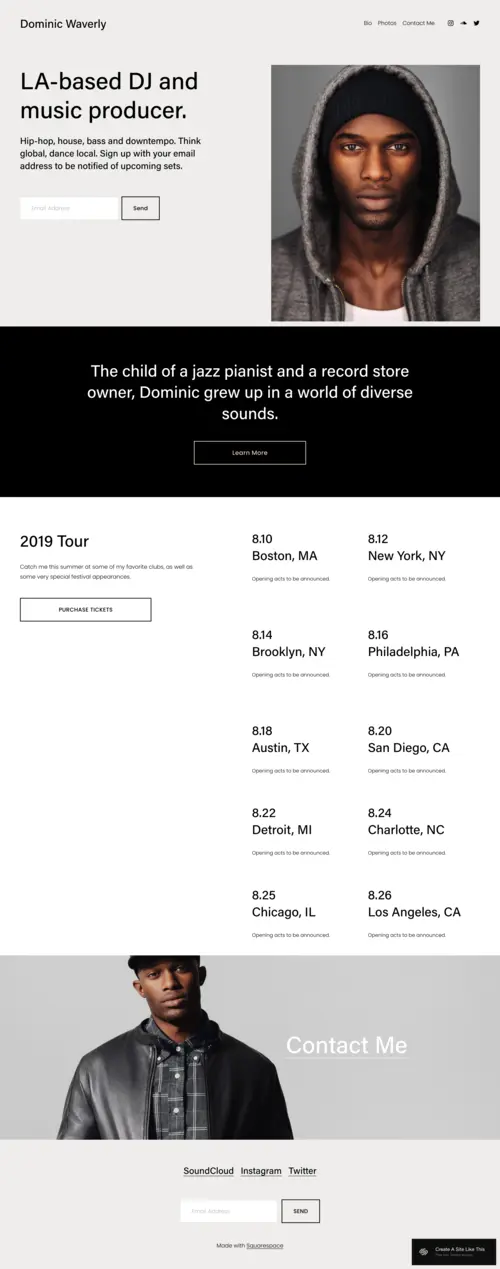
Waverly is built for music teachers who run busy studios. If your calendar is packed with recitals, group theory classes, summer camps, and the occasional masterclass, this template keeps everything organized without overwhelming visitors. The event integration isn't an afterthought - it's the centerpiece. For teachers who thrive on performance energy and community building, Waverly matches that vibe. It's bold enough to communicate excitement without being loud.
Amal
Best for Tech-Forward and Online Lessons ✓ Pros
- Modern, clean aesthetic appeals to adult learners and tech-comfortable families
- Flexible sections highlight multiple specialties without visual clutter
- Event listing supports online masterclasses, Zoom workshops, and hybrid formats
- Strong typography conveys a serious, professional educator
- Contact integration accessible from every page
✗ Cons
- Minimalist look can feel too corporate for warm, playful teaching styles
- Less visual storytelling space than image-heavy templates
- Needs intentional customization to avoid a generic finish
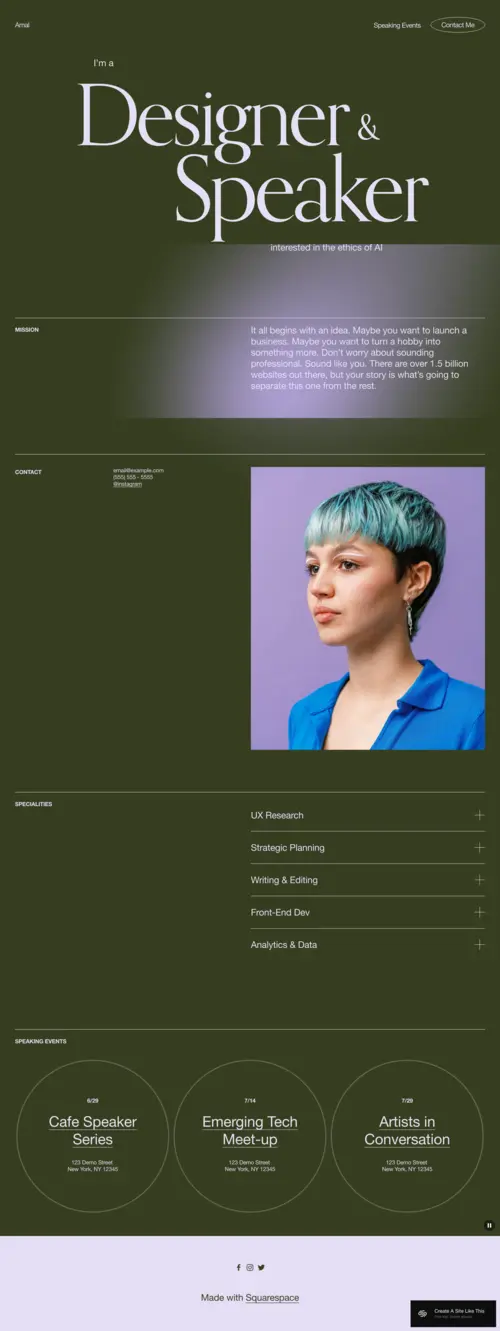
Amal is the template for music teachers who've embraced online lessons, use apps in their teaching, or attract students who found them through a Google search. It looks professional without being stuffy, modern without being cold. If you teach via Zoom, offer hybrid in-person/online packages, or simply want your website to reflect that you're keeping up with how music education is evolving, Amal delivers that impression instantly.
Cami
Best for Multi-Talented Educators and Creative Musicians ✓ Pros
- Portfolio layout suits teachers who also perform, compose, or create alongside teaching
- Gallery sections showcase recitals, student achievements, and your own musical work
- Minimalist navigation keeps lesson information easy to find despite the creative presentation
- Flexible enough to blend teaching, performance bookings, and commission work
- Professional finish positions you as an accomplished musician who also teaches
✗ Cons
- Requires substantial photo and video content to look its best
- Easy to overload when showcasing too many creative ventures at once
- Less streamlined for teachers focused purely on private instruction
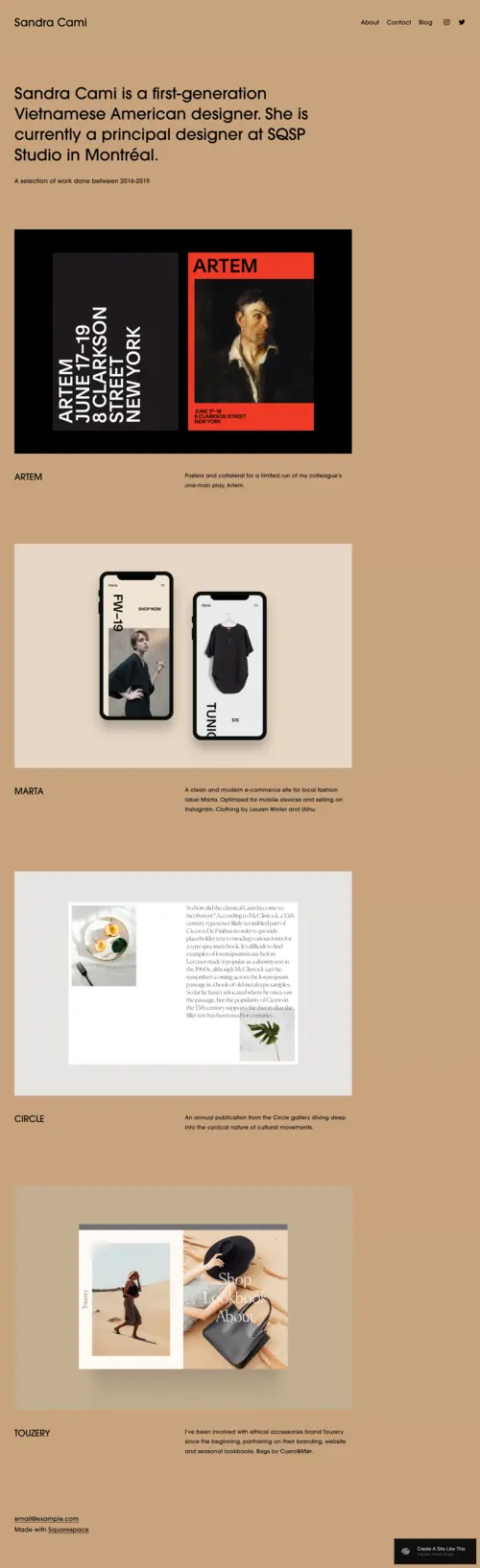
Cami is for music teachers who are also working musicians. Maybe you gig on weekends, compose for local theater, or released an album before shifting to teaching full-time. This template lets you present your full musical identity without making your teaching services feel secondary. Students benefit from learning with someone who's actively creating music, and Cami helps you communicate that credibility. It's polished, it's professional, and it shows you're not just teaching - you're living what you teach.
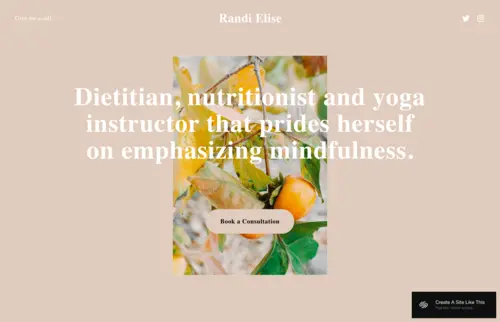
Randi
Best for Beginner-Focused and Nurturing Studios ✓ Pros
- Warm, approachable aesthetic puts nervous beginners and first-time parents at ease
- Philosophy-forward layout communicates patience, methodology, and commitment to enjoyable learning
- Clean, uncluttered design reduces overwhelm for families new to music education
- Trial lesson booking integration helps hesitant prospects take the first step
- Spacious layout makes pricing and lesson packages easy to digest
✗ Cons
- Too subdued for high-energy, performance-driven teaching styles
- Limited event functionality for recital-heavy studios
- May look too simple for teachers with advanced credentials to showcase
Randi is the template for music teachers who specialize in beginners - especially children. Parents researching piano lessons for their seven-year-old aren't looking for flashy; they're looking for patient. Randi communicates that patience before you say a word. The layout breathes. There's space. Nothing feels rushed or salesy. For teachers whose greatest skill is making nervous beginners feel safe enough to try, Randi is that feeling translated into a website.
How to Choose the Right Squarespace Template for Your Music Teaching Business
Consider Your Primary Student Demographics
Who walks through your studio door most often? If you primarily teach children and work with their parents to schedule lessons, you need a template that feels welcoming and trustworthy,Ortiz or Randi. If you attract adult learners who research independently and value professionalism, Amal's modern aesthetic speaks their language. Match your template's tone to the people actually booking lessons.
Evaluate Your Lesson Format and Offerings
Private instructors need different features than studio owners running group classes. If your business model centers on one-on-one lessons, prioritize templates with strong booking integration and personal storytelling like Ortiz. If you run workshops, camps, and group theory classes, Waverly's event-forward design will serve you better. Your template should reflect how you actually teach.
Think About Your Musical Identity Beyond Teaching
Are you purely an educator, or do you also perform, compose, or record? Teachers with active musical careers benefit from Cami's portfolio flexibility,it lets you present your full musician identity without burying your teaching services. If teaching is your sole focus, a simpler template like Randi keeps the message clear and undiluted.
Plan for the Content You Actually Have
Be realistic about your current assets. Portfolio-style templates like Cami look stunning with abundant photography and video,but sparse if you don't have that content yet. Newer teachers may find text-forward templates like Randi easier to populate immediately, then upgrade later as their recital photo library grows.
Match Your Teaching Philosophy to Visual Tone
Your website should feel like your studio. High-energy teachers who emphasize performance and motivation fit Waverly's bold design. Patient, nurturing instructors match Randi's calm aesthetic. Teachers who emphasize relationship-building over technical drilling will find Ortiz's story-driven layout aligns with their values. Let your philosophy guide your template choice.
Frequently Asked Questions
Which Squarespace template is best for music teachers who offer online lessons?
Can I embed audio or video of student performances on my music teacher website?
Can I sell sheet music or lesson recordings through my music teacher Squarespace site?
How do I integrate online booking for music lessons into my Squarespace template?
What is the best Squarespace template for a piano teacher website?
What should a music teacher website include?
How We Evaluate Templates
Find Your Template and Start Teaching
Your website should feel like an extension of your studio,welcoming, professional, and unmistakably you. Whether you're a patient instructor building beginner confidence with Randi, an event-driven studio owner keeping recitals organized with Waverly, or a performing musician sharing your craft through Cami, the right template makes your expertise visible before the first lesson ever begins. Pick the template that matches how you teach today, customize it with your story, and let the students find their way to you.
* Read the rest of the post and open up an offer