
.png)
Editor's Picks
| # | Name | Best For | Price | Rating | Image | |
|---|---|---|---|---|---|---|
| 1 | Video-focused personal websites and hobby sites | Free | 4.3/5 |
|
More Info | |
| 2 | Social media-integrated personal websites | Free | 4.1/5 |
.png)
|
More Info | |
| 3 | Media-rich personal portfolios and creative sites | Free | 4.3/5 |
|
More Info | |
| 4 | Unique portfolio-style personal websites | Free | 4.2/5 |
|
More Info | |
| 5 | Personal branding, skills showcase, and services | Free | 4.4/5 |
|
More Info | |
| 6 | Clean minimalist personal websites | Free | 4.2/5 |
.png)
|
More Info | |
| 7 | Striking visual personal websites | Free | 4.2/5 |
|
More Info | |
| 8 | Streamlined personal websites with blog integration | Free | 4.2/5 |
|
More Info | |
| 9 | Blogging-focused personal websites | Free | 4.3/5 |
|
More Info | |
| 10 | Professional personal websites with portfolio and blog | Free | 4.3/5 |
|
More Info |
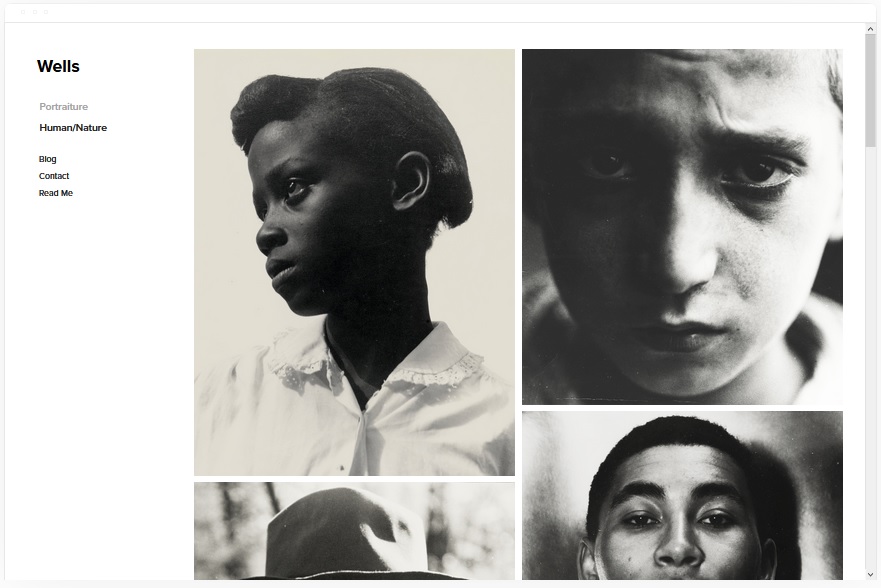
Wells
Best for Video-Focused Personal Websites ✓ Pros
- Seamless video integration lets you embed content directly via YouTube URL - perfect for creators who lead with video on their personal website.
- Built-in eCommerce functionality means you can sell merchandise, prints, or digital products from a hobby site without switching platforms.
- Highly customizable layout adapts quickly to different personal website styles, from minimal portfolios to content-rich hubs.
- Fast-loading pages keep visitors engaged and support stronger SEO performance for your Squarespace personal website template.
- Clean design structure makes it easy to add new sections as your personal site grows over time.
✗ Cons
- Video-first layout may feel underutilized if you do not regularly produce video content for your personal website.
- Less emphasis on text-heavy layouts, so writers and bloggers may need extra customization to get the reading experience right.
- Default styling leans casual - professionals in corporate fields may need to adjust fonts and colors to match their tone.
Wells is the template to pick if video is central to your personal brand. The YouTube integration is smooth and native-feeling, which means your content loads fast and looks polished without third-party workarounds. The eCommerce layer is a bonus for anyone running a hobby site who wants to monetize without the complexity of a separate store. It is a personal website template that does more than most without ever feeling cluttered.
Native
Best for Social Media-Integrated Personal Websites ✓ Pros
- Strong social media integration connects your personal website to your broader online presence across platforms.
- Rounded thumbnail design gives the layout a distinctive, modern look that stands out from standard grid templates.
- Built-in blog with location tagging is ideal for travel bloggers, digital nomads, or anyone documenting experiences across places.
- Smooth scrolling navigation creates a polished browsing experience that keeps visitors moving through your content.
- Lightweight design loads quickly on all devices, supporting both user experience and search engine rankings.
✗ Cons
- Rounded thumbnails are distinctive but may clash with brands that prefer sharp, geometric visual styles.
- Social-first layout can feel thin if you do not have active social media profiles to connect.
- Blog layout with locations is niche - less useful for personal websites focused on services or portfolio work.
Native works best when your personal website is an extension of an active social media presence. The integration is seamless, the scrolling experience feels natural, and the rounded thumbnails give your site a visual identity that visitors remember. If you are someone who posts frequently across platforms and wants a central hub that ties everything together, Native handles that job cleanly. The location-tagged blog is a nice bonus for anyone whose content is tied to places and experiences.
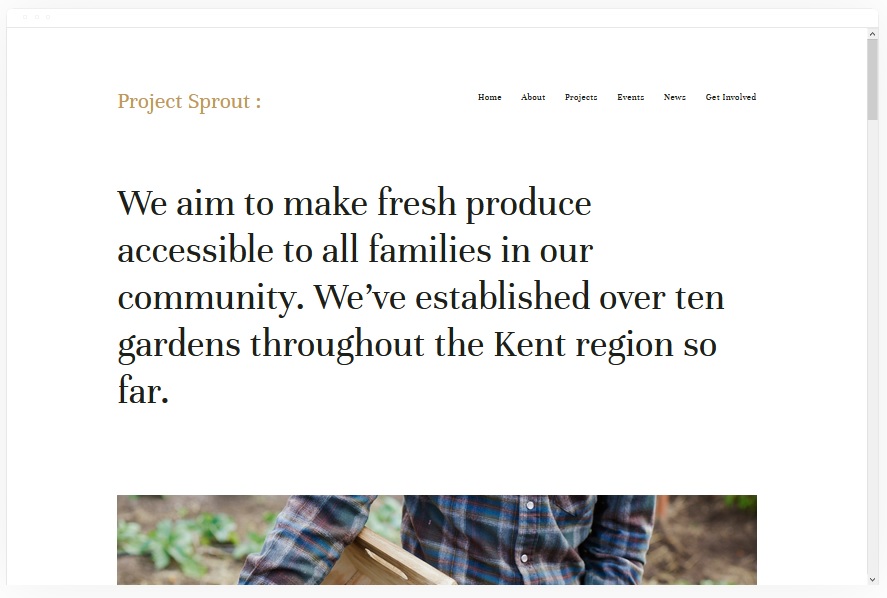
Kent
Best for Media-Rich Personal Portfolios ✓ Pros
- Media-rich layout handles photos, videos, and mixed content with equal polish - ideal for creatives with diverse portfolios.
- Dedicated portfolio section presents your work in a gallery-quality format that impresses potential clients and collaborators.
- Versatile page types including cover pages, blog, event listings, and album galleries give you everything a personal website needs.
- Built-in eCommerce lets you sell prints, digital products, or services directly from your personal website without extra plugins.
- Strong visual hierarchy ensures your best work gets prominent placement without manual layout adjustments.
✗ Cons
- Media-heavy design requires high-quality images and content - the layout exposes weak photography quickly.
- Multiple page types can feel overwhelming if you only need a simple one-page personal website.
- Default styling leans toward creative industries, so consultants or corporate professionals may need significant customization.
Kent is the Swiss army knife of personal website templates on Squarespace. Cover pages, blog, events, albums, and eCommerce are all built in, which means you can run a complete personal brand from a single template without compromises. It is especially strong for creatives who need to show diverse types of work - photographers who also blog, musicians who sell merchandise, or artists who host events. The layout handles variety without losing visual coherence.
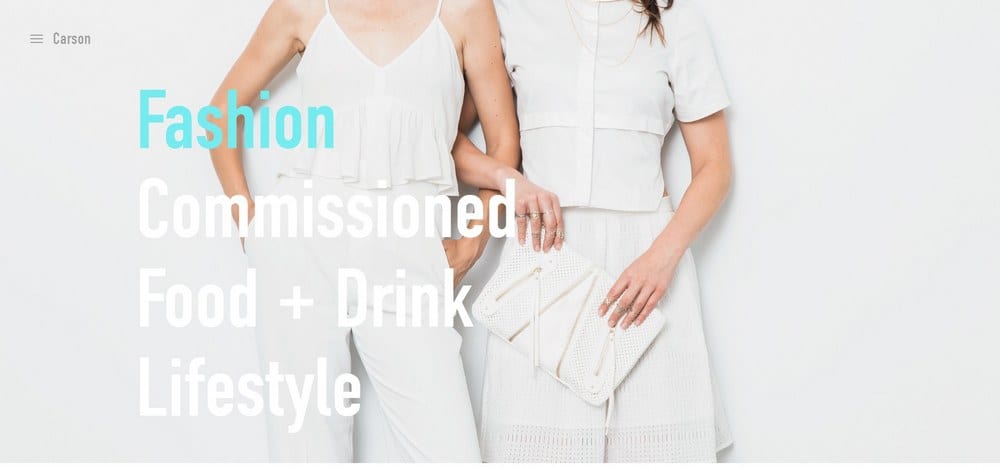
Carson
Best for Unique Portfolio-Style Personal Websites ✓ Pros
- Distinctive static hover page creates an immediately memorable first impression that sets your personal website apart.
- Hidden menu design keeps the layout clean and distraction-free, letting your content take center stage.
- Strong portfolio presentation with large image display puts creative work front and center.
- Inline Squarespace link integration makes navigation feel seamless and modern.
- Minimal chrome and generous whitespace give the template a gallery-quality aesthetic.
✗ Cons
- Hidden menu can confuse visitors who expect traditional navigation - not ideal for content-heavy personal websites.
- Static hover page is distinctive but may feel limiting if you prefer a conventional homepage layout.
- Less suited to service-based personal websites that need clear, visible calls to action above the fold.
Carson is for anyone who wants their personal website to feel like walking into a curated gallery. The static hover page is unlike anything else in the Squarespace template library, and it creates a first impression that sticks. The hidden menu is a bold design choice that works beautifully for visual portfolios where you want nothing competing with your images. If you are a photographer, designer, or artist who values presentation above all else, Carson delivers that experience.
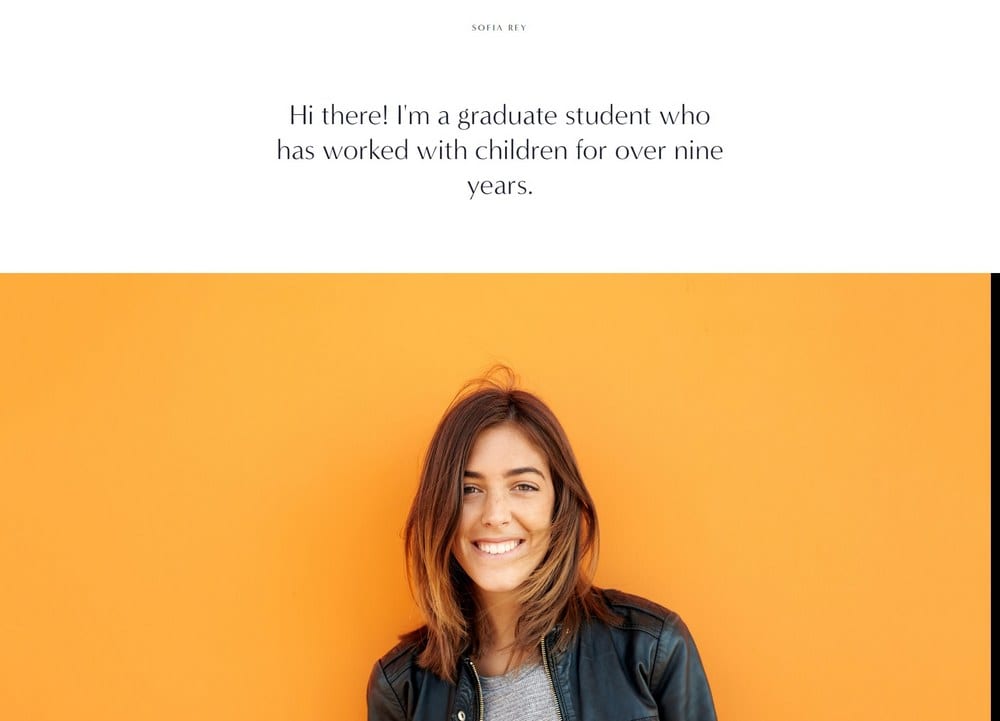
Sofia Rey
Best for Personal Branding and Services ✓ Pros
- Purpose-built layout for personal brands with dedicated sections for skills, services, and client reviews.
- Resume section makes it easy to present your experience and credentials in a polished, scannable format.
- Vibrant yet sleek design communicates energy and professionalism simultaneously - a rare combination in custom Squarespace templates.
- Strong social media integration connects your personal website to your broader online presence.
- Conversion-focused structure guides visitors from introduction through services to contact or booking.
✗ Cons
- Vibrant default styling may feel too bold for professionals in conservative industries like finance or law.
- Resume section is specific - less useful for personal websites focused on portfolio work rather than career credentials.
- Services-heavy layout can feel over-structured if you are building a simple bio or blog site.
Sofia Rey is the strongest Squarespace personal website template for anyone who needs their site to function as both a portfolio and a pitch. The skills and services sections let you present what you do with clarity, while the reviews section builds trust with potential clients or employers. The resume feature is a standout - it turns your site into a living CV that stays current without the limitations of a static PDF. If your personal website needs to actively generate leads or opportunities, Sofia Rey is built for that job.
Sofia Pazari
Best for Clean Minimalist Personal Websites ✓ Pros
- Clean, minimalist design lets your content and personality come through without visual noise or distraction.
- Two side-by-side image layout creates a distinctive visual rhythm that is elegant and easy to customize.
- Top-right menu placement keeps navigation accessible without cluttering the header or hero section.
- Highly customizable framework adapts to different personal website styles with minimal effort.
- Generous whitespace gives every element room to breathe, creating a calm and professional browsing experience.
✗ Cons
- Minimalist approach can feel too spare for personal websites that need to present a lot of information upfront.
- Side-by-side image layout requires carefully paired images - mismatched photos undermine the design.
- Less structured for service-heavy sites that need clear CTAs and detailed offering breakdowns.
Sofia Pazari is the template for people who believe less is more. The minimalist layout does not sacrifice sophistication - it amplifies it. Every design choice is intentional, from the paired images to the discreet menu placement, and the result is a personal website that feels curated and confident. It works especially well for creatives, writers, and professionals who want their site to communicate taste and restraint rather than volume and noise.
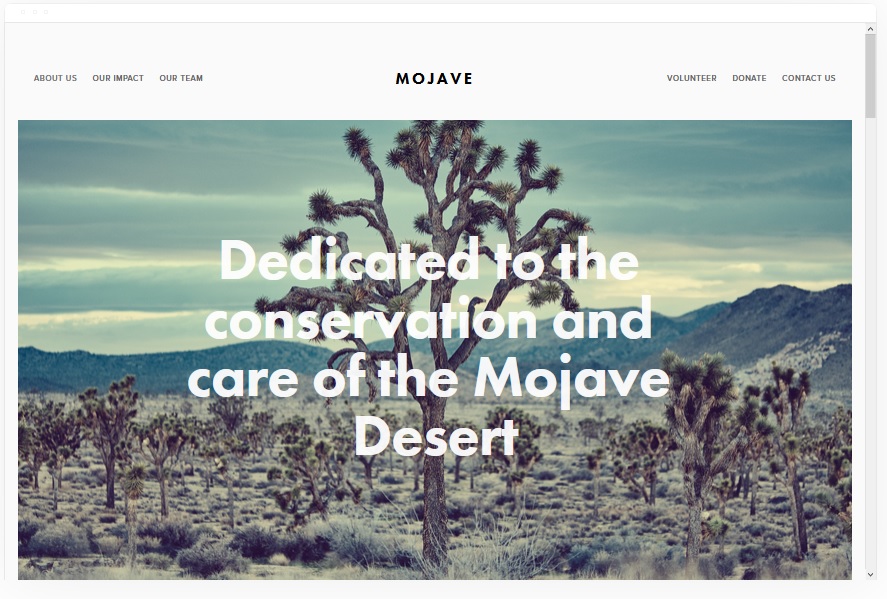
Mojave
Best for Striking Visual Personal Websites ✓ Pros
- Striking visual design with a scrolling parallax effect creates depth and movement that keeps visitors engaged.
- Built-in share buttons make it easy for visitors to spread your content across social platforms directly from your personal website.
- Clean white background ensures your images, text, and branding elements stand out with maximum contrast.
- Professional layout scales well from a simple about page to a full multi-section personal website.
- Smooth scrolling experience feels polished and modern across both desktop and mobile devices.
✗ Cons
- Parallax scrolling effect can feel dated if overused - best applied sparingly across key sections.
- White background design requires strong imagery to avoid feeling blank or unfinished.
- Less personality out of the box compared to more opinionated templates - needs intentional customization to feel unique.
Mojave is the go-to Squarespace personal website template for professionals who want clean visual impact without unnecessary complexity. The scrolling effect adds just enough dynamism to keep the experience interesting, while the white background keeps the focus squarely on your content. It is especially effective for consultants, freelancers, and creatives who want a personal website that communicates polish and professionalism from the first scroll.
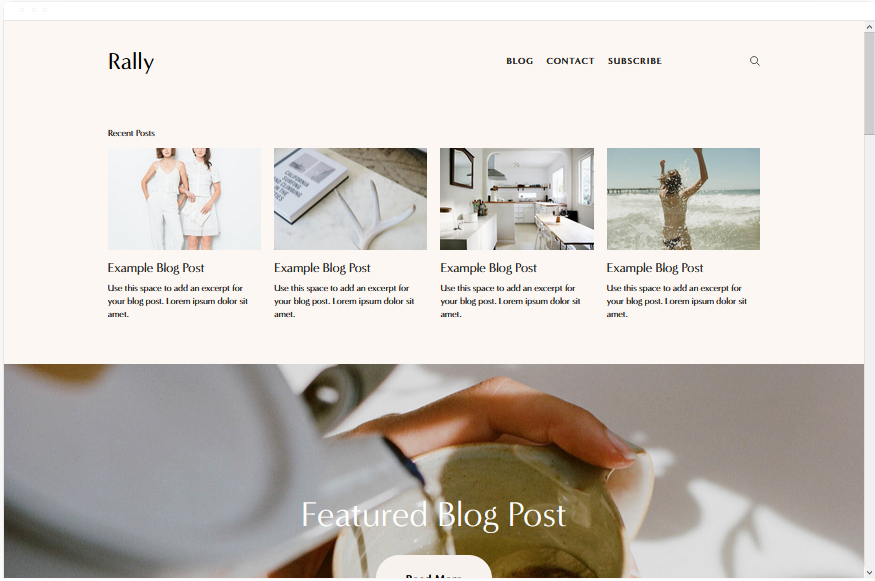
Rally
Best for Streamlined Personal Websites with a Blog ✓ Pros
- Streamlined layout presents your personal brand clearly without unnecessary visual elements or distractions.
- Smooth scrolling navigation creates a seamless browsing experience that keeps visitors moving through your content.
- Prominent social media link placement connects visitors to your profiles without requiring them to search for icons.
- Strong blog integration makes Rally a solid choice for personal websites centered around regular content publishing.
- Clean, modern typography reads well on all screen sizes and gives text-heavy pages a professional feel.
✗ Cons
- Streamlined design may feel too simple for personal websites that need visual complexity or dense content layouts.
- Less effective for portfolio-heavy sites where large image galleries are the primary content type.
- Limited section variety compared to more flexible templates - works best for focused, single-purpose personal sites.
Rally is the template for anyone who wants a personal website that gets straight to the point. There is no visual clutter, no unnecessary complexity - just your story, your content, and clear paths to connect. The blog integration is strong enough to make Rally a viable choice for personal websites where writing is the main attraction, and the social media links ensure visitors can follow you beyond the site. If simplicity and clarity are your priorities, Rally delivers both.
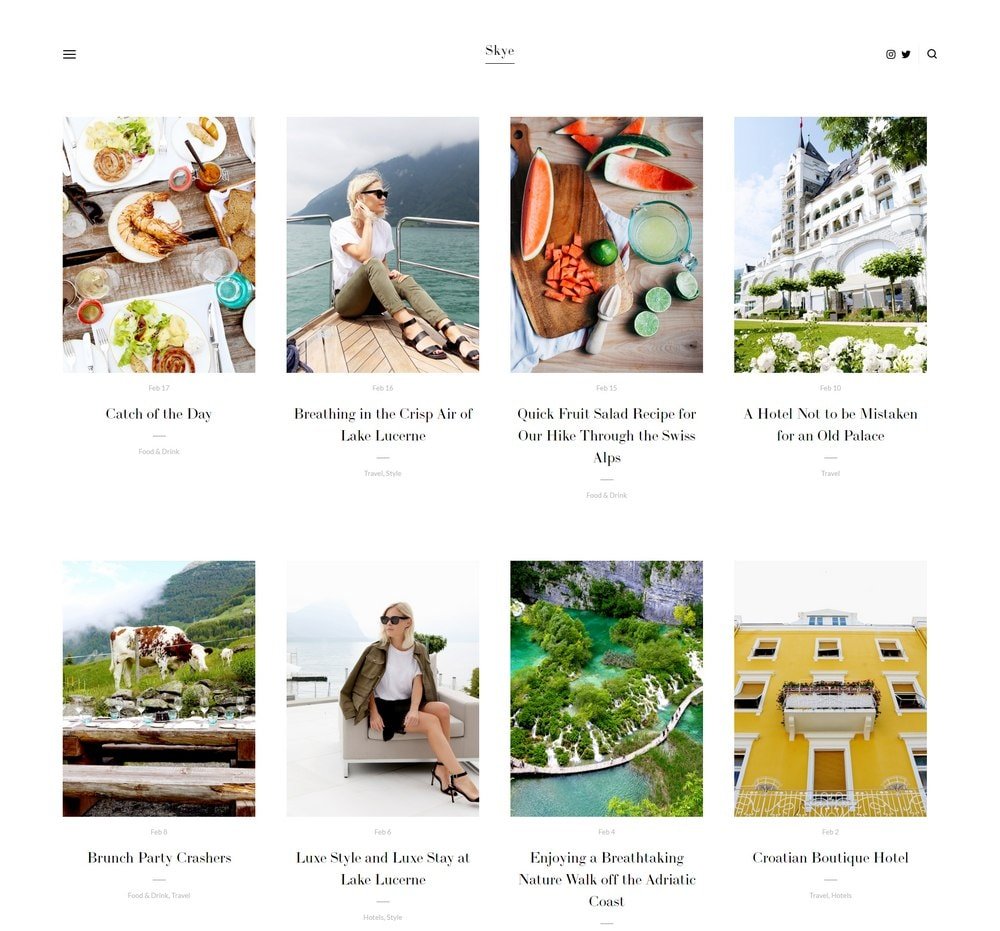
Skye
Best for Blogging-Focused Personal Websites ✓ Pros
- Grid-based blog layout presents posts in a visually appealing, magazine-style format that encourages browsing.
- Fullscreen image support gives hero sections and featured posts maximum visual impact on any device.
- Excellent mobile responsiveness ensures your personal website looks polished on phones and tablets.
- Strong content organization tools help bloggers categorize and present posts in a way that keeps readers engaged.
- Clean reading experience with good typography makes long-form content comfortable to consume.
✗ Cons
- Blog-first layout may feel unbalanced if your personal website is primarily a portfolio or services page.
- Grid layout requires consistent featured images across posts - inconsistent imagery breaks the visual pattern.
- Less suited to personal websites that need prominent service listings or booking functionality above the fold.
Skye is the strongest blogging template in this personal website roundup. The grid-based layout turns your blog archive into something visitors actually want to browse rather than scroll past, and the fullscreen image support means every post can make a visual statement. If your personal website exists primarily to publish and share written content, Skye gives your writing the presentation it deserves. The mobile experience is particularly strong, which matters when a growing share of blog traffic comes from phones.
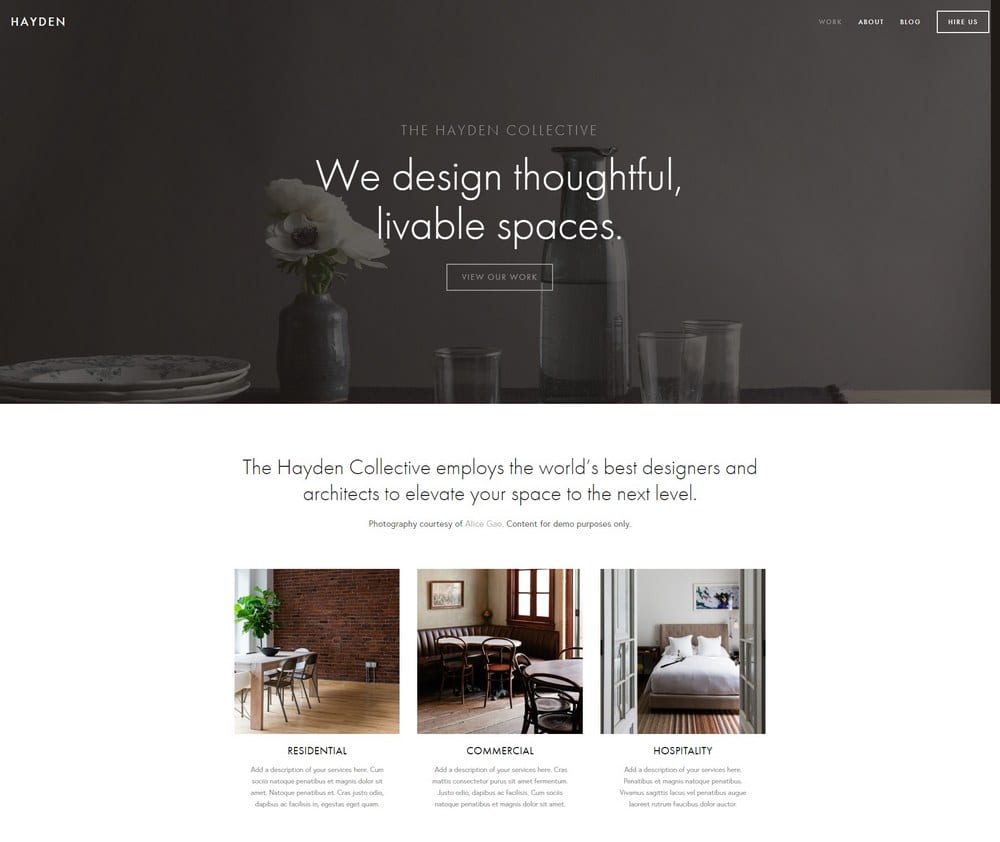
Hayden
Best for Professional Personal Websites ✓ Pros
- Professional layout with a sticky menu keeps navigation accessible as visitors scroll through your personal website.
- Strong blog section supports regular content publishing alongside your portfolio and services pages.
- Portfolio display handles project showcases and case studies with a clean, structured presentation.
- Built-in booking functionality lets clients schedule consultations or meetings directly from your personal website.
- Balanced design works equally well for creative freelancers and corporate professionals.
✗ Cons
- Sticky menu can feel intrusive on smaller screens if your navigation has too many items.
- Professional tone may read as slightly corporate for personal websites aiming for a casual or creative vibe.
- Requires strong content across multiple sections - thin pages feel more noticeable in a structured layout like this.
Hayden is the all-in-one professional personal website template. The sticky menu means visitors always know where they are and how to get where they want to go, which is critical for sites with multiple content types. The combination of portfolio, blog, and booking makes it possible to run your entire professional presence from a single Squarespace site. If you are a freelancer, consultant, or service provider who needs a personal website that works as hard as you do, Hayden covers every base.
How to Choose the Best Squarespace Template for Your Personal Website
Start With Your Primary Goal
The best Squarespace personal website template depends entirely on what you need your site to do. If you are building a portfolio, Kent and Carson offer the strongest visual presentation. If blogging is central, Skye and Rally handle content publishing better than the rest. For personal branding with services and credentials, Sofia Rey gives you the most complete structure. Decide what your site needs to accomplish first, then match the template to that goal.
Match the Design to Your Audience
A personal website for a creative professional and one for a business consultant need different visual signals. Bold, image-forward templates like Carson and Mojave suit creative industries where visual impact matters. Clean, structured layouts like Hayden and Wells are better fits for professionals where credibility and clarity lead. Think about what your ideal visitor expects to see and choose accordingly.
Consider How You Will Grow the Site
Many personal websites start simple and expand over time. Choose a Squarespace personal website template that can scale with you. Kent, Hayden, and Sofia Rey all handle multiple content types without requiring a redesign as you add pages and sections. Starting with a flexible template saves you from switching later when your needs evolve.
Think About Content You Already Have
If you have strong photography or video, lean toward templates like Wells, Kent, or Carson that showcase visual content. If your strength is writing, Skye and Rally give text the room and typography it needs. If you have active social media profiles, Native connects those channels naturally. The best personal website templates amplify the content you already create rather than forcing you to produce new types.
Frequently Asked Questions
What is the best Squarespace template for a personal website?
Are Squarespace personal website templates free to use?
Can I customize a Squarespace personal website template without coding?
Which Squarespace template is best for a personal website with a blog?
Can I add a portfolio to my Squarespace personal website?
How do I make my Squarespace personal website look professional?
Can I switch Squarespace personal website templates after building my site?
Do Squarespace personal website templates work well on mobile devices?
How We Evaluate Templates
Conclusion: Build Your Personal Website on the Right Foundation
The right Squarespace personal website template saves you time, looks professional from day one, and grows with you as your goals evolve. Sofia Rey leads for personal branding, Kent and Carson handle visual portfolios, Skye owns the blogging space, and Hayden covers everything a working professional needs in one template.
Pick the template that matches how you want visitors to experience you, add your content, and let your personal website start working. If content publishing is a priority, also check our guide to the best Squarespace templates for blogging.
* Read the rest of the post and open up an offer