

Starting a blog on Squarespace gives you a polished, professional site without needing a developer or wrestling with plugins. But not every template is built with bloggers in mind. Some prioritize e-commerce grids or portfolio showcases, leaving blog content as an afterthought. The five Squarespace templates for blogging below are different. Each one was chosen because it handles blog posts, categories, and reader navigation well out of the box. For bloggers who want movement and engagement built in, see our roundup of interactive Squarespace templates with scroll effects. If you are wondering whether the platform is right for you, we have a detailed guide on whether Squarespace is good for blogging that covers the full picture.
These Squarespace blog templates cover a range of blogging styles - from visual storytelling and lifestyle content to text-heavy editorial writing and niche blogging. You can also explore our list of free Squarespace templates if you want to compare options beyond blogging-specific picks.
Editor's Picks
| # | Name | Best For | Price | Rating | Image | |
|---|---|---|---|---|---|---|
| 1 | Multi-topic bloggers, personal bloggers, and content creators | Free | 4.4/5 |
|
More Info | |
| 2 | Visual storytellers, photo bloggers, and creative writers | Free | 4.3/5 |
|
More Info | |
| 3 | Lifestyle bloggers, fashion bloggers, and visual content creators | Free | 4.5/5 |
|
More Info | |
| 4 | Niche bloggers, editorial writers, and multimedia content creators | Free | 4.3/5 |
|
More Info | |
| 5 | Food bloggers, recipe writers, and niche content creators | Free | 4.1/5 |

|
More Info |
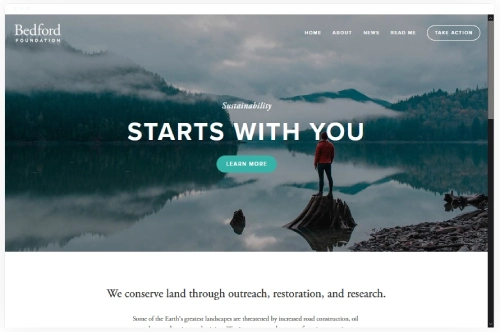
Bedford
Best for Multi-Topic Bloggers ✓ Pros
- Sidebar navigation keeps blog categories visible without cluttering the main content area, making it easy for readers to explore multiple topics.
- Flexible homepage layout lets you feature recent posts, popular categories, and an about section all on one page.
- Strong typography hierarchy ensures long-form articles are comfortable to read on both desktop and mobile screens.
- Built-in social sharing and author bio sections encourage engagement and help build your personal brand.
- Works well for bloggers who cover several topics - the layout naturally organizes diverse content without feeling chaotic.
✗ Cons
- The sidebar-heavy design may feel dated compared to more minimal, full-width Squarespace blogging templates.
- Image-light blogs can look sparse in Bedford since the layout benefits from strong featured images on every post.
- Customizing the sidebar widgets beyond the defaults requires some CSS knowledge.
Bedford is the Squarespace blogging template built for people who actually write. If you publish across multiple categories - travel stories, personal reflections, how-to guides - this template organizes it all without making your blog feel like a cluttered notebook. The sidebar keeps readers oriented, the post layouts are clean, and the overall structure rewards consistent publishing. It is not the flashiest template on the platform, but it is one of the most functional for bloggers who prioritize content over visual effects.
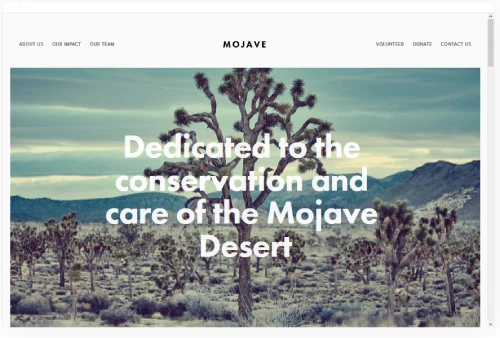
Mojave
Best for Visual Storytelling Blogs ✓ Pros
- Scrolling homepage effect creates an immersive browsing experience that draws readers into your content from the first visit.
- Large featured images give every blog post a magazine-quality presentation that rewards strong photography.
- Clean, spacious layout keeps text readable and prevents the visual clutter that undermines long-form articles.
- Excellent mobile responsiveness - blog content reflows naturally on smaller screens without losing its visual impact.
- Versatile enough to serve as both a personal website and a dedicated blogging platform.
✗ Cons
- The scrolling homepage can feel slow for repeat visitors who just want to jump to the latest post.
- Text-heavy blogs without strong imagery will not get the full benefit of Mojave's visual-first layout.
- Limited sidebar functionality compared to more traditional Squarespace blog templates like Bedford.
Mojave treats every blog post like a feature article. The scrolling homepage pulls readers through your content like turning pages in a coffee-table magazine, and the generous whitespace means your writing never feels cramped. This is the Squarespace blogging template for creators who pair strong writing with strong visuals - photographers who write long captions, travel bloggers who mix narrative with imagery, or lifestyle writers who want their site to feel like a curated experience rather than a reverse-chronological feed.
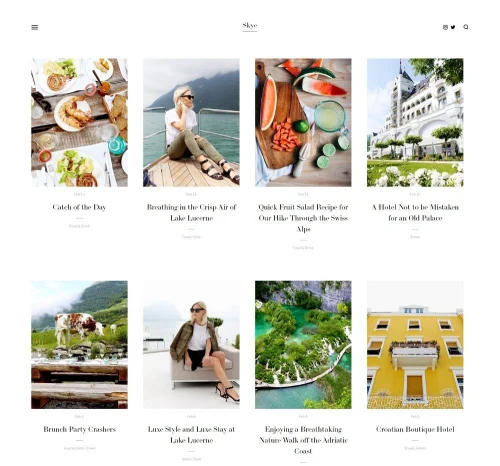
Skye
Best for Lifestyle and Photo Bloggers ✓ Pros
- Grid-based blog layout displays posts as visual cards, turning your blog feed into a curated, browsable collection.
- Fullscreen image support gives every post a striking hero section that captures attention immediately.
- Slide-out navigation keeps the interface clean while still providing easy access to categories and pages.
- Excellent mobile readability - the grid reformats cleanly on phones and tablets without losing its visual appeal.
- Works naturally for lifestyle blogs where aesthetics matter as much as the writing itself.
✗ Cons
- Grid layout depends on strong cover images - inconsistent or low-quality photos make the entire feed look disjointed.
- The slide-out menu can feel hidden to first-time visitors who expect top-bar navigation.
- Not ideal for text-heavy, long-form blogs that rely more on words than visuals.
Skye is one of the strongest Squarespace blog templates for anyone who leads with photography. The grid layout turns your blog index into a visual feed where each post is represented by its cover image, making it effortless for readers to scan and click into what interests them. If your blog covers fashion, beauty, travel, or any niche where visuals carry the story, Skye handles it naturally. Posts open into fullscreen, image-forward layouts that give your photos real presence on the page.
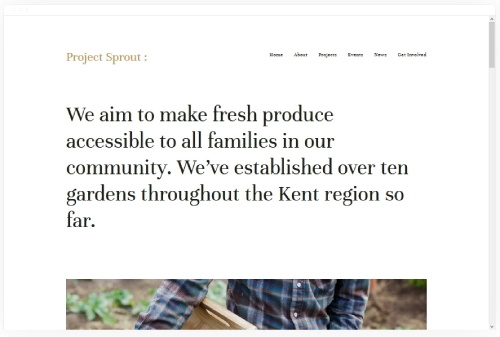
Kent
Best for Niche and Editorial Bloggers ✓ Pros
- Clean, magazine-style layout presents blog posts with strong visual hierarchy - featured images, headlines, and excerpts all read clearly.
- Multimedia integration handles embedded videos, audio players, and image galleries smoothly within blog posts.
- Prominent blog navigation makes it easy for readers to browse by category, date, or tag without leaving the page.
- Professional typography that works well for both short updates and in-depth editorial pieces.
- Versatile enough to support a fashion blog, food journal, or industry newsletter without structural changes.
✗ Cons
- The editorial layout can feel overly structured for casual, personal bloggers who want a more relaxed vibe.
- Requires consistent publishing to look good - a sparse blog feed with few posts feels empty in Kent's layout.
- Customizing the header and navigation beyond the defaults takes more effort than simpler Squarespace blog templates.
Kent is the Squarespace blogging template for writers who take their craft seriously. The layout reads like an online magazine, giving each post enough space to breathe while maintaining a consistent visual rhythm across your entire blog. If you publish regularly and want your archive to look as polished as your latest post, Kent delivers that. It also handles multimedia content well, so bloggers who mix video, audio, and photography into their posts will find it more capable than most templates on the platform.
Carson
Best for Food, Recipe, and Niche Bloggers ✓ Pros
- Dynamic blog page layout with interactive elements that keep readers engaged as they scroll through posts.
- Strong image handling makes food photography, recipe layouts, and step-by-step visuals look polished and appetizing.
- Clean navigation structure that works well for niche blogs with defined content categories like recipes, reviews, and guides.
- Built-in social media integration encourages sharing - critical for food and lifestyle content that spreads through platforms.
- Lightweight design loads quickly, which matters for food blog readers who often browse on mobile while shopping or cooking.
✗ Cons
- The layout is less suited for long-form, text-heavy editorial content where readers need extended focus.
- Limited customization for blog index pages compared to more flexible Squarespace blogging templates.
- The interactive elements may not appeal to bloggers who prefer a simpler, more traditional blog reading experience.
Carson is built for bloggers who need their content to look as good as it reads. The template handles images with care, which makes it a natural fit for food bloggers, recipe creators, and anyone whose posts rely on strong photography. The interactive blog page keeps visitors exploring rather than reading one post and leaving, and the clean navigation makes it easy to organize niche content into browsable categories. If you run a focused blog with a clear topic - food, recipes, crafts, fitness - Carson gives you a structure that grows with your content library.
How to Choose the Right Squarespace Blogging Template
Match the Template to Your Content Type

The biggest mistake bloggers make when picking a Squarespace blogging template is choosing based on how the homepage looks rather than how the blog page works. A template that looks stunning as a portfolio or landing page may handle blog posts poorly - cramped text, tiny images, or no category navigation. Start by asking what kind of content you publish most. If you write long-form articles, you need generous line spacing, clean typography, and a layout that does not distract from the text. If your blog on Squarespace relies on photography, prioritize templates with large featured images and grid-style blog indexes.
A travel blogger needs fullscreen photos and mobile-friendly scrolling. A business blogger needs professional typography and structured navigation. A food blogger needs beautiful image handling and recipe-friendly formatting. The right Squarespace blog template matches the content you actually create, not just the aesthetic you admire on someone else's site.
Consider Your Visual Style and Brand
Your Squarespace blogging template sets the visual tone for every piece of content you publish. A minimalist template with lots of whitespace communicates sophistication and editorial authority. A bold, colorful template signals energy and personality. Before selecting a template, define your brand's visual identity - your color palette, typography preferences, and the overall feeling you want readers to associate with your blog. Understanding whether each Squarespace template has its own site styles options will help you gauge how much visual control you have after choosing one.
Keep in mind that Squarespace templates are starting points, not final designs. You can adjust colors, fonts, spacing, and layout within the style editor. But the underlying structure - how the blog page displays posts, where navigation sits, how images are handled - is harder to change. Pick a template whose default structure matches your vision, then customize the details.
Evaluate SEO and Performance Features

A beautiful Squarespace blogging template means nothing if search engines cannot find your posts. All Squarespace templates include basic SEO tools - custom page titles, meta descriptions, URL slugs, and alt text for images. But some templates handle SEO-relevant elements better than others. Look for templates that support clean heading hierarchies (H1, H2, H3), generate fast page loads, and render well on mobile devices. Google's Core Web Vitals directly impact rankings, so a template that loads slowly or shifts layout during loading will hurt your visibility.
The best Squarespace blog templates for SEO also support internal linking naturally. Templates with related posts sections, category navigation, and sidebar widgets make it easier to connect your content and keep readers moving through your site. If you want to learn more about optimizing your blog for search, our guide on blogging on Squarespace success tips covers the essentials. You should also know how to change your blog layout in Squarespace so you can adjust your post display as your content strategy evolves.
Plan for Growth and Flexibility

Your blog today will not look like your blog in a year. As you publish more content, add new categories, and grow your audience, your template needs to scale with you. A Squarespace blogging template that works well with 10 posts may feel cluttered or disorganized with 100. Before committing, think about how the blog index page will look as your archive grows. Does the template support pagination? Can readers filter by category or tag? Is there a search function built into the layout?
Flexibility also means the template should accommodate new content types as your blog evolves. If you start with written posts but later want to add video, podcasts, or a newsletter, your template should handle those additions gracefully. Templates like Bedford and Kent are particularly strong here because their structured layouts adapt well to growing content libraries. If you are just getting started and wondering about costs, our guide on whether Squarespace blogging is free breaks down what you get at each pricing tier.

Frequently Asked Questions
What is the best Squarespace blogging template for beginners?
Are Squarespace blog templates free to use?
Yes. All Squarespace templates, including every Squarespace blogging template listed here, are included free with any Squarespace subscription plan. You choose your template after signing up, and you can switch templates or customize your design without paying anything beyond your regular plan fee.
Can I change my Squarespace blogging template after publishing?
You can switch Squarespace templates at any time without losing your content. Blog posts, pages, and images carry over to the new template. However, layout-specific customizations like sidebar widgets or custom CSS may need to be reconfigured. It is a good idea to preview the new template before switching to make sure your content displays correctly.
Which Squarespace blog templates are best for SEO?
All Squarespace blog templates include built-in SEO tools like custom meta titles, descriptions, and URL slugs. Templates with clean code, fast page loads, and strong heading hierarchies perform best for search rankings. Bedford, Skye, and Kent are particularly strong choices because they support structured content organization and internal linking through category navigation and related posts sections.
What Squarespace blogging template works best for photo-heavy blogs?
Skye and Mojave are the top Squarespace blog templates for photography-driven content. Skye's grid layout turns your blog feed into a visual gallery, while Mojave's scrolling design creates an immersive, magazine-style reading experience. Both templates handle large images well and maintain visual impact on mobile devices.
Do Squarespace blogging templates work well on mobile devices?
Every Squarespace template is fully responsive and automatically adjusts to mobile screens. However, some Squarespace blog templates handle the transition better than others. Templates like Skye and Carson are particularly strong on mobile because their layouts were designed with touch navigation and smaller screens in mind. Always preview your chosen template on a phone before publishing.
Can I use a Squarespace blogging template for a personal website too?
Absolutely. Many Squarespace blog templates double as excellent personal website templates. Bedford and Mojave are especially versatile - you can build a homepage with an about section, portfolio highlights, and contact info while maintaining a fully functional blog as a secondary page. The key is choosing a template that supports both static pages and dynamic blog content.
Conclusion: Find Your Perfect Squarespace Blogging Template
The right Squarespace blogging template turns your writing into a professional online presence without the complexity of custom development. Bedford handles multi-topic blogs with structured navigation. Mojave delivers immersive visual storytelling. Skye turns your blog feed into a curated photo gallery. Kent brings editorial polish to niche and multimedia content. Carson keeps food bloggers and recipe creators organized with clean, image-forward layouts.
Every template listed here is free with any Squarespace plan, fully responsive on mobile, and built with bloggers in mind. The best choice depends on your content type, visual style, and how you want readers to experience your blog. Start with the template that matches how you publish today, knowing you can always adjust as your blog grows. Before committing, see our guide on whether Squarespace blog is free and exactly what each plan covers. For food bloggers, our guide to the best Squarespace recipe templates covers designs built specifically for recipe content, food photography, and ingredient lists.
* Read the rest of the post and open up an offer