

Editor's Picks
| # | Name | Best For | Price | Rating | Image | |
|---|---|---|---|---|---|---|
| 1 | Versatile interior designers, home stagers, and decorating businesses | Free | 4.4/5 |
|
More Info | |
| 2 | Social media-focused designers, community-oriented decorators, and location-based interior design businesses | Free | 4.1/5 |
.png)
|
More Info | |
| 3 | Content-driven interior designers, decorators building audiences through design blogs | Free | 4.2/5 |
|
More Info | |
| 4 | Designers focused on search rankings, mobile performance, and clean presentation | Free | 4.3/5 |
.jpg)
|
More Info | |
| 5 | Interior designers with extensive portfolios, media-rich project documentation, and event work | Free | 4.3/5 |
|
More Info | |
| 6 | Creative interior designers, boutique decorators, and designers with a distinctive brand identity | Free | 4.1/5 |

|
More Info | |
| 7 | Interior designers focused on high-quality visuals, video walkthroughs, and project photography | Free | 4.2/5 |
|
More Info | |
| 8 | Minimalist interior decorators, modern design studios, and designers who favour clean aesthetics | Free | 4.1/5 |
.png)
|
More Info | |
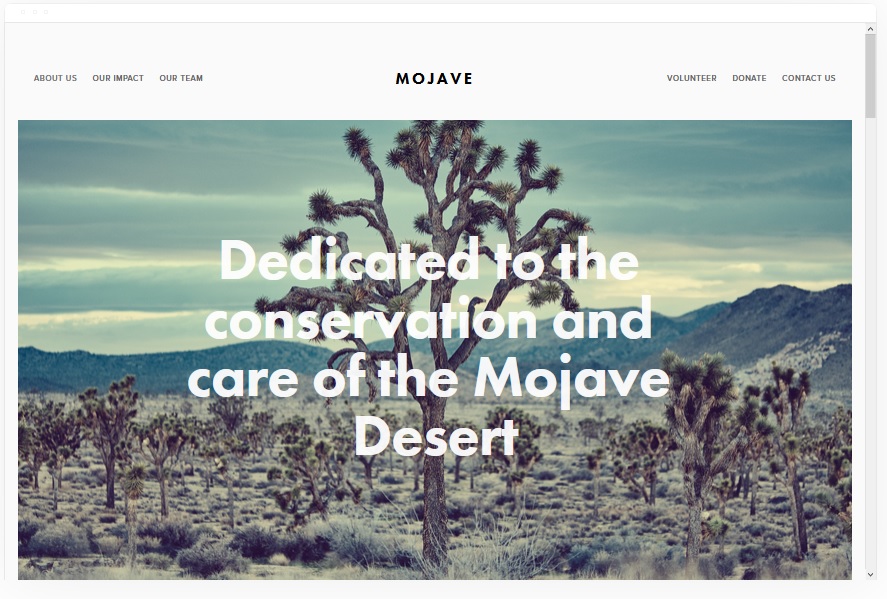
| 9 | Interior designers who want bold visuals, easy social sharing, and a clean white background aesthetic | Free | 4.2/5 |
|
More Info | |
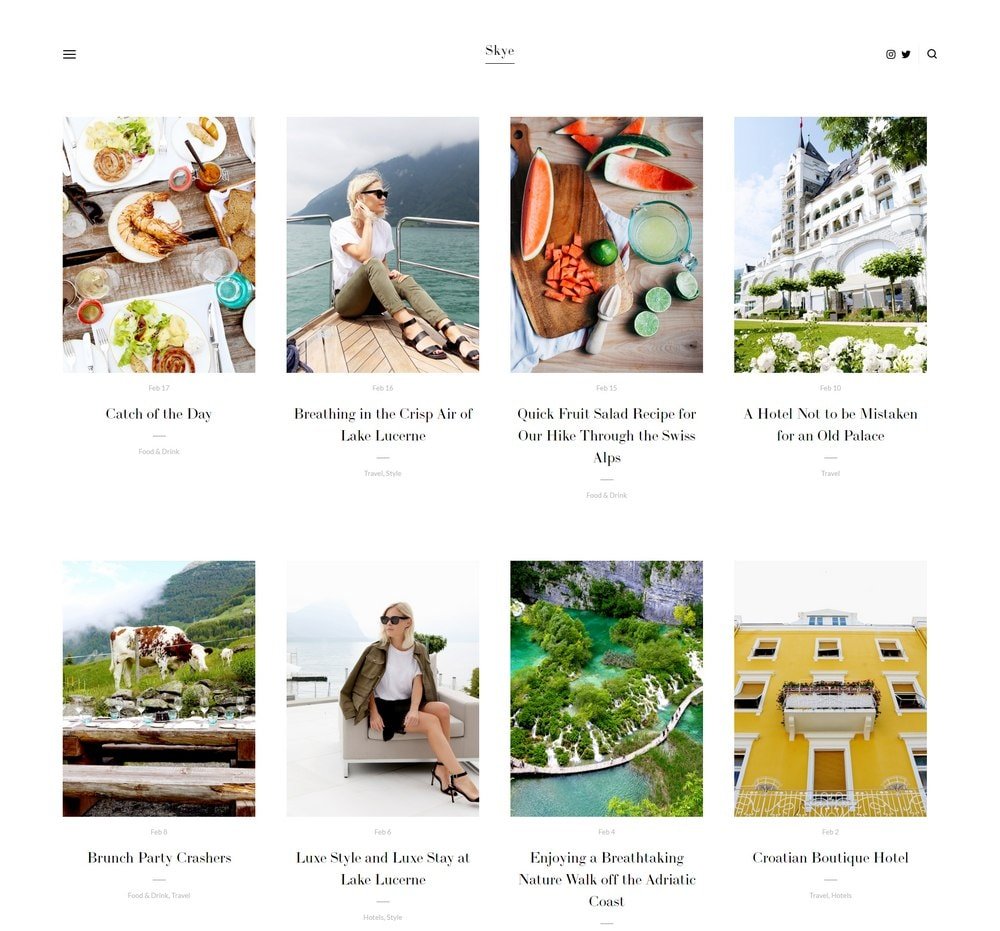
| 10 | Interior designers who blog, mobile-first portfolios, and designers building organic search traffic | Free | 4.3/5 |
|
More Info |
Our Picks: The 10 Best Squarespace Templates for Interior Designers
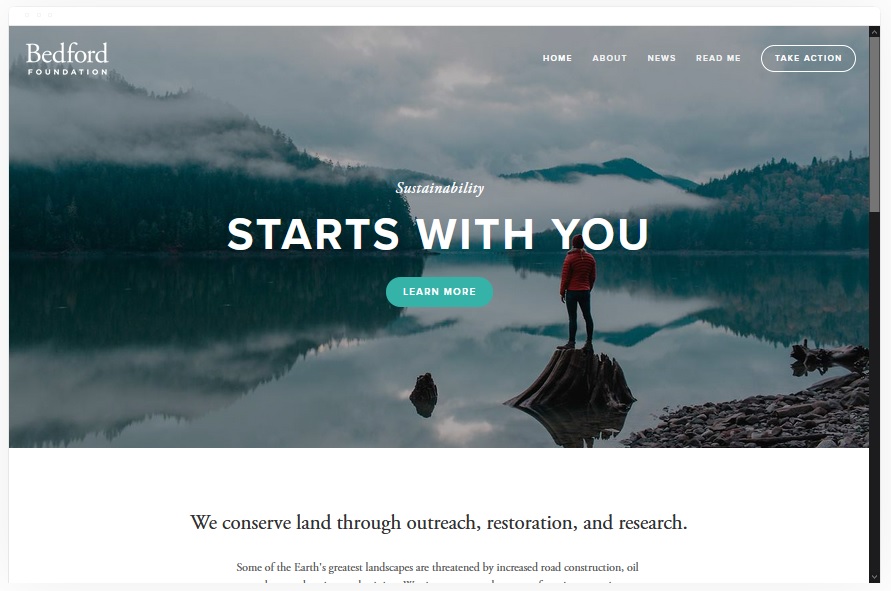
Bedford
Best Versatile Squarespace Template for Interior Designers ✓ Pros
- Sidebar navigation keeps the menu accessible without stealing space from your project images and portfolio content.
- Scrolling index page lets you build a seamless design portfolio that guides visitors through your work naturally.
- Banner sections with built-in CTAs drive visitors toward booking a consultation or requesting a quote on every page.
- Supports both images and video, making it easy to feature room reveals, before-and-after walkthroughs, and client testimonials.
- Highly customizable layout adapts to solo interior designers, full studios, and home staging companies without code changes.
✗ Cons
- The sidebar menu style may feel unconventional for visitors expecting a traditional top navigation on an interior design website.
- Scrolling index pages can become long and unwieldy if you showcase too many projects without careful curation.
- Requires strong photography to fill the image-heavy layout - weak project photos will undermine the professional impression.
Bedford is the Swiss army knife of Squarespace interior design templates. Its sidebar navigation and scrolling index page create a browsing experience that mirrors how potential clients actually explore portfolios - scrolling through rooms, pausing when something catches their eye, and clicking through for project details. The layout handles everything from a boutique decorator's highlight reel to a full studio's comprehensive portfolio with equal confidence. For interior designers who want one template that flexes across residential, commercial, and staging projects without compromise, Bedford delivers.
Native
Best for Social Media-Driven Interior Designers ✓ Pros
- Built-in social media integration connects your website to Instagram, Pinterest, and other platforms where you showcase design work.
- Rounded thumbnail galleries create a distinctive visual style that stands out from typical interior design website layouts.
- Blog sections double as location-based portfolio pages - create posts for each neighbourhood or design style you serve.
- Mobile-optimised layout ensures your content looks sharp on the devices your social media followers use most.
- Clean scrolling structure supports local SEO, helping your pages rank for area-specific Squarespace interior design template searches.
✗ Cons
- The social-forward design may feel informal for interior designers targeting luxury or high-end commercial clients.
- Rounded gallery thumbnails are distinctive but may not suit all interior design photography styles.
- Less emphasis on traditional portfolio grid layouts compared to more structured Squarespace interior design templates.
Native is the Squarespace template for interior designers whose business runs on social proof and visual inspiration. If your Instagram drives enquiries, your Pinterest boards generate leads, and your local reputation is your biggest asset, Native builds a website around that reality. The social media integration is central to the design rather than an afterthought. The blog-as-portfolio approach lets you create style-specific or location-specific content that ranks for interior design website searches while giving your audience the design expertise they follow you for. For community-oriented decorators and home stagers, Native turns your online presence into a cohesive ecosystem.
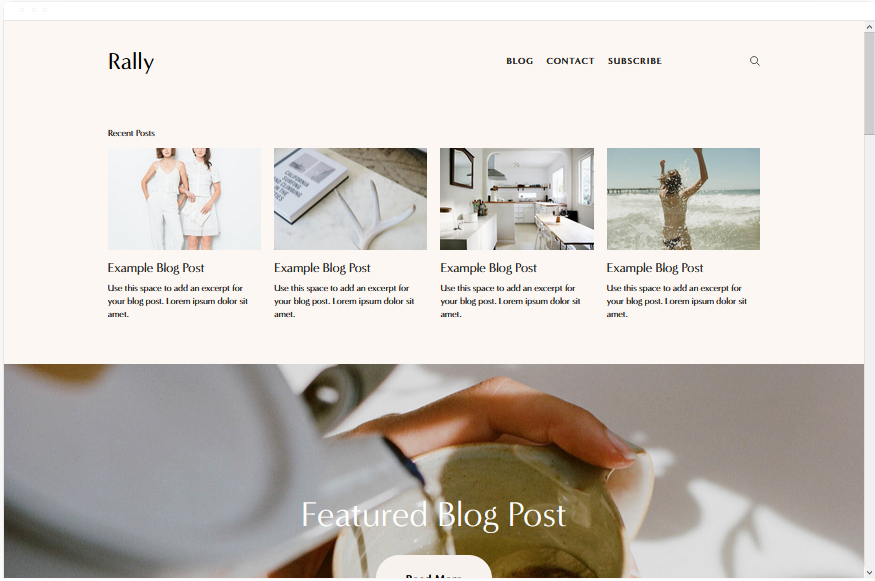
Rally
Best for Interior Designers Who Blog and Build Audiences ✓ Pros
- Streamlined top-right navigation with integrated social media links connects your site to your broader online presence.
- Strong blogging architecture lets you publish design tips, room makeover stories, and trend content that drives organic traffic.
- Smooth scrolling design creates a polished browsing experience that keeps visitors engaged through multiple portfolio sections.
- Mobile-optimised layout ensures interior design content and project photos display perfectly on phones.
- Clean, distraction-free aesthetic puts the focus on your design work and blog content rather than flashy site elements.
✗ Cons
- The blog-forward layout may feel content-heavy for designers who want a simpler, portfolio-only website.
- Social media link placement in the header could distract visitors away from your site before they explore your portfolio.
- Less visual impact on the homepage compared to more image-dominant Squarespace interior design templates.
Rally is built for the interior designer who understands that design marketing is a long game. Publishing room transformation stories, trend forecasts, and styling guides generates compounding search visibility - and Rally's blogging architecture is designed exactly for that strategy. Research shows that businesses publishing consistent blog content generate significantly more leads than those that rely on a static portfolio alone. For interior designers willing to invest in content, Rally turns a Squarespace interior design website into a lead-generation engine that works while you are on-site with clients.
Avenue
Best Minimalist Template for Interior Design SEO ✓ Pros
- Minimalist grid layout loads fast and ranks well on Google - critical for competitive interior design website keywords.
- Portfolio pages with space for detailed project descriptions, material lists, and design rationale.
- Clean layout keeps visitors focused on your work and contact actions without distracting design elements.
- Fully mobile-responsive design performs seamlessly on phones where most design inspiration browsing begins.
- Lightweight code structure means faster page speeds, which directly improves search engine visibility for Squarespace interior design template queries.
✗ Cons
- The minimalist aesthetic may feel too plain for luxury interior designers who need a more premium visual presence.
- Less visual drama than image-heavy templates - the design depends more on content quality than photography impact.
- Limited built-in features for designers who want advanced gallery layouts or interactive project showcases.
Avenue is the Squarespace interior design template built for designers who understand that ranking on the first page of Google generates more consultations than any other marketing channel. The minimalist, fast-loading design scores well on Core Web Vitals - the performance metrics Google uses to rank websites. Every unnecessary element has been stripped away, leaving a clean structure that search engines can crawl efficiently and visitors can navigate without friction. For interior designers competing in markets where "interior designer " is a high-value search query, Avenue gives you the technical foundation to win that ranking battle.
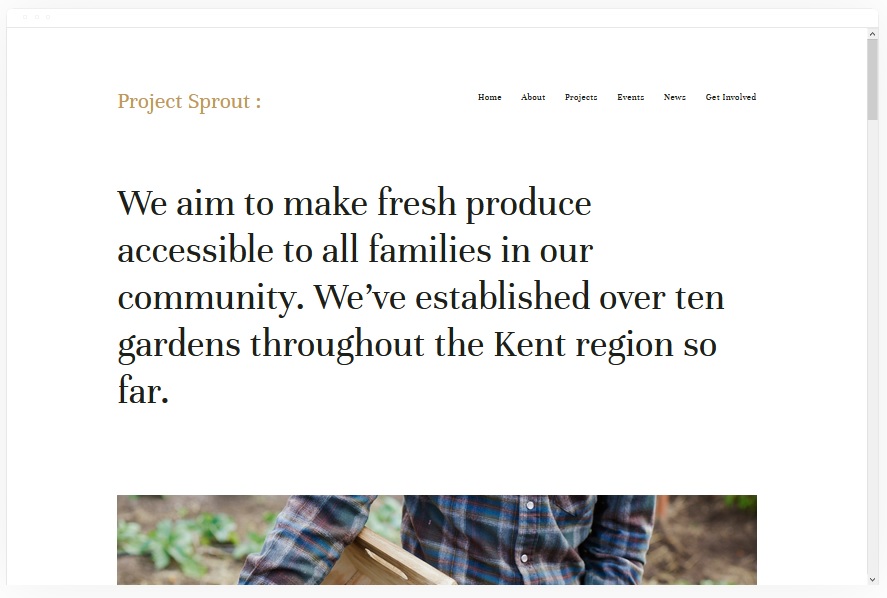
Kent
Best Media-Rich Template for Interior Design Portfolios ✓ Pros
- Media-rich layout supports cover pages, blog sections, event pages, and album galleries - ideal for documenting full design projects.
- Portfolio-centric structure puts your interior design work front and centre with dedicated gallery pages for each project.
- Album and event page types let you showcase design reveals, open house stagings, and client walkthroughs with impact.
- eCommerce functionality supports selling design consultations, styling packages, or digital mood boards directly from your site.
- Strong visual hierarchy ensures your best project photography gets the attention it deserves on every page.
✗ Cons
- The media-heavy layout requires a substantial portfolio to fill effectively - new designers with few projects may find the site feeling sparse.
- Multiple page types can make initial setup more complex than simpler Squarespace interior design templates.
- Relies on high-quality photography throughout - inconsistent image quality across projects will weaken the overall presentation.
Kent is the Squarespace template for interior designers who document every project with the thoroughness it deserves. The media-rich layout gives you cover pages for dramatic first impressions, album galleries for room-by-room walkthroughs, and blog sections for design process stories - all within a structure that feels cohesive rather than cluttered. For designers who want their website to feel like a curated design book rather than a simple photo grid, Kent provides the depth and flexibility that a serious interior design portfolio demands.
Carson
Best for Bold First Impressions and Creative Interior Designers ✓ Pros
- Unique static hover page with hidden menu creates a memorable first impression that sets you apart from every other interior design website.
- Portfolio-focused layout puts your design work at the centre of the experience from the first interaction.
- Dramatic reveal navigation adds an element of discovery that mirrors the experience of walking into a beautifully designed room.
- Minimal distractions on the landing page let one stunning project image do all the talking before visitors explore further.
- Clean structure keeps page loads fast and supports strong SEO performance for interior design website searches.
✗ Cons
- The hidden menu navigation may confuse visitors who expect conventional site structure on an interior design website.
- The static hover page concept works only if your lead image is exceptional - a mediocre photo kills the effect.
- Less suited to designers who need extensive content, multiple service pages, or detailed project write-ups on their homepage.
Carson is the Squarespace interior design template for designers who believe first impressions are everything - and who have the portfolio photography to back that belief up. The static hover page with hidden menu is unlike anything else in the Squarespace template library: visitors land on a single dramatic image of your best work, with navigation revealed only when they are ready to explore. It is a bold choice that communicates creative confidence. For boutique interior designers and decorators whose brand identity is as much about their artistic vision as their technical skills, Carson makes a statement that conventional templates simply cannot match.
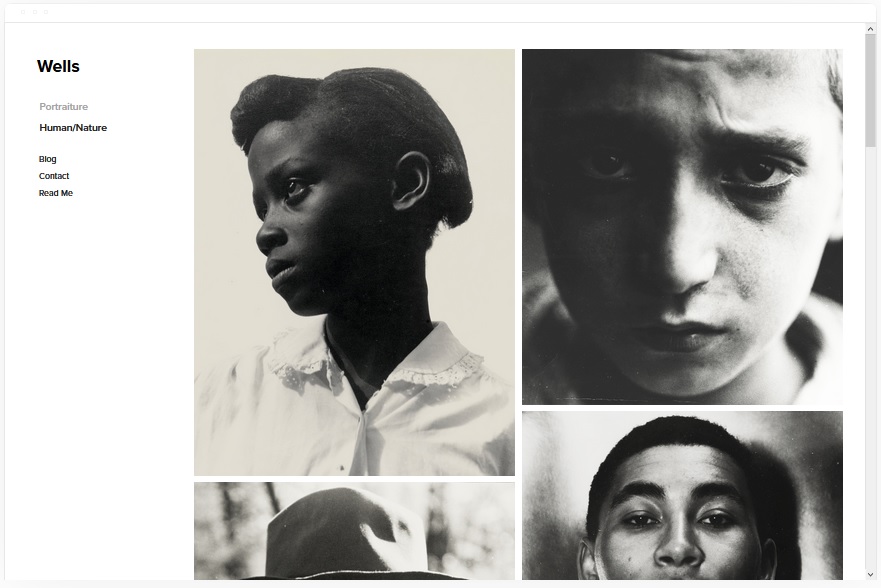
Wells
Best for Visual Showcases and Video Room Tours ✓ Pros
- Image-first design makes your project photography the centrepiece - every room gets the visual attention it deserves.
- Images can be linked directly to consultation booking pages, turning your gallery into a conversion tool.
- Video integration via YouTube lets you embed room tour walkthroughs and before-and-after reveal footage.
- eCommerce functionality supports selling design consultations, styling packages, or digital mood boards.
- Social media integration keeps your website connected to Instagram and Pinterest where design audiences engage most.
✗ Cons
- The heavy reliance on visuals means designers without professional photography will struggle to make the template shine.
- Gallery-focused layouts can feel repetitive if you showcase many similar room types without visual variety.
- Less emphasis on text content may limit your ability to rank for detailed interior design website search queries.
Wells is the template that understands a truth every experienced interior designer knows: clients fall in love with rooms through photos before they ever schedule a consultation. The image-first layout turns your Squarespace interior design website into a visual portfolio where every project is presented with the impact of a magazine spread. The ability to link images directly to booking pages and embed video tours creates a seamless journey from "that living room is stunning" to "I need to hire this designer." For interior designers who invest in professional photography and videography, Wells amplifies that investment into consultations.
Sofia Pazari
Best Clean Minimalist Template for Interior Decorators ✓ Pros
- Clean minimalist design with a two-image layout creates an elegant first impression that mirrors the refined taste of an interior decorator.
- Easy to customise without coding - swap images, update text, and adjust colours to match your brand identity quickly.
- White space-driven layout lets your project photography breathe, preventing the visual clutter that undermines a design portfolio.
- Fast-loading pages ensure visitors see your work instantly rather than waiting for heavy galleries to render.
- Strong mobile presentation keeps your portfolio looking polished on phones where most initial design browsing happens.
✗ Cons
- The two-image homepage layout may feel limiting for designers with extensive portfolios who want to showcase more projects upfront.
- The minimalist approach requires exceptional photography - average images have nowhere to hide in a sparse design.
- Less suited to interior designers who need complex page structures with multiple galleries and detailed project documentation.
Sofia Pazari is the Squarespace template for interior designers whose personal aesthetic leans toward restraint, negative space, and letting a few powerful images communicate more than a cluttered gallery ever could. The clean two-image layout forces you to lead with your absolute best work - and that selectivity signals the kind of editorial eye that high-end clients look for in a designer. For minimalist interior decorators and modern design studios, Sofia Pazari creates a website that practices what you preach: thoughtful curation over overwhelming abundance.
Mojave
Best for Striking Interior Design Portfolios with Social Sharing ✓ Pros
- Striking visual layout with smooth scrolling creates a dramatic portfolio browsing experience that holds visitor attention.
- Built-in social share buttons make it effortless for visitors to share your best project images across platforms.
- White background aesthetic lets your interior design photography pop without competing colours or design noise.
- Scrolling navigation guides visitors through your portfolio in a curated sequence you control.
- Clean structure supports strong page speeds and SEO performance for Squarespace interior design template searches.
✗ Cons
- The scrolling layout may not suit designers who prefer visitors to browse a traditional grid portfolio at their own pace.
- Share buttons can distract visitors from exploring deeper into your site if they click away to social media too early.
- The white background aesthetic works beautifully for light, airy interiors but may clash with dark or moody design photography.
Mojave is the Squarespace interior design template built for designers whose work is so visually striking that it sells itself - and whose clients are the type to share beautiful rooms with their own networks. The scrolling layout presents your portfolio as a curated visual journey against a clean white background, and the built-in share buttons turn every impressed visitor into a potential referral source. For interior designers who understand that word-of-mouth now happens on Instagram stories and Pinterest boards rather than over coffee, Mojave puts the sharing mechanism right where the inspiration happens.
Skye
Best for Interior Design Blogging and Mobile-First Portfolios ✓ Pros
- Grid-based blogging layout supports large, high-quality images that make project showcases visually compelling.
- Fullscreen image capability lets your best interior design photography take over the entire viewport for maximum impact.
- Mobile-optimised design ensures your portfolio looks exceptional on phones where most design inspiration browsing begins.
- Blog architecture supports both project showcases and design content, combining your portfolio with lead-generating articles.
- Fast page load speeds ensure your images display quickly even with multiple high-resolution interior design photographs.
✗ Cons
- The blog-style format may not suit designers who prefer a traditional portfolio grid without chronological ordering.
- Relies heavily on consistent publishing - an inactive blog can make your interior design business look dormant.
- The content-driven layout requires regular updates to avoid looking stale to returning visitors and search engines.
Skye combines two things that matter most in interior design marketing: stunning project visuals and a mobile-first experience that meets potential clients wherever they are scrolling. The grid-based layout with fullscreen image capability gives every project the space it deserves, and the blogging architecture lets you publish design tips, trend analysis, and room makeover stories that drive organic search traffic month after month. For interior designers who understand that content marketing generates compounding leads over time, Skye provides the framework to build a Squarespace interior design website that works as hard as you do.
How to Choose the Right Squarespace Template for Your Interior Design Website
5 Must-Haves for an Interior Design Website
Before choosing a Squarespace interior design template, make sure it supports the five features that every effective interior design website needs. First, a portfolio or gallery system that showcases your work with full-size, high-quality images - clients hire designers based on what they see, not what they read. Second, fast page load speeds - every second of delay costs you potential consultations, and image-heavy design portfolios are especially vulnerable to slow performance. Third, mobile responsiveness - the majority of design inspiration browsing now happens on phones, and a template that does not perform on mobile loses those leads instantly. Fourth, clear calls to action on every page - whether it is "Book a Consultation," "View Our Portfolio," or "Get a Free Quote," visitors should never have to hunt for the next step. Fifth, blog or content capability - publishing design tips, project stories, and trend content builds search visibility that brings new clients to your site organically over time.
Why Interior Designers Need a Dedicated Website
Relying on Houzz, Instagram, or a marketplace profile is like renting your online presence from someone else - you do not control the branding, the lead capture, or the client experience. A dedicated Squarespace interior design website gives you ownership of your professional identity online. You control which projects are featured, how your credentials are presented, and where leads go when they fill out a contact form. It also builds long-term SEO equity: every project page, design guide, and blog post you publish on your own domain strengthens your search visibility in ways that third-party profiles never will. Interior designers who invest in their own website consistently attract higher-quality clients than those who rely solely on marketplace platforms.
What Types of Interior Designers Are Launching Websites?
The interior design professionals building Squarespace websites today span every market segment. Luxury residential designers use visually striking templates like Carson and Wells to create digital experiences that match the calibre of the spaces they create. Home stagers lean toward clean, fast-loading designs like Avenue and Sofia Pazari that let property photography shine without distraction. Commercial interior designers choose media-rich layouts like Kent and Bedford that showcase office fit-outs, retail spaces, and hospitality projects with the depth corporate clients expect. Interior decorators and styling consultants use blog-forward templates like Rally and Skye to build audiences through design content that generates organic traffic. No matter your speciality, the right Squarespace template for interior design positions you as the go-to designer in your market.
Tips and Tricks for a High-Converting Interior Design Website
Start with your portfolio - it is the single most important page on any interior design website, and it needs to load fast, look stunning, and be easy to browse. Invest in professional photography for every project you showcase; designers who present their work with magazine-quality images attract clients willing to pay premium fees. Make your site mobile-friendly above all else - most potential clients will find your site on their phone while browsing design inspiration. Keep the design simple and the navigation obvious; visitors want to see your work and contact you, not navigate complex menus. Finally, add client testimonials prominently - in a trust-driven industry like interior design, social proof from past clients is the most persuasive content on your site.
Famous Interior Designers Who Built Strong Online Presences
The most successful interior designers in the industry all share one thing: a commanding online presence that drives business independently of referrals. Kelly Wearstler built a globally recognised brand around bold design content and a website that functions as both portfolio and lifestyle destination. Joanna Gaines transformed her interior design expertise into a media empire that starts with a polished, professional web presence. Nate Berkus demonstrates how a well-curated online portfolio and consistent content can elevate a designer from local practitioner to national authority. You do not need their budgets to apply their principles - a well-chosen Squarespace template for interior design and consistent project documentation gets you started on the same path.
Frequently Asked Questions
What is the best Squarespace template for an interior design website?
Is Squarespace good for interior design websites?
How much does a Squarespace interior design website cost?
Can I add a portfolio to my Squarespace interior design site?
How do I make my Squarespace interior design website rank on Google?
What should I include on my interior design website?
Can I switch Squarespace interior design templates after building my site?
Do I need professional photography for my interior design Squarespace website?
How We Evaluate Templates
Conclusion: Pick Your Squarespace Interior Design Template and Start Booking Clients
Your interior design website is the one marketing asset that works for you around the clock - showcasing your portfolio to potential clients at midnight, building search visibility while you are on-site with projects, and converting visitors into consultations without you lifting a finger. Bedford delivers versatility for any design niche. Wells and Kent make your photography the star. Avenue wins the SEO race. Rally and Skye turn content into leads. Carson makes an unforgettable first impression. Native connects your social presence. Sofia Pazari practises the minimalist restraint you preach. Mojave turns browsers into sharers. And every one of them loads fast enough to keep the 7% revenue-per-second clock from working against you.
Choose the Squarespace template for interior design that matches how your clients find you and what makes them hire you. Then fill it with your best project photography, your design perspective, and your credentials - and let it do what a great interior design website does best: turn strangers into clients.
* Read the rest of the post and open up an offer