

Finding the right podcast website template matters more than most creators realize. Listeners who land on a dedicated site spend more time with your content, discover older episodes, and are far more likely to subscribe to your email list than someone who stumbles across you in a crowded podcast app.
The Paloma Squarespace template solves the "where do I send people?" problem. Its layout is designed around episode showcasing, audience capture, and clean navigation that keeps visitors focused on your content rather than hunting for a play button. In this Paloma template review, we break down what makes this Squarespace podcast template worth using, who it suits best, and how to get the most from it.
Editor's Picks
| # | Name | Best For | Price | Rating | Image | |
|---|---|---|---|---|---|---|
| 1 | Podcasters, audio content creators, and media brands | Free | 4.5/5 |
|
More Info |
Paloma
Best for Podcasters and Audio Content Creators ✓ Pros
- Episode-first layout puts your latest content front and center the moment visitors land on your site
- Warm, inviting color palette feels professional without being cold or corporate
- Built-in audio embedding works with Squarespace's native audio blocks and RSS feed generation
- Clean blog-style episode pages make adding show notes, transcripts, and timestamps straightforward
- Fully responsive design looks polished on desktop, tablet, and mobile screens
✗ Cons
- Minimalist design relies on strong photography and branding: weak visuals will leave the site feeling bare
- No built-in podcast analytics beyond Squarespace's standard traffic metrics, so you still need your host's dashboard
- Layout is optimized for audio content, making it a less natural fit for non-media sites without significant customization
The Paloma Squarespace podcast template treats your show like a brand, not a hobby. Where most podcast websites feel like afterthoughts bolted onto a generic blog, Paloma gives episodes the visual weight they deserve. The layout guides listeners from discovery to subscription without friction, and the warm aesthetic makes your site feel like a place people want to spend time, not just grab a link and leave.
What Does the Paloma Squarespace Template Look Like?
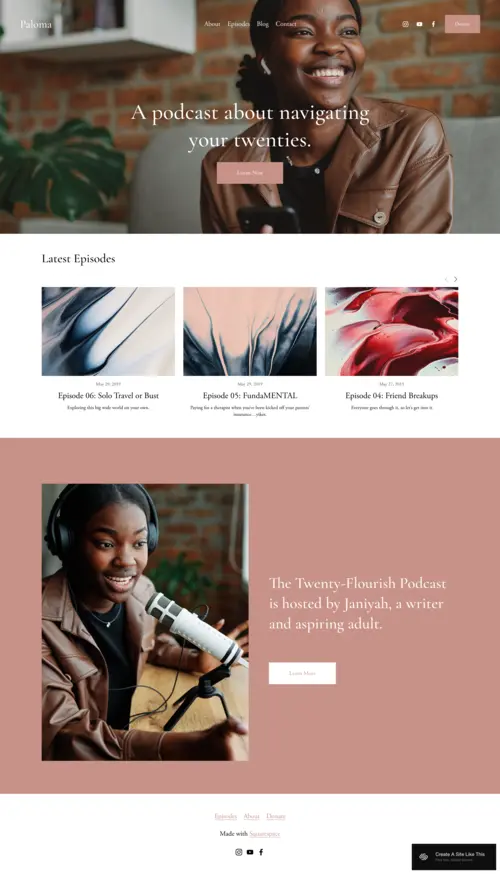
Paloma leads with a warm cream and beige color palette that feels editorial and approachable. The default typography pairs serif headings with clean sans-serif body text, giving each episode page a polished, magazine-quality look without requiring any design experience. The overall feel is intentionally warm rather than techy, which sets it apart from the stark white layouts common to business and portfolio templates.
On the homepage, your most recent episodes appear as a stacked or grid-style episode list, each with a featured image, episode title, and short description. Visitors can scan your back catalog at a glance without clicking into individual pages. The navigation is minimal by design: a top bar links to Episodes, About, and a Subscribe or Contact page, keeping the focus on content rather than menu complexity.
Featured episode images display prominently at the top of each episode page alongside your show artwork. Below that, show notes, embedded audio players, timestamps, and transcript sections all flow naturally in a single-column format that reads well on both desktop and mobile. The subscribe form appears as a full-width section lower on the homepage, positioned after listeners have had a chance to browse your content, which tends to produce better conversion than putting a signup form above the fold before any trust is established.
Paloma Template Demo: Key Pages and Sections
Homepage
The homepage opens with your podcast artwork or a branded hero image, followed immediately by your episode feed. Each episode card includes the featured image, episode title, publication date, and a short description pulled from the blog post excerpt. There is no cluttered sidebar, no widget overload, and no promotional banners competing with your content. The page ends with a newsletter signup section and social media links.
Episode Pages
Each episode page is a full blog post with built-in support for Squarespace audio blocks, embedded third-party players (Spotify, Apple Podcasts), and long-form show notes. You can add timestamps as a bulleted list, include a transcript, and drop in related episode links at the bottom. The layout keeps all of this in a readable single-column format with generous spacing between sections.
About Page
The About page is structured around your host bio, your show's mission, and a short FAQ or guest pitch section. It uses Squarespace's standard column and image blocks, which you can rearrange freely in the editor. Most podcasters use this page to introduce themselves, explain who the show is for, and give media contacts a place to reach them.
Contact Page
The Contact page includes Squarespace's built-in form block by default. You can customize the form fields to collect guest pitches, listener questions, or sponsorship inquiries without any third-party tools. The page is simple and fast-loading, which matters for listeners reaching out on mobile.
What Makes Paloma Stand Out as a Squarespace Podcast Template
Episode-First Homepage Architecture
Paloma's homepage is structured around your latest episodes, not a generic hero image or an about section that takes up half the viewport. When a listener finds your site via a web search, your most recent content is immediately visible. The layout supports episode thumbnails, short descriptions, and direct links to full episode pages, which encourages browsing through your back catalog rather than landing on one episode and leaving.
Built-In RSS Feed for Directory Submission
Squarespace generates an RSS feed automatically when you publish audio content through blog pages. The Paloma template is configured to display episodes as blog posts, which means your feed is ready to submit to Apple Podcasts, Spotify, and other directories without any additional setup. This is one of Paloma's practical advantages over building a podcast site with a generic Squarespace template: the episode-page structure works correctly with the RSS output from day one.
Audience Capture Tools Built In
Paloma includes email newsletter signup sections and social media links as native template sections. For podcasters, building a direct audience relationship outside of algorithm-driven apps is one of the highest-leverage moves you can make. A single change in how Spotify or Apple Podcasts surfaces content can wipe out your discoverability, but a direct email list cannot be taken away. Paloma positions these capture mechanisms prominently rather than burying them in a footer.
How to Choose the Right Squarespace Podcast Template
Match the Template to Your Show's Personality
Not every podcast website template works for every show. A warm, content-forward design like the Paloma Squarespace template is a natural fit for interview podcasts, storytelling series, and educational shows that want to feel approachable. But if your podcast has a darker, edgier tone (true crime, investigative journalism, or late-night commentary) a moodier template may communicate your brand better. Choose a template whose default look matches the feeling listeners get when they press play.
Prioritize Episode Display and Audio Playback
A podcast website that buries episodes behind multiple clicks defeats the purpose. Your template should showcase recent episodes immediately and make audio playback effortless. Paloma's blog-style episode layout handles this well, with each post supporting Squarespace's native audio blocks, embedded Spotify or Apple Podcasts players, and detailed show notes. Before committing to any Squarespace podcast template, test how it displays a full episode page, not just the homepage.
Consider Your Audience Growth Strategy
A podcast site should do more than host episodes: it should convert casual listeners into loyal subscribers. Look for templates that support prominent email signup forms, social media integration, and clear calls to action. Paloma includes sections for newsletter signups and social links out of the box, making it straightforward to build a direct relationship with your audience outside of algorithm-driven podcast apps.
Think About Mobile Listening Habits
Most podcast listeners discover and browse on their phones. Your website needs to load fast, display cleanly on small screens, and make episode playback one tap away. The Paloma Squarespace podcast template is fully responsive and keeps navigation simple on mobile, so listeners browsing during a commute or at the gym can find and play episodes without pinching, zooming, or hunting for a menu. Always test your template on a phone before launching.
Build Your Podcast Brand With Paloma
The Paloma Squarespace podcast template gives podcasters a website that treats their show like a real brand, not a side project. If your podcast thrives on interviews, storytelling, or educational content and you want an online home that converts listeners into subscribers, Paloma is a strong place to start. For podcasters who also cover news or media-focused topics, our picks for the best Squarespace templates for journalists offer more options worth exploring.
Frequently Asked Questions
Is the Paloma Squarespace template free?
What is the best Squarespace template for a podcast?
Can I host a podcast directly on Squarespace?
Can I embed Spotify or Apple Podcasts on the Paloma template?
Does the Paloma template support email signups and monetization?
How does Paloma compare to other Squarespace podcast templates?
* Read the rest of the post and open up an offer