

Editor's Picks
| # | Name | Best For | Price | Rating | Image | |
|---|---|---|---|---|---|---|
| 1 | Children's education, tutoring services, and family-focused learning platforms | Free | 4.7/5 |

|
More Info | |
| 2 | Life coaches, wellness instructors, and transformation-focused course creators | Free | 4.8/5 |
|
More Info | |
| 3 | Video creators, influencers, and entrepreneurs with bold personal brands | Free | 4.9/5 |

|
More Info |
Comet
Best for Kid-Focused Courses & Educational Platforms ✓ Pros
• Playful color palette and approachable layout instantly builds trust with parents shopping for children's courses• Clear visual hierarchy guides visitors from headline to enrollment CTA without distractions or confusion
• Simple page structure makes it easy to showcase course modules, pricing tiers, and instructor credentials
• Mobile-optimized design ensures parents browsing on phones can enroll kids quickly between activities
• Bright, energetic aesthetic matches the tone of educational content aimed at younger learners
✗ Cons
• May feel too playful for course creators teaching serious professional development or corporate training topics• Limited visual drama if your courses rely heavily on cinematic video content or bold personal branding
• Color scheme requires customization if your brand leans toward muted, minimalist, or luxury aesthetics
Comet gets out of your way and lets your course do the talking. If you teach children, run a tutoring business, or create homeschool curriculum, this template feels like it was built for you. No clutter. No confusing navigation. Just a clean path from "what is this course?" to "sign my kid up." That's exactly what busy parents need.
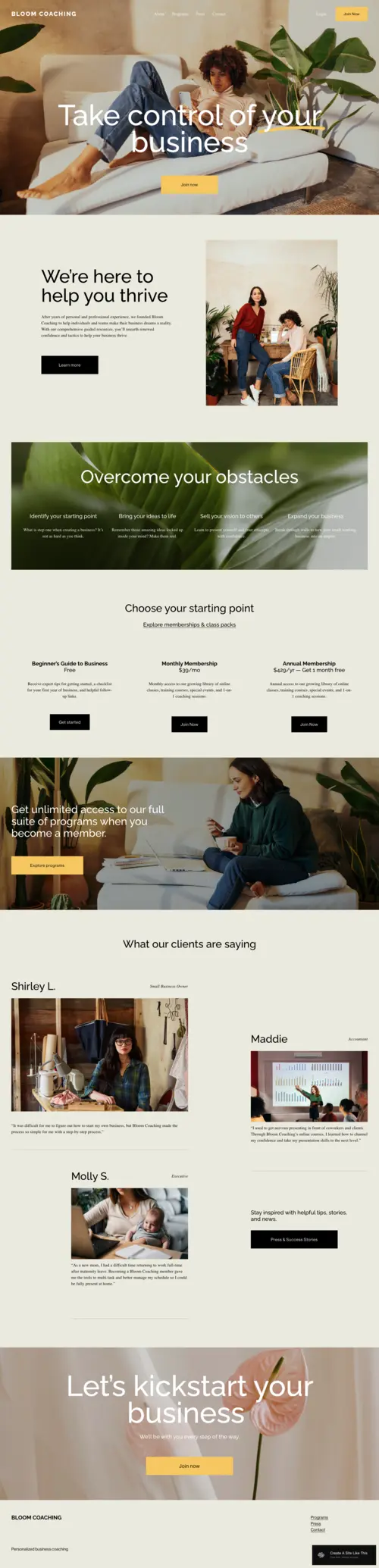
Bloom
Best for Coaching Programs & Personal Development Courses ✓ Pros
• Soft, trust-building design creates emotional safety for visitors considering personal development programs• Content-heavy layout handles detailed course descriptions, module breakdowns, and bonus materials gracefully
• Typography choices feel premium without being cold-ideal for coaches selling high-ticket programs
• Built-in testimonial sections let student success stories do your selling for you
• Gentle visual flow walks visitors through your offer without aggressive sales tactics
✗ Cons
• Calm aesthetic may lack punch for course creators in high-energy niches like fitness or business hustle• Requires strong copywriting to compensate for understated design-the template won't do the selling alone
• Not ideal if your brand relies on bold imagery, loud colors, or influencer-style visual impact
Bloom nurtures. If you're teaching people how to heal, grow, or transform their lives, this template holds space for that journey without rushing anyone. The layout gently guides visitors through your philosophy, your process, and your results-then invites them to enroll when they're ready. No pressure. Just clarity.
Forma
Best for Video-Based Courses & Creator Brands ✓ Pros
• High-impact visual design commands attention and positions you as an authority in your field instantly• Large typography and bold color contrast make course headlines and CTAs impossible to ignore
• Video-forward layout showcases course trailers, sample lessons, and testimonial clips beautifully
• Mobile-first design ensures your course looks just as powerful on phones as it does on desktop • Action-oriented structure drives visitors toward enrollment with clear visual momentum
✗ Cons
• Bold aesthetic may overwhelm course creators in softer niches like meditation, journaling, or gentle wellness• Requires strong visual assets-stock photos or low-quality images will undermine the premium feel
• Less effective for text-heavy course descriptions or academic-style curriculum breakdowns
Forma doesn't whisper. It announces. If you've built an audience and you're ready to monetize your expertise with a flagship course, this template matches that energy. The design drives action. Every scroll pushes visitors closer to clicking "enroll." If you've got something bold to teach, Forma makes people want to learn it from you.
How to Choose the Right Squarespace Template for Your Online Course
Consider Your Teaching Style and Course Format
Are you a talking-head instructor who delivers value through personality and video presence? Forma's bold, video-forward layout will amplify that energy. Do you teach through detailed written content, workbooks, and reflective exercises? Bloom's text-friendly structure handles that depth gracefully. Course creators who work primarily with children or families will find Comet's approachable design builds trust faster.
Match the Template to Your Student's Emotional Journey
Students enrolling in personal development courses need to feel safe before they commit-Bloom's soft aesthetics create that emotional opening. Students signing up for high-energy business or fitness courses want to feel motivated-Forma's bold design delivers that momentum. Think about how your ideal student feels the moment before they enroll, then choose the template that mirrors that emotional state.
Plan for Your Course Catalog's Growth
Starting with one flagship course? Any of these templates work beautifully. But if you're planning to scale into multiple programs, membership tiers, or certification tracks, consider how the template handles navigation and course organization. Bloom's clean structure expands gracefully. Forma's bold sections can differentiate between program levels. Choose with your future catalog in mind.
Prioritize Mobile Enrollment Experience
Most of your traffic will browse-and many will enroll-on mobile devices. Test each template's mobile demo before committing. Forma excels here with its mobile-first design philosophy. All three templates are responsive, but the enrollment flow should feel effortless on a phone screen. If your CTA buttons feel cramped or your course descriptions require endless scrolling, your conversions will suffer.
Frequently Asked Questions
Can I sell online courses directly through Squarespace?
Which Squarespace template is best for selling high-ticket online courses?
How much does Squarespace cost for online course creators?
Can I switch Squarespace templates after building my online course website?
Are these Squarespace templates mobile-friendly for course students browsing on phones?
Can I add student testimonials and success stories to these templates?
Do I need coding skills to customize these Squarespace templates for my online course?
Which template works best for course creators with video-heavy content?
How We Evaluate Templates
Launch Your Course With Confidence
The right template won't teach your course for you, but it will make sure your expertise gets the presentation it deserves. Pick the design that matches your teaching style, customize it to reflect your unique approach, and trust that the right students will find their way to enrollment. Your knowledge is valuable. Now give it a stage that proves it.
* Read the rest of the post and open up an offer