
.jpg)
Editor's Picks
| # | Name | Best For | Price | Rating | Image | |
|---|---|---|---|---|---|---|
| 1 | Photo-driven bloggers in food, fashion, and lifestyle niches | Free | 4.6/5 |
|
More Info | |
| 2 | Business and corporate blogs publishing thought leadership content | Free | 4.3/5 |
|
More Info | |
| 3 | Creative agencies and studios running a content marketing blog | Free | 4.2/5 |
|
More Info | |
| 4 | Educators, coaches, and online course creators sharing knowledge through blog content | Free | 4.3/5 |
|
More Info | |
| 5 | Lifestyle bloggers covering wellness, home, fashion, and daily life | Free | 4.2/5 |
|
More Info | |
| 6 | Video-first bloggers and vloggers embedding YouTube or Vimeo content | Free | 4.1/5 |
|
More Info | |
| 7 | Bloggers who cover multiple topics and need flexible content organization | Free | 4.4/5 |
|
More Info | |
| 8 | Content creators who publish frequently and want a smooth reading experience | Free | 4.3/5 |
|
More Info | |
| 9 | Minimalist bloggers who want clean design with subtle animation | Free | 4.4/5 |
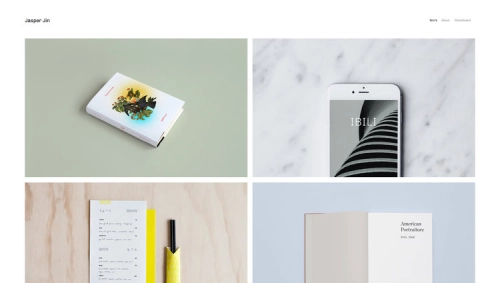
|
More Info | |
| 10 | Travel bloggers and adventure writers with strong photography | Free | 4.2/5 |
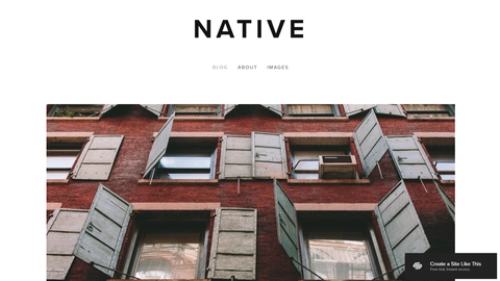
|
More Info |
Our Picks: 10 Best Squarespace Blog Templates 2026
Skye
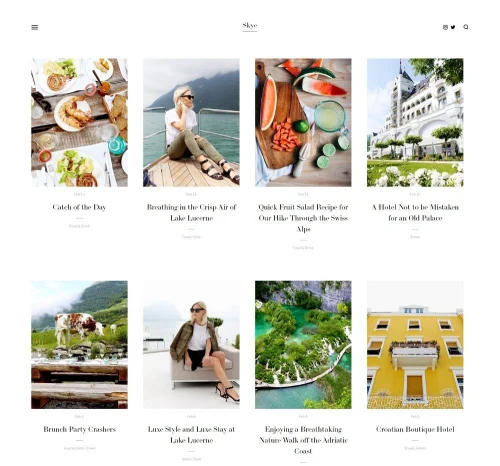
Best for Visual Bloggers ✓ Pros
- Grid-based blog layout displays posts as visual cards, making your feed look curated and browsable.
- Fullscreen image support gives every post a magazine-quality hero section.
- Slide-out navigation keeps the interface clean without hiding important links.
- Excellent mobile responsiveness - blog content reformats cleanly on all screen sizes.
✗ Cons
- Grid layout depends on strong cover images - weak photos make the whole feed look inconsistent.
- Slide-out menu can feel hidden to first-time visitors used to top-bar navigation.
- Not the best fit for text-heavy blogs with minimal imagery.
- Limited sidebar options for widgets like recent posts or newsletter signups.
Skye is one of the strongest Squarespace blog templates for anyone who leads with photography. The grid layout turns your blog index into a visual feed where each post is represented by its cover image, making it easy for readers to scan and click into what interests them. Posts open into fullscreen, image-forward layouts that give your photos real presence. If your blog covers food, fashion, travel, or any niche where visuals carry the story, Skye handles it naturally.
Harris
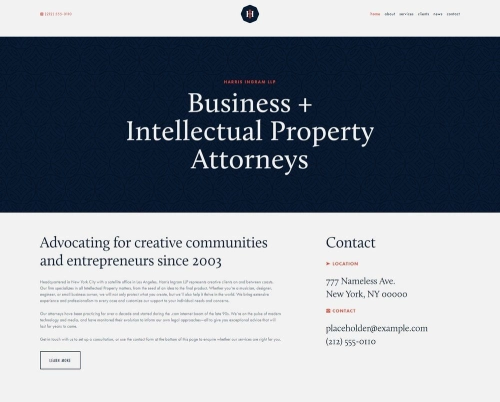
Best for Corporate Blogs ✓ Pros
- Professional, structured layout that communicates credibility and authority from the first scroll.
- Clean typography makes long-form articles and industry analysis easy to read.
- Strong header and navigation structure helps readers find specific content categories quickly.
- Works well for combining a company blog with service pages and team bios.
✗ Cons
- The corporate aesthetic may feel too formal for personal or creative bloggers.
- Less visual impact than image-first templates - not ideal for photography-driven content.
- Customization takes more effort if you want to soften the business-forward look.
- Blog index layout favors list-style browsing over visual grid discovery.
Harris is built for bloggers who want their site to feel like a professional publication rather than a personal journal. The layout prioritizes readability and structure, which makes it a natural fit for B2B blogs, SaaS content marketing, and industry thought leadership. Navigation is clear, the typography is sharp, and the overall design signals that the content behind it is worth taking seriously. If your blog supports a business, Harris gives it the right tone.
Hayden
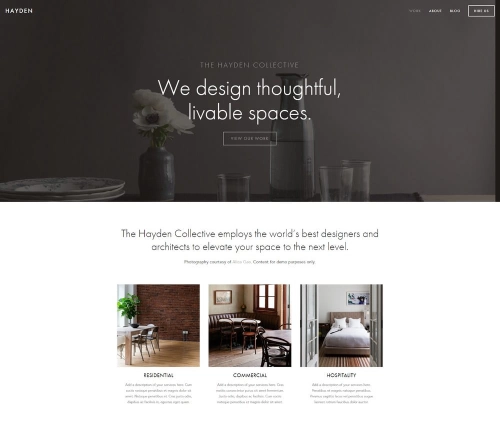
Best for Agency Blogs ✓ Pros
- Bold visual design that balances creative flair with professional structure.
- Portfolio and blog sections coexist naturally, ideal for agencies showcasing work alongside articles.
- Strong use of white space keeps content readable even on image-heavy pages.
- Supports video backgrounds and media embeds for rich, engaging blog posts.
✗ Cons
- The agency-focused layout needs reworking if you are running a purely personal blog.
- Some sections are designed for case studies rather than standard blog posts.
- Can feel heavy on pages with lots of embedded media if not optimized.
- Requires intentional content planning to avoid the site feeling more like a portfolio than a blog.
Hayden works well for agencies and studios that want their blog to sit alongside portfolio work without feeling like a secondary feature. The layout handles mixed content formats - case studies, how-to articles, industry commentary - and presents them all in a way that looks intentional. If your blog serves double duty as a content marketing channel and a showcase for client work, Hayden keeps both functions organized under one cohesive design.
Impact
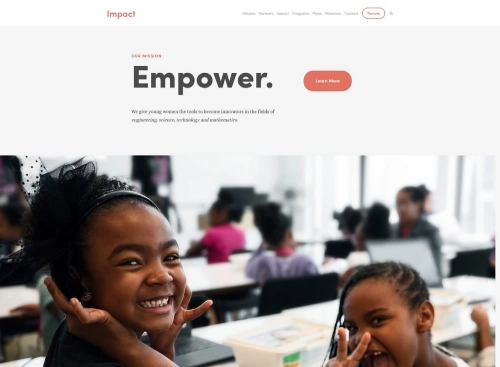
Best for Education Blogs ✓ Pros
- Clean, content-focused layout that prioritizes readability over visual effects.
- Strong typographic hierarchy makes tutorials, guides, and educational posts easy to follow.
- Built-in CTA sections work well for promoting courses, workshops, or email newsletters.
- Fast page loads keep readers engaged through longer educational content.
✗ Cons
- The straightforward design may feel plain to bloggers who want more visual personality.
- Less suited to image-heavy content - photography and visual storytelling take a back seat.
- Limited built-in community or membership features for paid educational content.
- Blog layout works best with consistent posting - a sparse feed looks empty in this template.
Impact is a strong Squarespace blog template for anyone publishing educational content. The layout puts your writing first, with clean formatting that makes step-by-step guides, tutorials, and explainer posts easy to read and follow. CTA blocks are built into the design, so you can promote your email list, free resources, or paid courses without disrupting the reading flow. If your blog is the top of your content funnel, Impact supports that strategy well.
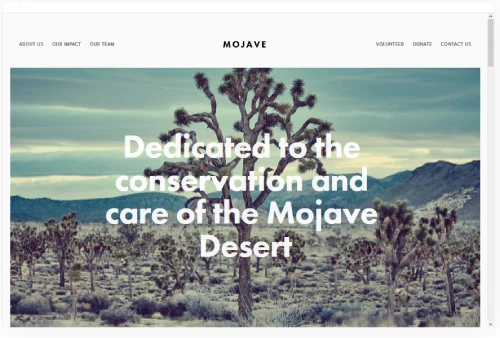
Mojave
Best for Lifestyle Blogs ✓ Pros
- Scrolling parallax effect creates an immersive, cinematic feel as readers browse your content.
- Banner sections support images and video, giving you flexible options for hero content.
- Clean white background lets your photography and writing stand out without visual competition.
- Built-in call-to-action buttons help grow your email list directly from blog posts.
✗ Cons
- The bold visual style can overshadow text-heavy posts if your content leans more editorial.
- Parallax effects may slow performance on older mobile devices.
- Adding social share buttons requires custom code injection.
- The template works best when you have high-quality banner images for each section.
Mojave brings a visual punch that most Squarespace blog templates do not have. The parallax scrolling creates a layered reading experience where images and text interact as you scroll, which keeps lifestyle blog readers engaged longer. Banner sections let you feature different content categories or highlight seasonal posts, and the clean white background ensures your photos pop. It is a strong pick for lifestyle bloggers who want their site to feel more like a digital magazine than a traditional blog.
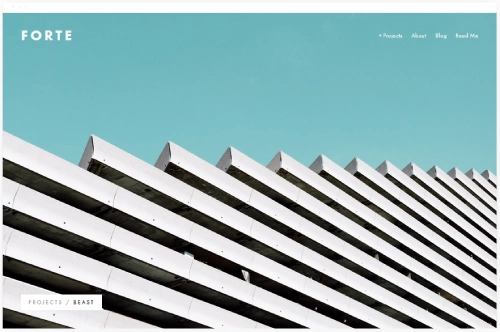
Forte
Best for Video Bloggers ✓ Pros
- Bold, large-format layout gives embedded videos the screen real estate they need.
- Strong visual hierarchy draws attention to featured content and video posts.
- Supports fullscreen video backgrounds for dramatic homepage presentations.
- Works well for mixing video content with written blog posts and show notes.
✗ Cons
- The large-format design can feel overwhelming if you publish mostly text content.
- Video-heavy pages depend on external hosting (YouTube/Vimeo) - no native video hosting.
- Navigation can feel sparse on content-light sites with only a few blog posts.
- Requires strong thumbnail images to make the blog feed look polished.
Forte is the Squarespace blog template to choose if video is your primary content format. The layout gives embedded videos enough space to feel like the main event rather than a sidebar element, and the bold design supports the energy that video content demands. Whether you run a YouTube channel with companion blog posts, publish video tutorials, or create vlogs with written recaps, Forte treats video as a first-class content type rather than an afterthought.
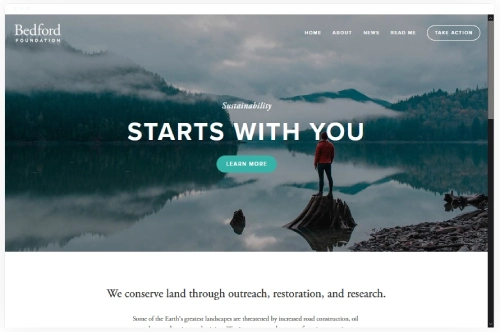
Bedford
Best for Multi-Purpose Blogs ✓ Pros
- Sidebar navigation keeps blog categories accessible without cluttering the main content area.
- Scrolling index page lets readers browse posts in a visual feed that encourages discovery.
- Full-width banners with CTA support work well for promoting lead magnets or affiliate content.
- Handles mixed content - articles, galleries, and video - all within the same layout.
✗ Cons
- The sidebar layout feels slightly dated compared to newer full-width Squarespace blog templates.
- Image-heavy posts can slow page loads without proper photo optimization.
- Requires good content organization - the scrolling index gets messy without clear categories.
- Less visually dramatic than templates built for single-topic, image-first blogs.
Bedford is one of the most versatile Squarespace templates for blogs because it does not force you into one content format. Sidebar navigation makes it easy for readers to jump between categories, the scrolling index keeps your blog feed engaging, and the full-width banners give you space to promote whatever matters most this week. If your blog covers multiple topics and you need a template that handles all of them without compromise, Bedford is a reliable choice. For a deeper look at blogging layouts, see our full guide to Squarespace templates for blogging.
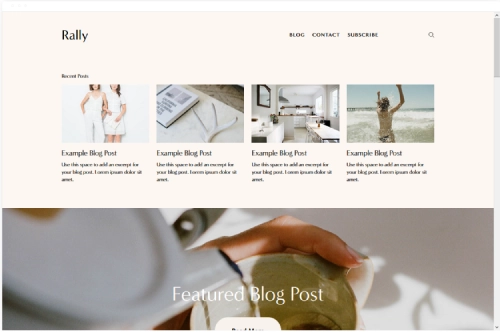
Rally
Best for Content Creators ✓ Pros
- Smooth scrolling animation creates a seamless reading experience that keeps visitors engaged.
- Streamlined layout with clear menu structure makes content easy to find and browse.
- Built-in social media link buttons help connect your blog audience to other platforms.
- Fast load times improve search rankings and keep mobile readers from bouncing.
✗ Cons
- The streamlined design offers fewer customization options for a highly unique look.
- Not as image-forward as Skye or Mojave for photography-driven blogs.
- The scrolling style may not suit bloggers who prefer paginated post browsing.
- Limited layout options for displaying featured or pinned posts prominently.
Rally is built for bloggers who post often and want readers to keep scrolling. The smooth scrolling animation feels natural on mobile, which is where most blog traffic comes from in 2026. Social media buttons are built into the design, making it easy for readers to follow you on Instagram, Pinterest, or YouTube directly from your blog. If you are a content creator who treats your blog as the hub of a multi-platform presence, Rally connects everything cleanly.
Jasper
Best for Minimalist Blogs ✓ Pros
- Grid blocks with built-in animations create an engaging browsing experience without feeling heavy.
- Scaling fonts in headers make headlines visually striking at every screen size.
- Project page feature lets you group related blog posts by topic or content series.
- Clean, fast-loading design that prioritizes content over decorative elements.
✗ Cons
- Animations may feel distracting on content-heavy pages if overused.
- Less suited to bloggers who want a traditional single-column feed layout.
- Requires thoughtful content organization to use the project page feature well.
- The minimal aesthetic limits visual branding options for bolder personalities.
Jasper is one of the best Squarespace blog templates for writers who want their content to feel curated rather than chronological. The project page feature lets you group posts by theme - all your how-to guides in one collection, all your opinion pieces in another - which gives readers a better way to explore your archive. Subtle animations keep the experience engaging without overwhelming the content, and the scaling typography ensures your headlines have real presence on both desktop and mobile.
Native
Best for Travel Blogs ✓ Pros
- Full-width image layouts give travel photography the space it needs to make an impact.
- Clean blog layout balances large images with readable text for destination guides and trip reports.
- Mobile-responsive design looks sharp on phones, where most travel blog readers browse.
- Simple navigation keeps the focus on content rather than cluttered menus.
✗ Cons
- The image-forward design depends on consistently high-quality photography.
- Limited options for sidebar widgets like maps, recent posts, or destination indexes.
- Can feel sparse on pages with minimal visual content or short text posts.
- Category organization requires manual effort - no built-in destination filtering.
Native is a natural fit for travel bloggers who want their photography to anchor every post. The full-width image layouts make destination photos feel immersive, and the clean text formatting keeps your travel guides readable even when they run long. The template does not try to do too much - it gives you a solid blog layout with strong image support and gets out of the way. For travel bloggers who let their photos tell most of the story, Native is a reliable Squarespace blog template that keeps things simple and effective.
How to Choose the Right Squarespace Blog Template
Match the Template to Your Content Format
The most important factor is how your content looks and reads. If your blog is photo-heavy, choose a template with grid layouts and fullscreen image support like Skye or Mojave. If you write long-form articles, prioritize templates with strong typography and clean reading layouts like Harris or Impact. Video bloggers should look at Forte, which treats embedded video as a primary content type. Picking a template that matches your main content format saves you from fighting the design later.
Think About Navigation and Content Organization
If you cover multiple topics, you need a template that makes it easy for readers to find what they want. Bedford's sidebar navigation and Jasper's project pages both handle multi-topic blogs well. For single-topic blogs, simpler navigation from Rally or Native keeps things focused. The more categories you plan to publish across, the more your template's navigation structure matters.
Prioritize Mobile Readability
Most blog traffic in 2026 comes from mobile devices. Every template on this list is responsive, but some handle the transition better than others. Skye's grid reformats cleanly on smaller screens. Rally's scrolling experience feels native on phones. Test your top template choices on a phone before committing - how your blog reads on a 6-inch screen matters more than how it looks on a 27-inch monitor.
Consider Your Growth Plans
If your blog might expand into courses, products, or services, choose a template that supports those additions. Bedford handles mixed-use sites well. Impact has built-in CTA sections for promoting lead magnets and courses. Hayden lets you run a portfolio alongside your blog. Starting with a flexible template is easier than migrating to a new one after you have published 100 posts.
Frequently Asked Questions
Is Squarespace good for blogging?
What is the best Squarespace template for a blog?
Can I change my Squarespace template after I start blogging?
Can I make money blogging on Squarespace?
Does Squarespace have built-in SEO tools for blogs?
Are Squarespace blog templates free?
Can I use Squarespace for a professional or business blog?
How do I add an email signup form to my Squarespace blog?
How We Evaluate Templates
Conclusion
The best Squarespace blog templates in 2026 give you a professional-looking blog without the technical overhead of self-hosted platforms. Skye leads for visual bloggers, Harris handles corporate content well, and Bedford remains the most flexible option for multi-topic blogs. Start by identifying your primary content format - photo-heavy, text-focused, video-first, or mixed - and choose the template that supports it best. Every template on this list is free with your Squarespace plan, so you can preview each one before committing. The right template will not make your blog successful on its own, but it removes the design friction so you can focus on what matters: publishing great content.
* Read the rest of the post and open up an offer