

Editor's Picks
| # | Name | Best For | Price | Rating | Image | |
|---|---|---|---|---|---|---|
| 1 | Coaches, consultants, and service professionals building trust-based membership communities with testimonials, tiered plans, and a warm, professional aesthetic | Free | 4.8/5 |
|
More Info | |
| 2 | Wellness brands, nutritionists, mindfulness coaches, and health-focused creators building tiered membership communities with exclusive content | Free | 4.8/5 |

|
More Info | |
| 3 | Yoga studios, fitness brands, meditation teachers, and movement practitioners building class-based membership sites with tiered access | Free | 4.7/5 |

|
More Info | |
| 4 | Personal development coaches, empowerment brands, and self-growth communities offering courses, coaching, and membership perks | Free | 4.7/5 |

|
More Info | |
| 5 | Educational programs, after-school platforms, family-oriented memberships, and learning communities aimed at children and parents | Free | 4.6/5 |

|
More Info | |
| 6 | Podcasters, musicians, content creators, and multimedia brands building exclusive-access membership communities around audio, video, and creative resources | Free | 4.7/5 |
|
More Info |
Our Picks: The Best Membership Website Squarespace Templates
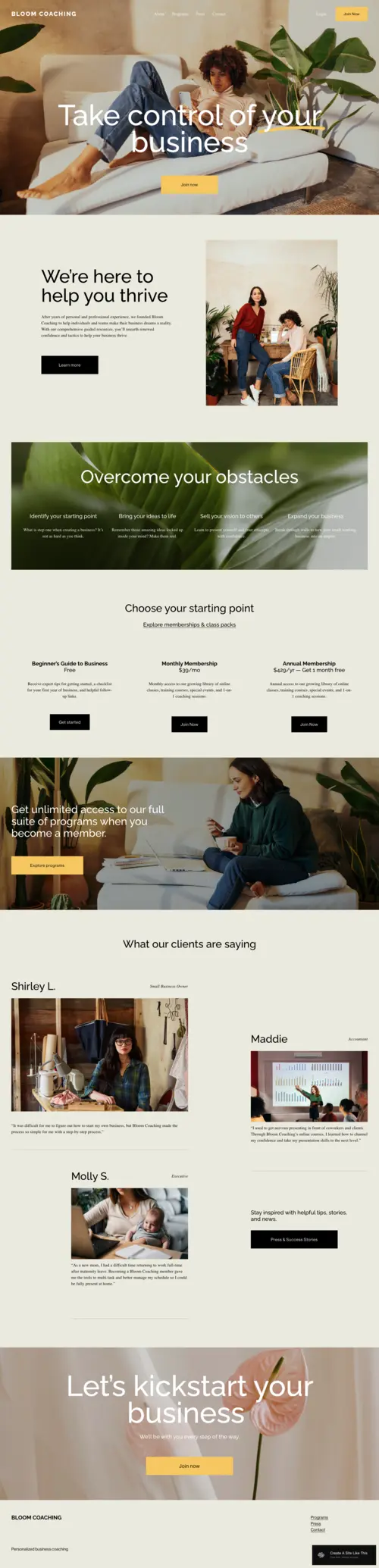
Bloom
Best for Coaching & Consulting Membership Sites ✓ Pros
- Clean layout communicates membership value instantly to first-time visitors.
- Built-in testimonial sections drive conversions with real client transformation stories.
- Visually separated membership tiers make plan options easy to compare.
- Warm, approachable design builds the personal connection trust-based communities need.
- Benefit-focused highlight sections create a smooth flow toward the pricing CTA.
✗ Cons
- Soft neutral palette may need adjustment for high-energy or corporate brands.
- Portfolio sections are limited for showcasing detailed client case studies.
- No built-in blog layout - content marketing requires additional configuration.
Bloom is one of the most well-rounded templates for coaches who want to launch a membership site without compromising on design quality. It handles the full conversion journey - from first impression to sign-up - with a clarity and warmth that few free templates match. If you're a coach or consultant building a trust-driven community, Bloom should be your first stop.
Myhra
Best for Health, Wellness & Mindfulness Membership Communities ✓ Pros
- Calm, earthy design instantly builds trust with wellness audiences.
- Spacious sections keep content-heavy wellness pages organized and easy to navigate.
- Imagery-forward blocks convey the aspirational lifestyle your community offers.
- Program sections clearly outline member benefits at each tier to reduce hesitation.
- Optimized mobile layouts support conversions for on-the-go wellness audiences.
✗ Cons
- Default feminine aesthetic may need adjustment for male-focused or mixed-gender brands.
- Pricing sections often need extra blocks or CSS to match the premium homepage feel.
- No built-in events or calendar section - live classes require third-party tools.
Myhra is one of the most visually cohesive wellness templates on Squarespace, and it translates beautifully to membership site use cases where mood, trust, and lifestyle aspiration drive conversion. Its ability to blend program descriptions, imagery, and soft CTAs into a flowing narrative makes it feel like a genuine invitation into a community. For nutritionists, mindfulness coaches, and holistic wellness brands, Myhra strikes exactly the right tone.
Alignflow
Best for Yoga, Fitness & Movement Membership Communities ✓ Pros
- Grid-based layout keeps large class and program libraries organized and scannable.
- Bold typography conveys energy and momentum for action-oriented fitness communities.
- Instructor profile sections build trust by highlighting credentials and specializations.
- Class previews communicate ongoing value while maintaining membership exclusivity.
- Strong mobile responsiveness ensures CTAs display cleanly for on-the-go members.
✗ Cons
- Bold, energetic style may feel out of place for meditative or slow-paced practices.
- No built-in class calendar - live sessions require third-party tools or workarounds.
- High-contrast palette may need softening for pastel or minimalist brand aesthetics.
Alignflow brings a kinetic, purposeful energy to Squarespace membership site design that few templates in this category can match. Its structured approach to presenting classes, instructors, and membership tiers makes it an exceptionally functional choice for yoga studios, fitness coaches, and movement-based communities. For movement practitioners serious about building a scalable online community, Alignflow is a standout choice.
Meriden
Best for Personal Development & Empowerment Membership Sites ✓ Pros
- Editorial layout positions the founder or coach as an authoritative, trusted guide.
- Course sections map membership journeys from starting point to desired outcomes.
- Media and podcast support showcases thought leadership and adds social proof.
- Email capture sections nurture leads and support long-term membership growth.
- Multiple testimonial placements reinforce outcomes and boost conversion confidence.
✗ Cons
- Text-heavy layout suits written content but needs work for visually driven memberships.
- Personal brand focus means team-based organizations must rework hero and about sections.
- Basic pricing sections may need extra styling to match the polished editorial areas.
Meriden is a template built for coaches and educators who lead with expertise and want their membership site to reflect that authority immediately. It handles the balance between sharing enough to inspire confidence and protecting enough to motivate sign-ups better than most templates in this category. For personal development coaches ready to turn their methodology into a scalable community, Meriden is a compelling choice.
Comet
Best for Educational & Family Membership Communities ✓ Pros
- Bright, friendly design helps parents and guardians feel confident about joining.
- Multi-audience layout addresses both decision-making parents and child participants clearly.
- Diverse content blocks make the membership's value tangible with videos and worksheets.
- Testimonial sections highlight endorsements from parents and child development professionals.
- Flexible layout scales with growing content libraries without requiring a full redesign.
✗ Cons
- Playful design may feel out of place for adult learners or professional development programs.
- No built-in age-group navigation - multi-level content needs custom sections or workarounds.
- Basic pricing tiers may need extra styling for premium educational programs.
Comet is a standout choice for family and educational membership sites that need to communicate safety, warmth, and genuine learning value. Its ability to speak simultaneously to parents as decision-makers and children as participants is a rare and practical advantage. For educators, after-school program creators, and family membership brands, Comet delivers a strong and reliable foundation.
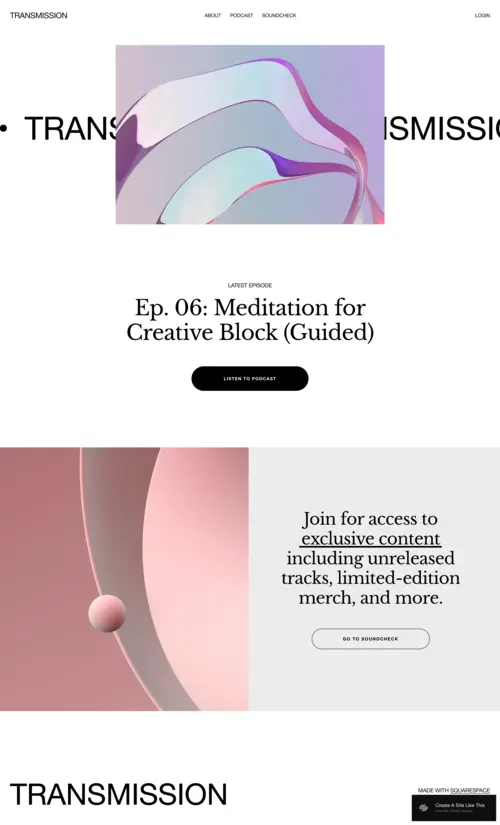
Transmission
Best for Podcasters, Creatives & Content-Driven Membership Sites ✓ Pros
- Media-first design puts audio, video, and multimedia content at the center.
- Series and episode-based structures are handled intuitively for back-catalog showcasing.
- Dark, bold aesthetic positions memberships as premium and exclusive offerings.
- Multimedia embed support lets prospective members sample content directly, boosting conversion.
- Section layouts support newsletters and behind-the-scenes content for community-driven memberships.
✗ Cons
- Dark, high-contrast style may clash with light or pastel brand aesthetics.
- Text-heavy or document-focused memberships need major layout adjustments for written content.
- Pricing sections are functional but less polished - additional styling is recommended.
Transmission is the most distinctive template on this list and the clear best choice for podcasters, musicians, and multimedia creators who want their membership site to feel like an extension of their creative brand. The media-forward layout, bold visual identity, and content archive structure communicate creative depth and exclusivity before a single word is read. For creators ready to convert loyal audiences into a sustainable membership business, Transmission provides the ideal foundation.
How to Choose the Right Squarespace Membership Website Template
Define Your Community Type Before Choosing a Template
The most important factor in choosing a Squarespace membership template is matching it to your community type. Coaching sites convert best with trust-focused templates like Bloom, while content creator communities perform better with media-first designs like Transmission. Before judging aesthetics, clarify what your membership delivers - transformation, content, community, or skill development - and select a template that naturally supports that goal. Alignment between template and community ensures your layout and conversion flow feel intuitive and credible, which visitors notice immediately.
Consider How You'll Structure Your Membership Tiers
Your membership tier strategy should guide your template choice. Single-tier memberships work with almost any template, but multi-tier models require layouts that clearly differentiate each option. Consider whether you need comparison tables, tier cards, or benefit checklists, and ensure the template supports these formats without heavy customization. Templates that present pricing with clear hierarchy consistently convert better - your layout should make joining obvious, not confusing.
Think About the Content Experience You Want to Create
Browse real squarespace member areas examples to see how different templates handle ongoing content delivery before choosing your design. A yoga membership on Alignflow communicates movement and energy, an educational site on Comet signals playful learning, Transmission showcases audio/video content, and Bloom emphasizes personal transformation. Prioritize templates whose layout and navigation support how members will interact with content week after week, ensuring a seamless transition from public site to member experience.
Factor In Your Member Retention and Engagement Strategy
Choose a template that actively supports member engagement, not just sign-ups. If your retention relies on regular content, pick a template with built-in blog or feed sections; if live events or group coaching are key, ensure the template handles event displays easily. Templates with natural spaces for announcements and content highlights - like Meriden or Transmission - make the community feel alive, signaling ongoing value. Avoid static pitch-only templates, as they limit long-term retention and growth.
Frequently Asked Questions
What is the best Squarespace template for a membership website?
Can I create a membership site on Squarespace?
What Squarespace plan do I need for a membership website?
How do I accept recurring payments for memberships on Squarespace?
Can I offer free and paid membership tiers on Squarespace?
How do I keep membership site content exclusive on Squarespace?
Can I add a community forum to my Squarespace membership site?
How do I grow my Squarespace membership site?
How We Evaluate Templates
Conclusion: The Best Squarespace Membership Website Templates for Your Community
Whether you're building a coaching community on Bloom, a wellness collective on Myhra, a fitness membership on Alignflow, a personal development program on Meriden, a family learning community on Comet, or a creator subscription on Transmission, Squarespace gives you a strong design foundation to launch with confidence. Each of these six templates has been chosen because it aligns design language, content architecture, and conversion structure with the real needs of membership-based businesses in distinct niches.
The right template for your membership site is the one that most closely mirrors the experience your community delivers - choose the design that your ideal member would recognize as built for them.
If you're interested in building a membership website on Squarespace, check out our templates for events, businesses, and even consultants.
* Read the rest of the post and open up an offer