3 Best Squarespace 90s Website Templates 2026

The best Squarespace 90s website templates are the ones that understand what actually made 90s web design magnetic - the personality, the color, the unapologetic refusal to be subtle - and translate that energy into a site that works in 2026

After evaluating Squarespace templates through the lens of retro-modern design, three stand out for channelling genuine 90s website aesthetic while delivering the usability and functionality today's visitors expect: Soony, Rotate, and Minoru.

Choosing a 90s website template isn't about recreating bad design from the past - it's about capturing the spirit of an era that made the internet feel alive, personal, and genuinely exciting. The early web had personality in abundance: bold colors, chunky typography, layouts that broke rules because the rules hadn't been written yet. The best 90s website templates on Squarespace take that energy and apply it with intent - bold without being chaotic, nostalgic without sacrificing usability, retro in aesthetic but thoroughly modern in function. These three templates each do that in different ways, suited to different niches and purposes.
3 Best Squarespace 90s Website Templates 2026
There's a reason 90s website design keeps coming back - it represents a moment when the internet felt like discovery rather than optimisation, and there was something genuinely thrilling about that. Whether you're building a retro e-commerce store, a quirky creative brand, or a community site that wants to stand out from the minimal-everything template landscape, a well-executed 90s website template gives you a competitive differentiation that most sites simply can't match. Squarespace's 7.1 platform delivers the technical foundation - fast loading, mobile-responsive layouts, full SEO control - that makes the retro aesthetic viable as a real business decision, not just a novelty.

Editor's Picks

# Name Best For Price Rating Image
1 Quirky e-commerce brands, collectibles, handmade goods, candles, crafts, and products with a personality-first identity Free 4.8/5 More Info
2 Fitness studios, dance schools, community-driven businesses, and brands built on energy, movement, and belonging Free 4.7/5 More Info
3 Language tutors, creative educators, coaches, and instructors who want a warm, playful online presence that makes learning feel exciting Free 4.7/5 More Info

Our Picks: The Best Squarespace 90s Website Templates

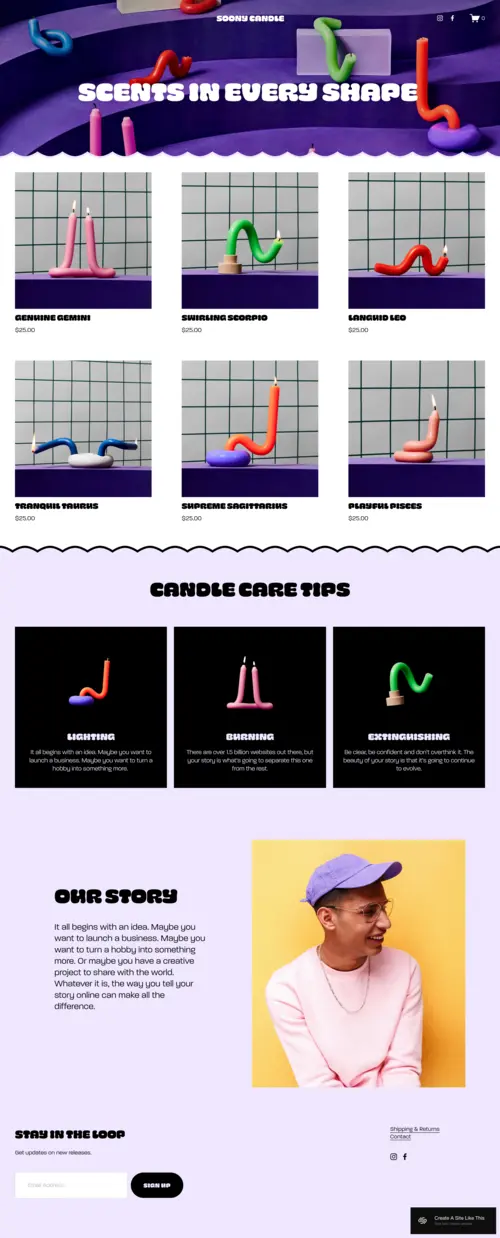
Soony

Best for Quirky E-Commerce Brands & Products With Personality
Soony Squarespace 90s website template

✓ Pros

  • Curvy graphics, bold chunky colors, and a deliberately unconventional layout deliver the 90s website aesthetic with precision and intent - this is retro design that knows exactly what it's doing, not a generic template with a color swap applied on top of an otherwise standard layout.
  • Product display architecture gives each item a visual moment of its own, which is exactly the right approach for quirky, artisanal, or collectible products where the individual character of each piece is a primary selling point rather than a commodity to be bulk-displayed in a grid.
  • Modern responsiveness and smooth navigation sit underneath the retro visual layer - visitors get the nostalgia hit of an early web aesthetic without the usability frustrations that actual 90s websites inflicted, which means the charm works on mobile without alienating anyone.
  • The template's visual personality does brand differentiation work that no amount of standard e-commerce copy can replicate - for brands competing in crowded Etsy-adjacent markets, a site that looks like nothing else online is a conversion advantage that compounds with every returning visitor.
  • Versatile enough for physical products across multiple categories - candles, crafts, art prints, collectibles, vintage finds, and any other product that benefits from being presented with maximum personality rather than maximum efficiency.

✗ Cons

  • The bold, unconventional visual language is a strong brand commitment - businesses in professional services, healthcare, finance, or any sector where visual credibility and authority are primary trust signals will find Soony's playful retro aesthetic actively undermines the positioning they need.
  • The quirky layout performs best with products that are themselves quirky or distinctive - generic, commodity products presented in Soony's retro setting may feel tonally mismatched, with the design implying a personality the product range doesn't support.
  • The high-personality aesthetic demands brand consistency throughout - photography, copy tone, and product selection all need to align with the retro-modern identity Soony creates, and a partially committed execution (retro template, generic product photography, corporate copy) will feel incoherent rather than charming.

Soony is the 90s website template for brands that understand their visual identity is a competitive weapon. The curvy graphics, the chunky color work, the product-forward layout - everything is designed to make visitors feel they've found something genuinely different online, not just another Squarespace store. For e-commerce brands whose products carry the same energy as the template - irreverent, individual, made with love and a distinct point of view - Soony creates a digital space where the personality of the brand and the personality of the shopping experience become the same thing.
Customization Tip Lead Soony's homepage with your most visually distinctive product - the one that immediately communicates what makes your brand different. The retro aesthetic will frame it as something worth noticing; your product needs to be worth noticing once it's noticed. Use the product display sections to give each item a brief piece of personality copy alongside the price - not a generic description, but a line that captures why this particular thing exists. Keep your photography consistent with the template's energy: bold lighting, strong color, and a sense of fun. Flat lays and product-on-white photography will fight the template's design rather than working with it.

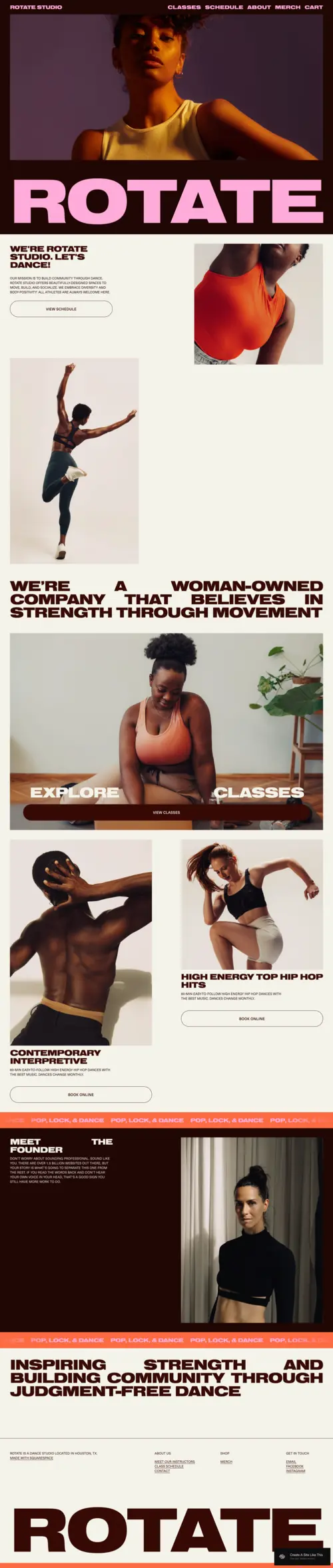
Rotate

Best for Fitness Studios, Community Spaces & High-Energy Brands
Rotate Squarespace 90s website template for fitness studios

✓ Pros

  • Bold, large-format typography and strong visual architecture capture the energetic, rebellious spirit of 90s website design while serving the specific communication needs of fitness and movement brands - big statements, fast clarity, and an immediate sense of what kind of community you're joining.
  • Class schedule, instructor biography, and community storytelling sections are all naturally accommodated within the template's layout, giving fitness studios and community spaces the functional architecture they need without sacrificing the visual identity that makes Rotate memorable.
  • High-contrast design philosophy creates visual impact at every scroll point - a crucial quality for fitness and community brands that need to sustain attention and motivate action through the browsing experience, not just at the hero image.
  • The template's expressive, fearless visual language communicates the judgement-free, welcoming energy that defines successful community fitness spaces - the design itself does some of the community-building work before a visitor reads a single word of copy.
  • Genuinely flexible across movement disciplines - dance, yoga, CrossFit, HIIT, cycling, barre, martial arts - the bold design principle adapts to different energy levels and aesthetics without losing the core 90s website template personality that makes it stand out.

✗ Cons

  • The bold, high-energy design is calibrated for brands where intensity and community are the product - service businesses outside the fitness and movement space that need visual calm, professional restraint, or clinical authority will find Rotate's expressive aesthetic tonally incompatible with their positioning.
  • The visual impact of the template depends significantly on strong, action-forward photography from real studio sessions - a Rotate site built with stock fitness imagery or posed, static photos loses the authentic community energy that the design is built to amplify.
  • The bold color palette and strong visual statements mean Rotate is less adaptable to brand color schemes that are soft, muted, or pastel - the template performs at its best with high-contrast, saturated palettes that match its design energy.

Rotate channels the 90s website aesthetic into something more purposeful than pure nostalgia - it uses that bold, expressive visual language to communicate exactly what a community-driven fitness brand needs to communicate: that this is a place with energy, with personality, and with a point of view. The large fonts, the strong imagery, the class and community sections - everything is built for the brand that wants to attract people who care about belonging as much as training. For studios and spaces that thrive on that intersection of movement and community, Rotate creates the digital atmosphere that makes the right people feel immediately at home.
Customization Tip Build Rotate around real photography from actual classes - the messy, genuine energy of a real session beats any studio-styled fitness shoot because it communicates authenticity in a way that polished production can't. Position the class schedule or booking CTA directly below the hero: visitors who land from a search for a local fitness studio have already decided they're interested, and a direct path to booking converts that motivation in the moment. Use the community section to feature real member stories, not instructor bios - at this template's visual scale, social proof from people who look and live like your target member converts better than any credential list.

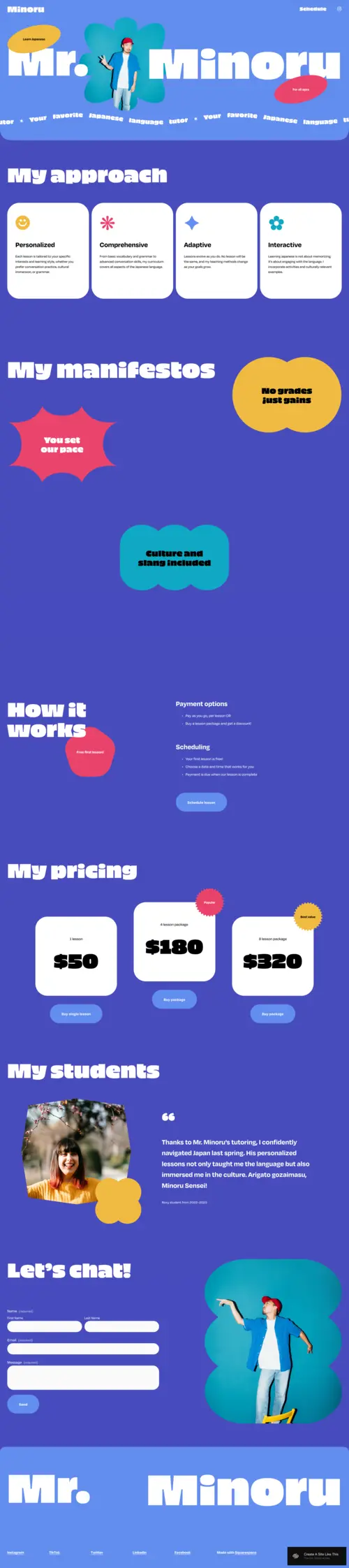
Minoru

Best for Educators, Tutors & Creative Mentors With a Playful Brand
Minoru Squarespace 90s website template for educators and tutors

✓ Pros

  • Bright, playful color palette and interactive layout deliver the cheerful, maximum-personality energy of 90s website builders - for educators and tutors who understand that the approachability of their digital presence is part of their student acquisition strategy, Minoru creates the right first impression before a lesson description is read.
  • Scheduling and pricing sections are clear and easily navigable within the playful layout - the design doesn't sacrifice usability for personality, which is the fundamental challenge of retro web design done well, and Minoru solves it more elegantly than most 90s-influenced templates.
  • The conversational, warm visual tone is specifically effective for educational businesses targeting younger learners, their parents, or adults who find formal, clinical educational website templates off-putting - the design signals accessibility and encouragement before any copy makes those claims.
  • Bold fonts and interactive visual elements create a sense of anticipation and engagement that mirrors the experience of a genuinely good class - visitors who enjoy browsing the website are already primed for a positive learning relationship, which is a meaningful head start on the conversion journey.
  • Versatile across educational sub-niches - language tutoring, music lessons, art classes, creative writing coaching, STEM tutoring - without requiring significant restyling, making Minoru one of the most broadly applicable 90s website templates for the education sector.

✗ Cons

  • The playful, high-energy aesthetic is calibrated for educators who want warmth and approachability - tutors and coaches targeting corporate clients, professional certification programmes, or executive education audiences may find Minoru's tone too informal for the credentialed, authority-first positioning those audiences expect.
  • The bold visual personality of the template requires copy and photography that match its energy - conservative, formal, or overly academic content will feel incongruous against Minoru's expressive design, and the mismatch will undermine the visual credibility the template creates.
  • The scheduling section, while functional, may feel insufficient as a standalone booking architecture for tutors running complex multi-subject, multi-student scheduling operations - a dedicated booking tool integration will almost certainly be needed for anything beyond basic lesson enquiry capture.

Minoru takes the 90s website aesthetic and does something specific and smart with it - it uses that era's innate playfulness and visual generosity to communicate the one thing that educational businesses most need to convey before a student books: that learning here will feel good. The bright colors, the interactive design elements, the warm and conversational visual tone - all of it signals that whoever runs this educational business understands that how teaching feels is as important as what is taught. For educators who share that conviction and want their website to reflect it, Minoru is the template that makes that argument most naturally.
Customization Tip Use Minoru's bold hero section to lead with your specific teaching promise - not "I teach French" but "By the end of your first month, you'll order confidently at any restaurant in Paris." The specificity of the outcome is what makes the template's personality work as a conversion tool rather than just a visual statement. Populate the scheduling section with your most popular lesson formats and their pricing before launch - friction at the booking stage (unclear pricing, unclear availability) is the most common reason warm educational leads don't convert, and Minoru's layout makes addressing that friction straightforward. Add one or two genuine student testimonials that describe the experience of learning with you, not just the results - the template's warm aesthetic is amplified by social proof that matches its emotional register.

How to Choose the Right Squarespace 90s Website Template

Decide Whether You Want Retro Aesthetics or Retro Functionality

There's an important distinction between templates that reference 90s website design as a visual style - bold colors, expressive typography, unconventional layouts - and templates that attempt to recreate the actual functional limitations of early web design. All three templates reviewed here take the first approach: they use 90s visual language purposefully while delivering modern responsiveness, fast load times, and intuitive navigation. This is the right approach for any business that wants to leverage the cultural appeal of retro web design without inheriting its usability problems. Before choosing a 90s website template, clarify whether you want visitors to feel like they've discovered something fresh and distinctive (which all three templates achieve) or whether you're seeking a literal recreation of 1996-era web design (which is better served by custom development than any Squarespace template).

Match the Template's Energy to Your Brand's Energy

Soony, Rotate, and Minoru each embody the 90s aesthetic in a different emotional register. Soony's retro energy is playful, product-obsessed, and consumer-facing - it's built for brands where the product's personality is the whole point. Rotate's 90s influence is bold, communal, and physically expressive - it's designed for brands where movement, energy, and belonging are the core offer. Minoru's retro warmth is inviting, educational, and deliberately approachable - it's suited to businesses where making visitors feel welcome and capable is the primary conversion goal. Choosing the right 90s website template means finding the one whose emotional register matches the relationship your business wants to build with its audience, not simply the one that looks most like your conception of 90s design.

Consider What Your Visitors Already Associate With Retro Design

Different audiences carry different associations with 90s web design. Younger audiences (18-30) often experience retro aesthetics as fresh, ironic, and intentionally different - a deliberate counter-positioning against the minimalism that has dominated digital design for a decade. Older audiences who actually browsed the internet in the 90s may experience the aesthetic with genuine nostalgia. Both responses are conversion-positive in the right context - but understanding which response your audience is likely to have helps you calibrate how earnestly or how playfully to commit to the retro aesthetic in your copy and photography alongside the template.

Think About How the Template Serves Your Primary Conversion Goal

Every 90s website template should be evaluated first as a business tool. Soony's primary conversion architecture is product discovery and purchase - the visual environment is designed to make products feel desirable and individual. Rotate's primary conversion goal is community engagement and class booking - the design motivates visitors to sign up and show up. Minoru's conversion focus is lesson enquiry and scheduling - the warmth and approachability of the template reduce the hesitation that often prevents first-time students from reaching out. Match the template's conversion architecture to your business's revenue model, and the retro aesthetic becomes a differentiator that works for you rather than a novelty that entertains without converting.

Frequently Asked Questions

What makes a good Squarespace 90s website template?

A good 90s website template for Squarespace captures the visual personality of the era - bold colors, expressive typography, unconventional layouts - while delivering modern usability, mobile responsiveness, and fast load times. The three templates reviewed here (Soony, Rotate, and Minoru) each achieve this balance in a different way: Soony through quirky product-forward e-commerce design, Rotate through bold community fitness aesthetics, and Minoru through warm educational personality. The best retro website template for your brand is the one whose 90s design energy matches your business's personality and serves your primary conversion goal.

Can a retro website template work for a modern business?

Yes - when executed well, a retro website template is a meaningful competitive differentiator in a digital landscape dominated by nearly identical minimalist designs. The key is choosing a template that uses retro aesthetics intentionally rather than literally: bold colors and expressive typography that communicate personality, not actual 1990s usability limitations. Squarespace 90s website templates like Soony, Rotate, and Minoru all deliver retro visual energy on a modern, mobile-responsive, SEO-friendly technical foundation - making them genuinely viable for businesses that want to stand out rather than blend in.

What types of businesses suit a 90s aesthetic website?

Businesses that benefit most from 90s website design are those where visual personality, brand distinctiveness, and cultural affinity with the era are competitive advantages. This includes quirky e-commerce brands, handmade and artisanal product sellers, creative studios, fitness and community spaces, educational businesses with a playful brand voice, music and entertainment brands, and any business targeting audiences who respond positively to deliberate retro styling. Businesses in professional services, healthcare, finance, or sectors requiring clinical authority should approach retro aesthetics cautiously - the visual personality of a 90s template can undermine the credibility signals those categories depend on.

How do I make a Squarespace template look like a 90s website?

To give a Squarespace template a 90s website aesthetic, focus on four design elements: bold, saturated color palettes with high contrast rather than the muted tones that define contemporary minimalist design; expressive, chunky typography that makes visual statements rather than deferring to the content; unconventional layout choices that break the standard top-to-bottom, left-to-right reading hierarchy; and playful graphical elements like geometric shapes, grid patterns, or bright accent colors. Squarespace's style editor allows significant customisation of all four elements on most templates. Alternatively, starting with a template that already has 90s design DNA - like Soony, Rotate, or Minoru - gives you a stronger foundation than retrofitting a minimalist template.

Is Squarespace good for retro-style websites?

Yes. Squarespace's 7.1 platform provides the design flexibility - custom CSS, comprehensive style editing, flexible section layouts - needed to execute a retro website design effectively. Several Squarespace templates have built-in 90s or retro aesthetic DNA (including the three reviewed here), and the platform's modern technical infrastructure means your retro design loads fast, performs well on mobile, and is fully indexable by search engines. Squarespace also supports the e-commerce, scheduling, and content management functions that retro-aesthetic sites in categories like quirky retail, community fitness, and creative education typically require.

What Squarespace plan do I need for a 90s style website?

The Squarespace Basic plan at $16/month (billed annually) supports all the features needed for a retro-aesthetic website including all template features for Soony, Rotate, and Minoru, custom domain, SSL, unlimited pages, and full style customisation. For e-commerce functionality (selling products through Soony, for instance), the Commerce Basic plan at $23/month adds shopping cart and payment processing. For fitness studios using Rotate to manage class bookings, adding Squarespace Scheduling starts at approximately $16/month. Most businesses using these templates operate on the Basic plan or Basic with a single add-on.

Can I add e-commerce to a Squarespace 90s template?

Yes. All three templates reviewed here - Soony, Rotate, and Minoru - support Squarespace's e-commerce functionality on Commerce-tier plans. Soony is particularly well-suited to product sales, with its visual architecture designed to showcase individual items. Rotate supports merchandise sales alongside class and membership bookings. Minoru can accommodate course and digital product sales alongside lesson scheduling. Squarespace's Commerce plans include product management, inventory tracking, digital downloads, discount codes, and integrated payment processing - all of which function within the retro aesthetic without disrupting the template's visual design.

How do I choose between Soony, Rotate, and Minoru for my 90s website?

Choose Soony if your primary goal is e-commerce and your products have a quirky, artisanal, or personality-forward identity - the template is built to make individual products feel distinctive and desirable. Choose Rotate if your business is community or movement-based (fitness studio, dance school, sports organisation) and you need a template that communicates energy and belonging alongside class booking and scheduling. Choose Minoru if you're in education or coaching and want a warm, approachable template that makes students feel welcome and excited rather than intimidated. All three share the same 90s design energy but apply it to different conversion goals and business types.

How We Evaluate Templates

These Squarespace 90s website templates were evaluated based on how effectively each one captures the visual personality and energy of 90s website design while delivering modern usability, mobile responsiveness, and genuine business utility. Assessment criteria included: authenticity and intentionality of the retro aesthetic (bold color use, typographic expressiveness, unconventional layout choices), usability quality relative to actual 90s web design limitations (mobile performance, navigation clarity, load speed), conversion architecture alignment with the primary business model each template serves (e-commerce for Soony, community and class booking for Rotate, educational scheduling for Minoru), brand versatility and the range of businesses within each template's intended category that can use it effectively, and photography requirements relative to typical brand asset libraries. Priority was given to templates where the 90s design influence is a genuine differentiator rather than a superficial color treatment applied over a standard layout.

Conclusion: Squarespace 90s Website Templates That Make the Internet Feel Like Discovery Again

The best 90s website template doesn't just look retro - it makes visitors feel something. Soony makes them feel like they've found a brand with genuine personality in a sea of identical stores. Rotate makes them feel the energy of a community that values belonging as much as performance. Minoru makes them feel that learning something new here might actually be as enjoyable as the teacher promises.

In an era of minimalism-by-default, a well-executed 90s aesthetic is not a novelty - it's a positioning decision. The brands that choose it are communicating something specific: that they have a point of view, that they're not afraid to express it, and that their website is the first evidence of both.

Still exploring design directions? If you're drawn to the retro end of the spectrum, take a look at our picks for the best Squarespace retro templates and our selection of the finest modern Squarespace templates - between them, you'll find every point on the classic-to-contemporary spectrum. You can also adapt our hand-selected list of the best interactive templates to create exactly the distinctive look you're going for.

Keep Reading

* Read the rest of the post and open up an offer
Top